


Cómo descargar Amazon Music como MP3 Archivos
Muchos usuarios de Amazon Music quieren descargar sus canciones favoritas como MP3 archivos para que puedan escucharlos sin conexión en cualquier dispositivo. Sin embargo, incluso con Amazon Música Prime o Ilimitado, las canciones descargadas no son reales MP3 archivos. Están encriptados y restringidos por DRM, lo que significa que no puedes transferirlos, editarlos ni conservarlos de forma permanente.
En esta guía aprenderás si es posible descargar Amazon Music como MP3 archivos, qué limitaciones impone Amazon y la forma más confiable de convertir Amazon Music a MP3 Para uso personal a largo plazo.
Guía de contenido Parte 1. ¿Puedes descargar Amazon Music como...? MP3 ¿Archivos directamente?Parte 2. Descargar desde Amazon Music a MP3 Uso de herramientas en líneaParte 3. Grabar Amazon Music en MP3 ArchivosParte 4. La mejor manera de descargar Amazon Music como MP3 Archivos Parte 5. Preguntas frecuentesParte 6. Resumen
Parte 1. ¿Puedes descargar Amazon Music como...? MP3 ¿Archivos directamente?
¿Puedes descargar desde Amazon Music a? MP3La respuesta corta es no. Amazon Music no permite a los usuarios descargar canciones de forma estándar. MP3 archivos.
Al descargar canciones con la app Amazon Music, los archivos se almacenan como archivos de caché cifrados. Estos archivos:
- No se puede acceder fuera de la aplicación Amazon Music
- No se puede transferir a MP3 reproductores, unidades USB o sistemas de coche
- No podrás jugar una vez que expire tu suscripción
- No se puede editar ni utilizar en otro software.
Es por eso que muchos usuarios buscan activamente formas de descargar Amazon Music como MP3 archivos en lugar de depender del modo sin conexión de Amazon.
Parte 2. Descargar desde Amazon Music a MP3 Uso de herramientas en línea
Cómo descargar Amazon Music como MP3 ¿Archivos? Algunos sitios web afirman que permiten convertir Amazon Music a MP3 En línea, pegando el enlace de una canción. Aunque parezca práctico, estas herramientas suelen tener serias limitaciones.
En la práctica, los convertidores en línea a menudo no detectan correctamente las pistas de Amazon Music. Incluso cuando la conversión funciona, la calidad de salida suele estar limitada por tasas de bits bajas, las listas de reproducción rara vez son compatibles y los servidores son inestables. Muchos sitios también imponen límites diarios o introducen anuncios, ventanas emergentes y riesgos de seguridad.
Para los usuarios que desean descargar varias canciones de Amazon Music o listas de reproducción completas como MP3 Los archivos y las herramientas en línea son poco confiables e inconsistentes.
Parte 3. Grabar Amazon Music en MP3 Archivos
Otra solución común es Grabación de Amazon Music mientras se reproduce. El software de grabación de pantalla o audio puede capturar el sonido del sistema y guardarlo como MP3.
Sin embargo, este método consume mucho tiempo. Las canciones deben grabarse en tiempo real, se pierden metadatos y el ruido de fondo o las alertas del sistema pueden afectar la calidad del audio. La grabación tampoco es práctica para listas de reproducción o álbumes, por lo que no es adecuada para usuarios que buscan alta calidad. MP3 archivos de manera eficiente.
Parte 4. La mejor manera de descargar Amazon Music como MP3 Archivos
Para los usuarios que desean una solución estable, de alta calidad y a largo plazo, DumpMedia Amazon Music Converter es la opción más confiable. DumpMedia está diseñado específicamente para ayudar a los usuarios a descargar Amazon Music como MP3 archivos mientras se eliminan las restricciones DRM para uso personal.
Descarga gratuita Descarga gratuita
Ventajas Clave del DumpMedia Amazon Music Converter
DumpMedia le permite convertir canciones, álbumes y listas de reproducción de Amazon Music en MP3 Formato sin instalar la app de Amazon Music. Compatible con cuentas de Amazon Music Free, Prime e Unlimited.
Convertido MP3 Los archivos pueden alcanzar hasta 320 kbps, lo que garantiza una excelente calidad de sonido. El software también conserva las etiquetas ID3, como título, artista, álbum y carátula, para que tu biblioteca musical esté perfectamente organizada.
Más importante, MP3 archivos convertidos con DumpMedia Podrás seguir reproduciendo tu música incluso después de finalizar tu suscripción a Amazon Music. Esto la hace ideal para quienes desean tener acceso permanente a su música en cualquier dispositivo.
Cómo descargar Amazon Music como MP3 Uso de archivos DumpMedia
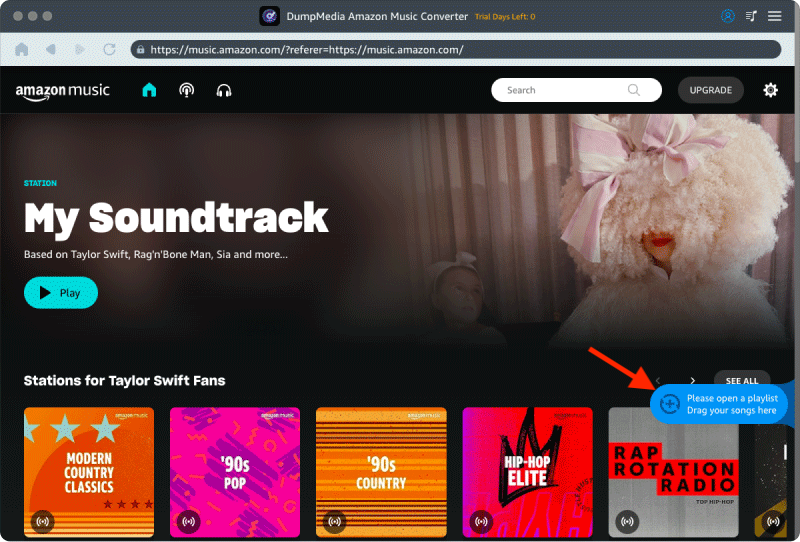
Paso 1. Debes seleccionar las canciones, listas de reproducción y álbumes que deseas convertir.
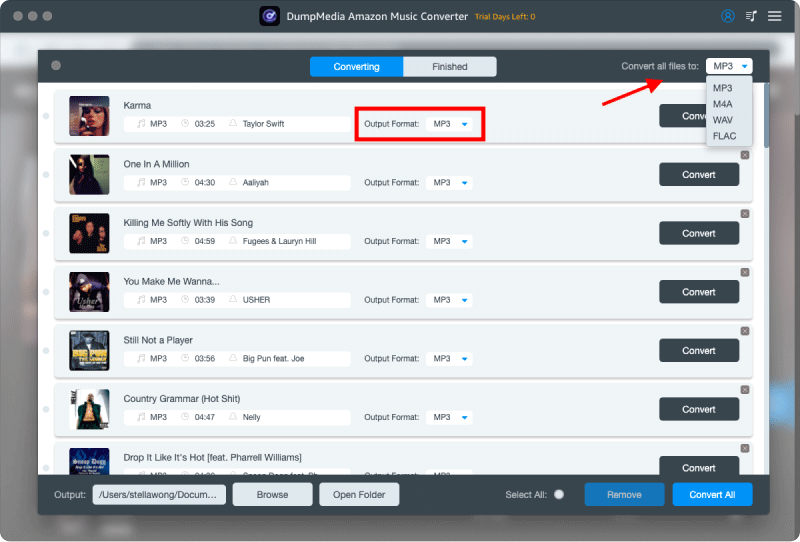
Paso 2. Seleccione el formato de salida que desee y elija la carpeta para sus archivos convertidos.
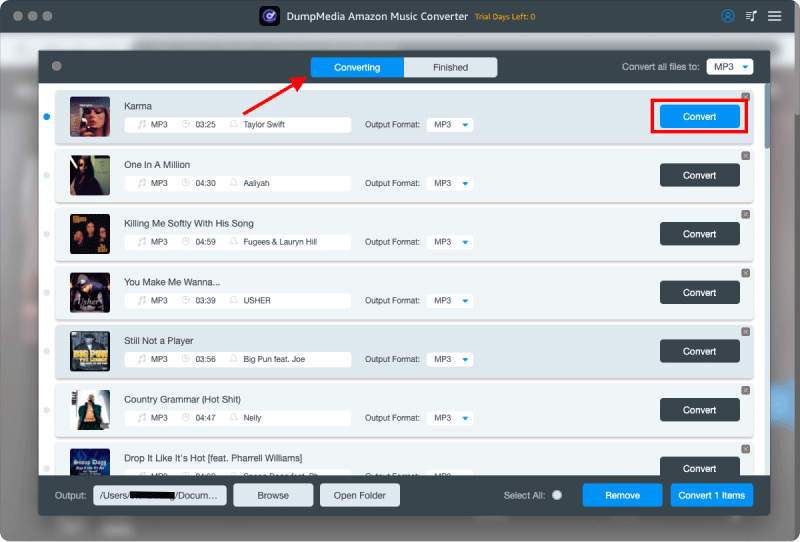
Paso 3. Haz clic en el botón "Convertir" y el programa hará el resto. Tras la conversión, podrás descargar Amazon Music como... MP3 archivos.
Aviso legal: Descargar o convertir Amazon Music como MP3 Los archivos deben ser exclusivamente para uso personal. Los archivos convertidos no deben compartirse, subirse ni redistribuirse. Cumpla siempre con las leyes locales de derechos de autor y las condiciones de servicio de Amazon.
Parte 5. Preguntas frecuentes
¿Puedo descargar Amazon Music como? MP3 archivos gratis?
Amazon Music no proporciona MP3 Descargas directas. Los métodos gratuitos suelen depender de grabaciones o de herramientas en línea inestables, que presentan limitaciones significativas.
¿Amazon Music Unlimited te ofrece contenido real? MP3 los archivos?
No. Incluso con Amazon Music Unlimited, las canciones descargadas están encriptadas y solo se pueden reproducir dentro de la aplicación Amazon Music.
¿Qué pasa con mi Amazon Music descargada una vez finalizada mi suscripción?
Las descargas sin conexión se vuelven inaccesibles una vez que la suscripción expira. MP3 Los archivos creados para uso personal siguen siendo reproducibles.
¿Es legal convertir Amazon Music a? MP3?
Generalmente, se acepta la conversión de música a la que se tiene acceso para escucharla personalmente. No se permite la redistribución ni el uso comercial.
¿Cuál es la mejor tasa de bits para Amazon Music? MP3 los archivos?
Se recomiendan 320 kbps para obtener el mejor equilibrio entre la calidad del sonido y el tamaño del archivo.
Parte 6. Resumen
Si bien Amazon Music ofrece escucha sin conexión, no proporciona una verdadera MP3 Descargas. Si quieres descargar Amazon Music como MP3 Para el acceso permanente y la compatibilidad de dispositivos, se requieren soluciones de terceros. Entre todas las opciones, DumpMedia Amazon Music Converter se destaca como la forma más eficiente y confiable de convertir Amazon Music a MP3 preservando al mismo tiempo la calidad y los metadatos para uso personal a largo plazo.