


Spotify Ses yok mu? Gerçekten işe yarayan kolay çözümler.
çok Spotify Kullanıcılar aniden can sıkıcı bir sorunla karşılaşıyor: Spotify Müzik normal şekilde çalarken ses gelmiyor. Bazen ilerleme çubuğu hareket ediyor, çalma listeleri doğru şekilde yükleniyor ve şarkılar çalmaya devam ediyor, ancak kesinlikle ses yok. Eğer siz de ses sorunu yaşıyorsanız... SpotifyYalnız değilsiniz. Bu rehberde, bunun ardındaki temel nedenleri açıklayacağız. SpotifySes yoksa, adım adım düzeltmeleri gösterir ve daha istikrarlı çevrimdışı oynatma için uzun vadeli bir çözüm sunar.
İçindekiler Kılavuzu Bölüm 1. Sebepler Neden Spotify Ses YokBölüm 2. Ses Sorununu Nasıl Çözersiniz? SpotifyBölüm 3. Kaçınmanın En İyi Yolu Spotify Oynatma Sorunları Kalıcı Olarak GiderildiBölüm 4. SSS Bölüm 5. Sonuç
Bölüm 1. Sebepler Neden Spotify Ses Yok
birçok olası nedeni vardır Spotify Sesle ilgili herhangi bir sorun yok. Çoğu durumda sorun şunlarla ilgilidir:
- yanlış ses çıkışı ayarları
- uygulama önbelleği bozulması
- modası geçmiş Spotify sürümler
- Bluetooth çakışmaları
- akış oynatma hataları
- sistem ses yapılandırma sorunları
Bazen Spotify Diğer uygulamalar sorunsuz çalışmasına rağmen ses gelmiyor.
Bölüm 2. Ses Sorununu Nasıl Çözersiniz? Spotify
Ses yok Spotify Özellikle ilerleme çubuğu hareket ederken hoparlörlerin sessiz kalması inanılmaz derecede sinir bozucu olabilir. İyi haber şu ki, bu sorunların çoğu hızlıca çözülebilir.
Düzeltme 1. Kontrol edin Spotify Ses Ayarları
En basit nedenlerden biri şudur: Spotify Ses gelmemesinin nedeni, uygulamanın ses seviyesinin kısılmış olmasıdır.
On Windows:
- Ses simgesine sağ tıklayın
- Açık Mikser
- emin olmak Spotify sessiz değil
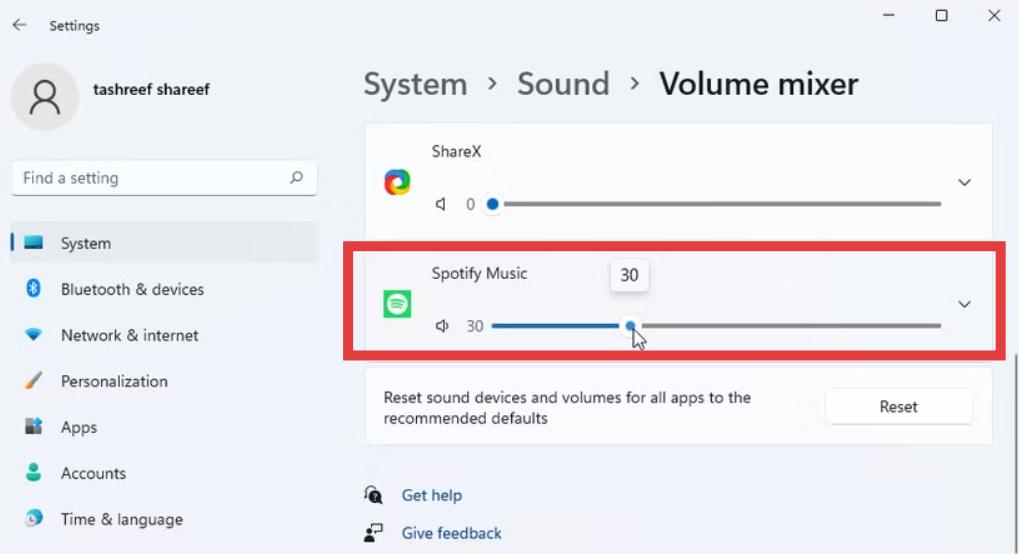
Mac'te:
- Sistem ses ayarlarını kontrol edin.
- doğrulamak Spotify çıktı hacmi
Bu basit çözüm birçok sorunu çözüyor. Spotify Ses sorunlarını hemen çözün.
Çözüm 2. Yeniden başlatın. Spotify Mobil Uygulama
Geçici oynatma aksaklıkları genellikle şunlara neden olur: Spotify Ses sorunu yok. Tamamen kapatmayı deneyin. Spotify ve uygulamayı yeniden açın. Bu, uygulamayı yeniler. Spotify'nin oynatma motoru ve ses oturumu.
3. Çözüm: Bluetooth Cihazlarını Devre Dışı Bırakın
Bazen Spotify Sesi yanlış çıkış cihazına gönderiyor. Eğer bu sorunu yaşıyorsanız Spotify Ses gelmiyorsa, Bluetooth kulaklıklarınızı, kablosuz hoparlörlerinizi veya harici ses cihazlarınızı ayırın. Ardından doğru oynatma cihazını manuel olarak seçin.
4. Düzeltme. Temizle Spotify Önbellek
Bozuk önbellek dosyaları başlıca nedenlerden biridir. Spotify Ses sorunları yok. Uygulama ayarlarında bunu temizlemek, yazılımın veri yapısını yenilemesini sağlar. Bu genellikle oynatma kararlılığını artırır.
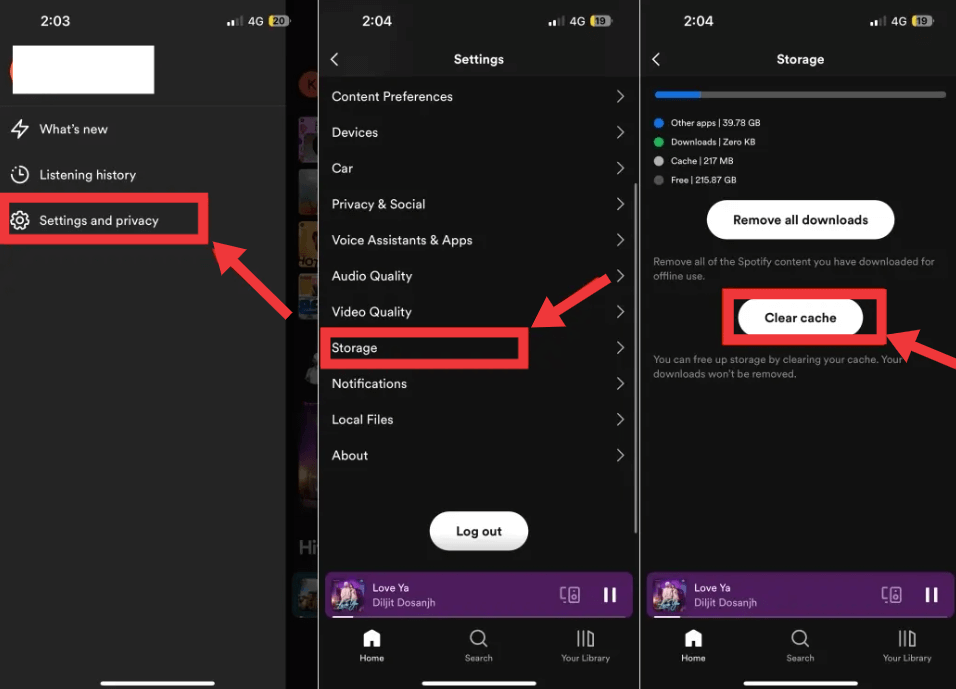
İlgili Madde: Nasıl Temizlenir Spotify Bilgisayar/Mobil Cihazda Önbellek >>>>>>
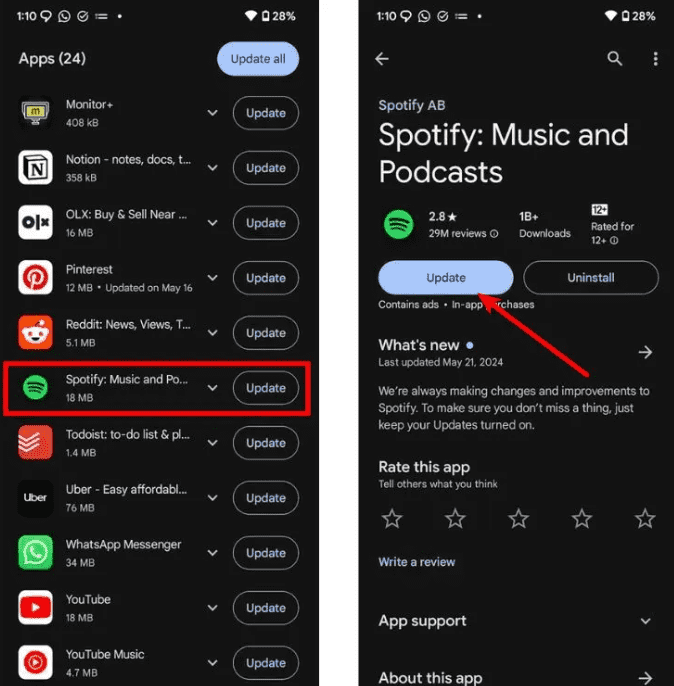
Düzeltme 5. Güncelleme Spotify En Son Sürüme
Büyük Spotify Sürümler, hatalar içerebilir ve bu da sorunlara yol açabilir. Spotify Ses olmaması için. Güncelleniyor Spotify Oynatma hatalarını ve ses çıkışı sorunlarını düzeltebilir. En iyi deneyim için her zaman en son sürümü kullanın.
6. Çözüm: Cihazın Ses Çıkışını Kontrol Edin
Birçok kullanıcı deneyimliyor Spotify Ses gelmemesinin nedeni, yanlış oynatma cihazının seçilmiş olmasıdır. Lütfen hoparlörleri, kulaklıkları, HDMI çıkışını ve USB ses aygıtlarını kontrol edin. Bu durum özellikle şu cihazlarda sık görülür: WinDows ve Mac sistemleri.
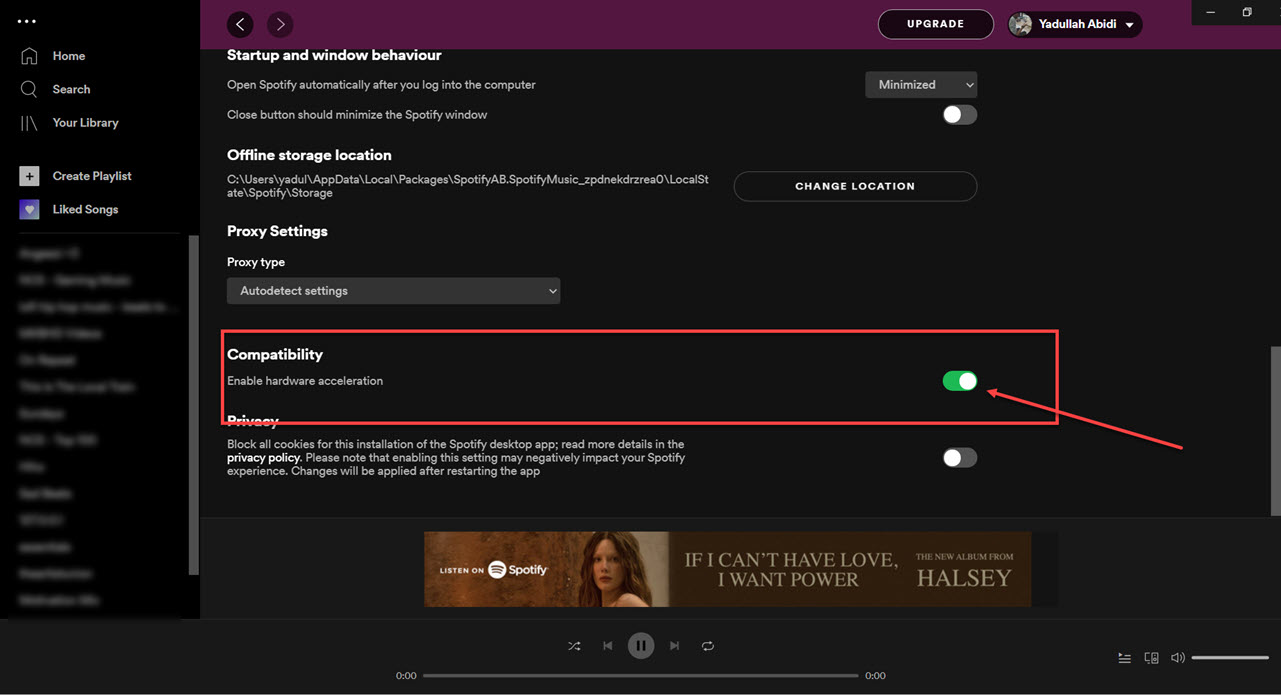
Çözüm 7. Donanım Hızlandırmayı Kapatın
Donanım hızlandırma bazen ses sürücüleriyle çakışabilir. Lütfen devre dışı bırakın. Bu, kalıcı sorunları çözebilir. Spotify Sesle ilgili herhangi bir sorun yok.
- Açılış Spotify Ayarlar
- Uyumluluk sayfasına kaydırın
- Donanım Hızlandırmayı Kapatın
8. Çözüm: Yeniden yükleyin. Spotify
If Spotify Dosyalar bozulursa, uygulamayı yeniden yüklemek sorunu çözebilir. Kaldır Spotify Tamamen silin ve resmi web sitesinden yeni bir kopyasını indirin. Bu, inatçı sorunlar için en etkili çözümlerden biridir. Spotify Sesle ilgili herhangi bir sorun yok.
Bölüm 3. Kaçınmanın En İyi Yolu Spotify Oynatma Sorunları Kalıcı Olarak Giderildi
Eğer sık sık deneyimlerseniz Spotify Ses kesintisi, ara belleğe alma veya oynatma kararsızlığı olmadan, çevrimdışı dinleme daha istikrarlı bir deneyim sağlayabilir. En iyi çözümlerden biri şudur: DumpMedia Spotify Music Converter.
Neden DumpMedia Spotify Music Converter En iyi seçiminiz mi? İndirilebilir ve dönüştürmek Spotify TeklerAlbüm, çalma listesi ve podcast'leri, DRM koruması olmayan birden fazla formata dönüştürün, örneğin: MP3M4A, WAV, FLAC ve ALAC formatlarını destekler. Ayrıca dönüştürme işleminden sonra orijinal ses kalitesini de korur. Böylece dönüştürülen müziğin keyfini yüksek kalitede çıkarabilirsiniz. Dahili ayarlar sayesinde, kanal, örnekleme hızı, bit hızı ve hız gibi çıkış sesinin parametrelerini de ayarlayabilirsiniz.
İndirdikten sonra, Spotify şarkılar yerel cihazınızda depolanacak ve bunları güvenli yedekler olarak kolayca yönetebilir veya dinleyebilirsiniz. Spotify sahip olduğunuz herhangi bir medya cihazını kullanarak çevrimdışı müzik dinleyebilirsiniz. Ayrıca kolayca tutmak Spotify Abonelikten sonra müzik.
Özellikleri DumpMedia Spotify Music Converter:
- ✅30 günlük Ücretsiz Deneme
- ✅100% Temiz. Kullanımda Risk Yok
- ✅Ücretsiz Güncellemeler ve Teknik Destek
- ✅Orijinal Ses Kalitesini Koruyun
- ✅Meta Veri Bilgilerini ve ID3 Etiketlerini Koru
- ✅Uyumludur WinDows ve macOS
- ✅Her İkisi İçin de Çalışın Spotify Premium ve Spotify Ücretsiz Kullanıcılar
- ✅Yerleşik Müzik Kütüphanesine Erişim Spotify web oynatıcısı
Nasıl Kullanılır? DumpMedia Spotify Music Converter:
1 Adım. Indirin ve yükleyin DumpMedia Spotify Music Converter Mac/PC'nize. Başlatın ve arayüzü göreceksiniz. Mac/PC'nizi kullanın. Spotify Giriş yapmak için Premium/Ücretsiz hesap.
2 Adım. Daha sonra şarkıları veya çalma listelerini doğrudan yüzen "+" simgesine sürükleyerek dönüştürme kuyruğuna ekleyebilir ve indirmeye hazır hale getirebilirsiniz.
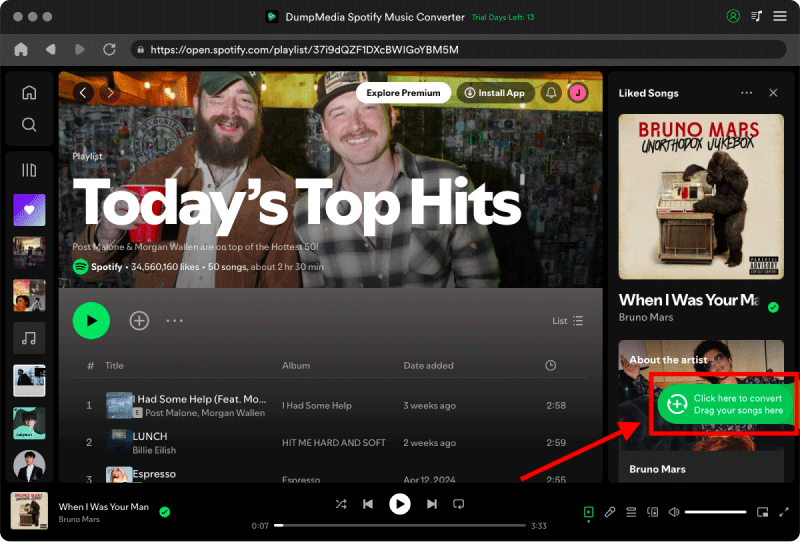
3 Adım. Seçtiğiniz şarkılardan memnun kaldığınızda, hangi ses dosyası biçimini tercih ettiğinizi seçebilirsiniz. İstediğiniz çıktı dosyası biçimini seçmek için “Tüm görevleri şuna dönüştür”e tıklayın.

4 Adım. Son olarak ayarlar tamamlandıktan sonra kullanıcılar "Dönüştür" simgesine basarak dönüştürme işlemini gerçekleştirebilirler. Daha sonra DumpMedia Spotify Music Converter süper hızlı hızıyla saniyeler içinde şarkıları indirme işlemini gerçekleştirecektir.

Bölüm 4. SSS
Neden yapar Spotify Ses yok mu?
Spotify Ses sorunlarının genellikle ses çıkışı ayarları, bozuk önbellek, eski uygulama sürümleri veya yayın oynatma çakışmalarından kaynaklandığı görülür.
Neden Spotify Oynatılıyor ama ses gelmiyor?
Bu genellikle şu durumlarda olur: Spotify Ses yanlış cihaza yönlendirildiğinde veya oynatma önbelleği bozulduğunda.
Neden yapar Spotify Bluetooth bağlantısında ses gelmiyor mu?
Bluetooth cihazları bazen düzgün bir şekilde bağlantıyı kesebilir veya ses çıkışını otomatik olarak değiştirebilir.
Bölüm 5. Sonuç
Rağmen Spotify Ses sorunları birçok nedenden kaynaklanabilir; sorunların çoğu yayın istikrarsızlığı, ses çıkışı çakışmaları veya uygulama önbellek hatalarıyla ilgilidir. Temel sorun giderme işlemleri geçici sorunları çözebilir, ancak daha istikrarlı bir oynatma deneyimi isteyen kullanıcılar, yayın bağımlılığını tamamen azaltmak için genellikle çevrimdışı dinleme çözümlerini tercih ederler.