


iTunes'u şuna dönüştür: MP3En İyi Yöntemler ve Apple Music Rehberi
Eğer yollar arıyorsanız iTunes'u şuna dönüştür: MP3Yalnız değilsiniz. Birçok kullanıcı müziklerini daha esnek bir formatta kaydetmek istiyor, örneğin... MP3 Böylece kısıtlama olmaksızın herhangi bir cihazda oynatabilirler. Ancak bu her zaman kolay değildir. İşlem, müziğinizin yerel iTunes kütüphanenizden mi yoksa Apple Music aboneliğinizden mi geldiğine bağlıdır. Bu kılavuzda, iTunes ve Apple Music'i dönüştürmenin en iyi yöntemlerini adım adım anlatacağız. MP3.
İçindekiler Kılavuzu Bölüm 1. iTunes Müziklerini Dönüştürebilir misiniz? MP3?Bölüm 2. iTunes Müziklerini Dönüştürme MP3 iTunes ileBölüm 3. Apple Music'i Dönüştürmek İçin En İyi Araç MP3Bölüm 4. SSSBölüm 5. Özet
Bölüm 1. iTunes Müziklerini Dönüştürebilir misiniz? MP3?
Başlamadan önce, iTunes'da iki tür müzik olduğunu anlamak önemlidir:
1. iTunes Yerel Müzik (DRM Korumasız Dosyalar)
CD'lerden şarkı aktardıysanız veya indirdiyseniz MP3 iTunes'a aktardığınız dosyalar DRM korumasız dosyalardır. iTunes dosyalarını kolayca dönüştürebilirsiniz. MP3 Herhangi bir kısıtlama olmaksızın yerleşik araçları kullanarak.
2. Apple Music Şarkıları (DRM Korumalı)
Eğer müziğiniz Apple Music aboneliğinden geliyorsa, durum farklıdır. Bu şarkılar şu şekilde korunmaktadır: DRM (Dijital Haklar Yönetimi)Bu durum, doğrudan dönüştürmeyi engeller. Yani, iTunes kullanarak Apple Music parçalarını doğrudan dönüştüremezsiniz. Bunun için özel bir araca ihtiyacınız olacak. DumpMedia Apple Müzik Dönüştürücü.
iTunes'u dönüştürmeye çalışırken bu farkı anlamak çok önemlidir. MP3Çünkü bu, hangi yöntemi kullanmanız gerektiğini belirler.
Bölüm 2. iTunes Müziklerini Dönüştürme MP3 iTunes ile
Şarkılarınız DRM korumalı değilse, iTunes'u kullanarak doğrudan dönüştürebilirsiniz. MP3 ücretsiz.
iTunes'u Dönüştürme Adımları MP3:
Adım 1. Bilgisayarınızda iTunes'u başlatın.
2 Adım. Düzenle > Tercihler > İçe Aktarma Ayarları'na gidin ve seçin. MP3 Kodla.
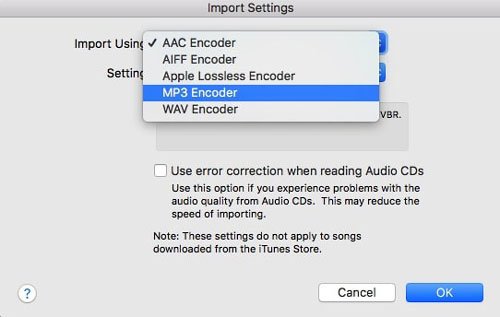
3. Adım. Dönüştürmek istediğiniz şarkıları seçin.
4 Adım. Dosya > Dönüştür > Oluştur'a tıklayın. MP3 Sürüm. Birkaç saniye sonra, sizin MP3 Dosyalar kütüphanenizde görünecektir.
Sınırlamalar
Bu ücretsiz yöntem iyi sonuç verse de bazı sınırlamaları vardır:
- Yalnızca DRM koruması olmayan dosyalar için geçerlidir.
- Apple Music şarkıları dönüştürülemiyor.
- Sınırlı format esnekliği
iTunes'u dönüştürmeye çalışıyorsanız MP3 Apple Music parçaları için bu yöntem işe yaramayacaktır. İşte bu noktada profesyonel araçlar devreye giriyor.
Bölüm 3. Apple Music'i Dönüştürmek İçin En İyi Araç MP3
Peki ya Apple Music şarkıları? iTunes, Apple Music şarkılarını dönüştürmede başarısız olduğunda, DumpMedia Apple Müzik Dönüştürücü ideal çözüm haline gelir. DumpMedia Yerel iTunes dosyalarını doğrudan içe aktaramaz veya dönüştüremez, ancak DRM ile korunan Apple Music yayın şarkılarını indirebilir.
Temel Özellikler DumpMedia Apple Müzik Dönüştürücü
- Apple Music'i şuna dönüştür: MP3: Kolayca Apple Music şarkılarını dönüştürün MP3 çevrimdışı kullanım için biçim.
- DRM korumasız şarkıları indirin: DRM'yi* devre dışı bırakmak, müziğinizin keyfini kısıtlama olmadan çıkarmanızı sağlar.
- Yüksek Kaliteli Çıktı: Dönüştürme işleminden sonra orijinal ses kalitesini koruyun.
- Toplu Dönüşüm: Birden fazla şarkıyı, albümü veya çalma listesini aynı anda dönüştürün.
- Meta verileri ve ID3 etiketlerini saklayın: Şarkı başlıklarını, sanatçıları, albümleri ve albüm kapaklarını korur.
- Her Yerde Oyna: Dönüştürme işlemi tamamlandıktan sonra dosyalarınız oynatılabilir. MP3 müzik çalarlar, akıllı telefonlar, araç ses sistemleri ve daha fazlası.
- Not: DumpMedia Apple Music Converter artık iTunes ile çalışmayı desteklemiyor. Ancak, yerel olarak depolanan iTunes şarkılarını "Araçlar > Biçim Dönüştürücü" bölümüne sürükleyip bırakarak biçimlerini dönüştürebilirsiniz.
Apple Music'i Apple Music'e Dönüştürme MP3 kullanma DumpMedia
Apple Music şarkılarını şu şekilde dönüştürebilirsiniz: MP3 Adım adım formatlama:
Adım 1. Yazılımı bilgisayarınıza indirin ve kurun. Program içindeki yerleşik Apple Music oynatıcısına erişin.
Adım 2. Dönüştürmek istediğiniz şarkıları seçin.

3 Adım. set MP3 İstediğiniz çıktı biçimini seçin.

4. Adım. Dönüştür düğmesine tıklayın ve işlemin tamamlanmasını bekleyin.

Dönüştürme işleminden sonra dosyalarınız kısıtlama olmaksızın çevrimdışı olarak oynatılabilir.
Bölüm 4. SSS
iTunes'u dönüştürebilir miyim? MP3 ücretsiz mi?
Evet, DRM koruması olmayan dosyaları iTunes'un kendisini kullanarak ücretsiz olarak dönüştürebilirsiniz.
Neden bazı iTunes şarkılarını dönüştüremiyorum?
Çünkü bunlar Apple Music'e ait ve DRM ile korunuyorlar.
Yapabilmek DumpMedia iTunes dosyalarını dönüştürmek mi?
Hayır. DumpMedia Apple Music Converter, yerel iTunes dosyalarını doğrudan dönüştürmez. Apple Music içeriği için tasarlanmıştır.
Apple Music'i dönüştürmenin en iyi yolu nedir? MP3?
Örneğin, özel bir araç kullanarak DumpMedia Apple Music Converter en etkili yöntemdir.
Bölüm 5. Özet
iTunes'u dönüştürmeye çalışıyorum MP3 Müziğinizin nereden geldiğine bağlı olarak bu işlem basit veya zorlu olabilir. Şarkılarınız iTunes'da yerel olarak saklanıyorsa ve korunmuyorsa, dönüştürme işlemini iTunes'un kendisini kullanarak ücretsiz olarak kolayca tamamlayabilirsiniz.
Ancak, müziğiniz Apple Music aboneliğinden geliyorsa, DRM koruması doğrudan dönüştürmeyi engelleyecektir. Bu gibi durumlarda, profesyonel bir araç kullanmak şarttır. DumpMedia Apple Music Converter, yerel iTunes dosyalarını doğrudan dönüştürmez; özellikle Apple Music parçalarını işlemek ve bunları dönüştürmenize olanak sağlamak için tasarlanmıştır. MP3 Yüksek kalitede ve oynatma kısıtlaması olmayan bir format. Bu, müziğinizin keyfini herhangi bir cihazda çevrimdışı olarak çıkarmanıza olanak tanır.
*DumpMedia Bu özellik, Apple Music şarkılarını şifresini çözerek ve DRM'siz dosyalara indirerek çalışır; böylece herhangi bir cihaz için kütüphanenizin temiz ve kısıtlamasız bir kopyasını elde edebilirsiniz. İşlevselliği, yerel ses dosyalarının DRM'sinin kaldırılmasını içermez.