


Spotify Yanıt vermiyor mu? 2026'da düzeltin.
Birçok kullanıcı şu can sıkıcı sorunla karşılaşıyor: Spotify cevap vermiyor Müzik çalmaya, çalma listelerini açmaya veya çevrimdışı modu kullanmaya çalışırken bazen bu sorun ortaya çıkabiliyor. Spotify uygulamayı yükleyeceğiz Oynatma sırasında tamamen donuyor, beklenmedik şekilde çöküyor veya çalışmayı durduruyor. Spotify Uygulama sorunları son derece yaygındır. Bu kılavuzda, bunun nedenlerini açıklayacağız. Spotify Aniden çalışmayı durduruyor, yaygın bir sorun nasıl çözülür? Spotify Uygulama sorunları ve çevrimdışı müzik çalma deneyiminin daha istikrarlı hale getirilmesi.
İçindekiler Kılavuzu Bölüm 1. Neden Spotify Uygulama yanıt vermiyor mu?Bölüm 2. Nasıl Onarılır Spotify Uygulama yanıt vermiyor mu?Bölüm 3. Kaçınmanın En İyi Yolu Spotify Oynatma SorunlarıBölüm 4. SSSBölüm 5. Sonuç
Bölüm 1. Neden Spotify Uygulama yanıt vermiyor mu?
Bunun birçok nedeni var Spotify Müzik çalma veya uygulama kullanımı sırasında yanıt vermiyor.
Zayıf İnternet Bağlantısı
Spotify Yayın akışı ve hesap doğrulama işlemleri için istikrarlı internet erişimine büyük ölçüde bağımlıdır. Zayıf ağ bağlantıları sorunlara yol açabilir. Spotify Donmak veya yanıt vermeyi durdurmak.
Bozuk Spotify Önbellek
Geçici dosyalar içeride saklanır. Spotify Zamanla bozulabilir ve bu da uygulama çökmelerine ve oynatma sorunlarına neden olabilir.
modası geçmiş Spotify Mobil Uygulama
Büyük Spotify Sürümler, "Spotify "Yanıt vermiyor" hatası.
Spotify Sunucu Sorunları
Bazen Spotify Sunucu kesintileri, dünya genelinde kullanıcı oynatma ve uygulama performansını etkiler.
Arka Plan Yazılım Çakışmaları
Antivirüs yazılımı, güvenlik duvarı ayarları veya donanım hızlandırma çakışmaları da sorunlara neden olabilir. Spotify yanıt vermeyi durdurmak için.
Cihaz Uyumluluk Sorunları
Eski işletim sistemleri veya desteklenmeyen cihazlar, en yeni sürümü çalıştırmakta zorluk yaşayabilir. Spotify uygulama sorunsuz çalışıyor.
Bunlar, "Spotify "Yanıt vermiyor" sorunu.
Bölüm 2. Nasıl Onarılır Spotify Uygulama yanıt vermiyor mu?
If Spotify Cihazınızda yanıt vermiyorsa, aşağıdaki çözümleri deneyin.
Çözüm 1. Yeniden başlatın. Spotify
Tamamen yakın Spotify ve uygulamayı yeniden açın. Bu basit çözüm, geçici oynatma sorunlarını genellikle giderir.
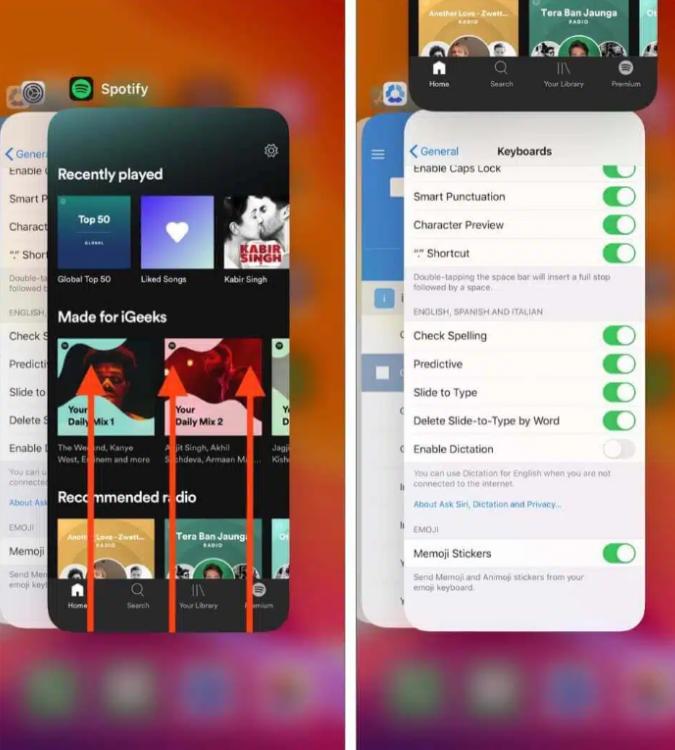
iOS'ta (iPhone / iPad): Ekranın alt kenarından yukarı doğru kaydırın ve ortada bekleyin (veya eski cihazlarda Ana Ekran düğmesine çift tıklayın). Şunu bulun: Spotify Önizleme kartını görüntüleyin ve tamamen yukarı kaydırarak ekranın dışına çıkarın.
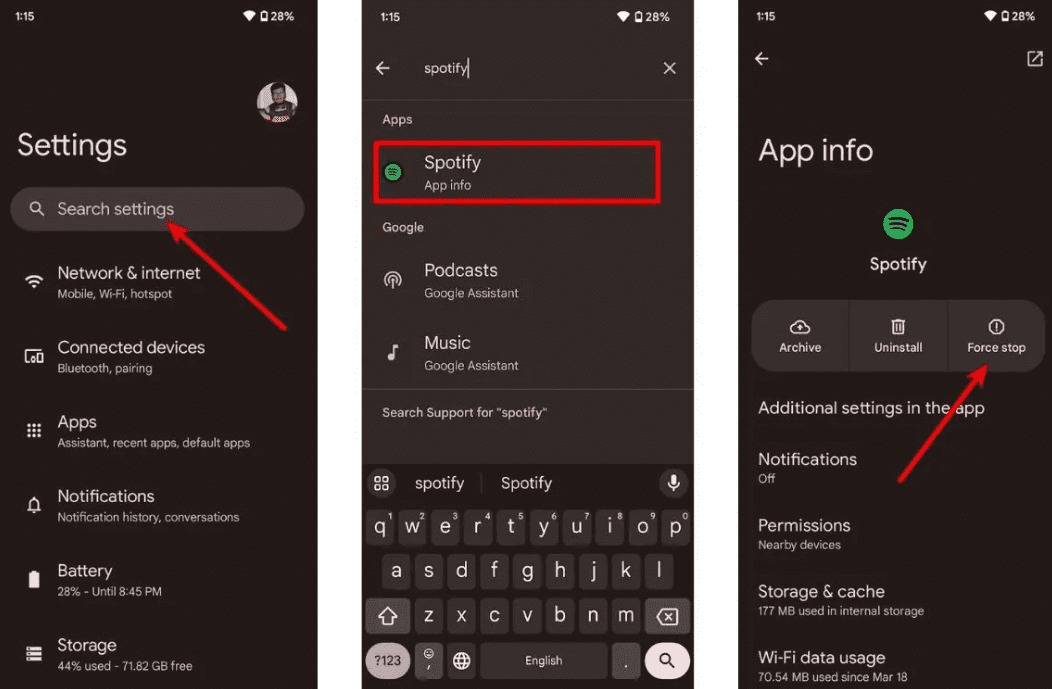
Android'de: Ayarlar > Uygulamalar > bölümüne gidin Spotify ve Zorla Durdur'a dokunun. Bu, beklemede olan tüm arka plan görevlerini sonlandırır. Açın Spotify uygulama çekmecenizden.
macOS'ta: Tıkla Spotify Üst menü çubuğundan Çıkış'ı seçin. SpotifyYa da pencereye tıklayıp Command (⌘) + Q tuşlarına basın.
On WinDows (10/11): Ekranın sol üst köşesindeki Dosya seçeneğine tıklayın. Spotify Pencereyi kapatın ve Çıkış'ı seçin (sağ üst köşedeki "X"e basmak genellikle pencereyi kapatmak yerine sistem tepsisine küçültür).
Düzeltme 2. İnternet Bağlantınızı Kontrol Edin
Bağlantı kararlılığını test etmek için Wi-Fi ve mobil veri arasında geçiş yapın.
3. Düzeltme. Temizle Spotify Önbellek
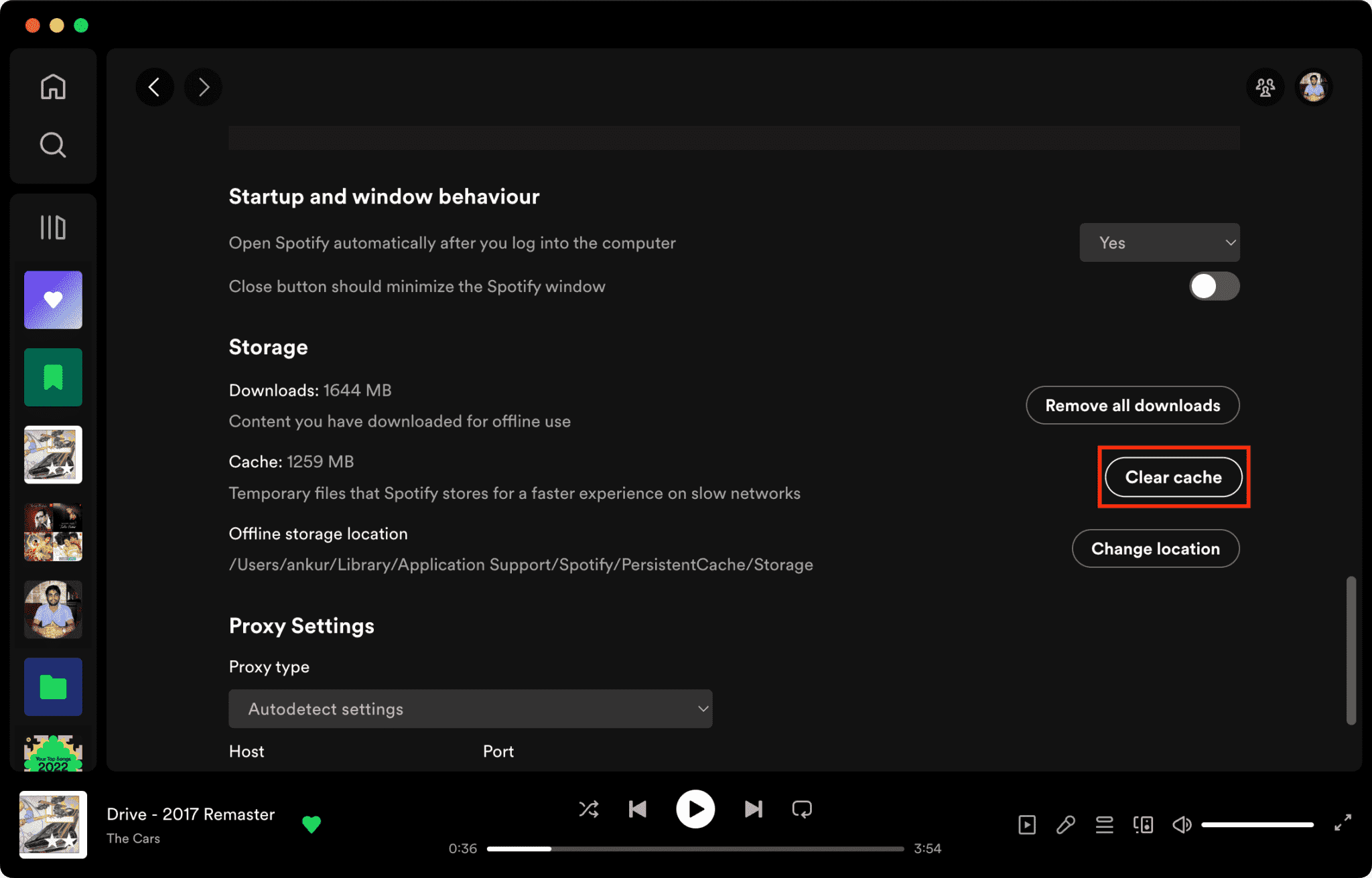
Bozuk önbellek dosyaları bunun başlıca nedenlerinden biridir. Spotify cevap vermiyor.
Nasıl Temizlenir Spotify Mac'te Önbellek/Windows/iPhone/Android >>>>
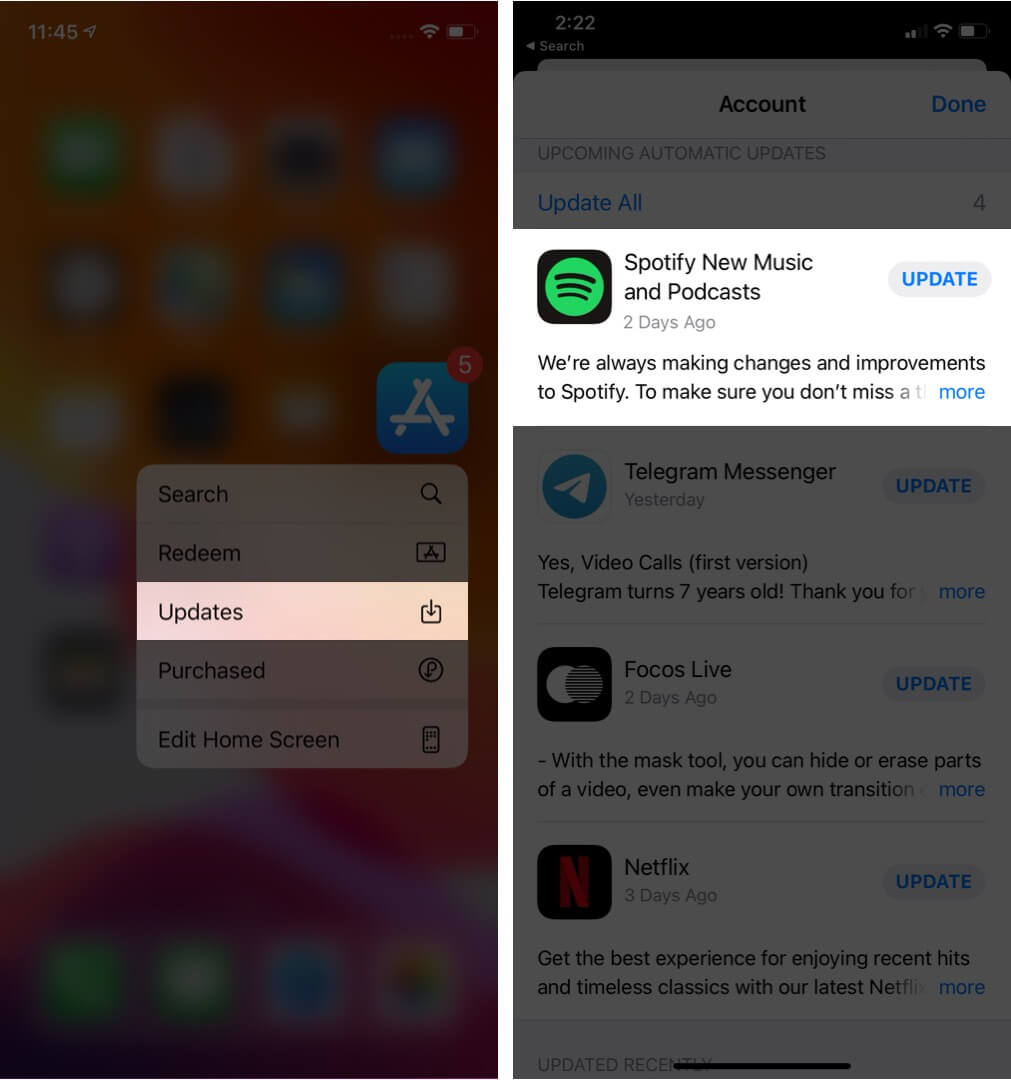
Düzeltme 4. Güncelleme Spotify Mobil Uygulama
En son sürümü yüklemek Spotify Bu sürüm, bilinen yazılım hatalarını düzeltebilir.
Düzelt 5. Cihazınızı Yeniden Başlatın
Bilgisayarınızı veya telefonunuzu yeniden başlatmak sistem kaynaklarını yenileyebilir.
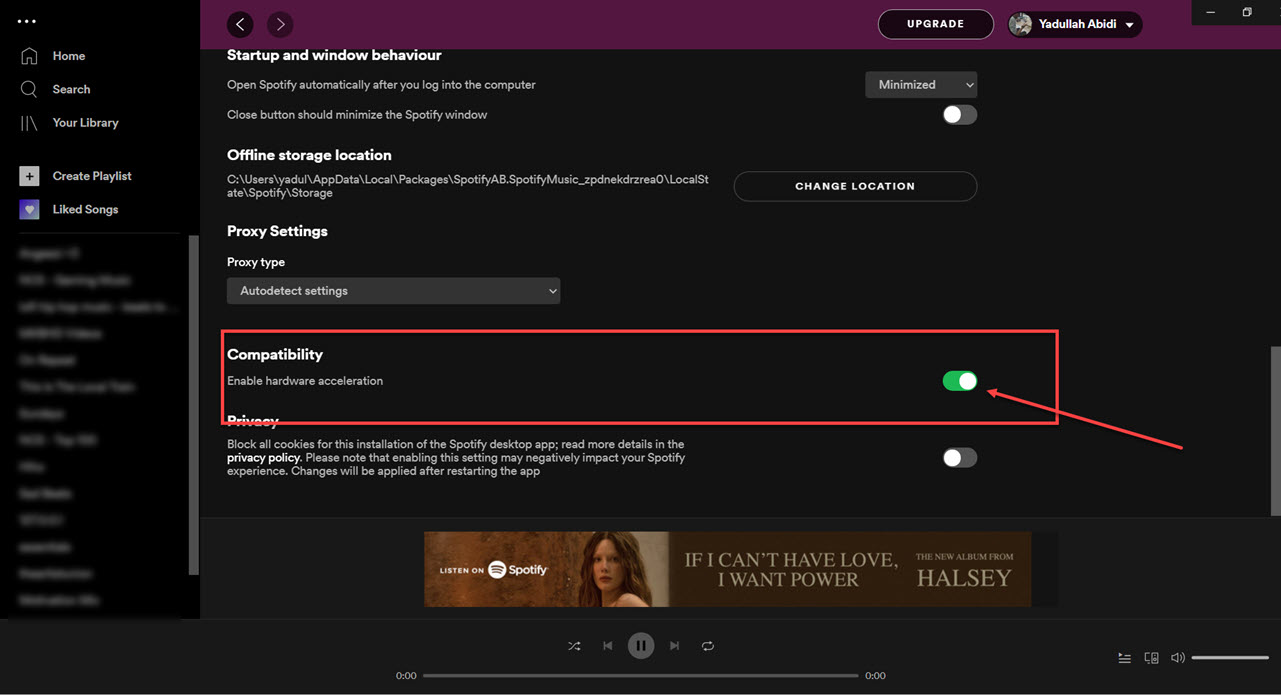
Düzeltme 6. Donanım Hızlandırmasını Devre Dışı Bırakma
Donanım hızlandırmayı devre dışı bırakabilirsiniz. Bu bazen donma sorunlarını çözer.
Düzeltme 7. Kontrol edin Spotify Sunucu durumu
Küresel Spotify Zaman zaman yaşanan kesintiler, oynatma ve oturum açma hizmetlerini etkileyebilir.
Bölüm 3. Kaçınmanın En İyi Yolu Spotify Oynatma Sorunları
Birçok kullanıcı indirilenleri varsayıyor Spotify Şarkılar her zaman çevrimdışı çalışır, ancak indirilen şarkılar DRM ile korunur; bu da müziğin yalnızca yayın uygulaması içinde çalıştığı anlamına gelir. İndirilenler serbestçe aktarılamaz. Eğer sık sık "Spotify "Yanıt vermiyor" sorunu için popüler bir araç şudur: DumpMedia Spotify Music ConverterBu yazılım, kullanıcıların dönüştürme yapmasına olanak tanır. Spotify Daha esnek çevrimdışı oynatma için müziği yerel ses formatlarına dönüştürün. Spotify Uygulama cihazınızda çalışmıyor, şunları yapabilirsiniz: oyun Spotify şarkılar çevrimdışı Hemen başka bir müzik çalara geçin.
🏆Temel Özellikleri DumpMedia Spotify Music Converter
- İndir Spotify müzik MP3WAV, FLAC ve AAC
- Kaldır Spotify DRM koruması*
- Orijinal ses kalitesini koruyun
- Çalma listelerini ve albümleri toplu olarak indirin
- Hızlı dönüşüm hızı
- Şarkı meta verilerini ve ID3 etiketlerini koruyun.
- Herhangi bir cihazda çevrimdışı oynatmayı destekler.
Kullanıcıların yaşadığı sorunlar nedeniyle duydukları hayal kırıklığı için Spotify Uygulama kararsızlığına kıyasla, yerel müzik çalma genellikle çok daha güvenilir hissettiriyor.
dönüştürmek Spotify için MP3 Adım Adım
1 Adım. Indirin ve yükleyin DumpMedia Spotify Music Converter Mac/PC'nizde çalıştırın. Başlattığınızda arayüzü göreceksiniz. Kullanın Spotify Giriş yapmak için Premium/Ücretsiz hesap.
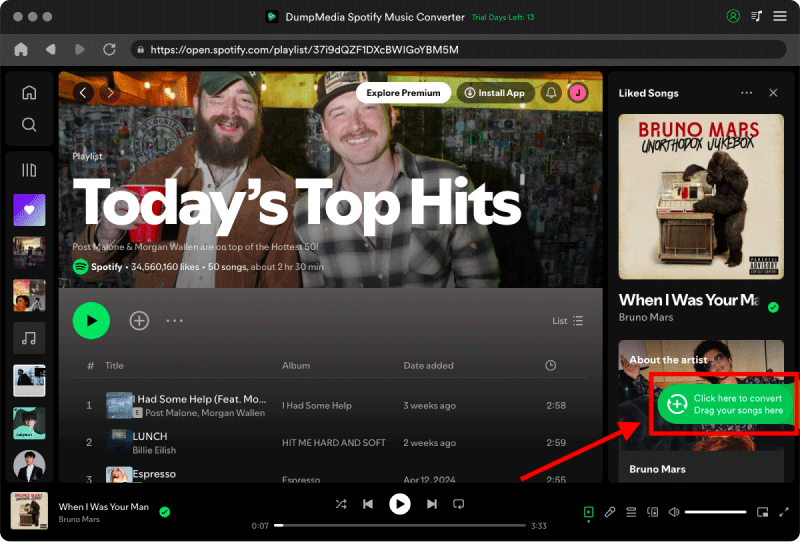
2. Adım. Dönüştürmek istediğiniz çalma listesini, albümü veya belirli şarkıyı bulun. Tek bir şarkıyı ekranın sağ tarafındaki "+" simgesinin üzerine sürükleyebilirsiniz. Alternatif olarak, tüm çalma listesini/albümü açın ve tüm listeyi dönüştürücüye yüklemek için "Dönüştürmeye Ekle" simgesine tıklayın.
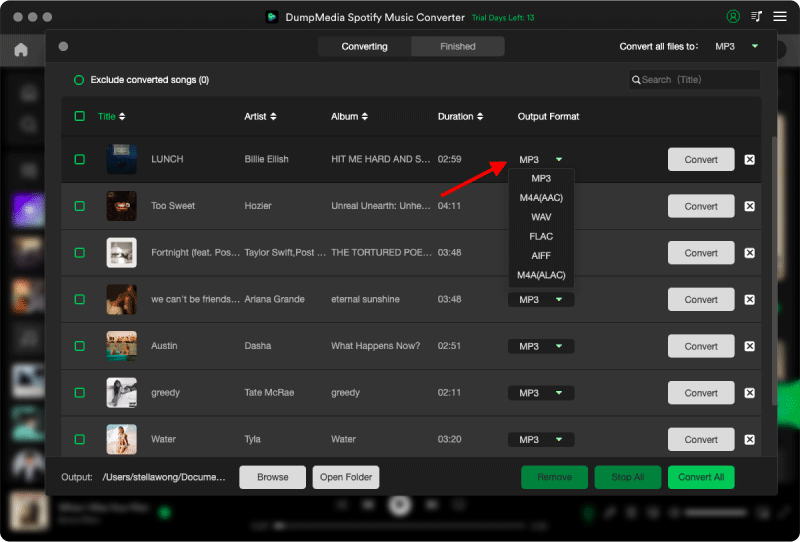
3 Adım. Seç MP3 (en uyumlu olanı). Ayrıca, bit hızını veya örnekleme hızını değiştirebilirsiniz. En iyi denge için 320 kbps'yi seçin.
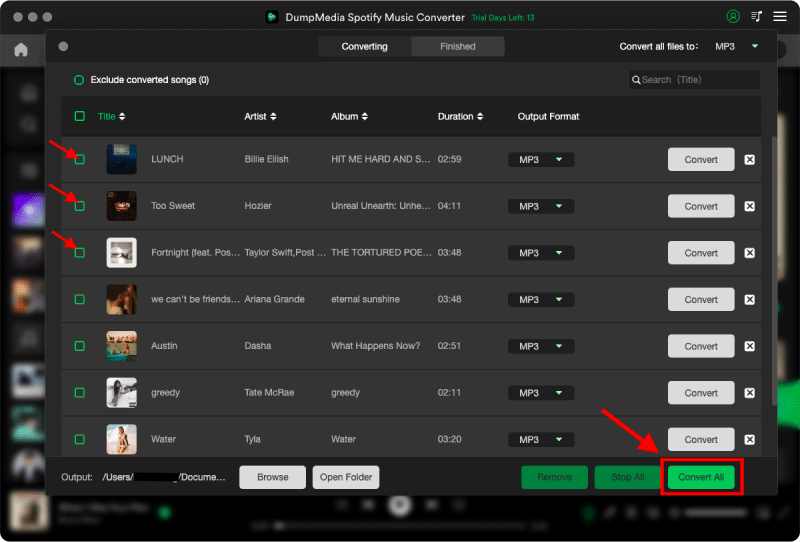
4 Adım. Ayarlar tamamlandıktan sonra, kullanıcılar "Dönüştür" simgesine tıklayarak dönüştürme işlemini gerçekleştirebilirler. Ardından DumpMedia indirecek Spotify şarkılar MP3 Süper hızlı hızı sayesinde saniyeler içinde.
Bölüm 4. SSS
Neden Spotify cevap vermiyor?
Spotify İnternet sorunları, bozuk önbellek dosyaları, güncel olmayan yazılımlar veya sunucu sorunları nedeniyle yanıt vermeyi durdurabilir.
Neden yapar Spotify Donmaya devam mı ediyor?
Spotify Donma sorunları genellikle önbellek bozulması veya donanım hızlandırma çakışmalarıyla ilgilidir.
Neden Spotify Telefonumda çökme sorunu mu yaşıyorum?
Telefon Spotify Çökme sorunlarına düşük depolama alanı, eski uygulama sürümleri veya yazılım çakışmaları neden olabilir.
Neden Spotify Çevrimdışı mod çalışmıyor mu?
Çevrimdışı oynatma hala şunlara bağlıdır: Spotify Yetkilendirme ve uygulama kararlılığı.
Is DumpMedia Spotify Music Converter kasa?
Evet. Bunun için tasarlanmıştır Spotify Müzik dönüştürme ve yerel oynatma yönetimi.
Not: Yayın platformlarının kendi kuralları ve izleme sistemleri vardır. Üçüncü taraf bir araç olarak, DumpMedia Spotify Music Converter Ayrıca, bu kısıtlamalara da tabidir ve bu durum bazı durumlarda kullanımını etkileyebilir. Spotify Hizmet Şartlarını ihlal eden bir faaliyet tespit etmesi durumunda harekete geçebilir; bu tamamen kendi takdirindedir. Spotifytakdir yetkisi.
Bölüm 5. Sonuç
"Spotify "Yanıt vermiyor" sorunu internet bağlantısının istikrarsızlığından, bozuk önbellek dosyalarından, güncel olmayan yazılımlardan veya başka nedenlerden kaynaklanabilir. Spotify Uygulama sorunları. Birçok geçici çözüm oynatmayı geri yüklemeye yardımcı olsa da, Spotify Yayın akışı hala büyük ölçüde uygulama kararlılığına ve çevrimiçi doğrulamaya bağlıdır. Daha istikrarlı çevrimdışı dinleme isteyen kullanıcılar için, DumpMedia Spotify Music Converter pratik bir dönüştürme yöntemi sunar Spotify şarkıları yerel hale dönüştür MP3 Farklı cihazlarda esnek oynatma için dosyalar.
*DumpMedia şifre çözme ve indirme yoluyla çalışır Spotify Şarkıları DRM'siz dosyalara dönüştürerek, kütüphanenizin temiz ve kısıtlamasız bir kopyasını herhangi bir cihazda elde etmenizi sağlar. İşlevselliği, yerel ses dosyalarının DRM'sinin kaldırılmasını içermez.