


Neden ki Spotify Çevrimdışı mı? Düzelt Spotify 2026'da Çevrimdışı Mod
Birçok kullanıcı aniden can sıkıcı bir sorunla karşılaşıyor: Spotify İnternet bağlantıları normal görünse de çevrimdışı durumdalar. Eğer "neden ki Spotify çevrimdışı," yalnız değilsiniz. Spotify Çevrimdışı sorunlar son derece yaygındır ve internet sorunları, uygulama hataları veya daha fazlasıyla ilgili olabilir. Bu kılavuzda, bunun nedenlerini açıklayacağız. Spotify Çevrimdışı, nasıl düzeltilir? Spotify Çevrimdışı mod sorunları ve tamamen ona bağlı kalmadan daha istikrarlı çevrimdışı dinleme deneyiminin nasıl elde edileceği Spotify'ın uygulama sistemi.
İçindekiler Kılavuzu Bölüm 1. Neden Benim Spotify Çevrimdışıyım ama internet bağlantım var?Bölüm 2. Nasıl Onarılır Spotify Çevrimdışı olduğunuzu mu söylüyorsunuz?Bölüm 3. Çevrimdışı Dinlemenin En İyi Yolu Spotify SorunlarıBölüm 4. SSSBölüm 5. Özet
Bölüm 1. Neden Benim Spotify Çevrimdışıyım ama internet bağlantım var?
Bunun birkaç yaygın nedeni vardır. Spotify Çevrimdışı veya düzgün bir şekilde yeniden bağlanamıyor.
Zayıf İnternet Bağlantısı
"Neden?" sorusuna verilen en yaygın cevaplardan biri şudur: Spotify "Çevrimdışı" durumu, istikrarsız internet bağlantısı anlamına gelir. Zayıf Wi-Fi veya mobil ağlar, internet bağlantısının bozulmasına neden olabilir. Spotify çevrimdışı moda.
Spotify Çevrimdışı Mod Etkinleştirildi
Bazen kullanıcılar yanlışlıkla etkinleştirir. Spotify Çevrimdışı Modu manuel olarak ayarlayın. Bu da sık karşılaşılan bir diğer nedendir. Spotify çevrim dışı.
Spotify Sunucu Sorunları
Ara sıra Spotify Sunucularda kesintiler veya senkronizasyon sorunları yaşanabilir. Spotify Sunucular kullanılamıyor, kullanıcılar böyle düşünebilir. Spotify İnternet bağlantıları normal çalışmasına rağmen çevrimdışı görünüyorlar.
Bozuk Önbellek Dosyaları
Hasarlı önbellek dosyaları, işlemleri engelleyebilir. SpotifyNormal çalışmasını engeller ve çevrimdışı oynatma hatalarını tetikler.
Premium Doğrulama Başarısızlığı
Spotify Çevrimdışı indirmeler yine de periyodik hesap doğrulaması gerektirir. Doğrulama başarısız olursa, indirilen şarkılar kaybolabilir veya çalışmayı durdurabilir.
modası geçmiş Spotify Mobil Uygulama
Büyük Spotify Sürümler bazen çevrimiçi ve çevrimdışı işlevselliği etkileyen hatalar içerebilir.
Bölüm 2. Nasıl Onarılır Spotify Çevrimdışı olduğunuzu mu söylüyorsunuz?
Eğer nedenini soruyorsanız Spotify Çevrimdışı olarak aşağıdaki çözümleri deneyin.
1. Yeniden Spotify
Tamamen yakın Spotify ve uygulamayı yeniden açın. Geçici uygulama hataları genellikle yeniden başlatma ile çözülür.
iOS'ta (iPhone / iPad): Ekranın alt kenarından yukarı doğru kaydırın ve ortada bekleyin (veya eski cihazlarda Ana Ekran düğmesine çift tıklayın). Şunu bulun: Spotify Önizleme kartını görüntüleyin ve tamamen yukarı kaydırarak ekranın dışına çıkarın.
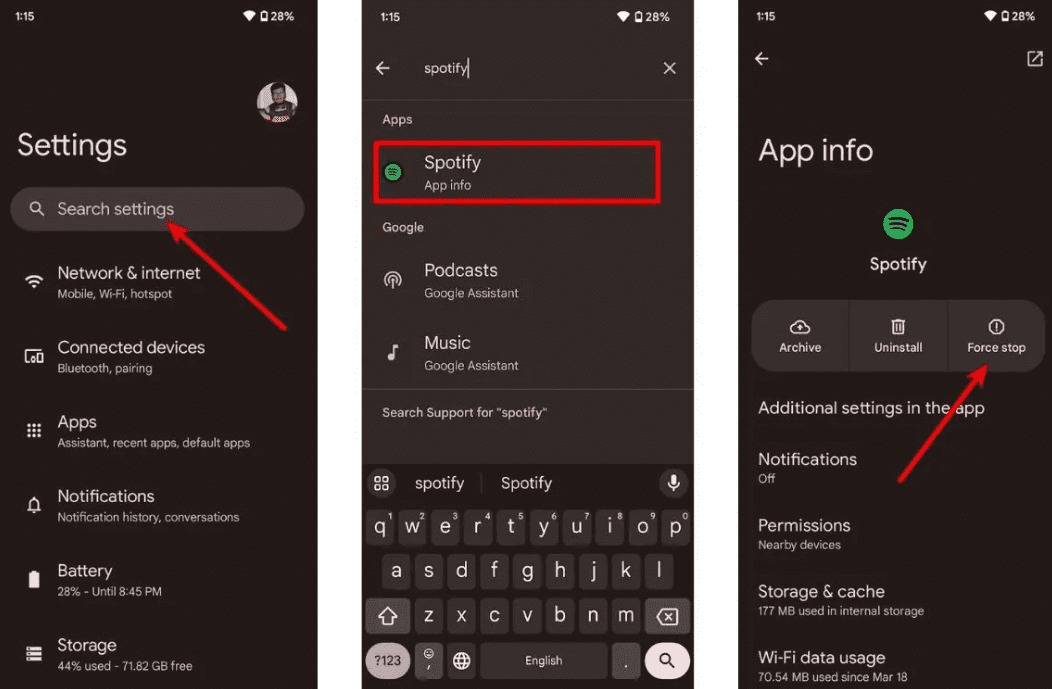
Android'de: Ayarlar > Uygulamalar > bölümüne gidin Spotify ve Zorla Durdur'a dokunun. Bu, beklemede olan tüm arka plan görevlerini sonlandırır. Açın Spotify uygulama çekmecenizden.
macOS'ta: Tıkla Spotify Üst menü çubuğundan Çıkış'ı seçin. SpotifyYa da pencereye tıklayıp Command (⌘) + Q tuşlarına basın.
On WinDows (10/11): Ekranın sol üst köşesindeki Dosya seçeneğine tıklayın. Spotify Pencereyi kapatın ve Çıkış'ı seçin (sağ üst köşedeki "X"e basmak genellikle pencereyi kapatmak yerine sistem tepsisine küçültür).
2. İnternet Bağlantınızı Kontrol Edin
Ağ kararlılığını test etmek için Wi-Fi ve mobil veri arasında geçiş yapın.
3. Devre dışı Spotify Çevrimdışı moda
Bu durum inanılmaz derecede sinir bozucu. Spotify Özellikle internet bağlantınız gayet iyi durumdayken, uygulama çevrimdışı olduğunuz konusunda ısrar ederek takılı kalıyor. Bu genellikle çevrimdışı modun yanlışlıkla açılması ve uygulamanın gelen tüm veri akışlarını engellemesi nedeniyle olur. Bu modu kapatmak bağlantınızı hemen geri yükler. Spotify'nin yayın sunucuları.
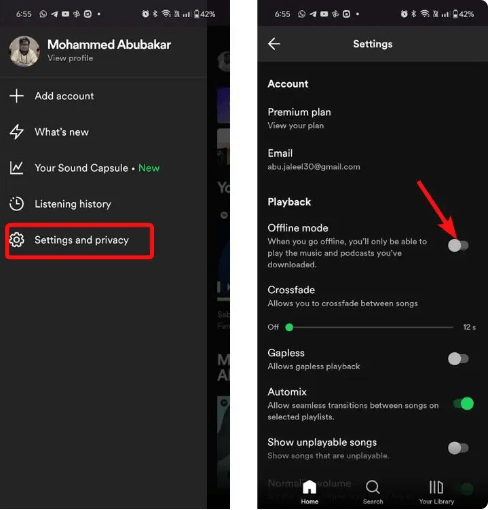
Mobil Cihazlarda (iPhone, iPad ve Android): Profil resminize dokunun, ardından Ayarlar ve gizlilik'i seçin. Aşağı kaydırın ve Oynatma bölümüne dokunun. Menünün üst kısmına yakın Çevrimdışı modu bulun. Eğer düğme yeşil renkteyse veya sağa doğru çevrilmişse, kapatın (böylece gri renkte görünür).
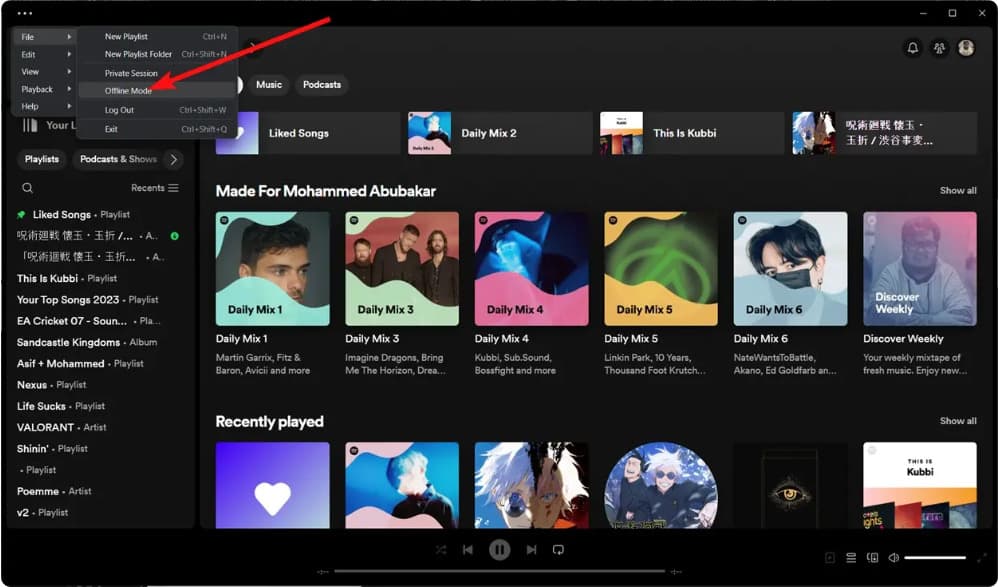
Masaüstünde (Mac ve Win(dows): Menüye erişin. Dosya üzerine gelin (üzerinde). Win(dows) simgesine tıklayın veya (Mac'te) açılır menüye doğrudan bakın. Çevrimdışı Mod'un yanında bir onay işareti varsa, işareti kaldırmak için bir kez tıklayın. Uygulama anında yenilenecek ve yeniden bağlanacaktır.
4. Açık Spotify Önbellek
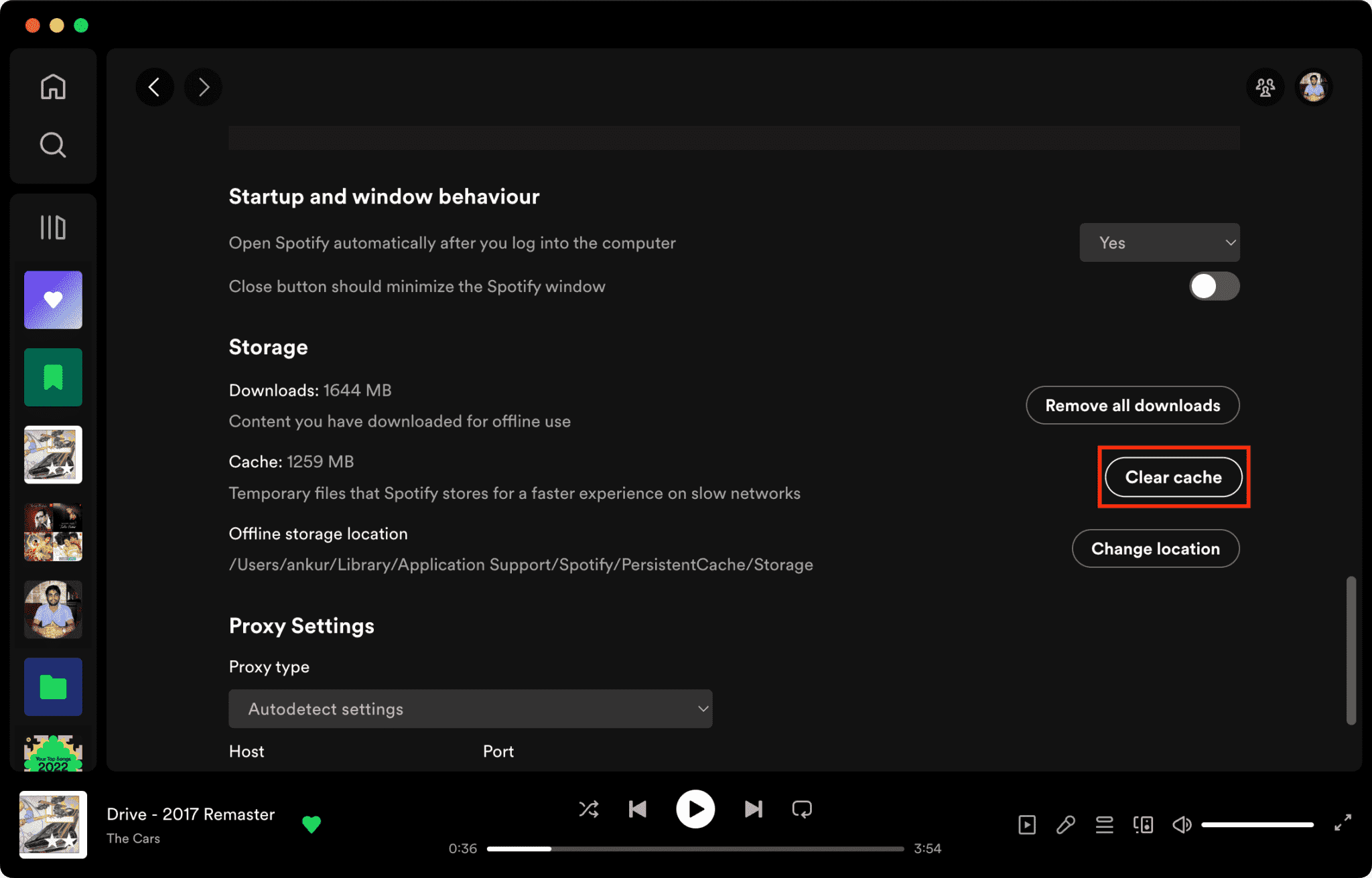
Bozuk önbellek dosyaları bunun başlıca nedenlerinden biridir. Spotify Beklenmedik bir şekilde çevrimdışı.
Nasıl Temizlenir Spotify Mac'te Önbellek/Windows/iPhone/Android >>>>
5. Kontrol Spotify Sunucu durumu
Küresel Spotify Zaman zaman kesintiler oturum açma ve oynatma hizmetlerini etkileyebilir. Durumunu kontrol edebilirsiniz. Spotify Resmi Twitter hesabı @ adresini ziyaret ederek sunucuya ulaşabilirsiniz.SpotifyDurum, hizmette olası arızalar hakkında gerçek zamanlı bilgi yayınlar. Eğer Spotify Sunucu kapalı, müzik çalabilmek için tekrar çalışır duruma gelmesini beklemeniz gerekecek. Spotify normalde.
6. Güncelleştirme Spotify Mobil Uygulama
Sorunu çözmek için deneyebileceğiniz bir sonraki çözüm şudur: Spotify Çevrimdışı sorunun amacı, emin olmaktır Spotify Uygulama güncellendi. Güncelleme, yükleme hatasını düzeltmiş olabilir. Spotify. ziyaret edebilirsiniz Google Play Store Veya Android, iOS veya macOS işletim sistemli bir cihaz kullanarak App Store'dan uygulamayı indirip olası güncellemeleri kontrol edin. Spotify Uygulamayı masaüstü kullanıcıları için lütfen açın. Spotify masaüstü uygulamasına gidin ve mevcut bir güncellemeyi arayın.
Bölüm 3. Çevrimdışı Dinlemenin En İyi Yolu Spotify Sorunları
Birçok kullanıcı nedenini soruyor. Spotify çevrimdışı olarak sonunda şunu keşfederler ki Spotify Çevrimdışı modun hala bazı kısıtlamaları var. İndirilen şarkılar bile şu durumlarda çalışmayı durdurabilir: Spotify Bazı kullanıcılar hesap veya uygulama sorunları yaşayabilir. Bu nedenle bazı kullanıcılar yerel çözümleri tercih eder. MP3 oynatma yerine tamamen ona güvenmek Spotify'ın çevrimdışı modu.
Eğer sık sık "neden" diye arama yapıyorsanız Spotify "Çevrimdışı" özelliği, daha istikrarlı bir çevrimdışı dinleme çözümüne yardımcı olabilir. Popüler seçeneklerden biri şudur: DumpMedia Spotify Music ConverterBu yazılım, kullanıcıların dönüştürme yapmasına olanak tanır. Spotify Müziğinizi daha esnek bir şekilde oynatmak için yerel ses dosyalarına dönüştürün. Spotify Uygulama cihazınızda çalışmıyor, şunları yapabilirsiniz: oyun Spotify şarkılar çevrimdışı Hemen başka bir müzik çalara geçin.
🏆Neden Kullanılmalı? DumpMedia Spotify Music Converter
- İndir Spotify müzik MP3WAV, FLAC ve AAC
- Kaldır Spotify DRM koruması*
- Orijinal ses kalitesini koruyun
- Çalma listelerini ve albümleri toplu olarak indirin
- Hızlı dönüşüm hızı
- Şarkı meta verilerini ve ID3 etiketlerini koruyun.
- Herhangi bir cihazda çevrimdışı oynatmayı destekler.
Kullanıcıların yaşadığı sorunlar nedeniyle duydukları hayal kırıklığı için Spotify Çevrimdışı sorunlar yaşandığında, yerel oynatma genellikle daha güvenilir ve kullanışlı geliyor.
dönüştürmek Spotify için MP3 Adım Adım
1 Adım. Indirin ve yükleyin DumpMedia Spotify Music Converter Mac/PC'nizde çalıştırın. Başlattığınızda arayüzü göreceksiniz. Kullanın Spotify Giriş yapmak için Premium/Ücretsiz hesap.
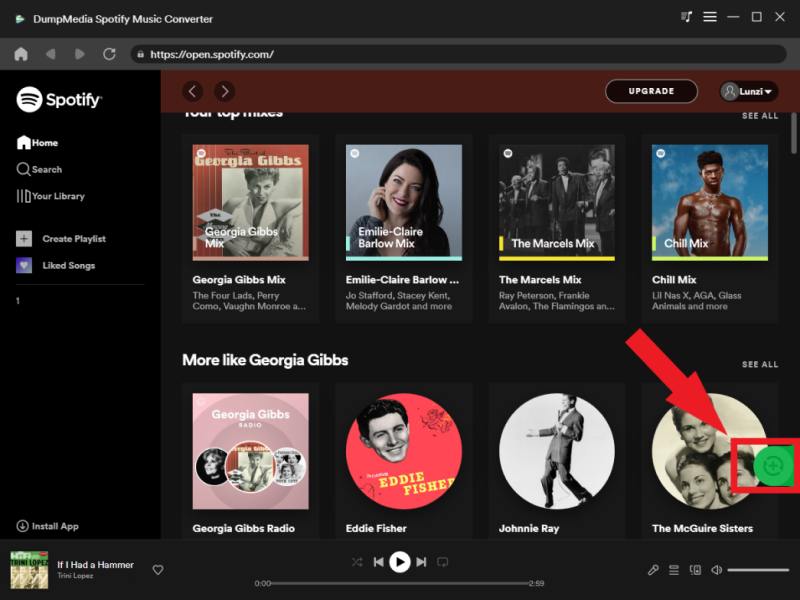
2. Adım. Dönüştürmek istediğiniz çalma listesini, albümü veya belirli şarkıyı bulun. Tek bir şarkıyı ekranın sağ tarafındaki "+" simgesinin üzerine sürükleyebilirsiniz. Alternatif olarak, tüm çalma listesini/albümü açın ve tüm listeyi dönüştürücüye yüklemek için "Dönüştürmeye Ekle" simgesine tıklayın.
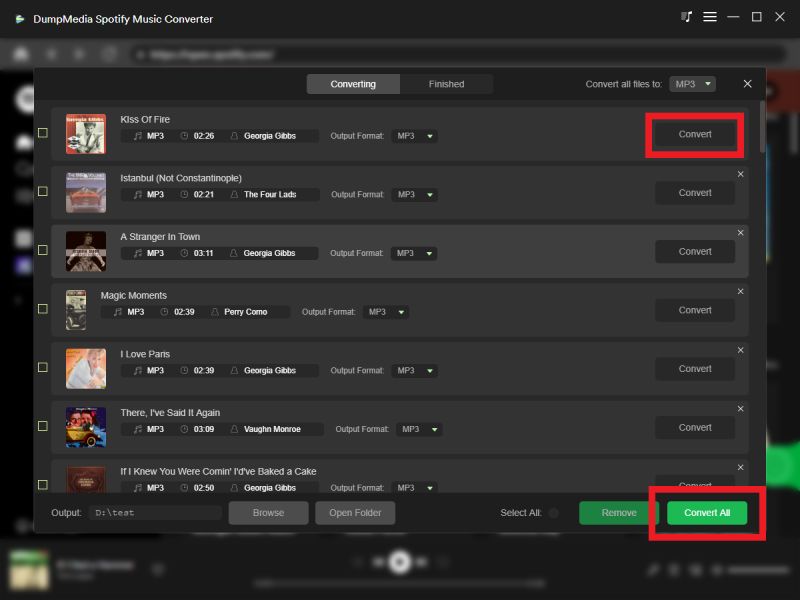
3 Adım. Seç MP3 (en uyumlu olanı). Ayrıca, bit hızını veya örnekleme hızını değiştirebilirsiniz. En iyi denge için 320 kbps'yi seçin.

4 Adım. Ayarlar tamamlandıktan sonra, kullanıcılar "Dönüştür" simgesine tıklayarak dönüştürme işlemini gerçekleştirebilirler. Ardından DumpMedia indirecek Spotify şarkılar MP3 Süper hızlı hızı sayesinde saniyeler içinde.
Dönüştürme işleminden sonra, müziğiniz tamamen ona bağlı kalmadan çalınabilir. Spotify çevrimdışı mod.
Bölüm 4. SSS
Neden Spotify İnternet bağlantısı olsa bile çevrimdışı mı?
Spotify İnternet bağlantınız düzgün çalışsa bile önbellek bozulması, sunucu sorunları veya hesap doğrulama sorunları yaşayabilirsiniz.
Neden yapar Spotify Çevrimdışı kalmaya devam mı edeceksiniz?
Ağ istikrarsızlığı, güncel olmayan yazılımlar veya bozulmuş uygulama verileri, çevrimdışı modu tekrar tekrar tetikleyebilir.
Neden benim Spotify İndirilen dosyalar oynatılmıyor mu?
Spotify İndirmeler hala hesap yetkilendirmesi ve uygulama işlevselliği gerektiriyor.
Nasıl devre dışı bırakabilirim? Spotify Çevrimdışı mod mu?
Açılış Spotify Ayarlar'a girin ve Oynatma seçenekleri altında Çevrimdışı Modu kapatın.
Yapabilmek Spotify Çevrimdışı şarkıların süresi mi doluyor?
Evet. Spotify Çevrimdışı indirmeler hala hesap doğrulama ve abonelik durumuna bağlıdır.
Bölüm 5. Özet
Eğer nedenini merak ediyorsanız... Spotify Çevrimdışı durumda, sorun internet bağlantısının istikrarsızlığıyla ilgili olabilir. Spotify Sunucu sorunları, uygulama hataları veya önbellek bozulması. Spotify Çevrimdışı mod kullanışlıdır, ancak yine de büyük ölçüde uygulamanın işlevselliğine ve hesap doğrulamasına bağlıdır.
Daha istikrarlı çevrimdışı oynatma isteyen kullanıcılar için, DumpMedia Spotify Music Converter dönüştürme için pratik bir çözüm sunar Spotify şarkıları yerel hale dönüştür MP3 Birden fazla cihazda esnek dinleme için dosyalar.
*DumpMedia şifre çözme ve indirme yoluyla çalışır Spotify Şarkıları DRM'siz dosyalara dönüştürerek, kütüphanenizin temiz ve kısıtlamasız bir kopyasını herhangi bir cihazda elde etmenizi sağlar. İşlevselliği, yerel ses dosyalarının DRM'sinin kaldırılmasını içermez.