


Streamlabs Spotify: Nasıl Oynanır Spotify Streamlabs OBS'de müzik
Birçok yayıncı kullanmak istiyor Spotify müzik yayın yaparken Streamlabs OBS Daha iyi bir izleme deneyimi yaratmak için. Bu yüzden birçok kullanıcı Streamlabs'i arıyor. Spotify Çevrimiçi çözümler mevcut. Ancak Streamlabs'i kurmak... Spotify Birçok insanın beklediği kadar basit değil. Bu kılavuzda, Streamlabs OBS'nin destekleyip desteklemediğini açıklayacağız. Spotifysınırlamaları Spotify Streamlabs üzerinden yayın yapmak ve en iyi kullanım şekli Spotify Streamlabs OBS ile müziğinizi daha esnek bir şekilde çalın.
İçindekiler Kılavuzu Bölüm 1. Streamlabs OBS Destekliyor mu? Spotify?Bölüm 2. En İyi Kullanım Şekli Spotify Streamlabs OBS ileBölüm 3. SSSBölüm 4. Özet
Bölüm 1. Streamlabs OBS Destekliyor mu? Spotify?
Streamlabs ile ilgili en sık sorulan sorulardan biri... Spotify Streamlabs OBS'nin resmi olarak destekleyip desteklemediği sorusu. Spotify entegrasyon. Cevap hayır.
Neden Şimdi Spotify Streamlabs OBS'de kullanımı zor olabilir.
Streamlabs'e rağmen Spotify Bu kurulumlar yayıncılar arasında popülerdir. Spotify Yayın akışı, çeşitli teknik ve pratik sınırlamalara sahiptir.
Şu anda Streamlabs OBS yerel bir destek sağlamamaktadır. Spotify İçe aktarma veya yönetme için entegrasyon Spotify Parçaları doğrudan yazılımın içinde oynatır. Çoğu yayıncı sadece oynatır. Spotify Arka planda müzik çalmasını sağlayın ve Streamlabs OBS'nin masaüstü sesini yakalamasına izin verin.
Öte yandan, Spotify Şarkılar, kullanıcıların doğrudan erişimini engelleyen DRM teknolojisiyle korunmaktadır. Spotify Müzik dosyaları. Müzik dosyalarına dışarıdan erişilemez. Spotify Bu durum, Streamlabs OBS içindeki yerel ses yönetimini daha zor hale getiriyor.
Daha ne, Spotify Yayın akışı için istikrarlı bir internet bağlantısı gereklidir. Canlı yayınlar sırasında, zayıf ağ koşulları oynatma kesintilerine veya ara belleğe alma sorunlarına neden olabilir. Profesyonel yayın ortamları için, yerel ses oynatma genellikle daha güvenilirdir.
Bu sınırlamalar nedeniyle, Streamlabs'i arayan birçok kullanıcı Spotify Çözümler nihayetinde daha istikrarlı çevrimdışı oynatma yöntemleri arayışına giriyor.
Bölüm 2. En İyi Kullanım Şekli Spotify Streamlabs OBS ile
Streamlabs'e rağmen Spotify Entegrasyon sınırlı olsa da, etkili bir çözüm yolu hala mevcut. En iyi çözüm dönüştürmektir. Spotify şarkıları yerel hale dönüştür MP3 Öncelikle dosyaları seçin ve ardından yerel müzik dosyalarınızı Streamlabs OBS'ye ekleyin. Bu yöntem daha iyi oynatma kontrolü sağlar ve yayınla ilgili birçok sorunu önler.
Bunu başarmak için birçok kullanıcı şunlara güveniyor: DumpMedia Spotify Music ConverterBu profesyonel Spotify dönüştürücü, kullanıcıların indirme ve dönüştürme işlemlerine yardımcı olur. Spotify Şarkıları Streamlabs OBS ile uyumlu yaygın ses formatlarına dönüştürün.
🏆Temel Özellikleri DumpMedia Spotify Music Converter
- İndir Spotify podcast veya müzik MP3WAV, FLAC ve AAC
- Kaldır Spotify müzik DRM koruma*
- Orijinal ses kalitesini koruyun
- Çalma listelerini ve albümleri toplu olarak indirin
- Hızlı dönüşüm hızı
- Şarkı meta verilerini ve ID3 etiketlerini koruyun.
- Herhangi bir cihazda çevrimdışı oynatmayı destekler.
Nasıl Oynanır Spotify Streamlabs OBS'de müzik
1 Adım. Indirin ve yükleyin DumpMedia Spotify Music Converter Mac/PC'nizde çalıştırın. Başlattığınızda arayüzü göreceksiniz. Kullanın Spotify Giriş yapmak için Premium/Ücretsiz hesap.
2. Adım. Dönüştürmek istediğiniz çalma listesini, albümü veya belirli şarkıyı bulun. Tek bir şarkıyı ekranın sağ tarafındaki "+" simgesinin üzerine sürükleyebilirsiniz. Alternatif olarak, tüm çalma listesini/albümü açın ve tüm listeyi dönüştürücüye yüklemek için "Dönüştürmeye Ekle" simgesine tıklayın.
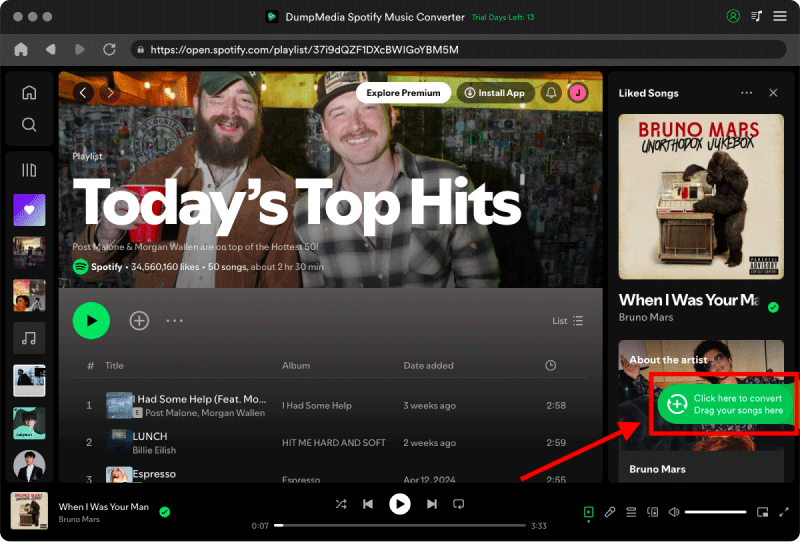
3 Adım. Seç MP3 (en uyumlu olanı). Ayrıca, bit hızını veya örnekleme hızını değiştirebilirsiniz. En iyi denge için 320 kbps'yi seçin.

4 Adım. Ayarlar tamamlandıktan sonra, kullanıcılar "Dönüştür" simgesine tıklayarak dönüştürme işlemini gerçekleştirebilirler. Ardından DumpMedia dönüştürecek Spotify şarkılar MP3 Süper hızlı hızı sayesinde saniyeler içinde.
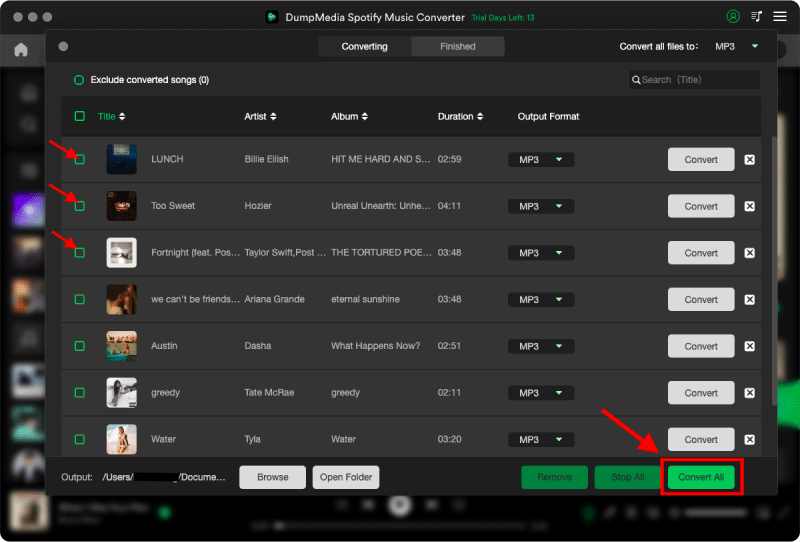
5. Adım. Bilgisayarınızda Streamlabs OBS'yi başlatın.
6 Adım. Dönüştürülenleri içe aktar Spotify MP3 Dosyaları ses kaynağı kurulumunuza ekleyin.
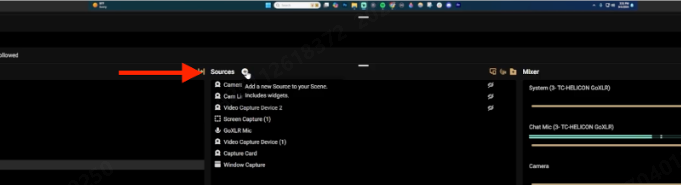
7. Adım. Arka plan müziği, mikrofon, oyun sesi veya masaüstü sesi için ses seviyelerini ayarlayın.
Artık Streamlabs'i kullanabilirsiniz. Spotify Canlı yayınlar sırasında oynatma daha sorunsuz gerçekleşir.
Bölüm 3. SSS
Streamlabs OBS kullanabilir mi? Spotify?
Evet, ancak Streamlabs OBS resmi olarak entegre olmuyor. Spotify Doğrudan. Çoğu kullanıcı masaüstü ses yakalama veya yerel çözümlere güvenir. MP3 oynatma.
Neden Spotify Streamlabs OBS'de çalışmıyor mu?
Ses yönlendirme sorunları, DRM kısıtlamaları ve masaüstü ses ayarları engelleyebilir. Spotify Oynatma işlemi düzgün çalışıyor.
En iyi Streamlabs hangisi? Spotify Çözüm?
Birçok yayıncı kullanıyor DumpMedia Spotify Music Converter dönüştürmek Spotify şarkıları yerel hale dönüştür MP3 Çevrimdışı oynatma için dosyalar.
Kullanabilirmiyim Spotify Canlı yayınlar sırasında müzik mi?
Evet, ancak platforma ve içerik kullanımına bağlı olarak telif hakkı kısıtlamaları geçerli olabilir.
Kullanabilirmiyim Spotify Streamlabs OBS'de çevrimdışı mı?
Resmi Spotify Çevrimdışı indirmeler uygulama kısıtlamasına tabidir. Dönüştürüldü MP3 Dosyalar, çevrimdışı oynatma konusunda daha esnek bir yapı sunar.
Is DumpMedia Spotify Music Converter kasa?
Evet. Bunun için tasarlanmıştır Spotify Müzik dönüştürme ve çevrimdışı oynatma yönetimi.
Bölüm 4. Özet
Streamlabs OBS resmi olarak doğrudan bağlantıyı desteklemese de Spotify entegrasyon sayesinde yayıncılar hala kullanabilirler. Spotify Yerel ses oynatma özelliği sayesinde müziği daha esnek bir şekilde dinleyin. İstikrarlı bir Streamlabs arayan kullanıcılar için. Spotify Çözelti DumpMedia Spotify Music Converter etkili bir dönüşüm yöntemi sunar Spotify şarkıları yerel hale dönüştür MP3 Çevrimdışı yayın için dosyalar ve daha iyi ses yönetimi.
Yerel kullanarak Spotify Streamlabs OBS içindeki dosyalar sayesinde yayıncılar, oynatma istikrarını artırabilir, yayın kesintilerini azaltabilir ve canlı yayınlar sırasında arka plan müziği üzerinde daha fazla kontrol sahibi olabilirler.
*DumpMedia şifre çözme ve indirme yoluyla çalışır Spotify Şarkıları DRM'siz dosyalara dönüştürerek, kütüphanenizin temiz ve kısıtlamasız bir kopyasını herhangi bir cihazda elde etmenizi sağlar. İşlevselliği, yerel ses dosyalarının DRM'sinin kaldırılmasını içermez.