


Spotify Virtual DJ'e: Kullanın Spotify Virtual DJ'deki şarkılar
Birçok DJ ve müziksever bağlantı kurmak istiyor. Spotify Sanal DJ'e Çalma listelerini karıştırmak, canlı setler oluşturmak ve çevrimdışı performans sergilemek için kullanılır. Ancak süreç artık eskisi kadar basit değil. Bu kılavuzda, Virtual DJ'nin çevrimdışı performansı destekleyip desteklemediğini açıklayacağız. Spotify ve ithalat için en iyi yöntem Spotify Çevrimdışı oynatma özelliğiyle Virtual DJ'e şarkılar ekleyin.
İçindekiler Kılavuzu Bölüm 1. Virtual DJ Destekliyor mu? Spotify?Bölüm 2. Neden Spotify Virtual DJ ile doğrudan çalışamıyor musunuz?Bölüm 3. En İyi Kullanım Şekli Spotify Virtual DJ ileBölüm 4. Nasıl Eklenir Spotify Sanal DJ için şarkılar?Bölüm 5. SSSBölüm 6. Sonuç
Bölüm 1. Virtual DJ Destekliyor mu? Spotify?
Bağlantıyla ilgili en sık sorulan sorulardan biri şudur: Spotify Virtual DJ için önemli olan, Virtual DJ'nin hala bu özelliği destekleyip desteklemediğidir. Spotify Entegrasyon. Cevap hayır.
2020 olarak, Spotify Resmi olarak küresel lisanslama stratejisini revize ederek, tüm üçüncü taraf DJ yazılımlarına (dahil olmak üzere) desteği sonlandırdı. Sanal DJTicari performanslar ve telif haklarıyla ilgili yasal riskleri azaltmak amacıyla djay Pro, Traktor vb. gibi araçlarla bağlantı kurulamaz. Kullanıcılar artık doğrudan bağlantı kuramazlar. Spotify Virtual DJ'e yayın akışı oynatma için.
Kullanımla ilgili birçok eski eğitim videosu Spotify Virtual DJ ile yapılanlar artık güncelliğini yitirdi çünkü daha önce yazılmışlardı. Spotify DJ yazılım desteği sona erdi. Resmi API'nin desteği kesildiğinden, kullanmak istiyorsanız... Spotify Virtual DJ'de müzik kullanabilmek için öncelikle dosyayı indirip dönüştürmeniz gerekir. Spotify izler MP3 Veya bir dönüştürücü kullanarak WAV formatına dönüştürün. Ardından, bu yerel dosyaları Virtual DJ'ye aktarın.
Bölüm 2. Neden Spotify Virtual DJ ile doğrudan çalışamıyor musunuz?
Nedenini anlamak Spotify Virtual DJ'in artık resmi olarak çalışmaması, güvenilir miksaj çözümleri arayan DJ'ler için önemlidir. Doğrudan içe aktarabilir misiniz? Spotify Virtual DJ'e şarkı eklemek mi? Hadi başlayalım.
DRM Koruması
Spotify Şarkılar DRM (Dijital Hak Yönetimi) ile korunmaktadır. Premium kullanıcılar bile indirilen parçaları serbestçe kopyalayamaz, aktaramaz veya değiştiremez. DRM şifrelemesi nedeniyle çevrimdışı kullanımda kısıtlamalar bulunmaktadır. Spotify Dosyalar yalnızca içeride çalışır. Spotify app.
Yayın Kararlılığı Sorunları
Canlı DJ performansları istikrarlı oynatma ve düşük gecikme süresi gerektirir. Yayın hizmetlerinde internet kesintileri veya parça yükleme gecikmeleri yaşanabilir. Profesyonel DJ miksajı için yerel dosyalar genellikle çevrimiçi yayınlardan daha güvenilirdir. Bu nedenle birçok DJ, yerel dosyalar arayışındadır. Spotify Virtual DJ çözümlerine geçiş artık tercih ediliyor. Spotify Şarkıları yerel ses formatlarına dönüştürün.
Bölüm 3. En İyi Kullanım Şekli Spotify Virtual DJ ile
Doğrudan olmasına rağmen Spotify Virtual DJ entegrasyonu mümkün olmasa da, pratik bir çözüm yolu mevcut. En iyi çözüm dönüştürmektir. Spotify şarkıları yerel hale dönüştür MP3 Dosyaları kullanıp daha sonra dönüştürülmüş dosyaları Virtual DJ'ye aktarabilirsiniz. Bu yöntem, DJ'lerin kullanmasına olanak tanır. Spotify Yayın kısıtlamaları olmadan müzik.
Bunu başarmak için birçok kullanıcı şunlara güveniyor: DumpMedia Spotify Music Converter, profesyonel Spotify Çevrimdışı oynatma ve DJ yazılımlarıyla uyumluluk için tasarlanmış müzik indirme ve dönüştürme programı. Spotify Uygulama cihazınızda çalışmıyor, şunları yapabilirsiniz: oyun Spotify şarkılar çevrimdışı Hemen başka bir müzik çalara geçin.
🏆Temel Özellikleri DumpMedia Spotify Music Converter
- İndir Spotify Podcast veya Müzik MP3WAV, FLAC ve AAC
- Kaldır Spotify Müzik DRM koruması*
- Orijinal ses kalitesini koruyun
- Çalma listelerini ve albümleri toplu olarak indirin
- Hızlı dönüşüm hızı
- Şarkı meta verilerini ve ID3 etiketlerini koruyun.
- Herhangi bir cihazda çevrimdışı oynatmayı destekler.
dönüştürmek Spotify için MP3 Adım Adım
1 Adım. Indirin ve yükleyin DumpMedia Spotify Music Converter Mac/PC'nizde çalıştırın. Başlattığınızda arayüzü göreceksiniz. Kullanın Spotify Giriş yapmak için Premium/Ücretsiz hesap.
2. Adım. Dönüştürmek istediğiniz çalma listesini, albümü veya belirli şarkıyı bulun. Tek bir şarkıyı ekranın sağ tarafındaki "+" simgesinin üzerine sürükleyebilirsiniz. Alternatif olarak, tüm çalma listesini/albümü açın ve tüm listeyi dönüştürücüye yüklemek için "Dönüştürmeye Ekle" simgesine tıklayın.
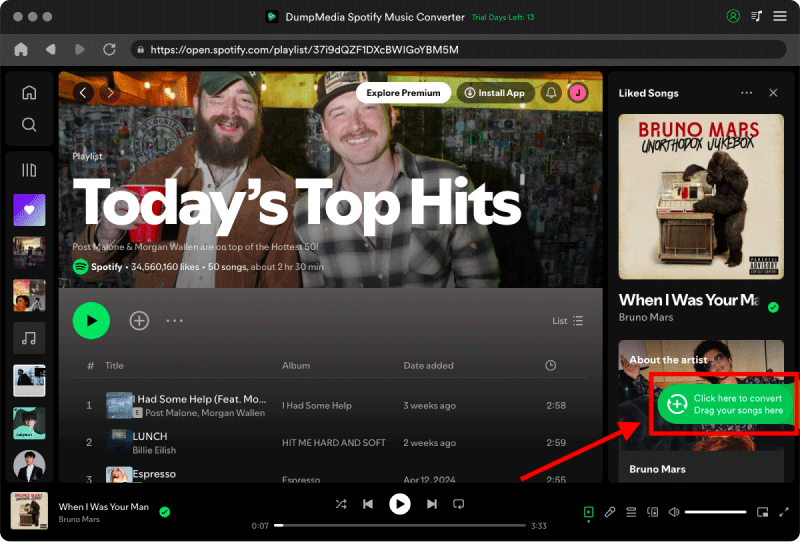
3 Adım. Seç MP3 (en uyumlu olanı). Ayrıca, bit hızını veya örnekleme hızını değiştirebilirsiniz. En iyi denge için 320 kbps'yi seçin.

4 Adım. Ayarlar tamamlandıktan sonra, kullanıcılar "Dönüştür" simgesine tıklayarak dönüştürme işlemini gerçekleştirebilirler. Ardından DumpMedia dönüştürecek Spotify şarkılar MP3 Süper hızlı hızı sayesinde saniyeler içinde.

Bölüm 4. Nasıl Eklenir Spotify Sanal DJ için şarkılar?
Şimdi, yerel olarak dönüştürüldü Spotify Şarkılar DJ uygulamalarına serbestçe aktarılabiliyor. İşte bir şarkıyı nasıl ekleyeceğiniz: Spotify Virtual DJ'e adım adım rehber.
Adım 1. Bilgisayarınızda VirtualDJ'i başlatın. Arayüzün sol alt köşesinde Klasör Listesi'ni göreceksiniz.
2 Adım. Yerel Müzik klasörünü genişleterek standart sistem klasörlerinizi (Müzik, Videolar, Masaüstü) görüntüleyin. Dönüştürdüğünüz dosyayı kaydettiğiniz klasörü bulun. Spotify MP3s.
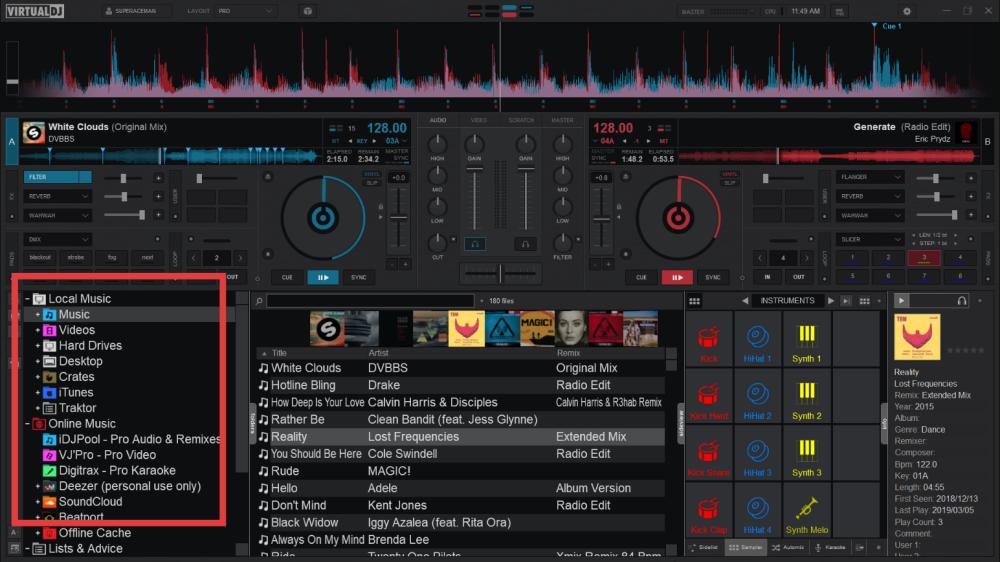
Artık başarıyla kullanabilirsiniz. Spotify Virtual DJ'e resmi olmadan Spotify entegrasyon.
Bölüm 5. SSS
Virtual DJ kullanılabilir mi? Spotify?
Hayır. Spotify Virtual DJ entegrasyonu artık resmi olarak desteklenmiyor.
Neden oldu Spotify DJ yazılımlarına desteği durdurmak mı?
Spotify Lisans anlaşmaları ve DRM koruma politikaları nedeniyle DJ entegrasyonları kaldırıldı.
Ne iyi Spotify Virtual DJ çözümüne mi?
dönüştürme Spotify şarkılar içine MP3 kullanan dosyalar DumpMedia Spotify Music Converter En iyi çözümlerden biridir.
Çevrimdışı olarak DJ'lik yapabilir miyim? Spotify şarkılar?
Evet, dönüştürdükten sonra. Spotify Parçaları yerel ses dosyalarına dönüştürün.
Nasıl dönüştürebilirim? Spotify Virtual DJ için şarkılar?
Sen kullanabilirsiniz DumpMedia Spotify Music Converter dönüştürmek Spotify şarkılar içine MP3 DJ yazılımlarıyla uyumluluk için format.
Is DumpMedia Spotify Music Converter kasa?
Evet. Çevrimdışı kullanım için tasarlanmıştır. Spotify Oynatma ve müzik dönüştürme.
Bölüm 6. Sonuç
Resmi olmasına rağmen Spotify Virtual DJ entegrasyonu artık desteklenmiyor, ancak DJ'ler yine de kullanmaya devam edebilir. Spotify Virtual DJ'de müzik parçalarını yerel formata dönüştürerek müzik oluşturma MP3 Dosyalar. İstikrarlı bir çözüm arayan kullanıcılar için. Spotify Virtual DJ çözümüne, DumpMedia Spotify Music Converter etkili bir kaldırma yöntemi sağlar Spotify Oynatma sınırlamalarını kaldırın ve çevrimdışı DJ mikslemenin keyfini çıkarın. Dönüştürerek Spotify DJ'ler, şarkıları uyumlu ses formatlarına dönüştürerek güvenilir çevrimdışı kütüphaneler oluşturabilir, miksleme istikrarını artırabilir ve kullanabilirler. Spotify Virtual DJ içinde özgürce müzik dinleyin.
*DumpMedia şifre çözme ve indirme yoluyla çalışır Spotify Şarkıları DRM'siz dosyalara dönüştürerek, kütüphanenizin temiz ve kısıtlamasız bir kopyasını herhangi bir cihazda elde etmenizi sağlar. İşlevselliği, yerel ses dosyalarının DRM'sinin kaldırılmasını içermez.