


Spotify DJ Modu: Nasıl Kullanılır (2026 Tam Kılavuz)
Eğer yakın zamanda şunlardan haberdar olduysanız... Spotify DJ modu, tam olarak ne işe yaradığını ve nasıl kullanıldığını merak ediyor olabilirsiniz. Spotify Yapay Zeka DJ Modu, bunlardan biridir. SpotifyEn heyecan verici özelliklerinden biri, yapay zekâ destekli kişiselleştirilmiş bir müzik deneyimi sunmasıdır. Ancak güçlü olmasına rağmen, birçok kullanıcının farkında olmadığı sınırlamaları da vardır. Bu kılavuzda, bu sınırlamaların neler olduğunu öğreneceksiniz. Spotify Yapay zekâ destekli DJ nedir ve yapay zekâ destekli DJ'i nasıl etkinleştirebilirsiniz? Spotify.
İçindekiler Kılavuzu Bölüm 1. Nedir Spotify Yapay zekâ DJ mi?Bölüm 2. Nasıl Etkinleştirilir Spotify Yapay zekâ DJ mi?Bölüm 3. Sınırlamalar Spotify yapay zeka DJ'iBölüm 4. Nasıl Kaydedilir Spotify Çevrimdışı Kullanım İçin DJ Müziği?Bölüm 5. SSSBölüm 6. Sonuç
Bölüm 1. Nedir Spotify Yapay zekâ DJ mi?
Spotify DJ modu, gelişmiş makine öğrenimini son derece gerçekçi bir yapay zeka sesiyle harmanlayan, sanal bir radyo sunucusu gibi çalışan kişiselleştirilmiş bir müzik rehberidir. Premium abonelere sunulan bu özellik, sadece şarkıları karıştırmakla kalmaz; dinleme geçmişinize, güncel trendlere ve hatta yıllardır dinlemediğiniz nostaljik şarkılara dayanarak sürekli bir müzik akışı oluşturur.
Temel Özellikler Spotify yapay zeka DJ'i
- Kişiselleştirilmiş şarkı önerileri
- Manuel müdahale olmadan sürekli oynatma
- Yapay zeka tarafından oluşturulan sesli yorum
- Akıllı ruh hali ve tür geçişleri
Bu nedenle Spotify DJ modu, zahmetsiz dinlemeyi tercih eden kullanıcılar arasında giderek daha popüler hale geliyor.
Bölüm 2. Nasıl Etkinleştirilir Spotify Yapay zekâ DJ mi?
Nasıl erişilir Spotify DJ modu mu? Abone olduysanız... Spotify Premium, bu adımları takip et:
Adım 1. Uygulamanızın en son sürüme güncellendiğinden emin olun. Ana sayfaya gidin.
2. Adım. Akışınızda DJ özelliğini bulun. Anında dinlemeye başlayın.
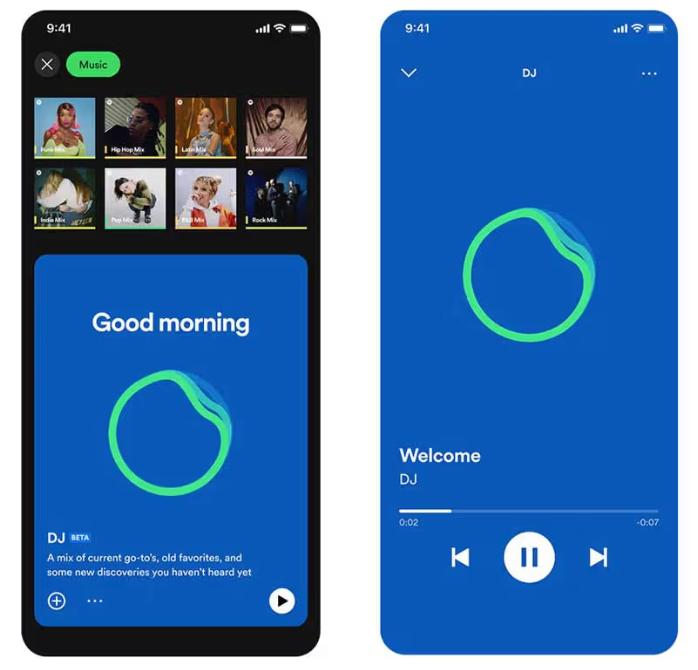
SpotifyYapay zekâ destekli DJ uygulaması artık "İstekler" özelliğini destekliyor. Tıpkı gerçek bir DJ ile konuşur gibi, sesli komutlar veya kısa mesajlar kullanarak "Daha yumuşak bir türe geç" veya "Jay Justin Bieber'dan daha fazla şarkı çal" gibi şeyler söyleyebilirsiniz ve yapay zekâ anında çalma listesini ayarlayacaktır.
Bölüm 3. Sınırlamalar Spotify yapay zeka DJ'i
Spotify DJ modu, müziği manuel olarak arama ihtiyacını ortadan kaldırdığı için öne çıkıyor. Arka planda müzik dinlemek, yeni şarkılar keşfetmek ve radyo benzeri bir deneyim yaratmak için idealdir. SpotifyYapay zekâ destekli DJ'in performansı etkileyici olsa da, beraberinde birkaç önemli sınırlama getiriyor.
1. Kalıcı İndirme Yok
Premium üyeliğe sahip olsanız bile, şarkılar gerçekten indirilemez. Dosyalar uygulamada kilitlidir ve aktarılamazlar.
2. Çevrimdışı Özgürlük Yok
Çevrimdışı dinlemek için indirebilirsiniz, ancak erişim aboneliğe bağlıdır. Aboneliğinizi iptal ederseniz müzikler kaybolur.
3. İhracat veya Paylaşım Yok
DJ çalma listelerini dışa aktaramaz ve miksleri harici olarak kaydedemezsiniz.
4. Sınırlı Kontrol
Spotify Şarkı seçimi ve sıralaması yapay zeka tarafından kontrol ediliyor. Tamamen özelleştirme imkanınız yok.
Müziğiniz üzerinde daha fazla kontrol sahibi olmak istiyorsanız, bu sınırlamalar önem kazanır.
Bölüm 4. Nasıl Kaydedilir Spotify Çevrimdışı Kullanım İçin DJ Müziği?
Eğer hoşlanıyorsanız Spotify DJ modundasınız ama daha fazla esneklik istiyorsunuz, şarkıları kalıcı olarak kaydetmenin bir yoluna ihtiyacınız var. Bunun yerine şunlara güvenmek yerine: SpotifyYerleşik sınırlamaları aşarak, DJ önerilerinden şarkılar seçip bunları yerel dosyalara dönüştürebilirsiniz. Bu size müziğiniz üzerinde tam kontrol sağlar. Bunu yapmanın en güvenilir yolu, gibi profesyonel bir araç kullanmaktır. DumpMedia Spotify Music Converter.
🏅Neden Bunu Seçmelisiniz? DumpMedia Spotify Music Converter:
- ⭐Entegrasyon ile Spotify web oynatıcısı
- ⭐Her ikisi için de çalışın Spotify Premium ve Spotify Ücretsiz kullanıcılar
- ⭐35 kata kadar hızda toplu dönüştürme sağlayın
- ⭐dönüştürmek Spotify şarkılar MP3, WAV veya FLAC
- ⭐Sanatçı, kapak, sanat eseri vb. ID3 etiketlerini saklayın.
- ⭐Orijinal ses kalitesini koruyun
- ⭐100% temiz. Kullanırken risk yok
Adım Adım: Dönüştür Spotify DJ Müzik
1 Adım. Yazılımı bilgisayarınıza indirip kurun. Her ikisiyle de çalışır. WinWindows ve Mac işletim sistemleriyle uyumludur. Kullanıcı dostu arayüzü sayesinde yeni başlayanlar için kullanımı kolaydır.
2 Adım. Dahili menüyü açın. Spotify web oynatıcısı içinde DumpMedia ve ile oturum açın Spotify hesap. Gözat Spotify İndirmek istediğiniz şarkıları, albümleri veya çalma listelerini dönüştürücüye sürükleyin.

3 Adım. Ayarlar panelinde, şunu seçin: MP3 çıktı formatı olarak etkinleştirmek için MP3 Seçtiğiniz parçaların indirilmesi.

4 Adım. "Tümünü Dönüştür" düğmesine basın ve dönüştürme işlemini başlatın. DumpMedia Spotify Music Converter 35 kat daha hızlı indirme hızını destekler, bu nedenle dönüştürme işleminin bitmesini beklemeniz yeterlidir.

Bölüm 5. SSS
1. Nedir Spotify DJ modu mu?
Bu, zevkinize göre kişiselleştirilmiş müzik çalan yapay zeka destekli bir özelliktir.
2. mı Spotify'ın yapay zeka DJ'i ücretsiz mi?
Hayır, genellikle Premium abonelik gerektirir.
3. İndirebilir miyim? Spotify DJ şarkıları mı?
Yalnızca uygulama içerisinde, yerel dosyalar olarak değil.
4. Kendi DJ çalma listemi oluşturabilir miyim?
Evet, özellikle de müziğinizin yerel kopyalarına sahipseniz.
Bölüm 6. Sonuç
Spotify DJ modu, müzik keşfini daha kolay ve keyifli hale getiren güçlü bir özelliktir. Ancak, kalıcı indirmelerin olmaması ve kısıtlı çevrimdışı erişim gibi sınırlamaları da vardır. DJ modunun tüm avantajlarından tam olarak yararlanmak istiyorsanız, SpotifyBu kısıtlamalar olmadan yapay zekâ destekli DJ'inizi kullanmak yerine, müziğinizi kaydetmek için güvenilir bir araç kullanmak en iyi çözümdür. Bu sayede favori parçalarınızı saklayabilir, kendi çalma listelerinizi oluşturabilir ve dinleme deneyiminiz üzerinde tam özgürlüğün tadını çıkarabilirsiniz.
*DumpMedia şifre çözme ve indirme yoluyla çalışır Spotify Şarkıları DRM'siz dosyalara dönüştürerek, kütüphanenizin temiz ve kısıtlamasız bir kopyasını herhangi bir cihazda elde etmenizi sağlar. Bu özellik, yerel ses dosyalarının dönüştürülmesini içermez.