


Nasıl İçe Aktarılır Spotify Karıştırma için Serato DJ'e Müzik [Güncellendi]
Eğer deniyorsanız ithalat Spotify Serato'ya müzikFark etmiş olabileceğiniz gibi, eskisi kadar basit değil artık. Aslında, Spotify Serato artık bu özelliği desteklemiyor, yani doğrudan yayın yapamaz veya içe aktaramazsınız. Spotify Artık parçaları Serato DJ'e aktarmıyorum.
Konserler sırasında harika bir şarkı kombinasyonunu kullanabilmek, DJ'ler için harika bir şey. Ve Spotify uygulama, bu harika listeye ve karışıma ulaşmada büyük bir yardımcı olabilir.
İçindekiler Kılavuzu Bölüm 1: Kullanabilir misiniz? Spotify Serato ile mi?Bölüm 2: İçe Aktarmanın En İyi Yolu Spotify Serato'ya ŞarkılarBölüm 3: İthalat Spotify Serato DJ Yazılımına MüzikBölüm 4: Hepsini Özetlemek İçin
Bölüm 1: Kullanabilir misiniz? Spotify Serato ile mi?
Hayır, doğrudan kullanamazsınız. Spotify Artık Serato ile değil. Spotify Serato dahil olmak üzere DJ yazılım platformlarıyla entegrasyon resmi olarak kaldırıldı. Bunun anlamı şudur:
- Yayın yapamazsınız. Spotify Serato'daki şarkılar
- Çalma listelerini doğrudan içe aktaramazsınız.
- Spotify Parçalar korunmaktadır ve yerel dosyalar olarak erişilemez durumdadır.
Yani eğer kullanmanın bir yolunu arıyorsanız Spotify Serato ile alternatif bir çözüme ihtiyacınız var.
Güncelleme: 2025 yılının sonlarından itibaren Serato DJ Pro ve Lite doğrudan şu özelliklerle çalışmaktadır: SpotifyPremium aboneliği olan kullanıcıların tüm kataloğu dinlemesine, miks yapmasına ve incelemesine olanak tanır. Parçalar çevrimdışı olarak saklanamadığı veya Stem'lerle kullanılamadığı için istikrarlı bir internet bağlantısı gereklidir.
İndirilen dosyaları içe aktarabilir misiniz? Spotify Songs to Serato?
İndirilen dosyaları taşıyıp taşıyamayacağınızı soruyorsanız... Spotify Çevrimdışı dinleme için olan uygulamaları Serato'ya aktarmak isterseniz, cevap Hayır. SpotifyÇevrimdışı dosyalar DRM korumalıdır ve yalnızca kullanıcıların erişebileceği bir formatta kodlanmıştır. Spotify Uygulama dosyaları okuyabilir. Serato bu dosyaları "göremez" veya oynatamaz.
Öte yandan, Serato yalnızca yerel ses dosyalarını destekler, örneğin... MP3WAV, AAC ve FLAC. Bu uyumsuzluk nedenidir. Spotify Müzik dosyaları doğrudan Serato'ya aktarılamaz.
Bölüm 2: İçe Aktarmanın En İyi Yolu Spotify Serato'ya Şarkılar
İthalatın tek etkili yolu Spotify Serato için müzik, dönüştürmek Spotify yerel ses dosyalarına parçaları dönüştürmek gibi MP3 veya WAV. İşte burası DumpMedia Spotify Music Converter devreye girer
Temel Özellikler DumpMedia Spotify Music Converter
- Hızlı Spotify için MP3 Dönüştürme
- Orijinal Ses Kalitesini Koruyun
- ID3 Etiketlerini ve Meta Verileri Saklayın
- Zaman Verimliliği için Toplu Dönüştürme
- Çoklu Çıktı Formatları
Adım Adım Kılavuz: Dönüştürme Spotify Serato için müzik
Almak nasıl Spotify Müziğinizi Serato'ya mı aktarmak istiyorsunuz? İşte adımları izleyerek aktarabilirsiniz. Spotify izler MP3 ilk:
1 Adım. Yazılımı bilgisayarınızda açın. Her ikisiyle de çalışır. WinWindows ve Mac işletim sistemleriyle uyumludur. Kullanıcı dostu arayüzü sayesinde yeni başlayanlar için kullanımı kolaydır.
2 Adım. Dahili menüyü açın. Spotify web oynatıcısı içinde DumpMedia ve ile oturum açın Spotify hesap. Gözat Spotify İndirmek istediğiniz şarkıları, albümleri veya çalma listelerini dönüştürücüye sürükleyin.
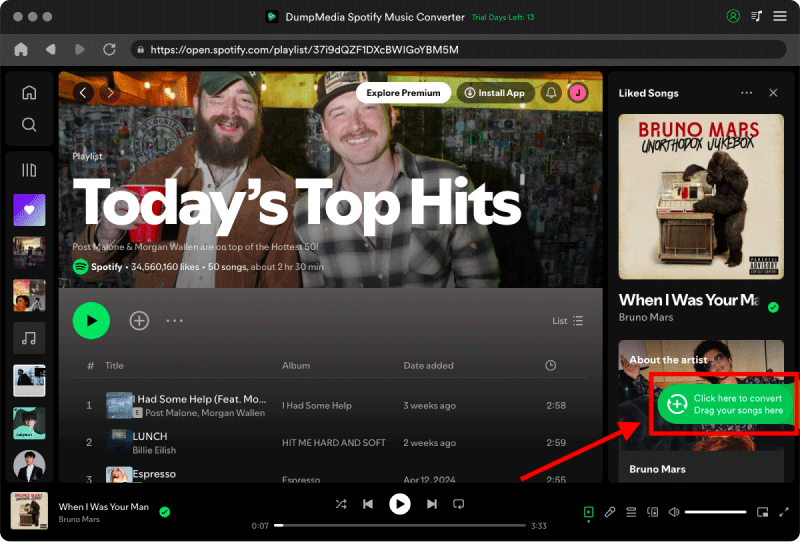
3 Adım. Ayarlar panelinde, şunu seçin: MP3 çıktı formatı olarak etkinleştirmek için MP3 Seçtiğiniz parçaların indirilmesi.

4. Adım. Son adım, dönüştürme işlemini başlatmak için "Dönüştür" düğmesine basmaktır.

5 Adım. Almak nasıl Spotify Müziği Serato'ya mı aktarmak istiyorsunuz? Serato'yu açın ve ekranın üst orta kısmına yakın "Dosyalar" düğmesine tıklayın.
Adım 6. Bilgisayarınızda müziğinizin saklandığı klasöre gidin. Dosyaları veya tüm klasörü seçin ve "Tüm..." simgesinin (soldaki mor simge) üzerine sürükleyin.
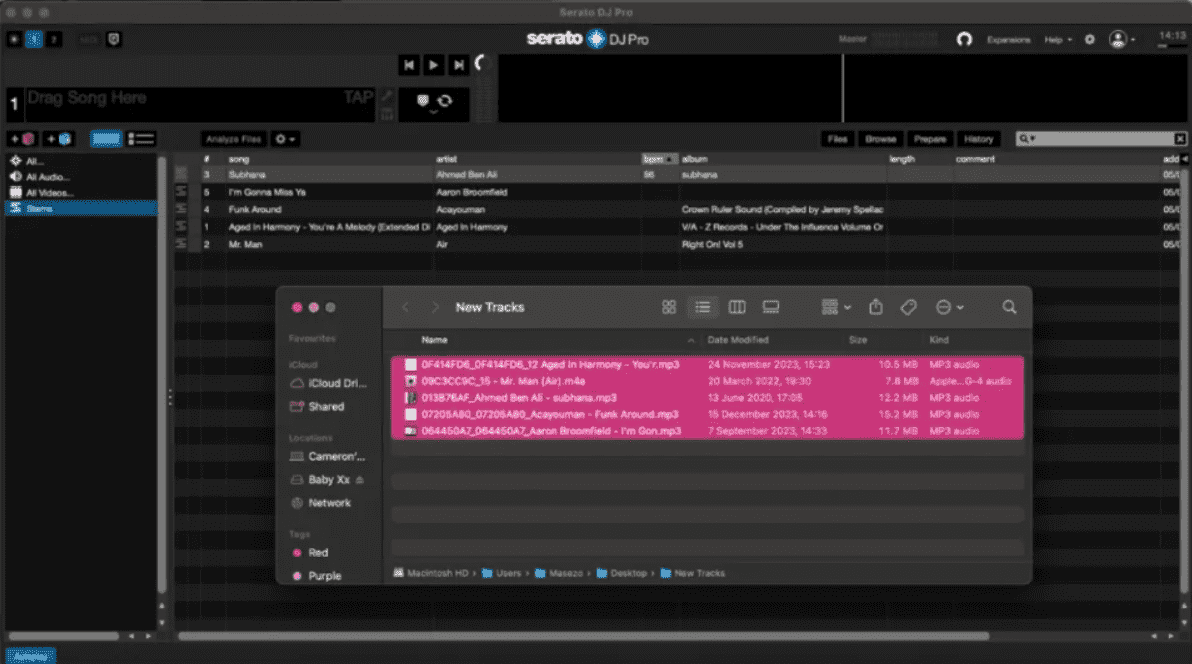
7. Adım. Eklendikten sonra, Serato'nun BPM ve Tonu hesaplayabilmesi için "Dosyaları Analiz Et" düğmesine tıklayın.
Şimdi senin Spotify Müzik mikslemeye hazır!
Bölüm 3: Sıkça Sorulan Sorular: Spotify ve Serato
1. Serato oynatabilir mi? Spotify direkt olarak?
2025 yılının sonlarından itibaren Serato, doğrudan entegrasyonu resmi olarak ekledi. Spotify PremiumBu, (3.3.5 ve sonrası sürümler) büyük bir güncelleme olup önemli değişiklikler getirmiştir. Spotify 5 yıllık bir aradan sonra DJ dünyasına geri döndüm.
Ancak, resmi "doğrudan" yöntemi kullanmanın, farkında olmanız gereken birkaç önemli sınırlaması vardır:
- Çevrimdışı Mod Yok: Stabil bir internet bağlantınız olmalıdır. Çevrimdışı kullanım için parçaları "önbelleğe alamazsınız" veya indiremezsiniz.
- Kök ses yok: Serato'nun gerçek zamanlı kök ses ayırma özelliğini kullanamazsınız. Spotify izler.
- Kayıt Yok: Lisans kısıtlamaları nedeniyle Serato, akış halindeki bir parça çalarken "Kayıt" işlevini devre dışı bırakır.
- Yavaş Yükleme: Parçaların oynatılmaya hazır hale gelmesi birkaç saniye sürebilir.
2. Serato için en iyi format hangisidir?
MP3 ve WAV en yaygın kullanılan formatlardır.
3. Dönüştürmek yasal mıdır? Spotify müzik?
Dönüştürülen dosyalar yalnızca kişisel kullanım içindir.
Bölüm 4: Hepsini Özetlemek İçin
Rağmen Spotify Artık Serato ile doğrudan çalışmasa da, yine de pratik bir çözümünüz var. Bunu hızlı ve güvenilir bir şekilde yapmak istiyorsanız, DumpMedia Spotify Music Converter En iyi seçiminiz bu. Dönüştürerek Spotify Şarkıları yerel dosyalara kaydederek çalma listelerinizi koruyabilir, Serato'da özgürce miks yapabilir ve platform sınırlamalarından kaçınabilirsiniz.