


Müzik Nasıl Açılır MP3 gelen oyuncu Spotify 2026 yılında
Nasıl müzik eklenir? MP3 oyuncu Spotify Bu, en sık sorulan sorulardan biri olmaya devam ediyor. Spotify kullanıcılar, esas olarak çünkü Spotify hiçbir yere doğrudan indirmeye izin vermez. MP3 cihaz nedeniyle DRMİndirilen dosyayı aktarmaya çalışırsanız... Spotify pistler, çoğu MP3 oyuncular onları tanıyamayacaklar.
Bu sınırlamanın üstesinden gelmek için dönüştürme yapabilen bir araca ihtiyacınız var. Spotify müziği standart bir ses formatına dönüştürmek, örneğin MP3. DumpMedia Spotify Music Converter Bu görev için en güvenilir çözümlerden biridir. Amacınız taşımak ise Spotify Kütüphaneyi çevrimdışı dinleme için taşınabilir bir cihaza aktarmak istiyorsanız, bu dönüştürücü en hızlı ve en basit yöntemi sunar.
İçindekiler Kılavuzu Bölüm 1. Neden Koyamazsınız? Spotify Şarkılar açık MP3 Oyuncu?Bölüm 2. Nasıl Yerleştirilir Spotify Müzik açık MP3 Oyuncu?Bölüm 3. SSSBölüm 4. Hepsini Özetlemek İçin
Bölüm 1. Neden Koyamazsınız? Spotify Şarkılar açık MP3 Oyuncu?
Spotify Kullanıcıların şarkıları doğrudan bir yere aktarmasına izin vermez. MP3 oyuncu çünkü hepsi Spotify Parçalar Dijital Hak Yönetimi (DRM) ile korunmaktadır. Bu DRM şifrelemesi, kullanıcıların parçaları kopyalamasını, dışa aktarmasını veya dönüştürmesini engeller. Spotify'ın ses dosyalarını standart formatlara dönüştürüyor, örneğin MP3Şarkıları bir yöntem kullanarak indirseniz bile... Spotify Premium Hesapta, bu dosyalar yalnızca hesabın erişebileceği kilitli bir OGG formatında kalır. Spotify Uygulama okuyabilir. Sonuç olarak, geleneksel MP3 Oynatıcılar, özellikle akıllı olmayan cihazlar, bu şifrelenmiş dosyaları tanıyamaz veya oynatamaz.
Özetle, DRM sistemi şunu sağlar: Spotify müzik yalnızca şu alan içinde çalınabilir Spotify'ın yetkili ekosistemi. Bu yüzden sadece sürüklemek Spotify şarkılar MP3 Oynatıcı asla çalışmayacak.
Nasıl müzik eklenir? MP3 oyuncu SpotifyBu sınırlamayı aşmak için, şu özelliklere sahip bir araca ihtiyacınız var: kaldırma Spotify'nin DRM koruması ve parçaları evrensel formatlara dönüştürmek. DumpMedia Spotify Music Converter Tam olarak bu amaca hizmet eder. Dönüştürür. Spotify şarkıları, albümleri ve çalma listelerini DRM'siz hale getirin. MP3M4A, WAV veya FLAC dosyalarıyla uyumlu hale getirerek, herhangi bir cihazla kullanılabilmelerini sağlar. MP3 Oynatıcı ve müziğinizin gerçek çevrimdışı sahipliğine olanak tanır.
Bölüm 2. Nasıl Yerleştirilir Spotify Müzik açık MP3 Oyuncu?
Nasıl müzik eklenir? MP3 oyuncu Spotify? Koymadan önce Spotify müzik senin MP3 oyuncu, şunlara sahip olduğunuzdan emin olun DumpMedia Spotify Music Converter yüklü.
DumpMedia Spotify Music Converter arasında popülerlik kazanıyor Spotify harika müzik indirme hizmeti için dinleyicilere. kullanıcısı olmanızın bir önemi yok Spotify Ücretsiz veya Spotify Premium üye olarak indirebilir ve dönüştürmek Spotify şarkılar, çalma listeleri ve albümler MP3, AAC, ALAC, FLAC veya diğer formatları kullanarak DumpMediaDaha da iyisi, aboneliğiniz sona erse bile indirmeler her zaman kullanılabilir olacaktır.
Adım Adım Kılavuz: Nasıl Takılır Spotify Müzik açık MP3 Oyuncu
1 Adım. Yazılımı bilgisayarınızda açın. Her ikisiyle de çalışır. WinWindows ve Mac işletim sistemleriyle uyumludur. Kullanıcı dostu arayüzü sayesinde yeni başlayanlar için kullanımı kolaydır.
2 Adım. MyCAD'de yazılım Güncelleme ye git Spotify Dönüştürmek istediğiniz şarkıyı, albümü veya çalma listesini seçin. Yazılım parçaları otomatik olarak algılayacaktır.

3 Adım. Lütfen cihazınızla uyumlu bir format seçin. MP3 oyuncu. Yaygın tercihler şunlardır: MP3M4A, WAV veya FLAC formatlarını kullanabilirsiniz. Ayrıca çıkış kalitesini ve dönüştürme hızını da ayarlayabilirsiniz.

4 Adım. Dönüştürme işlemini başlatmak için "Dönüştür" düğmesini tıklayın. DumpMedia Spotify Music Converter DRM korumasını kaldıracak ve seçili tüm parçaları seçtiğiniz formata dönüştürecektir. Dönüştürme işlemi yüksek ses kalitesini korur.

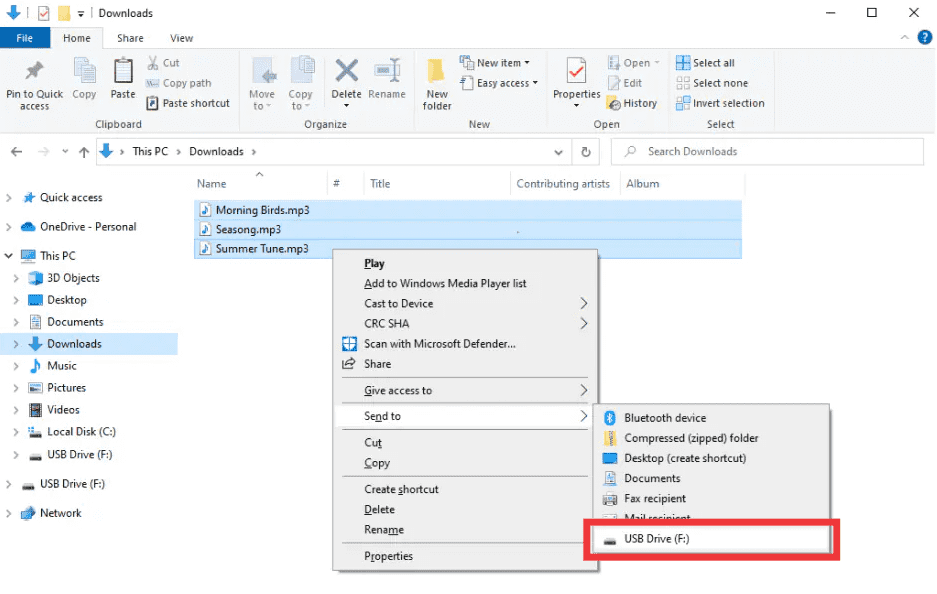
5 Adım. Nasıl müzik eklenir? MP3 oyuncu SpotifyDönüştürme işleminden sonra, çıktı klasörünü bulun. Bağlantınızı kurun. MP3 Oynatıcıyı USB aracılığıyla bilgisayarınıza bağlayın ve dönüştürülen dosyaları kopyalayın. Spotify Müzik artık herhangi bir cihazda çevrimdışı olarak çalınmaya hazır. MP3 cihaz.
Bölüm 3. SSS
1. Koyabilir miyim? Spotify şarkıları doğrudan MP3 oyuncular?
Hayır. SpotifyBu parçaların DRM koruması altında olması nedeniyle doğrudan dışa aktarılamazlar. Bunun için bir dönüştürücüye ihtiyacınız var. DumpMedia Spotify Music Converter onları uyumlu hale getirmek için.
2. Nasıl dönüştürürüm? Spotify çalma listeleri MP3?
Kullanım DumpMedia Spotify Music Converter: çalma listesi bağlantılarını kopyala, seç MP3 Çıktı olarak kaydedin ve dönüştürün. Ardından dosyaları aktarın. MP3 oyuncu.
3. Dönüştürmek yasal mıdır? Spotify müzik?
dönüştürme Spotify Kişisel çevrimdışı kullanım için müzik genellikle serbesttir. Dönüştürülmüş dosyaları başkalarına dağıtmaktan kaçının, bu telif hakkı yasalarını ihlal edebilir.
4. Hangi formatları kullanabilirim? MP3 oyuncular?
MP3 en yaygın olanıdır. DumpMedia Spotify Music Converter Ayrıca M4A, WAV ve FLAC formatlarını da destekler ve bunların tümü çoğu cihazla uyumludur.
5. Transfer edebilir miyim? Spotify Müziği birden fazla cihaza mı aktarıyorsunuz?
Evet. Dönüştürüldükten sonra. DumpMedia, Sizin Spotify Şarkılar DRM koruması içermez ve herhangi bir cihazda çalınabilir. MP3 oynatıcı, telefon veya tablet.
Bölüm 4. Hepsini Özetlemek İçin
Eğer bir cihaza nasıl müzik ekleyeceğinizi merak ettiyseniz... MP3 oyuncu SpotifyÇözüm açık: Spotify'ın DRM'si doğrudan aktarımları engelliyor, ancak DumpMedia Spotify Music Converter Bu kısıtlamaları kaldırır. En sevdiğiniz şarkıları, albümleri veya çalma listelerini dönüştürür. MP3 veya diğer evrensel formatlar, yüksek kaliteyi koruyarak ve herhangi bir cihazda çevrimdışı oynatmaya olanak tanıyarak.
denemek DumpMedia Spotify Music Converter bugün ve tadını çıkar Spotify Her yerde, her zaman müzik, artık sınırlama yok, DRM sorunları yok.