


İndirebilir misin Spotify iPod Nano'da mı? Gerçek Çözüm Açıklaması
Birçok kullanıcı hala kullanmayı seviyor. iPod Nano Hafif tasarımı, çevrimdışı oynatma özelliği ve uzun pil ömrü nedeniyle tercih ediliyor. Ancak sıkça sorulan bir soru var: İndirebilir misiniz? Spotify iPod Nano'da mı?
Kısa cevap hayır. Doğrudan kurulum yapamazsınız. Spotify iPod Nano'da. Ama yine de oynatabilirsiniz. Spotify iPod Nano'da dolaylı olarak dönüştürme yoluyla Spotify şarkılar içine MP3 Dosyaları manuel olarak aktarmak ve dosyaları kalıcı olarak oynatmak. Bu kılavuzda, dosyaları kalıcı olarak oynatmanın gerçek yöntemini açıklayacağız. Spotify Eski iPod'larda çevrimdışı müzik dinleme.
İçindekiler KılavuzuBölüm 1. İndirebilir misiniz? Spotify iPod Nano'da uygulama mı var?Bölüm 2. En İyi Yerleştirme Yöntemi Spotify iPod Nano'da Müzik Bölüm 3. Nasıl Aktarılır Spotify MP3 Dosyalar iPod Nano'ya mı?Bölüm 4. SSSBölüm 5. Sonuç
Bölüm 1. İndirebilir misiniz? Spotify iPod Nano'da uygulama mı var?
Bunu çalıştırmak kesinlikle imkansız. Spotify Uygulamayı doğrudan bir iPod Nano'da çalıştırın. iPod Nano klasik bir donanım parçası olsa da, teknik mimarisi modern yayın hizmetleriyle temelde uyumlu değildir.
"İndir" neden önemli? Spotify iPod Nano'da mümkün değil mi?
Donanım Sınırlamaları: iPod Nano (son 7. nesil modeli bile) üçüncü taraf uygulamaların yüklenmesini desteklemeyen kapalı, tescilli bir işletim sistemi üzerinde çalışır. Wi-Fi modülü bulunmamaktadır (7. nesil yalnızca ses iletimi için Bluetooth'u destekler) ve bu nedenle içerik akışı için internete bağlanamaz.
DRM Koruması: SpotifyMüziği, Dijital Hak Yönetimi (DRM) ile korunan şifrelenmiş dosyalardan oluşmaktadır. İndirseniz bile... Spotify"Çevrimdışı dosyalar" olarak adlandırılan bu dosyalar, bir bilgisayar aracılığıyla yalnızca uygulama içinde oynatılabilir. Spotify Bu uygulama istemciye aittir ve doğrudan iPod'a aktarılamaz.
Resmi destek sona erdi: Apple, iPod Nano'nun üretimini 2017'de durdurmuştu. Spotify İnternet bağlantısı olmayan cihazlarla uyumlu bir hizmet sürümü hiçbir zaman geliştirmedi.
Bölüm 2. En İyi Yerleştirme Yöntemi Spotify iPod Nano'da Müzik
Oynamanın bir yolu var mı? Spotify iPod nano'da mı? En etkili çözüm dönüştürmektir. Spotify içine müzik MP3 Önce biçimlendirme. Ama Spotify Şarkılar DRM ile korunmaktadır, bu da indirilen parçaların yalnızca DRM ortamında çalışacağı anlamına gelir. Spotifyİşte tam da bu yüzden kullanıcılar nasıl indirileceğini arıyorlar. Spotify iPod Nano'da genellikle şunlara ihtiyaç duyulur: Spotify Müzik dönüştürücü. Başarılı bir şekilde oynatmak için. Spotify iPod Nano'daki şarkıları kullanabilirsiniz. DumpMedia Spotify Music Converter.
DumpMedia Spotify Music Converter dönüştürme sürecini basitleştirir DRM korumasını kaldırma* korurken 100% Orijinal ses kalitesi. İster tek bir parçayı, ister bir podcast'i, isterse de devasa bir çalma listesini yedeklemek isteyin, DumpMedia Müziğinizin birkaç tıklamayla çoğu medya cihazında kullanıma hazır olmasını sağlar.
🏅Daha da Şaşırtıcı Özellikler
- ⭐dönüştürmek Spotify müzik MP3, WAV, FLAC
- ⭐Entegrasyon ile Spotify web oynatıcısı
- ⭐Her ikisi için de çalışın Spotify Premium ve Spotify Ücretsiz kullanıcılar
- ⭐35 kata kadar hızda toplu dönüştürme sağlayın
- ⭐Sanatçı, kapak, sanat eseri vb. ID3 etiketlerini saklayın.
- ⭐Orijinal ses kalitesini koruyun
- ⭐100% temiz. Kullanırken risk yok
İndirme Adımları Spotify şarkılar
1 Adım. Indirin ve yükleyin DumpMedia Spotify Music Converter Mac'inize/Windows. Başlatın ve arayüzü göreceksiniz. Kullanın Spotify Giriş yapmak için Premium/Ücretsiz hesap.
Adım 2. Şimdi indirmek istediğiniz şarkıya gidebilirsiniz. Şarkıyı doğrudan dönüştürme listesine sürükleyebilirsiniz.
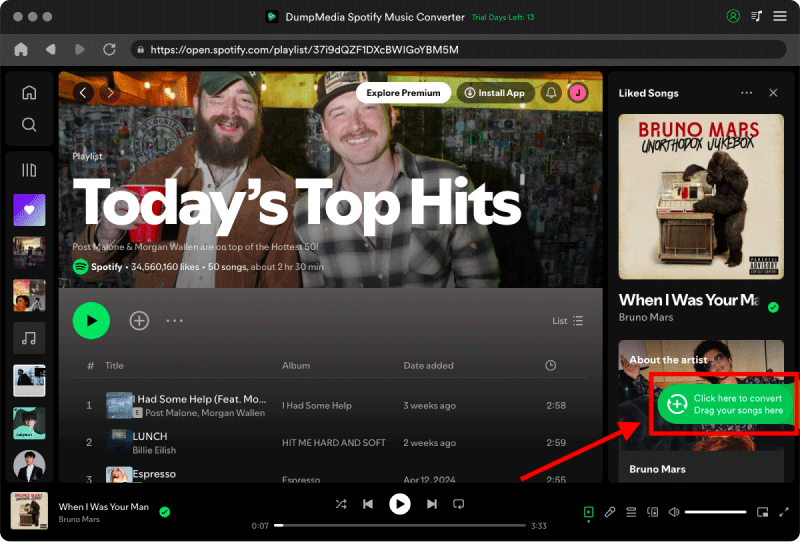
3 Adım. Dönüştürme arayüzünde çıktı formatını şu şekilde seçebilirsiniz: MP3Ayrıca, Tercihler bölümünden Örnekleme Hızı veya Bit Hızı'nı ayarlayın. Dosyaların kaydedileceği klasörü de seçin.

4 Adım. Son adım, zaten oldukça açık olması gereken "Dönüştür" düğmesine tıklamaktır. DumpMedia Spotify Music Converter basit bir arayüze sahiptir.
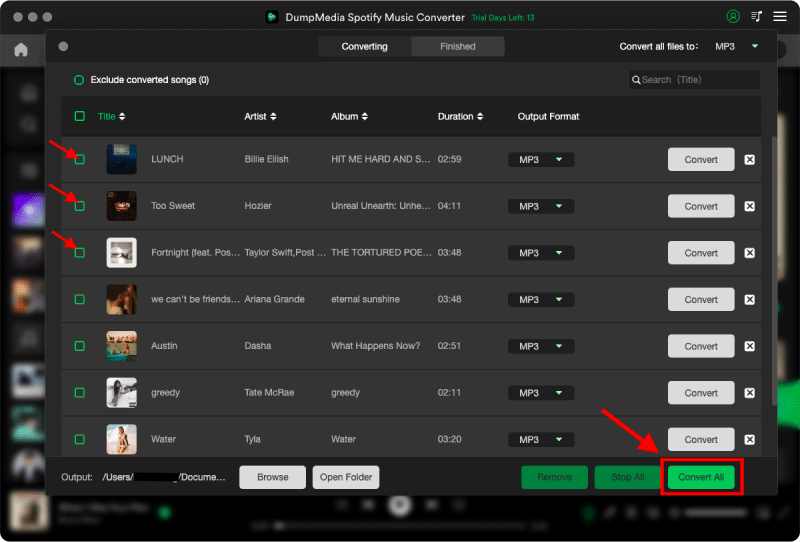
Artık nihayet indirebilirsiniz. Spotify iPod Nano'da şarkıları kısıtlama olmadan çevrimdışı olarak dinleyin.
Bölüm 3. Nasıl Aktarılır Spotify MP3 Dosyalar iPod Nano'ya mı?
İndirilenler nasıl aktarılır? Spotify iPod Nano'ya dosya nasıl aktarılır? iPod Nano'da Wi-Fi bulunmadığı için, işletim sisteminize bağlı olarak kablolu bağlantı ve uygun yazılım kullanmanız gerekir.
Finder'ı kullanma (macOS Catalina ve sonrası)
- iPod Nano'nuzu bir USB kablosu kullanarak Mac'inize bağlayın.
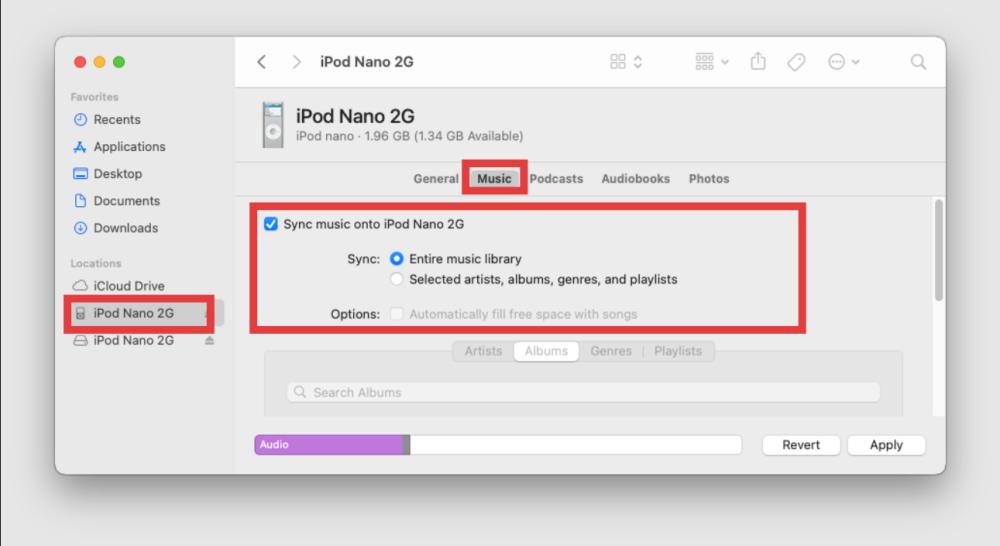
- Finder penceresini açın. Kenar çubuğundaki "Konumlar" bölümünde iPod'unuzun adını göreceksiniz. Üzerine tıklayın.
- Ana düğme çubuğundaki Müzik sekmesine tıklayın.
- "Müziği [iPod'unuzun Adı] cihazına senkronize et" seçeneğini işaretleyin.
- "Seçilen sanatçılar, albümler, türler ve çalma listeleri"ni seçin.
- İthal ürününüzü bulun Spotify Klasörleri veya oynatma listelerini kontrol edin.
- Aktarımı başlatmak için sağ alt köşedeki Uygula düğmesine tıklayın.
Sürükle ve Bırak Müzik
Geleneksel "Senkronizasyon" işlemi yerine "Sürükle ve Bırak" yöntemini tercih ederseniz, adımlar Mac ve diğer cihazlar arasında önemli ölçüde farklılık gösterir. WinHer sistemin iPod'un dahili depolama alanını nasıl yönettiğine bağlı olarak bu durum değişir. İşte iPod'unuzun dahili depolama alanını manuel olarak nasıl yönetebileceğiniz: Spotify MP3s.
Windows:
- iPod Nano'nuzu bilgisayarınıza bağlayın.
- Cihaz simgesine tıklayın > Özet > "Müzik ve videoları manuel olarak yönet" seçeneğini işaretleyin. Uygula'ya tıklayın.
- iTunes'u açın ve iPod simgesinin görünür olduğundan emin olun.
- Açın WinDönüştürülmüş dosyalarınızı içeren dows klasörü. Spotify MP3s.
- İstediğiniz şarkıları seçin.
- Bunları doğrudan iTunes kenar çubuğundaki "Cihazlar" bölümüne (özellikle iPod'unuzun adına) sürükleyip bırakın.
- Dosyalar kopyalanırken üst kısımda bir ilerleme çubuğu göreceksiniz.
Mac:
- iPod Nano'nuzu bilgisayarınıza bağlayın.
- Kenar çubuğunda iPod'unuza tıklayın > Genel sekmesinde kalın > "Müzik, film ve TV programlarını manuel olarak yönet" seçeneğini işaretleyin. Uygula'ya tıklayın.
- İki Finder penceresi açın.
- In Win1. Adımda, Konumlar menüsünden iPod Nano'nuzu bulun. Müzik sekmesine tıklayın.
- In Win2. adımda, dosyanızın bulunduğu klasörü açın. Spotify MP3s saklanır.
- Dosyalarınızı seçin ve doğrudan iPod Nano penceresine sürükleyin.
- Bağlantıyı kesmeden önce, kenar çubuğunda iPod adının yanında bulunan "Senkronizasyon" simgesinin dönmesinin durmasını bekleyin.
Bölüm 4. SSS
Doğrudan indirebilir miyim? Spotify iPod Nano'da mı?
Hayır. Spotify iPod Nano cihazlarını resmi olarak desteklememektedir.
iPod Nano müzik çalabilir mi? Spotify müzik?
Evet, ancak yalnızca dönüştürme işleminden sonra. Spotify şarkılar içine MP3 dosyaları.
İndirmenin en iyi yolu nedir? Spotify iPod Nano'da mı?
En iyi yöntem şudur: DumpMedia Spotify Music ConverterDönüştürme işleminden sonra şarkılar yerel hale gelir. MP3 Dosyalar ve oynatma kalıcı hale gelir.
Saklayabilir miyim? Spotify Din değiştirdikten sonra şarkılar sonsuza dek mi kalacak?
Evet. Bir kez dönüştürüldüğünde. MP3 Dosyalar ve şarkılar kalıcı olarak saklanabilir ve serbestçe aktarılabilir.
Bölüm 5. Sonuç
Rağmen Spotify Resmi olarak iPod Nano'yu desteklemese de, yine de güvenilir bir indirme yöntemi mevcut. Spotify iPod Nano'da kullanarak MP3 dönüştürme. Dönüştürerek Spotify Müzikleri uyumlu ses dosyalarına dönüştüren bu özellik sayesinde kullanıcılar çevrimdışı oynatmanın keyfini çıkarabilir, şarkıları özgürce aktarabilir, yayın sınırlamalarını aşabilir ve müziklerini kalıcı olarak saklayabilirler. Klasik iPod'ları seven kullanıcılar için bu, en iyi çözüm olmaya devam ediyor.
*DumpMedia şifre çözme ve indirme yoluyla çalışır Spotify Şarkıları DRM'siz dosyalara dönüştürerek, kütüphanenizin temiz ve kısıtlamasız bir kopyasını herhangi bir cihazda elde etmenizi sağlar. İşlevselliği, yerel ses dosyalarının DRM'sinin kaldırılmasını içermez.