


Nasıl Dönüştürülür Spotify 2026'de FLAC'a Müzik
Birçok müziksever şunu istiyor: dönüştürmek Spotify FLAC'a müzik Daha iyi ses kalitesi, kalıcı çevrimdışı oynatma ve HiFi dinleme deneyimleri için. Spotify yüksek kaliteli yayın akışı sunar, Spotify Şarkılar, kullanıcıların serbestçe yönetebileceği veya yerel olarak saklayabileceği standart FLAC dosyaları olarak sunulmaz. Bu kılavuzda, FLAC'ın ne olduğunu, ses tutkunlarının neden FLAC sesini tercih ettiğini açıklayacağız. SpotifyResmi ses sınırlamaları ve dönüştürmenin en iyi yolu Spotify Çevrimdışı dinleme için şarkıları FLAC formatına dönüştürün.
İçindekiler Kılavuzu Bölüm 1. FLAC Nedir ve Kullanıcılar Neden Onu Tercih Eder?Bölüm 2. Can Spotify Müziği Resmi Olarak FLAC'e Dönüştürmek Mümkün mü?Bölüm 3. Dönüştürmenin En İyi Yolu Spotify Şarkıdan FLAC formatınaBölüm 4. SSSBölüm 5. Sonuç
Bölüm 1. FLAC Nedir ve Kullanıcılar Neden Onu Tercih Eder?
Dönüştürmeyi öğrenmeden önce Spotify Müzikten FLAC formatına geçişte, FLAC'ın ses tutkunları arasında neden bu kadar popüler olduğunu anlamak önemlidir.
FLAC Nedir?
FLAC, Free Lossless Audio Codec'in kısaltmasıdır. Sıkıştırılmış ses formatlarının aksine, MP3FLAC, orijinal ses bilgilerini kalite kaybı olmadan korur. Bu da FLAC'ı HiFi dinleme, odyofil sistemler, DAC çalma veya stüdyo kalitesinde ses için en popüler formatlardan biri haline getirir.
FLAC vs MP3
Kullanıcıların dönüşüm yapmasının en önemli nedenlerinden biri Spotify Müzikten FLAC formatına dönüştürme, kayıpsız ve kayıplı ses dosyaları arasındaki farktır.
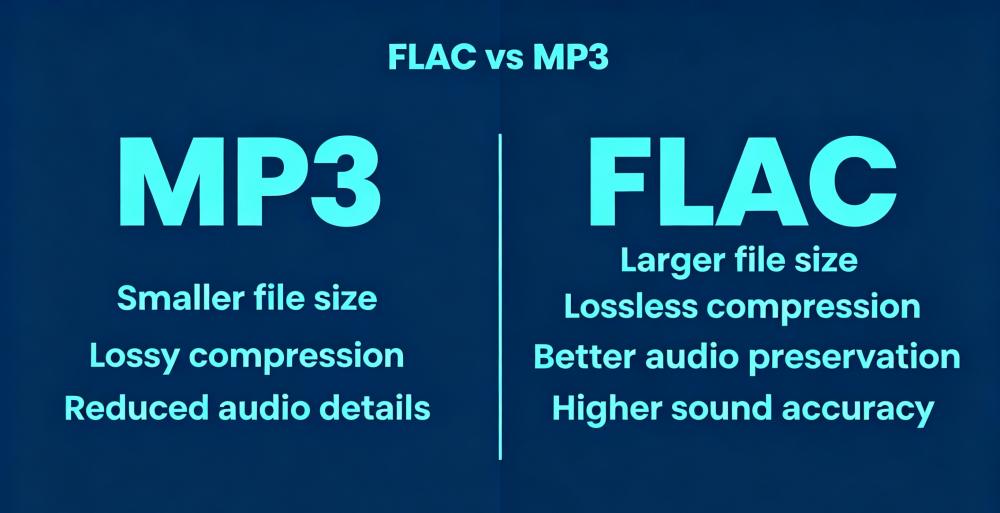
Üst düzey kulaklık, DAC veya stüdyo monitörlerine sahip kullanıcılar için FLAC, genellikle fark edilir derecede daha zengin bir dinleme deneyimi sunar.
Bölüm 2. Can Spotify Müziği Resmi Olarak FLAC'e Dönüştürmek Mümkün mü?
Hayır. Spotify Kullanıcıların dönüştürme yapmasına resmi olarak izin vermiyor. Spotify FLAC'a müzik.
Spotify Akış Ses Formatı
Spotify Genellikle OGG Vorbis sıkıştırması kullanarak müzik akışı sağlar. Hatta Spotify Premium Ses, gerçek FLAC kayıpsız dosyaları yerine sıkıştırılmış akışlı ses olarak kalır.
Spotify Çevrimdışı İndirmeler FLAC Değildir
Premium kullanıcılar şarkıları çevrimdışı dinlemek için indirebilseler de, indirilen dosyalar şifreli kalır ve şarkılar yalnızca Premium kullanıcılar için geçerlidir. SpotifyBu dosyaları başka bir cihaza aktarıp FLAC formatına dönüştüremezsiniz.
Bu nedenle birçok kullanıcı dönüştürme yolları arıyor. Spotify Daha esnek oynatma için müziği FLAC formatına dönüştürün.
Bölüm 3. Dönüştürmenin En İyi Yolu Spotify Şarkıdan FLAC formatına
FLAC dosyaları, uzun süreli depolama için daha fazla ses bilgisi korur. Ayrıca, birçok kullanıcı abonelikleri değişse bile müziklerine erişmeye devam etmek ister. Bu nedenler, dönüştürme için tasarlanmış araçların artan popülaritesini açıklamaktadır. Spotify Müzik dosyalarını FLAC formatına dönüştürmek için en popüler araçlardan biri. Spotify müziği FLAC formatına dönüştürmek DumpMedia Spotify Music Converter.
🏆Temel Özellikleri DumpMedia Spotify Music Converter
- İndir Spotify müzik MP3WAV, FLAC ve AAC
- Kaldır Spotify DRM koruması*
- Orijinal ses kalitesini koruyun
- Çalma listelerini ve albümleri toplu olarak indirin
- Hızlı dönüşüm hızı
- Şarkı meta verilerini ve ID3 etiketlerini koruyun.
- Herhangi bir cihazda çevrimdışı oynatmayı destekler.
Dönüştürme işlemini nasıl yapacağını arayan kullanıcılar için Spotify müzikleri verimli bir şekilde FLAC formatına dönüştürün. DumpMedia Yerel müzik çalma için kullanışlı bir çözüm sunar. Spotify Uygulama cihazınızda çalışmıyor, şunları yapabilirsiniz: oyun Spotify şarkılar çevrimdışı Hemen başka bir müzik çalara geçin.
dönüştürmek Spotify Şarkıyı FLAC'e Adım Adım Dönüştürme
1 Adım. Indirin ve yükleyin DumpMedia Spotify Music Converter Mac/PC'nizde çalıştırın. Başlattığınızda arayüzü göreceksiniz. Kullanın Spotify Giriş yapmak için Premium/Ücretsiz hesap.
2 Adım. Dönüştürmek istediğiniz çalma listesini, albümü veya belirli şarkıyı bulun. Tek bir şarkıyı ekranın sağ tarafındaki "+" simgesinin üzerine sürükleyebilirsiniz. Alternatif olarak, tüm çalma listesini/albümü açın ve tüm listeyi dönüştürücüye yüklemek için "Dönüştürmeye Ekle" simgesine tıklayın.
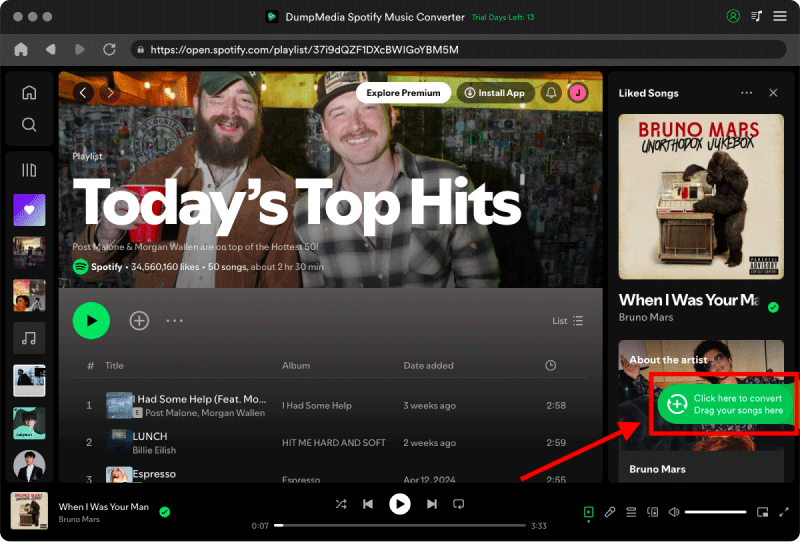
3 Adım. FLAC formatını seçin. Ayrıca, bit hızını veya örnekleme hızını da değiştirebilirsiniz.

4 Adım. Ayarlar tamamlandıktan sonra, kullanıcılar "Dönüştür" simgesine tıklayarak dönüştürme işlemini gerçekleştirebilirler. Ardından DumpMedia dönüştürecek Spotify Süper hızlı özelliği sayesinde müziklerinizi saniyeler içinde FLAC formatına dönüştürün.

Dönüştürme işleminden sonra, sizin Spotify HiFi sistemlerinde ve yerel medya oynatıcılarda müzik daha esnek bir şekilde çalınabilir.
Bölüm 4. SSS
Yapabilmek Spotify Müziği FLAC formatına dönüştürmek mi?
Hayır. Spotify FLAC dönüştürme hizmetini resmi olarak sağlamamaktadır.
Is Spotify kayıpsız ses mi?
Hayır. Spotify Şu anda gerçek FLAC kayıpsız ses formatı yerine sıkıştırılmış akış formatları kullanıyor.
Mı Spotify FLAC kullanıyor musunuz?
Hayır. Spotify Genellikle OGG Vorbis sıkıştırma yöntemini kullanarak müzik akışı sağlar.
FLAC vs MP3Hangisi daha iyi geliyor kulağa?
FLAC, diğer formatlara göre daha fazla ses bilgisini korur ve genellikle daha yüksek ses kalitesi sunar. MP3.
Saklayabilir miyim? Spotify Şarkıları kalıcı olarak mı?
Birçok kullanıcı kullanıyor DumpMedia Spotify Music Converter kaydetmek için Spotify Çevrimdışı oynatma için müziği yerel olarak kaydedin.
Is DumpMedia Spotify Music Converter kasa?
Evet. Bunun için tasarlanmıştır Spotify Müzik dönüştürme ve yerel oynatma yönetimi.
Not: Yayın platformlarının kendi kuralları ve izleme sistemleri vardır. Üçüncü taraf bir araç olarak, DumpMedia Spotify Music Converter Ayrıca, bu kısıtlamalara da tabidir ve bu durum bazı durumlarda kullanımını etkileyebilir. Spotify Hizmet Şartlarını ihlal eden bir faaliyet tespit etmesi durumunda harekete geçebilir; bu tamamen kendi takdirindedir. Spotifytakdir yetkisi.
Bölüm 5. Sonuç
Birçok kullanıcı dönüştürmek istiyor. Spotify FLAC formatına dönüştürmeyi tercih ediyorum çünkü FLAC daha iyi ses koruması, HiFi çalma kalitesi ve esnek çevrimdışı dinleme imkanı sunuyor. Spotify Yayın akışı kullanışlı, resmi Spotify İndirilen dosyalar gerçek FLAC dosyaları değildir ve hala uygulama kısıtlamalarına bağlıdır.
Yerel kayıpsız müzik çalma ve uzun vadeli müzik esnekliği isteyen kullanıcılar için, DumpMedia Spotify Music Converter etkili bir dönüştürme çözümü sunar Spotify Müziği FLAC formatına dönüştürerek birden fazla cihazda çevrimdışı dinleme imkanı sunar.
*DumpMedia şifre çözme ve indirme yoluyla çalışır Spotify Şarkıları DRM'siz dosyalara dönüştürerek, kütüphanenizin temiz ve kısıtlamasız bir kopyasını herhangi bir cihazda elde etmenizi sağlar. İşlevselliği, yerel ses dosyalarının DRM'sinin kaldırılmasını içermez.

%30 İndirim >>>