


CD'den Nasıl Yazılır? Spotifyİndir ve Yazdır Spotify Çalma listeleri
Denemek istiyorsan CD'yi yakmak için SpotifyÇok geçmeden şunu keşfedeceksiniz ki Spotify Doğrudan CD yazmaya izin vermiyor, hatta bir cihazla bile. Premium abonelik. Spotifyİndirilen şarkılar şifrelenmiştir ve yalnızca uygulama içinde oynatılabilir. Spotify Bu DRM koruması nedeniyle kullanıcılar şarkıları dışa aktaramazlar. MP3 Dosyaları yazdırın veya CD yazma yazılımına aktarın.
Çözüm öncelikle dönüştürmektir. Spotify parçaları güvenilir bir yöntem kullanarak CD uyumlu bir ses formatına dönüştürün. Spotify Öncelikle bir dönüştürücü kullanın, ardından bir disk yazma uygulaması kullanarak CD'nizi oluşturun. Bu kılavuz, önerilen formatlar, ayrıntılı yazma adımları ve en iyi ses sonuçları için önemli ipuçları da dahil olmak üzere tüm süreci size adım adım anlatacaktır.
İçindekiler Kılavuzu CD'ye şu dosyadan CD yakabilir misiniz? Spotify Direkt olarak?1 Adımı: Dönüştür Spotify Yanmadan Önceki Şarkılar (Kullanarak) DumpMedia)Adım 2: Yakma Spotify CD'ye Şarkılar (Detaylı Kılavuz)SSSSonuç
CD'ye şu dosyadan CD yakabilir misiniz? Spotify Direkt olarak?
Çünkü SpotifySes dosyaları şifrelenmiş Ogg Vorbis formatını kullanır ve DRM (Dijital Hak Yönetimi) ile korunmaktadır; bu nedenle ne ücretsiz ne de premium kullanıcılar şarkıları doğrudan CD'ye yazdıramazlar. Spotify Geleneksel yazma yazılımları bu korumalı önbelleğe alınmış verileri tanıyamadığı için bu uygulama kullanılabilir.
CD yakmak için SpotifyÖncelikle indirip dönüştürmeniz gerekiyor. Spotify Üçüncü taraf bir dönüştürme aracı kullanarak çalma listesini standart kayıpsız ses formatlarına dönüştürmek, örneğin: MP3WAV veya FLAC formatlarına dönüştürerek platform kısıtlamalarını ortadan kaldırabilirsiniz. Format dönüştürme işlemi tamamlandıktan sonra, bu yaygın ses dosyalarını içe aktarabilirsiniz. WinWindows Media Player, iTunes veya diğer profesyonel CD yazma yazılımlarını kullanarak, bu dosyaları kalıcı olarak fiziksel bir diske yazdırabilir ve araç müzik sistemlerinde veya geleneksel oynatıcılarda ücretsiz olarak dinleyebilirsiniz.
1 Adımı: Dönüştür Spotify Yanmadan Önceki Şarkılar (Kullanarak) DumpMedia)
CD yakmayı öğrenmenin en önemli adımı Spotify Şarkıları yazdırılabilir bir formata dönüştürüyor. DumpMedia Spotify Music Converter Genellikle kullanılır çünkü destekler. MP3Meta verileri koruyarak WAV, FLAC ve diğer CD uyumlu formatlara dönüştürme.
Key Feature
- DRM'yi şuradan kaldır Spotify şarkılar ve çalma listelerini güvenli bir şekilde
- dönüştürmek Spotify şarkılar MP3M4A, AAC, WAV, vb.
- Çalma listelerini, albümleri veya tüm kütüphanenizi toplu olarak indirin.
- Yüksek ses kalitesini ve ID3 etiketlerini koruyun.
- Abonelik kısıtlamaları olmadan müziğinizin keyfini dilediğiniz cihazda çıkarın.
Nasıl Dönüştürülür Spotify olan şarkılar DumpMedia
1 Adım. Kur ve başlat DumpMedia Spotify Music Converter. Açık Spotify ve CD'ye yazmak istediğiniz şarkıyı seçin.
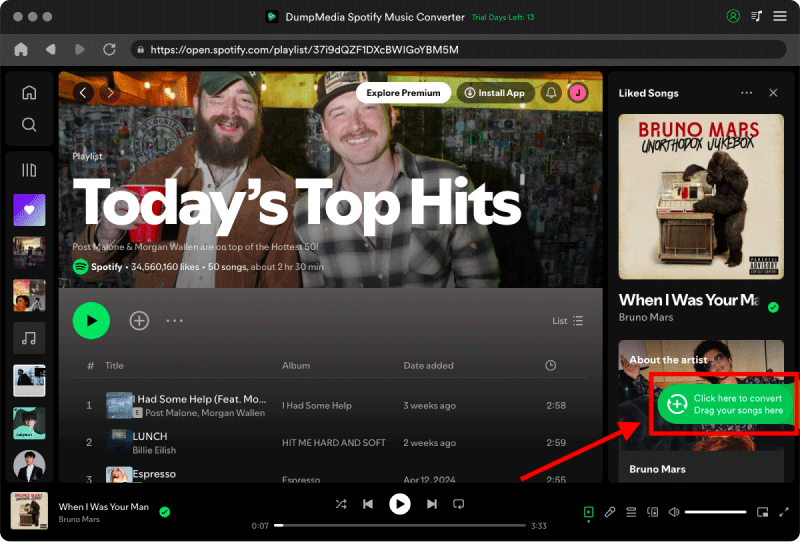
2 Adım. Çıkış formatını seçin: WAV (ses CD'leri için en uygun format)MP3 (için en iyisi MP3 CD)/FLAC (yüksek kaliteli arşiv formatı)

3 Adım. "Dönüştür"e tıklayarak dosyanızı indirin. Spotify şarkıları.

Dönüştürme işlemi tamamlandıktan sonra dosyalarınız CD'ye yazılmaya hazırdır.
Adım 2: Yakma Spotify CD'ye Şarkılar (Detaylı Kılavuz)
Şimdi senin Spotify Parçalar dönüştürüldükten sonra, üç yaygın yakma yönteminden birini seçebilirsiniz:
Yöntem 1: CD'yi şu şekilde yazdırın: Spotify Müzik Uygulamasını Kullanma (macOS)
1 Adım. Apple Music'i açın. Dosya > Yeni > Çalma Listesi'ne gidin. Dönüştürdüğünüz dosyayı sürükleyip bırakın. Spotify Şarkıları çalma listesine ekle.
Adım 2. Boş bir CD-R veya CD-RW takın. Çalma listesine sağ tıklayın ve "Çalma Listesini Diske Yazdır" seçeneğini seçin.
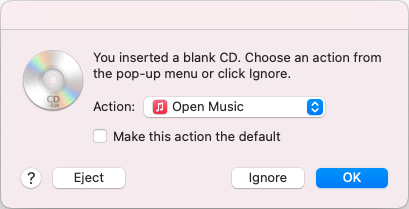
3 Adım. Yazma ayarlarını seçin: Ses CD'si (herhangi bir CD çalar için standart CD)/MP3 CD (sadece için) MP3-uyumlu oynatıcılar)/Tercih Edilen Hızı Seçin: Daha az yazma hatası için 8x
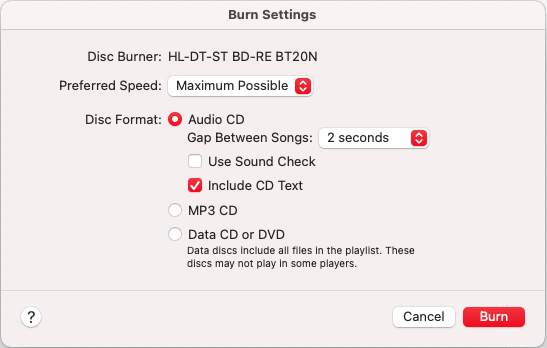
4. Adım. Yakma işlemine tıklayın.
Yöntem 2: CD'yi şu şekilde yazdırın: Spotify kullanma WinDows Medya Oynatıcısı
1 Adım. Açılış WinWindows Media Player'ı açın. "Yazdır" sekmesine tıklayın. Boş bir CD takın.
2 Adım. Dönüştürülmüş olanı sürükleyin. Spotify Dosyaları yakma listesine ekle.
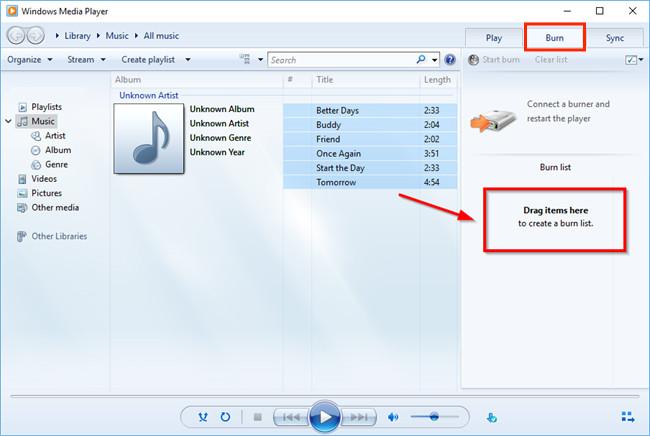
3 Adım. Yazma türünü seçin: Ses CD'si (araç müzik sistemleri ve CD çalarlar için)/Veri CD'si (MP3 (Modern oynatıcılar için CD)
4. Adım. "Yazdırmaya Başla"ya tıklayın.
WinWindows Medya Oynatıcısı şunlar için idealdir: WinDows kullanıcıları için idealdir çünkü entegre bir özelliktir ve ek yazılım gerektirmez.
Yöntem 3: CD'yi şu şekilde yazdırın: Spotify Mac Finder'ı Kullanmak
Finder, iTunes/Müzik uygulamasına ihtiyaç duymadan temel CD yazma işlemlerini destekler.
1 Adım. Dönüştürdüğünüz dosyaları içeren bir klasör oluşturun. Spotify şarkılar. Boş bir CD takın.
Adım 2. Klasöre sağ tıklayın ve "Diske Yazdır" seçeneğini seçin.
3. Adım. Yazma hızını seçin. Yazmayı onaylayın.
Bu yöntem basit, ancak geleneksel ses CD'leri değil, veri CD'leri oluşturuyor. Araç müzik sistemleri ve eski oynatıcılar için Apple Music uygulamasını kullanın.
SSS
CD yakmak yasal mı? Spotify?
CD yakma işlemi Spotify Müzik yalnızca kişisel ve özel kullanım içindir. CD'lerin paylaşılması, satılması veya yüklenmesi kesinlikle yasaktır.
CD'ye yazdırabilir miyim? Spotify Şarkıları dönüştürmeden mi?
Hayır. Dönüştürme gereklidir çünkü SpotifyDosyalar şifrelenmiş ve CD yazıcılarla uyumlu değil.
Yazmak için hangi formatı kullanmalıyım? Spotify Şarkıları CD'ye mi kaydedeceksiniz?
Ses CD'leri için WAV formatını kullanın veya MP3 için MP3 CD'ler.
iTunes neden bazı şarkıların CD-Cube'a yazılamayacağını söylüyor?
Büyük olasılıkla dosyalar hala DRM korumalı veya yanlış formatta.
Kaç Spotify Şarkılar bir CD'ye sığar mı?
- Ses CD'si: ~80 dakika (~20 şarkı).
- MP3 CD: 700 MB'a kadar (~100-200 şarkı).
Sonuç
CD'yi doğrudan yakamasanız da Spotify DRM kısıtlamaları nedeniyle, dosyanızı dönüştürdüğünüz anda süreç basitleşir. Spotify Çalma listelerini standart ses formatlarına dönüştürün. DumpMedia Spotify Music Converter şarkılarınızı indirmenizi sağlar MP3 veya WAV dosyaları, bu sayede iTunes gibi CD yazma araçlarıyla tam uyumlu hale gelirler. WinWindows Media Player ve Finder.
Yukarıdaki adımları izleyerek, CD'lere başarıyla yazdırabilirsiniz. SpotifyAraba veya ev müzik sisteminiz için ses diskleri oluşturun ve en sevdiğiniz çalma listelerinizi sınırlama olmaksızın çevrimdışı olarak saklayın.