


iTunes Filmlerinden DRM'yi Ücretsiz Kaldırma: 2026'da Hala İşe Yarayan Yöntemler
Apple, DRM korumasını kullanıyor iTunes DRM korumalı filmler, oynatma yetkilendirmesini ve telif hakkı erişimini kontrol etmek için kullanılır. Bu nedenle, korumalı M4V film dosyaları genellikle oynatma kısıtlamaları, cihaz sınırlamaları ve çevrimdışı izleme sorunlarıyla birlikte gelir. Bu kılavuzda, iTunes filmlerinden DRM'yi ücretsiz olarak kaldırmanın mevcut durumunu, çoğu ücretsiz DRM kaldırma aracının neden artık güvenilir bir şekilde çalışmadığını ve Apple kullanıcılarının DRM korumalı medyayı bugün nasıl yönettiğini açıklayacağız.
İçindekiler Kılavuzu Bölüm 1. iTunes Film DRM'si Nedir?Bölüm 2. iTunes Filmlerinden DRM'yi Kaldırmak Hala Mümkün mü?Bölüm 3. Apple Music'ten DRM'yi Kaldırmak Hala Mümkün mü?Bölüm 4. Apple Music Çevrimdışı Oynatma İçin Daha İyi Bir ÇözümBölüm 5. SSSBölüm 6. Özet
Bölüm 1. iTunes Film DRM'si Nedir?
iTunes filmlerinden DRM'yi ücretsiz olarak kaldırmayı anlamak için öncelikle Apple DRM'nin nasıl çalıştığını anlamak önemlidir.
Apple DRM, iTunes Filmlerini Nasıl Koruyor?
Apple, iTunes üzerinden yapılan birçok film satın alma ve kiralama işlemine DRM teknolojisi uyguluyor. Bu koruma sistemi Apple'a şu konularda yardımcı oluyor:
- Yetkisiz paylaşımı önleyin
- Oynatma izinlerini kontrol edin
- Desteklenmeyen cihazları kısıtla
- Telif hakkıyla korunan içeriği koruyun.
Korumalı M4V Dosyaları Nelerdir?
Birçok iTunes filmi korumalı M4V dosyaları olarak saklanır. Standart MP4 videolarının aksine, korumalı M4V dosyaları yalnızca yet授权li Apple platformlarında oynatılabilir.
DRM'nin Oynatmayı Kısıtlamasının Nedenleri
DRM koruması genellikle şunları sınırlandırır:
- Dosya transferleri
- Çevrimdışı oynatma
- Cihaz uyumluluğu
- Kalıcı erişim
- Üçüncü taraf oynatıcı desteği
Bu nedenle birçok kullanıcı iTunes filmlerinden DRM'yi ücretsiz olarak kaldırmaya yönelik yöntemler aramaya başlıyor.
Bölüm 2. iTunes Filmlerinden DRM'yi Kaldırmak Hala Mümkün mü?
Birçok kullanıcı, iTunes filmlerinden DRM'yi ücretsiz olarak kaldırmanın hala işe yarayıp yaramadığını merak ediyor. Yıllar önce, çeşitli ücretsiz DRM kaldırma araçları, korumalı iTunes film dosyalarının kilidini açtığını iddia ediyordu. Bazı araçlar M4V dosyalarını dönüştürmeye çalışıyordu. Bugün, birçok ücretsiz DRM kaldırma çözümü artık güvenilir bir şekilde çalışmıyor. Apple, DRM sistemlerini düzenli olarak güncelliyor ve bu da eski araçları güncelliğini yitirmiş veya uyumsuz hale getiriyor.
Bölüm 3. Apple Music'ten DRM'yi Kaldırmak Hala Mümkün mü?
Evet, bu tamamen mümkün, ancak "nasıl" yapıldığına dair teknik tanım değişti. Gerçek DRM kaldırma, yani doğrudan yayın uygulamasından indirilen şifrelenmiş bir dosyayı (.m4p) alıp dosyayı değiştirmeden FairPlay şifreleme katmanını kaldırmak, günümüzde neredeyse imkansız. Modern masaüstü işletim sistemleri ve iTunes/Apple Music'in güncellenmiş sürümleri, bu şifre çözme döngülerini sıkı bir şekilde kilitledi.
Bunun yerine, insanlar Apple Music'ten DRM'yi kaldırmaktan bahsettiklerinde aslında DRM'siz kopyaları indirmeyi veya özel yazılımlar kullanarak akışı yakalamayı kastediyorlar.
Bölüm 4. Apple Music Çevrimdışı Oynatma İçin Daha İyi Bir Çözüm
Daha esnek çevrimdışı müzik dinleme deneyimi isteyen kullanıcılar için, DumpMedia Apple Müzik Dönüştürücü Pratik bir çözüm sunar. Film DRM kaldırma araçlarından farklı olarak, bu yazılım özellikle Apple Music ses yönetimi ve çevrimdışı oynatma için tasarlanmıştır. Bu profesyonel dönüştürücü, kullanıcılara yardımcı olur. Apple Music'i şuna dönüştür: MP3 ve bu şarkıları, tamamen Apple Music uygulamasına bağımlı kalmadan, istikrarlı bir şekilde çevrimdışı oynatma için kaydedin.
Neden kullan DumpMedia Apple Müzik Dönüştürücü?
- 🎶Apple Music'i indirin MP3WAV, FLAC ve AAC
- 🎶Orijinal ses kalitesini koruyun
- 🎶Çalma listelerini ve albümleri toplu olarak indirin
- 🎶Hızlı dönüşüm hızı
- 🎶Şarkı meta verilerini ve ID3 etiketlerini koruyun
- 🎶Herhangi bir cihazda çevrimdışı oynatmayı destekler
Akış kısıtlamalarından rahatsız olan kullanıcılar için yerel müzik çalma genellikle çok daha kullanışlı bir deneyim sunar. Apple Music uygulaması çalışmıyor. Cihazınızda, Apple Music'i başka bir müzik çalarda anında çevrimdışı olarak oynatabilirsiniz.
Apple Music şarkılarını çevrimdışı oynatmak için indirin.
1 Adım. Indirin ve yükleyin DumpMedia Mac/PC'nizde Apple Music Converter'ı açın. Başlattığınızda arayüzü göreceksiniz. Apple Music hesabınızla giriş yapın.
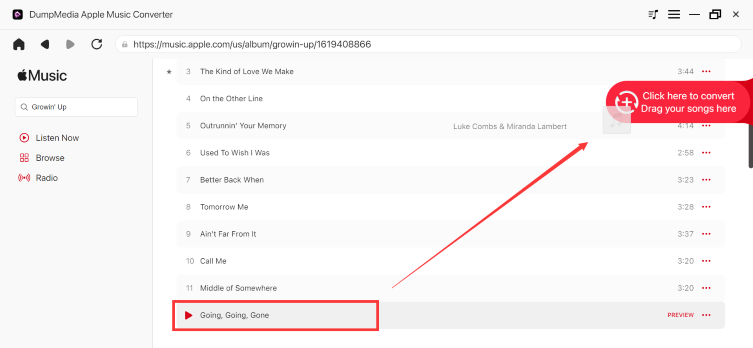
2 Adım. Dönüştürmek istediğiniz çalma listesini, albümü veya belirli şarkıyı bulun. Tek bir şarkıyı ekranın sağ tarafındaki "+" simgesinin üzerine sürükleyebilirsiniz. Alternatif olarak, tüm çalma listesini/albümü açın ve tüm listeyi dönüştürücüye yüklemek için "Dönüştürmeye Ekle" simgesine tıklayın.
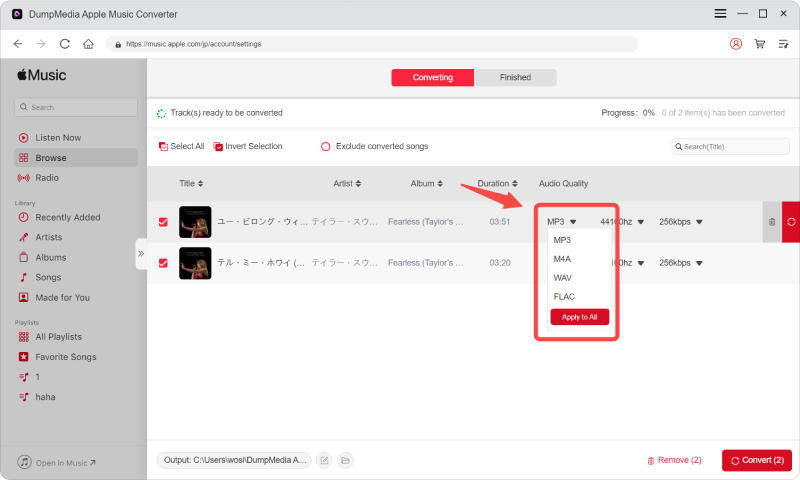
3 Adım. Seç MP3 (en uyumlu olanı). Ayrıca, bit hızını veya örnekleme hızını değiştirebilirsiniz. En iyi denge için 320 kbps'yi seçin.
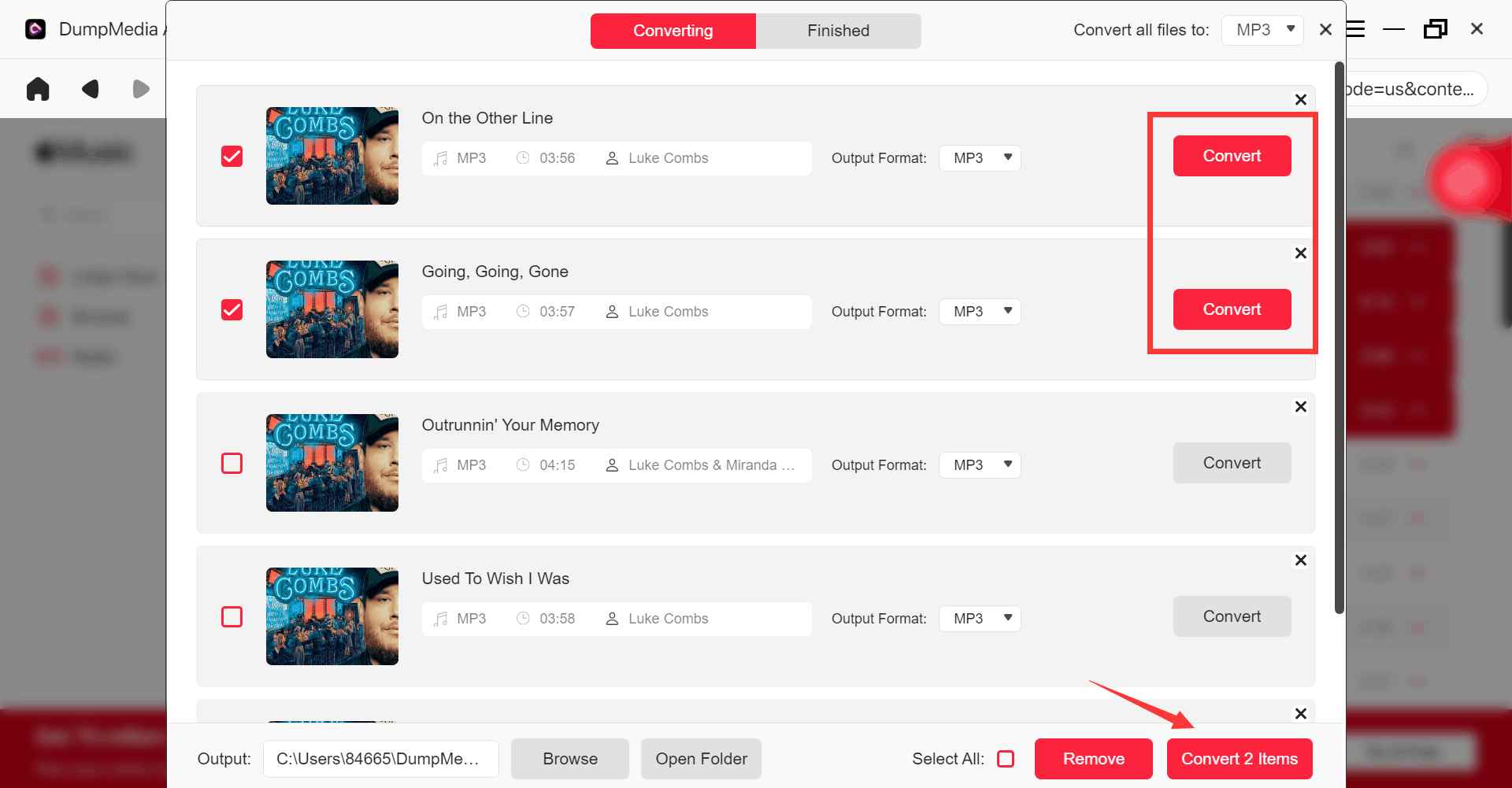
4 Adım. Ayarlar tamamlandıktan sonra, kullanıcılar "Dönüştür" simgesine tıklayarak dönüştürme işlemini gerçekleştirebilirler. Ardından DumpMedia Apple Music şarkılarını dönüştürecek MP3 Süper hızlı hızı sayesinde saniyeler içinde.
Bölüm 5. SSS
iTunes filmlerinden DRM'yi ücretsiz olarak kaldırmak mümkün mü?
Bazı eski araçlar iTunes filmlerinden DRM'yi kaldırmayı denedi, ancak Apple'ın DRM güncellemeleri nedeniyle birçok ücretsiz çözüm artık güvenilir şekilde çalışmıyor.
Ücretsiz DRM kaldırma araçları neden çalışmayı durduruyor?
Apple, DRM sistemlerini sık sık güncellediği için eski araçlar uyumsuz hale geliyor.
Korumalı M4V dosyaları nelerdir?
Korumalı M4V dosyaları, oynatma kısıtlamaları olan DRM korumalı iTunes film dosyalarıdır.
Apple Music de DRM kullanıyor mu?
Evet. Apple Music şarkıları da DRM ile ilgili oynatma sınırlamaları içerebilir.
Apple Music'i kısıtlama olmadan çevrimdışı olarak kullanabilir miyim?
Birçok kullanıcı kullanıyor DumpMedia Daha esnek çevrimdışı oynatma için Apple Music Converter.
Bölüm 6. Özet
iTunes filmlerinden DRM'yi ücretsiz olarak kaldırmayı arayan birçok kullanıcı, nihayetinde DRM korumalı medyanın neden olduğu oynatma kısıtlamalarını, çevrimdışı izleme sorunlarını ve cihaz uyumluluğu sınırlamalarını çözmeye çalışmaktadır. iTunes filmleri için ücretsiz DRM kaldırma çözümleri giderek daha güvenilmez hale gelmiş olsa da, Apple ekosisteminin DRM kısıtlamaları bugün hala birçok dijital içerik türünü etkilemektedir.
Apple Music'te çevrimdışı dinleme ve esnek yerel oynatma özelliklerine odaklanan kullanıcılar için, DumpMedia Apple Music Converter, müzikleri standart ses formatlarına indirerek birden fazla cihazda çevrimdışı oynatma için kullanışlı bir çözüm sunar.
*DumpMedia Bu özellik, Apple Music şarkılarını şifresini çözerek ve DRM'siz dosyalara indirerek çalışır; böylece herhangi bir cihaz için kütüphanenizin temiz ve kısıtlamasız bir kopyasını elde edebilirsiniz. İşlevselliği, yerel ses dosyalarının DRM'sinin kaldırılmasını içermez.

%30 İndirim >>>