


Apple Music'im Neden Çalışmıyor? 2026'da Çözümler
Apple Music, en popüler müzik yayın platformlarından biridir, ancak birçok kullanıcı sık sık şu sorunun cevabını arar: "Apple Music'im neden çalışmıyor? Apple Music'in şarkıları çalmaması, çevrimdışı indirmelerin çalışmayı durdurması veya uygulamanın sürekli çökmesi gibi sorunlar, dinleme deneyimini ciddi şekilde etkileyebilir. Bu kılavuzda, Apple Music'in çalışmamasının en yaygın nedenlerini açıklayacak ve iPhone, Mac, PC ve diğer cihazlarda oynatma sorunlarını gidermek için pratik çözümler göstereceğiz. WinDows ve diğer cihazlar.
İçindekiler Kılavuzu Bölüm 1. Apple Music Neden Çalışmayı Durdurdu? Bölüm 2. Apple Music Çalışmama Sorununu Nasıl Çözebilirim? Bölüm 3. Apple Music'i Çevrimdışı Çalışmaya Kalıcı Olarak Devam Ettirmenin En İyi Yolu BDMV Dosyaları Hakkında Detaylı Bilgiler Bölüm 4. Özet
Bölüm 1. Apple Music Neden Çalışmayı Durdurdu?
"Apple Music neden çalışmıyor?" diye soruyorsanız, sorunun arkasında birkaç olası neden var.
Zayıf İnternet Bağlantısı
"Apple Music neden çalışmıyor" diye arama yapan birçok kullanıcı, asıl nedenin ağ istikrarsızlığı olduğunu keşfediyor. Apple Music akışı, istikrarlı bir internet bağlantısı gerektirir. Zayıf Wi-Fi veya istikrarsız mobil veri, şarkıların yüklenmemesine, oynatma kesintilerine veya ara belleğe alma sorunlarına neden olabilir. Ayrıca Apple Music çalma listeleriniz cihazlar arasında güncellenmiyor olabilir.
Apple Music Sunucu Sorunları
Bazen Apple Music'in kendi sunucularında geçici kesintiler yaşanabiliyor. Bu süre zarfında şarkılar cihazınızda oynatılamayabilir.
Abonelik Süresi Doldu
Apple Music'te yayın akışı ve çevrimdışı oynatma için aktif bir abonelik gereklidir. Aboneliğinizin süresi dolarsa, indirilen şarkılar kaybolabilir ve çevrimdışı oynatma çalışmayı durdurabilir.
DRM Kısıtlamaları
Apple Music şarkıları, indirilen dosyalara erişim ve oynatma şeklini sınırlayan DRM (Dijital Hak Yönetimi) ile korunmaktadır . DRM nedeniyle, şarkılar yalnızca Apple Music uygulaması içinde çalışır. Bu, kullanıcıların çevrimdışı dinleme sırasında "Apple Music'im neden çalışmıyor?" diye sormaya devam etmelerinin en önemli nedenlerinden biridir.
Uygulama Hataları ve Önbellek Sorunları
Eski uygulamalar veya bozuk önbellek dosyaları da Apple Music oynatma sorunlarına neden olabilir. Uygulama, oynatma sırasında beklenmedik şekilde kapanabilir.
Cihaz Yetkilendirme Sorunları
Apple Music hesapları Apple Kimlikleri ve yetkilendirilmiş cihazlarla bağlantılıdır. Yetkilendirme başarısız olursa, kullanıcılar müzik kitaplıklarına erişimlerini kaybedebilirler.
Bölüm 2. Apple Music Çalışmama Sorununu Nasıl Çözersiniz?
Apple Music'te oynatma sorunları yaşıyorsanız, aşağıdaki çözümleri deneyin.
Apple Music uygulamasını yeniden başlatın.
Apple Music uygulamasını yeniden başlatmak, senkronizasyon hataları, donmuş ekranlar veya oynatma sorunları için en yaygın çözümdür.
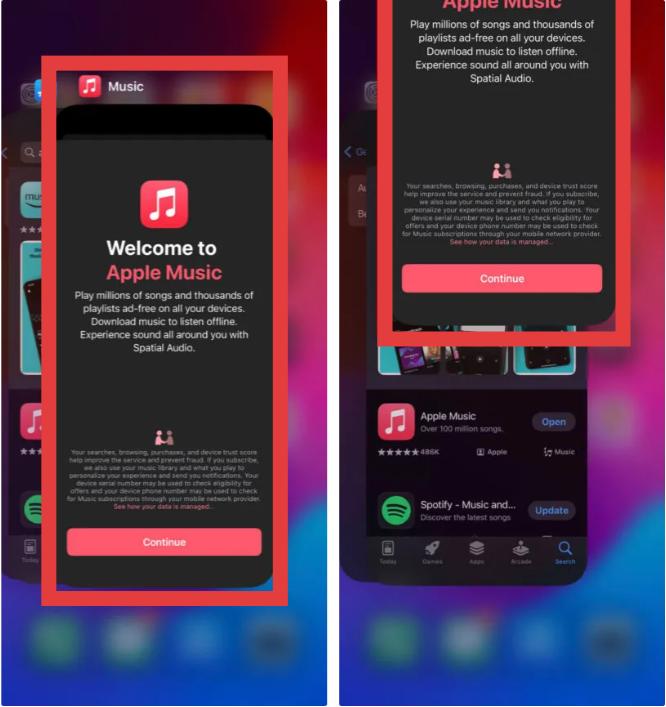
iOS'ta: Ekranın altından, ortaya doğru yukarı kaydırın ve Uygulama Değiştirici görünene kadar basılı tutun. Apple Music önizleme kartını yukarı kaydırarak zorla kapatın. Ana Ekranınıza geri dönün ve yeniden başlatmak için Müzik simgesine dokunun.
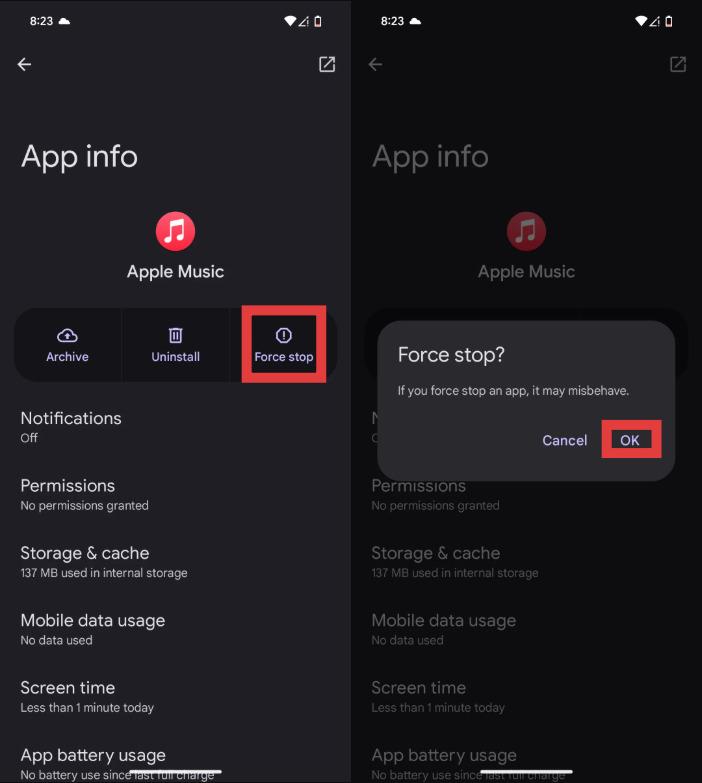
Android'de: Ayarlar > Uygulamalar > Apple Music'e gidin ve Zorla Durdur'a dokunun. Bu, tüm arka plan işlemlerini sonlandırır. Ardından, Apple Music'i uygulama çekmecenizden yeniden açın.
macOS'ta: Apple Music penceresini seçin ve Command (⌘) + Q tuşlarına basın. Ardından Dock'tan yeniden açın.
On WinDows (10/11): Ctrl + Shift + Esc tuşlarına basın. "İşlemler" sekmesinde Apple Music'i bulun. Üzerine sağ tıklayın ve Görevi Sonlandır'ı seçin.
İnternet bağlantınızı kontrol edin
Apple Music'in yayın sırasında neden çalışmadığını merak ediyorsanız, bunun nedeni genellikle kararsız bir internet bağlantısıdır. Ağ sorunlarının oynatmayı etkileyip etkilemediğini test etmek için cihazınızda Wi-Fi ve mobil veri arasında geçiş yapın.
iOS veya macOS'u güncelleyin
Eski yazılım sürümleri Apple Music ile uyumluluk sorunlarına neden olabilir. Sistem güncellemesi, Apple Music'in düzgün çalışmadığı durumları düzeltmeye yardımcı olabilir.

Apple Kimliğinize tekrar giriş yapın
Bazen Apple Music hesap doğrulama işlemi başarısız olur. Apple ID'nizden çıkış yapıp tekrar giriş yapmak, çevrimdışı oynatma ve müzik senkronizasyonuyla ilgili sorunları çözebilir.
Müzik Kütüphanesini Yeniden Senkronize Et
Çalma listeleri veya indirilen şarkılar kaybolursa, kullanıcılar "Apple Music'im neden çalışmıyor?" diye düşünebilir; oysa asıl sorun Kütüphane Senkronizasyonu hatasıdır. Müzik veritabanınızı yenilemek için ayarlardan Kütüphane Senkronizasyonunu devre dışı bırakıp tekrar etkinleştirin.
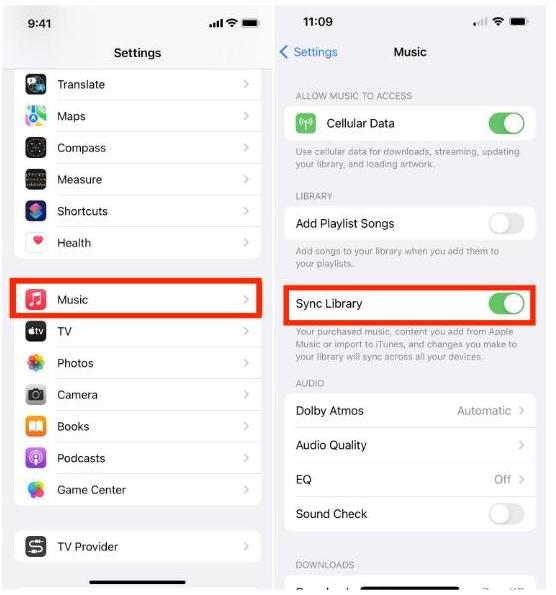
iOS'ta: Ayarlar > Uygulamalar > Müzik'i açın. Kütüphaneyi Senkronize Et seçeneğini Açık konuma getirin.
Android'de: Sağ üst köşedeki üç nokta menüsüne (⋮) dokunun ve Ayarlar'ı seçin. Kütüphaneyi Senkronize Et seçeneğini bulun ve KAPALI konuma getirin, ardından tekrar AÇIN.
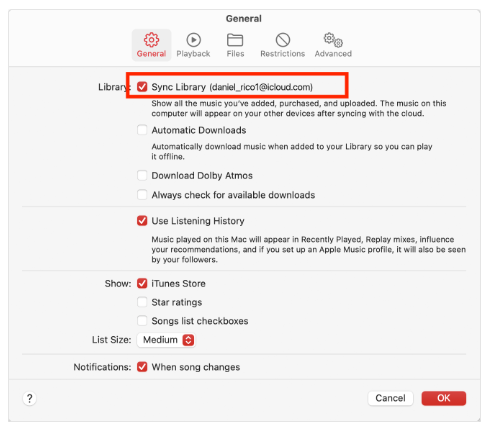
macOS'ta: Müzik uygulamasını açın. Müzik > Ayarlar > Genel bölümüne gidin ve Kitaplığı Senkronize Et seçeneğinin işaretini kaldırın, Tamam'a tıklayın, ardından geri dönüp tekrar işaretleyin.
On WinDows (10/11): Kenar çubuğunun altındaki Profil Adınıza/Simgenize tıklayın. Ayarlar > Genel bölümüne gidin. Kütüphane Senkronizasyonunu kapatıp tekrar açın.
Çevrimdışı Şarkıları Yeniden İndir
Bozuk indirmeler, Apple Music'in çevrimdışı çalışmamasının bir başka nedenidir. Şarkıları kaldırıp tekrar indirmek, oynatma işlevini geri getirebilir.
Önbelleği Temizle ve Cihazı Yeniden Başlat
Önbelleğe alınmış veriler ve geçici dosyalar Apple Music uygulamasının çalışmasına engel olabilir. Önbelleği temizlemek ve cihazınızı yeniden başlatmak genellikle oynatma sorunlarını çözebilir.
Bölüm 3. Apple Music'i Çevrimdışı Çalışır Durumda Kalıcı Olarak Tutmanın En İyi Yolu
Kullanıcılar için en büyük hayal kırıklıklarından biri, çevrimdışı oynatmanın aniden çalışmayı durdurmasıdır. Birçok kişi, indirilen şarkıların internet erişimi olmadan artık oynatılamadığını keşfettikten sonra "Apple Music'im neden çevrimdışı çalışmıyor?" diye arama yapıyor. Bu genellikle Apple Music çevrimdışı indirmelerinin hala DRM doğrulamasına ve abonelik kimlik doğrulamasına bağlı olmasından kaynaklanmaktadır. Daha istikrarlı çevrimdışı dinleme isteyen kullanıcılar için, yerel MP3 Oynatma genellikle daha güvenilir bir çözümdür.
Apple Music'te tekrar eden oynatma sorunlarını önlemek için birçok kullanıcı Apple Music şarkılarını yerel ses dosyalarına dönüştürmeyi tercih eder. Bu amaç için en iyi araçlardan biri şudur: DumpMedia Apple Müzik DönüştürücüBu profesyonel dönüştürücü, kullanıcılara yardımcı olur. Apple Music'i şuna dönüştür: MP3 ve bu şarkıları, tamamen Apple Music uygulamasına bağımlı kalmadan, istikrarlı bir şekilde çevrimdışı oynatma için kaydedin.
🏆Temel Özellikleri DumpMedia Apple Müzik Dönüştürücü
- 🎶Apple Music'i indirin MP3WAV, FLAC ve AAC
- 🎶Apple Music DRM korumasını kaldırın*
- 🎶Orijinal ses kalitesini koruyun
- 🎶Çalma listelerini ve albümleri toplu olarak indirin
- 🎶Hızlı dönüşüm hızı
- 🎶Şarkı meta verilerini ve ID3 etiketlerini koruyun
- 🎶Herhangi bir cihazda çevrimdışı oynatmayı destekler
“Apple Music neden çalışmıyor?” diye tekrar tekrar soran kullanıcılar için, yerel MP3 Dönüştürme, uzun vadeli bir oynatma çözümü sağlar.
Apple Music'i Çevrimdışı Oynatma İçin Nasıl Dönüştürebilirsiniz?
1 Adım. Indirin ve yükleyin DumpMedia Mac/PC'nizde Apple Music Converter'ı açın. Başlattığınızda arayüzü göreceksiniz. Apple Music hesabınızla giriş yapın.
2. Adım. Dönüştürmek istediğiniz çalma listesini, albümü veya belirli şarkıyı bulun. Tek bir şarkıyı ekranın sağ tarafındaki "+" simgesinin üzerine sürükleyebilirsiniz. Alternatif olarak, tüm çalma listesini/albümü açın ve tüm listeyi dönüştürücüye yüklemek için "Dönüştürmeye Ekle" simgesine tıklayın.

3 Adım. Seç MP3 (en uyumlu olanı). Ayrıca, bit hızını veya örnekleme hızını değiştirebilirsiniz. En iyi denge için 320 kbps'yi seçin.
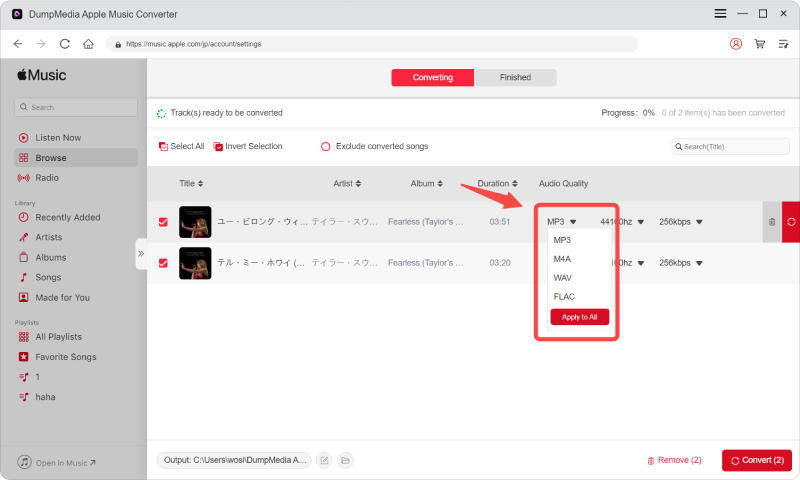
4 Adım. Ayarlar tamamlandıktan sonra, kullanıcılar "Dönüştür" simgesine tıklayarak dönüştürme işlemini gerçekleştirebilirler. Ardından DumpMedia Apple Music şarkılarını dönüştürecek MP3 Süper hızlı hızı sayesinde saniyeler içinde.

Dönüştürme işleminden sonra, şarkılarınızı Apple Music doğrulama sorunları yaşamadan çevrimdışı olarak oynatabilirsiniz.
Bölüm 4. SSS
Apple Music'im neden çalışmıyor?
Apple Music sorunları internet sorunlarından, abonelik süresinin dolmasından, DRM kısıtlamalarından veya uygulama hatalarından kaynaklanabilir.
Apple Music'teki şarkılarım neden gri renkte görünüyor?
Soluk renkte gösterilen şarkılar genellikle lisanslama veya senkronizasyon sorunlarını gösterir.
İndirdiğim Apple Music şarkılarını neden oynatamıyorum?
Çevrimdışı indirmeler hala hesap doğrulaması ve DRM kimlik doğrulaması gerektiriyor.
Apple Music'teki şarkıları sonsuza kadar saklayabilir miyim?
Resmi indirmeler aboneliklerle birlikte sona erer. Dönüştürülen yerel dosyalar kalıcı olarak saklanabilir.
Is DumpMedia Apple Music Converter güvenli mi?
Evet. Apple Music'e dönüştürme ve çevrimdışı oynatma yönetimi için tasarlanmıştır.
Bölüm 4. Özet
Eğer sürekli "Apple Music neden çalışmıyor?" diye soruyorsanız, sorun genellikle DRM kısıtlamaları, abonelik doğrulaması, uygulama bağımlılığı veya internet bağlantısıyla ilgilidir. Daha güvenilir çevrimdışı dinleme deneyimi isteyen kullanıcılar için, DumpMedia Apple Music Converter, Apple Music şarkılarını kalıcı yerel dosyalara dönüştürmenin pratik bir yolunu sunar. MP3 Dosyalar. Oynatma kısıtlamalarını ve uygulama bağımlılığını ortadan kaldırarak, kullanıcılar Apple Music'i farklı cihazlarda ve çevrimdışı ortamlarda daha esnek bir şekilde kullanabilirler.
*DumpMedia Bu özellik, Apple Music şarkılarını şifresini çözerek ve DRM'siz dosyalara indirerek çalışır; böylece herhangi bir cihaz için kütüphanenizin temiz ve kısıtlamasız bir kopyasını elde edebilirsiniz. İşlevselliği, yerel ses dosyalarının DRM'sinin kaldırılmasını içermez.