


Hur man överför Spotify Spellista till Amazon Music?
Musikstreamingtjänster har förändrat hur människor lyssnar på musik. Att byta plattform kan dock ibland vara obekvämt, särskilt när man har noggrant utvalda spellistor som byggts upp över tid. Många användare som tidigare förlitade sig på Spotify kan bestämma sig för att försöka Amazon Music för dess integration med Amazon-enheter, omfattande musikbibliotek och kompatibilitet med Alexa-aktiverade smarta högtalare.
Lyckligtvis finns det nu flera verktyg som gör det möjligt att automatiskt flytta spellistor mellan streamingtjänster. I den här guiden förklarar vi de mest effektiva metoderna för att överföring Spotify spellista till Amazon Music med hjälp av onlineverktyg, datorprogram och mobilappar. Oavsett om du använder Windows, Mac, iOS eller Android, hittar du en lösning som hjälper dig att migrera dina spellistor snabbt och korrekt.
Innehållsguide Del 1. Överföring Spotify Spellistor till Amazon Music OnlineDel 2. Överföring Spotify Spellistor till Amazon Music på Windows/MacDel 3. Överföring Spotify Spellistor till Amazon Music på iOSDel 4. Överföring Spotify Spellistor till Amazon Music på AndroidDel 5. Vanliga frågorDel 6. Slutsats
Del 1. Överföring Spotify Spellistor till Amazon Music Online
För användare som vill ha en snabb och enkel metod utan att installera programvara är onlineverktyg för överföring av spellistor ett bekvämt alternativ. Dessa tjänster låter dig ansluta dina streamingkonton via en webbläsare och automatiskt migrera spellistor mellan plattformar.
Ett av de mest populära onlineverktygen för detta ändamål är TuneMyMusic. TuneMyMusic är ett webbaserat verktyg för migrering av spellistor som stöder många streamingplattformar. Det låter användare överföra Spotify spellista till Amazon Music med bara några få steg.
VIKTIGA FUNKTIONER
- Fungerar direkt i din webbläsare
- Stöder många streamingplattformar
- Enkelt gränssnitt med steg-för-steg-vägledning
- Ingen installation av programvara behövs
Steg för att överföra Spotify Spellista till Amazon Music med TuneMyMusic
Steg 1. Besök TuneMyMusics webbplats och klicka på knappen ”Börja” för att starta processen.
Steg 2. Välja Spotify som källplattform och logga in på ditt konto. Verktyget kommer att begära åtkomst till dina spellistor.
Steg 3. När du är ansluten kan du välja den specifika spellista du vill migrera eller klistra in länken till spellistan. Systemet kommer att ladda alla låtar i den spellistan.
Steg 4. Välj sedan Amazon Music som destinationstjänst och logga in på ditt Amazon-konto för att godkänna överföringen.

Steg 5. Klicka på "Börja flytta min musik". Verktyget matchar automatiskt låtar från Spotify med Amazon Music-katalogen.
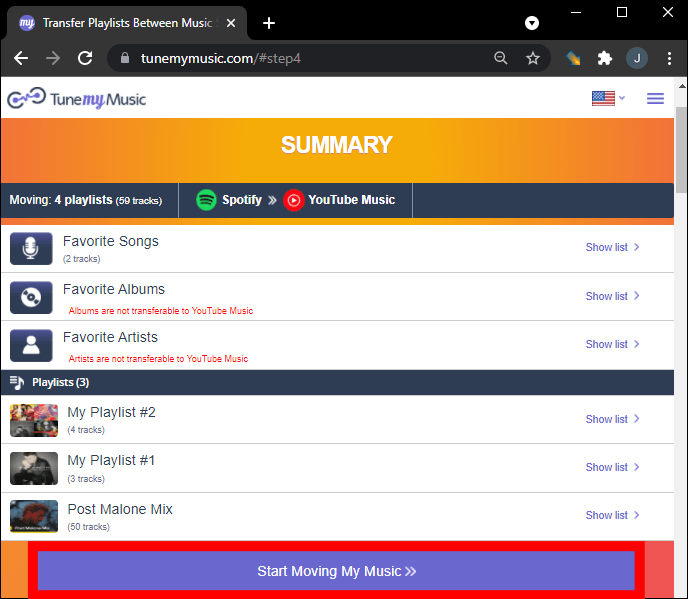
Steg 6. När processen är klar öppnar du ditt Amazon Music-bibliotek för att bekräfta att spellistan har skapats.
Att använda ett onlineverktyg som TuneMyMusic är ett av de snabbaste sätten att överföra Spotify spellista till Amazon Music för små eller medelstora spellistor. Men för användare med stora musikbibliotek eller de som vill ha mer stabilitet kan en skrivbordslösning vara ett bättre val.
Del 2. Överföring Spotify Spellistor till Amazon Music på Windows/Mac
Om du vill ha en mer pålitlig och funktionsrik lösning är det ofta bästa alternativet att använda skrivbordsprogramvara. DumpMedia Vilken musikkonverterare som helst är ett kraftfullt program utformat för att hantera och konvertera musik samtidigt som det erbjuder en dedikerad funktion för spellistaöverföring. DumpMedia tillåter användare att överföra Spotify spellista till Amazon Music effektivt samtidigt som spellisteinformation och låtmetadata bevaras.
Gratis nedladdning Gratis nedladdning
VIKTIGA FUNKTIONER
- Stöder Windows och macOS
- Dedikerad funktion för överföring av spellistor
- Migrering av batchspellistor
- Smart spårmatchning
- Behåller metadata som artist-, album- och spårtitlar
- Stabil lokal bearbetning utan webbläsarbegränsningar
Dessa funktioner gör det till ett av de mest effektiva sätten att överföra Spotify spellista till Amazon Music för användare med stora spellistor.
Steg-för-steg-guide
Steg 1. Ladda ned och installera DumpMedia Valfri musikkonverterare på din Windows eller Mac-dator. Starta programmet efter installationen.
Gratis nedladdning Gratis nedladdning
Steg 2. Välj Verktyg > Överför spellista. Spotify som en källa.

Steg 3. Välj Amazon Music som destination.
Steg 4. Välj vad du vill överföra. Vi stöder dina favoritlåtar, artister, album och dina utvalda spellistor.

Steg 5. Klicka på Konvertera för att starta överföringen.
Steg 6. Överföringen är klar. Klicka på "Gå till Amazon Music". Dina spellistor har flyttats till en ny tjänst och du kan börja lyssna på en ny spellista på Amazon Music.
Jämfört med onlinetjänster ger den här metoden mer stabilitet och bättre noggrannhet när du överför Spotify spellista till Amazon Music.
Del 3. Överföring Spotify Spellistor till Amazon Music på iOS
Om du föredrar att använda en mobil enhet finns det flera appar som kan hjälpa dig att överföra Spotify spellista till Amazon Music direkt från din iPhone eller iPad. Ett av de mest populära alternativen är SongShift. SongShift är en välkänd app för migrering av spellistor designad för iOS-användare. Den stöder många musikstreamingtjänster och erbjuder ett intuitivt gränssnitt för att överföra spellistor.
VIKTIGA FUNKTIONER
- Lättanvänt mobilgränssnitt
- Stöder flera streamingplattformar
- Tillåter batchöverföringar av spellistor
- Byggd specifikt för iOS-enheter
Steg för att överföra Spotify Spellista till Amazon Music med SongShift
Steg 1. Ladda ner SongShift från App Store och öppna appen. Auktorisera Spotify så att appen kan komma åt dina spellistor.
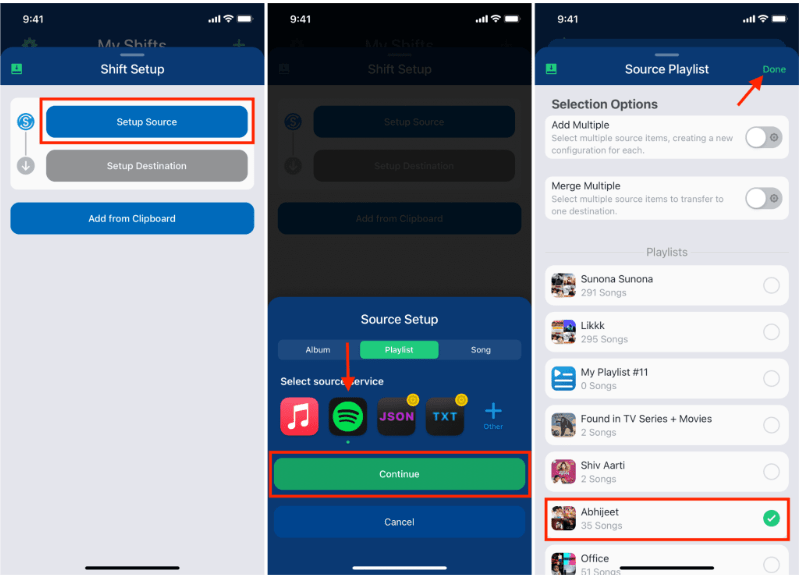
Steg 2. Lägg till Amazon Music som din destinationstjänst genom att logga in på ditt Amazon-konto.
Steg 3. Välj Spotify spellistan du vill migrera.
Steg 4. Tryck på Start Shift och låt appen matcha låtar över olika plattformar.
När processen är klar bör din spellista visas i Amazon Music. SongShift är ett bekvämt alternativ för användare som vill överföra Spotify spellista till Amazon Music utan att använda en dator.
Del 4. Överföring Spotify Spellistor till Amazon Music på Android
Android-användare kan också överföra spellistor mellan streamingtjänster med hjälp av dedikerade appar. En vanligt förekommande lösning är FreeYourMusic. FreeYourMusic är ett plattformsoberoende musiköverföringsverktyg som fungerar på Android, iOS, Windows och macOS. Det låter användare flytta spellistor mellan streamingtjänster med minimal ansträngning.
VIKTIGA FUNKTIONER
- Stöder många streamingplattformar
- Enkel överföringsprocess
- Fungerar på flera enheter
- Tillåter batchöverföringar av spellistor
Steg för att överföra Spotify Spellista till Amazon Music med FreeYourMusic
Steg 1. Ladda ner FreeYourMusic från Google Play Store och öppna appen. Välj Spotify som källplattform och logga in på ditt konto.
Steg 2. Välj Amazon Music och logga in på ditt konto.
Steg 3. Välj Spotify spellistan du vill migrera.
Steg 4. Tryck på Överför för att starta migreringen. Appen matchar låtar och återskapar spellistan i Amazon Music.
Del 5. Vanliga frågor
1. Kan jag överföra Spotify gratis spellista till Amazon Music?
Vissa verktyg erbjuder gratis överföring av spellistor med begränsningar, till exempel ett maximalt antal låtar per överföring. Premiumversioner tar vanligtvis bort dessa begränsningar.
2. Kommer alla låtar att överföras utan problem?
De flesta låtar överförs utan problem, men ibland kan det hända att vissa spår inte är tillgängliga på båda plattformarna på grund av licensskillnader.
3. Hur lång tid tar det att överföra spellistor?
Tiden det tar beror på storleken på din spellista. Mindre spellistor kan överföras inom några minuter, medan större kan ta längre tid.
4. Är det säkert att använda verktyg för överföring av spellistor?
Pålitliga verktyg använder säker autentisering för att komma åt dina konton. Välj alltid betrodda program när du överför Spotify spellista till Amazon Music.
Del 6. Slutsats
Oavsett om du föredrar en onlinetjänst, ett skrivbordsprogram eller en mobilapp finns det flera sätt att överföra Spotify spellista till Amazon Music snabbt och effektivt. För användare som vill ha de mest stabila och exakta resultaten, särskilt för stora spellistor, DumpMedia Any Music Converter erbjuder en av de bästa lösningarna.