


Hur man överför Spotify Musik till YouTube: Komplett guide för alla enheter
Att flytta sina spellistor mellan streamingplattformar är ett vanligt behov, särskilt när man byter app eller konsoliderar sitt musikbibliotek. Om du vill överföring Spotify musik till YouTubeDen goda nyheten är att moderna överföringsverktyg gör processen sömlös på webben, datorer och mobila enheter. Den här guiden guidar dig steg för steg genom varje metod. Med stöd för Spotify och YouTube på alla större enheter kan du enkelt migrera dina spellistor och hålla din musik tillgänglig var du än lyssnar.
Innehållsguide Del 1. Överföring Spotify Spellista till YouTube onlineDel 2. Överföring Spotify Spellista till YouTube på Windows/MacDel 3. Överföring Spotify Spellista till YouTube på iOSDel 4. Överföring Spotify Spellista till YouTube på AndroidDel 5. Vanliga frågorDel 6. För att summera det hela
Del 1. Överföring Spotify Spellista till YouTube online
Om du vill ha det snabbaste sättet att överföra Spotify musik till YouTube utan att installera programvara är ett onlineverktyg för att synkronisera spellistor det bekvämaste alternativet. En allmänt använd lösning är TuneMyMusic, en webbläsarbaserad tjänst som stöder direkt migrering av spellistor mellan stora streamingplattformar.
Så här fungerar TuneMyMusic online:
- Öppna TuneMyMusic i din webbläsare.
- Välja Spotify som källplattform och logga in.
- Markera den spellista du vill flytta.
- Välja Youtube som destination.
- Bekräfta låtlistan och starta överföringen.

Den här metoden är snabb, plattformsoberoende och kräver ingen lokal installation. Den är idealisk för användare som helt enkelt vill överföra Spotify-musik till YouTube på det mest friktionsfria sättet.
Del 2. Överföring Spotify Spellista till YouTube på Windows/Mac
För datoranvändare som söker mer kontroll, högre konverteringsstabilitet och automatiserad hantering av spellistor, DumpMedia Vilken musikkonverterare som helst erbjuder en dedikerad modul för spellistaöverföring. Det är särskilt fördelaktigt för användare som regelbundet överför Spotify musik till YouTube i bulk eller som behöver förutsägbar och repeterbar spellistemappning.
Gratis nedladdning Gratis nedladdning
Viktiga fördelar med funktionen för överföring av spellistor:
- Stöder migrering av massspellistor
- Hanterar metadata, omslagsbilder och spårordning
- Tillhandahåller robust matchningslogik för att minimera felmatchade spår
- Fungerar på båda Windows och macOS
Hur man använder det:
Steg 1. Öppna valfri musikkonverterare. Välj Verktyg > Överför spellistor.
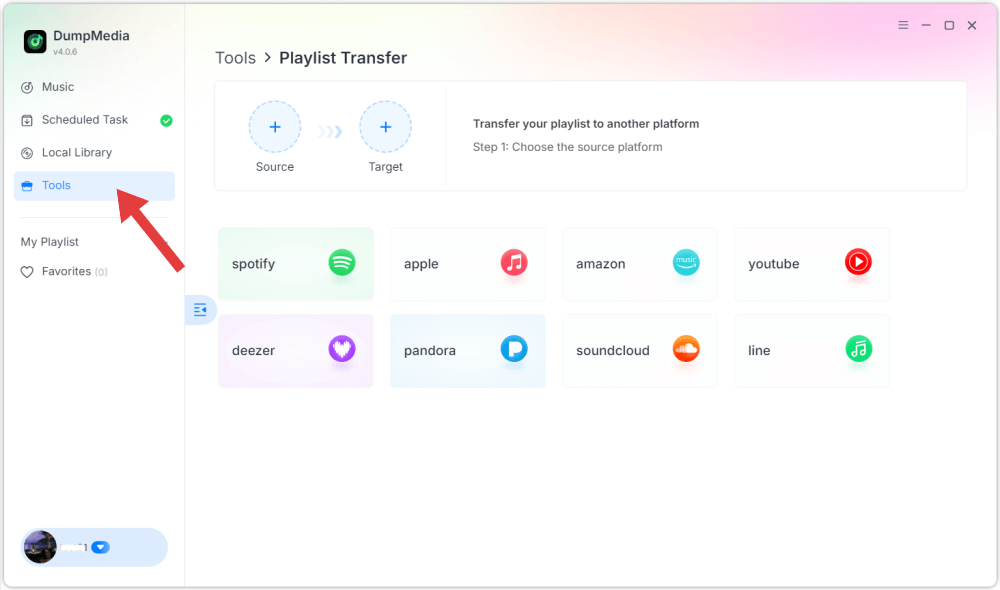
Steg 2. Välja Spotify som en källa.

Steg 3. Välj YouTube Music som destination.
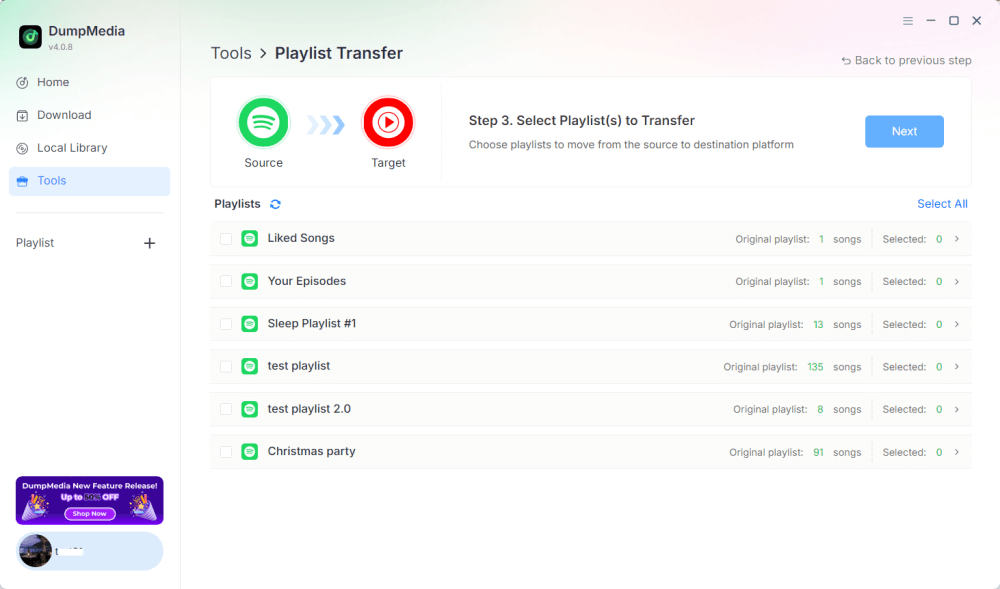
Steg 4. Välj vad du vill överföra. Vi stöder dina favoritlåtar, artister, album och dina utvalda spellistor.
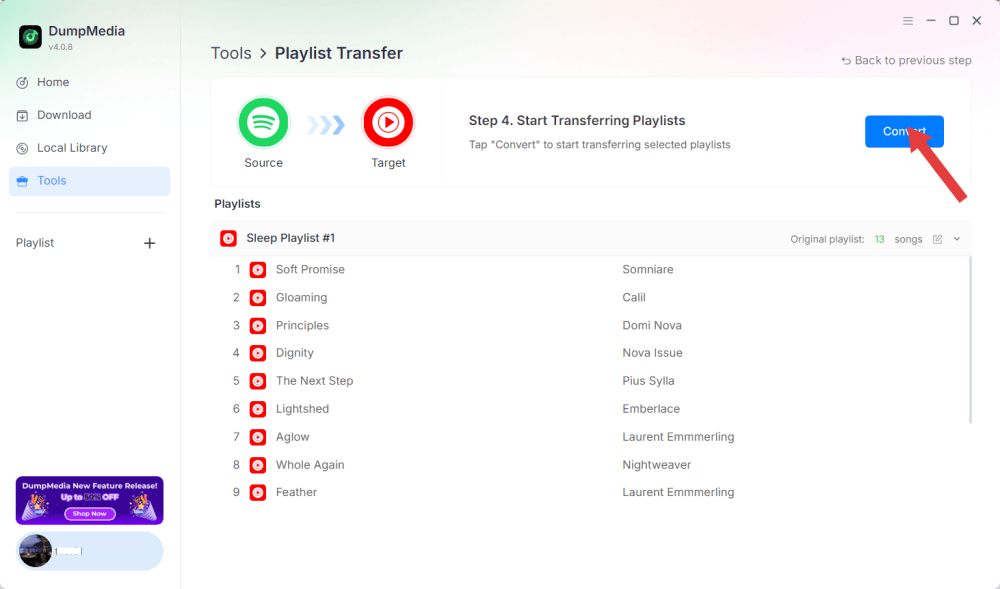
Steg 5. Klicka på Konvertera för att starta överföringen.
Steg 6. Överföringen är klar. Klicka på "Gå till YouTube Music". Dina spellistor har flyttats till en ny tjänst och du kan börja lyssna på en ny spellista på YouTube Music.
Eftersom alla operationer körs lokalt är den här lösningen stabilare än webbläsarbaserade verktyg, perfekt för användare som ofta behöver överföra Spotify-musik till YouTube för flera spellistor eller stora bibliotek.
Del 3. Överföring Spotify Spellista till YouTube på iOS
Om du använder en iPhone eller iPad och vill överföra Spotify-musik till YouTube är ett mobiloptimerat migreringsverktyg som SongShift ett beprövat alternativ. Det är utformat specifikt för Apples ekosystem och erbjuder intuitiva arbetsflöden för att mappa spellistor.
Så här fungerar SongShift:
- Installera SongShift från App Store.
- Anslut Spotify konto.
- Anslut ditt YouTube-konto.
- Skapa en ny Shift-uppgift och välj Spotify spellista som källa.
- Ställ in YouTube som destination och bekräfta att spåren matchar.
- Utför överföringen.
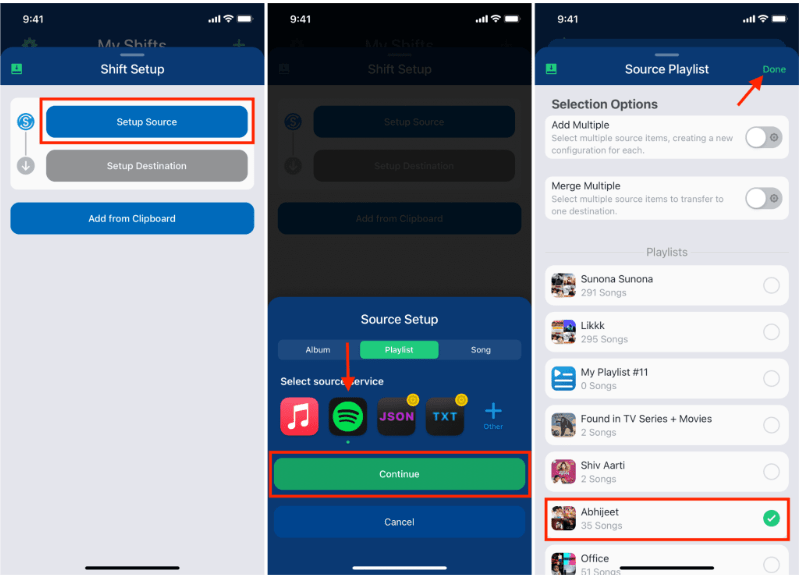
SongShifts styrka ligger i iOS-inbyggda UI-interaktioner, vilket gör överföringsuppgiften Spotify musik till YouTube smidigt för användare som främst arbetar på mobila enheter.
Del 4. Överföring Spotify Spellista till YouTube på Android
På Android-enheter är det enklaste sättet att överföra Spotify Musik till YouTube sker med Soundiiz Mobile Web, som fungerar bra i mobila webbläsare och stöder Android-vänliga gränssnitt.
Steg för Soundiiz mobilwebb:
- Öppna Soundiiz-webbplatsen i din Android-webbläsare.
- Logga in på ditt Spotify konto.
- Välj den spellista du vill flytta.
- Välj YouTube som måltjänst.
- Bekräfta och starta synkroniseringen.
Det här arbetsflödet är bekvämt för användare som inte vill installera extra appar men ändå behöver ett enkelt sätt att överföra Spotify musik till YouTube när du är på språng.
Del 5. Vanliga frågor
1. Kommer spellistornas ordning att förbli densamma när jag överför Spotify musik till YouTube?
De flesta verktyg försöker upprätthålla ordning, men exakt bevarande beror på spårtillgänglighet och igenkänningsnoggrannhet.
2. Är alla Spotify finns låtar på YouTube?
Inte alltid. Skillnader i upphovsrätt, regionala begränsningar och otillgängliga låtar kan orsaka luckor.
3. Kräver dessa verktyg åtkomst till mina konton?
Ja. De behöver behörighet för att läsa din Spotify spellistor och lägg till dem i ditt YouTube-bibliotek. Pålitliga verktyg använder säker OAuth-autentisering.
4. Hur lång tid tar det att överföra Spotify spellistor till YouTube?
Det beror på spellistans storlek, små spellistor blir klara inom några sekunder, medan stora bibliotek kan ta flera minuter.
Del 6. För att summera det hela
Att hitta den bästa metoden för överföring Spotify musik till YouTube beror på ditt arbetsflöde och din enhet. Med rätt verktyg kan du enkelt överföra Spotify spellistor till YouTube och upprätthålla musikalisk kontinuitet över plattformar.