


Deezer Offline: Hur man lyssnar på Deezer-musik offline utan gränser
Många musikälskare förlitar sig på Deezers offline-läge för att lyssna på låtar utan att använda mobildata eller en internetanslutning. Oavsett om du reser, pendlar eller sparar bandbredd är Deezers offline- uppspelning en av plattformens mest användbara funktioner. Många användare upptäcker dock snabbt att vanliga Deezer-nedladdningar har begränsningar. I den här guiden får du lära dig hur Deezers offline-läge fungerar, dess begränsningar och hur du håller Deezers musik offline permanent.
Innehållsguide Del 1. Vad är Deezer Music offline-läge? Del 2. Hur använder man Deezer Music offline-läge? Del 3. Bästa sättet att hålla Deezer Music offline permanent Del 4. Vanliga frågor Del 5. Slutsats
Del 1. Vad är Deezer Musics offlineläge?
Deezers offline-läge låter Premium- prenumeranter ladda ner låtar, album och spellistor för att lyssna utan internetanslutning. När offline-läget används kan användare lyssna på musik utan Wi-Fi.
Många användare missförstår dock hur Deezer offline faktiskt fungerar. Deezer-nedladdningar är inte traditionella. MP3 filer som lagras permanent på din enhet. Istället förblir de krypterade och knutna till ditt Deezer-konto.
Del 2. Hur använder man Deezer Music offline-läge?
Att använda Deezer offline-läge är relativt enkelt.
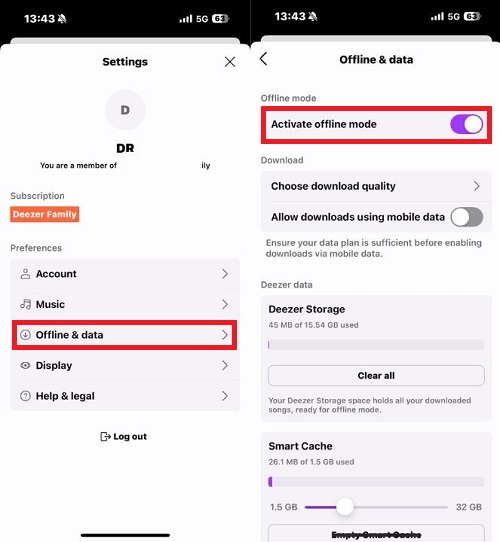
På mobilen
- Öppna Deezer-appen
- Logga in på ditt Deezer Premium-konto
- Välj en spellista eller ett album
- Tryck på nedladdningsknappen
- Aktivera offlineläge i inställningarna
Efter nedladdningen blir din musik tillgänglig utan internetåtkomst.
Del 3. Bästa sättet att hålla Deezer Music offline permanent
Även om det är bekvämt, kommer Deezer offline-uppspelning med flera begränsningar som frustrerar många användare. För det första förblir nedladdad musik bunden till ditt Deezer Premium-konto. När din prenumeration löper ut kan offline-låtar sluta fungera omedelbart. En annan stor begränsning med Deezers offline-läge är att nedladdade låtar inte lagras som vanligt. MP3 filer. Användare kan inte fritt använda nedladdningar utanför Deezer.
För användare som vill ha mer flexibilitet, verktyg som DumpMedia DeezPlus erbjuda ett alternativt tillvägagångssätt till Deezers vanliga offlinebegränsningar. Istället för att helt förlita sig på Deezers krypterade nedladdningar, DumpMedia DeezPlus låter användare konvertera Deezer-musik till vanliga ljudformat för permanent offline-uppspelning.
Gratis nedladdning Gratis nedladdning
🏆Varför använda DumpMedia DeezPlus
- Konvertera Deezer till MP3, WAV, FLAC och AAC
- Integration med Deezer webbspelare
- Ta bort Deezer DRM-skydd*
- Behåll originalljudkvaliteten
- Ladda ner spellistor och album i batch
- Snabb omvandlingshastighet
- Bevara låtmetadata och ID3-taggar
- Stöd för offlineuppspelning på alla enheter
Detta ger användarna mycket mer kontroll jämfört med traditionell Deezer offline-uppspelning.
Ladda ner Deezer Music för permanent offline-uppspelning
Steg 1. Ladda ned och installera DumpMedia DeezPlus på din Mac/PC. Starta DumpMedia Deezer Converter, så ser du gränssnittet. Använd ditt Deezer-konto för att logga in.
Gratis nedladdning Gratis nedladdning
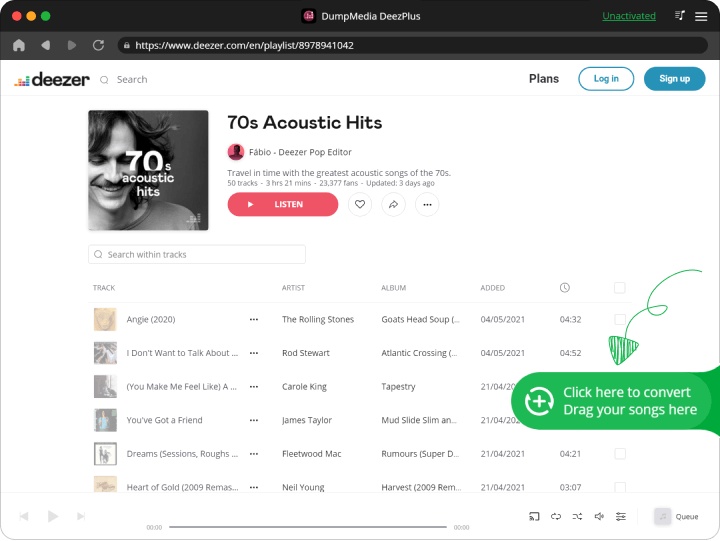
Steg 2. Hitta spellistan, albumet eller den specifika låten du vill konvertera. Du kan dra en enskild låt till "+"-ikonen på höger sida av skärmen. Alternativt kan du öppna en hel spellista/album och klicka på ikonen "Lägg till i konverter" för att ladda hela listan i konverteraren.
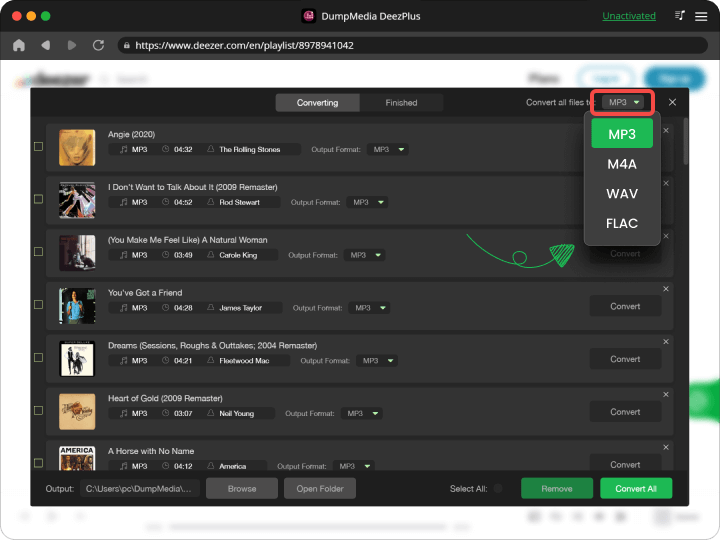
Steg 3. Välja MP3 (mest kompatibel). Du kan också ändra bithastigheten eller samplingshastigheten.
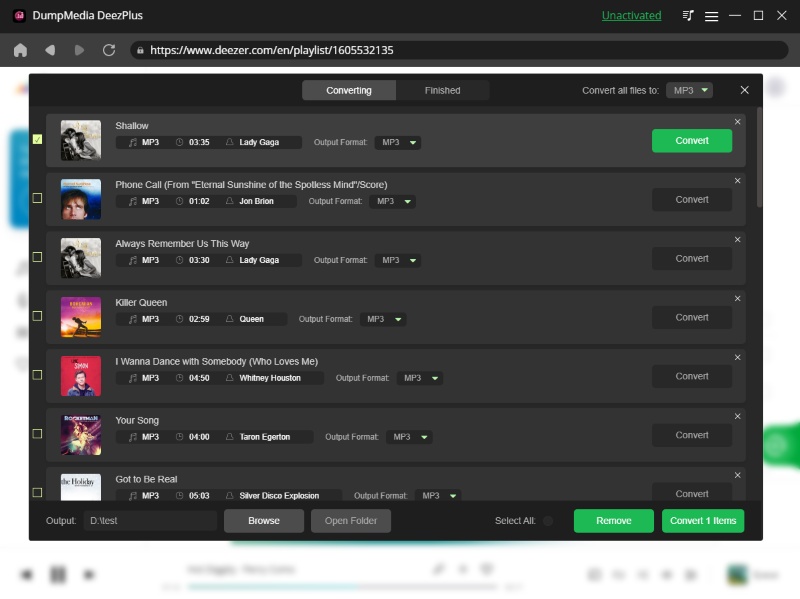
Steg 4. När inställningarna är klara kan användarna genomföra konverteringen genom att trycka på ikonen "Konvertera". DumpMedia kommer att konvertera Deezer-låtar till MP3 inom några sekunder med sin supersnabba hastighet.
Del 4. Vanliga frågor
Fungerar Deezer offline utan internet?
Ja, men nedladdad musik beror fortfarande på kontoverifiering och prenumerationsstatus.
Kan jag spara Deezer-låtar för alltid?
Standardnedladdningar av Deezer offline är tillfälliga. Konverterade lokala filer ger mer permanent åtkomst.
Varför försvann mina Deezer-nedladdningar?
Detta händer vanligtvis på grund av att prenumerationen har löpt ut eller att appen krävde onlineverifiering.
Är Deezer offline tillgängligt för gratisanvändare?
Nej. Offline-läge är generellt begränsat till Deezer Premium-prenumeranter.
Kan jag konvertera Deezer-musik till MP3?
Ja. Verktyg som DumpMedia DeezPlus kan konvertera Deezer-musik till vanliga ljudformat.
Del 5. Slutsats
Deezer offline-läge är användbart för tillfällig offline-lyssning, men det har flera begränsningar relaterade till prenumerationer, enhetskompatibilitet och filåtkomst. För användare som vill ha mer permanent flexibilitet för offline-uppspelning, DumpMedia DeezPlus erbjuder en praktisk lösning för att konvertera Deezer-musik till tillgängliga ljudformat som kan lagras och spelas upp på flera enheter.
Gratis nedladdning Gratis nedladdning
*DumpMedia fungerar genom att dekryptera och ladda ner Deezer-låtar till DRM-fria filer, vilket gör att du får en ren, obegränsad kopia av ditt bibliotek för vilken enhet som helst. Dess funktionalitet inkluderar inte DRM-borttagning av lokala ljudfiler.