


Como ouvir Audible no Apple Watch [Atualização de 2026]
Ouvir Audible no Apple Watch parece conveniente, mas se você já tentou, deve ter percebido que não é tão simples quanto parece. Muitos usuários enfrentam problemas de sincronização, limitações offline e recursos de reprodução restritos. Neste guia, mostraremos o que realmente funciona para você curtir audiolivros do Audible livremente no seu Apple Watch, offline e sem depender do seu iPhone.
Sumário Parte 1. É possível usar o Audible no Apple Watch? Parte 2. Método oficial para reproduzir o Audible no Apple Watch Parte 3. Melhor maneira de ouvir o Audible offline no Apple Watch Parte 4. Resumo
Parte 1. É possível usar o Audible no Apple Watch?
Sim, você pode reproduzir Audible no Apple Watch, mas o Apple Watch não oferece todas as funcionalidades do Audible como o iPhone ou o iPad. Existem algumas restrições:
- Dependência do iPhone: O relógio espelha o conteúdo do seu iPhone; a reprodução independente é limitada.
- Limitações offline: Não é possível baixar e armazenar audiolivros diretamente no relógio.
- Problemas com os controles de reprodução: recursos como marcação de páginas, controle de velocidade e seleção de capítulos são limitados.
Essas restrições dificultam a vida dos usuários que desejam verdadeira flexibilidade e a possibilidade de ouvir música offline.
Parte 2. Método oficial para reproduzir o Audible no seu Apple Watch
Este ano, a forma oficial de reproduzir o Audible no Apple Watch está muito mais simples do que nos anos anteriores. Veja como o Audible funciona oficialmente no Apple Watch:
Requisitos
- Hardware: Apple Watch Series 4 ou posterior.
- Programas: Assista 11.0 ou posterior e iOS 18.0 ou posterior no seu iPhone emparelhado.
- Acessórios: Fones de ouvido Bluetooth (como AirPods ou Shokz) emparelhados diretamente com o relógio.
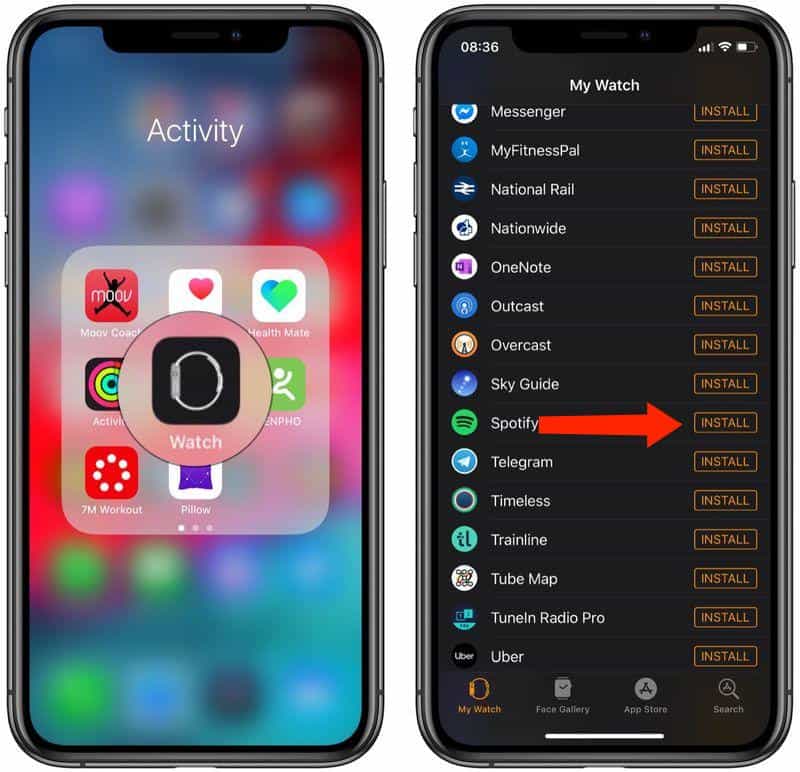
Passo 1. Abra o aplicativo Watch no seu iPhone, encontre o Audible e toque em Instalar.
Passo 2. Abra o aplicativo Audible no seu Apple Watch. Se solicitado, um código de 6 dígitos aparecerá na tela do relógio.
Passo 3. No seu iPhone (ou em qualquer navegador), acesse audible.com/activate. Faça login e insira o código. Seu Apple Watch agora está "emparelhado" com sua biblioteca na nuvem.
Passo 4. Depois de emparelhado, você pode usar o Watch de duas maneiras sem o iPhone por perto: streaming independente (modelos com conexão celular) e downloads offline (recomendado para exercícios).
Controles de reprodução
- Volume: vire o Crown digitais.
- Velocidade: Toque em 1x Ícone para ajustar a velocidade de reprodução (até 3.5x).
- Capítulos: Toque em Ícone do menu (canto inferior esquerdo) para pular para capítulos específicos.
- Dispositivos de comutação: Toque em Ícone do dispositivo Para alternar o áudio entre o seu Apple Watch e outras caixas de som AirPlay.
Limitação: Você precisa ter o iPhone por perto e o armazenamento é mínimo. Se você quer liberdade offline, isso não é suficiente.
Parte 3. A melhor maneira de ouvir o Audible offline no Apple Watch
Se você quiser ouvir audiolivros do Audible no Apple Watch sem depender do seu iPhone, a solução mais prática é converter os audiolivros do Audible para um formato universal, como o Audiobook. MP3. É onde DumpMedia Audible Converter entra em ação. Ele pode baixar livros da Audible diretamente, sem restrições de DRM e Converter arquivos Audible AAX para MP3 ou M4A para total compatibilidade. Este método resolve os principais problemas da reprodução no Apple Watch: independência, flexibilidade e controle total sobre seus audiolivros.
Ouça o Audible offline no Apple Watch com DumpMedia
Passo 1. Abra o software no seu computador. Ele funciona com ambos. WinO sistema operacional é compatível com Windows e Mac. A interface é intuitiva, facilitando o uso para iniciantes.
Download grátis Download grátis
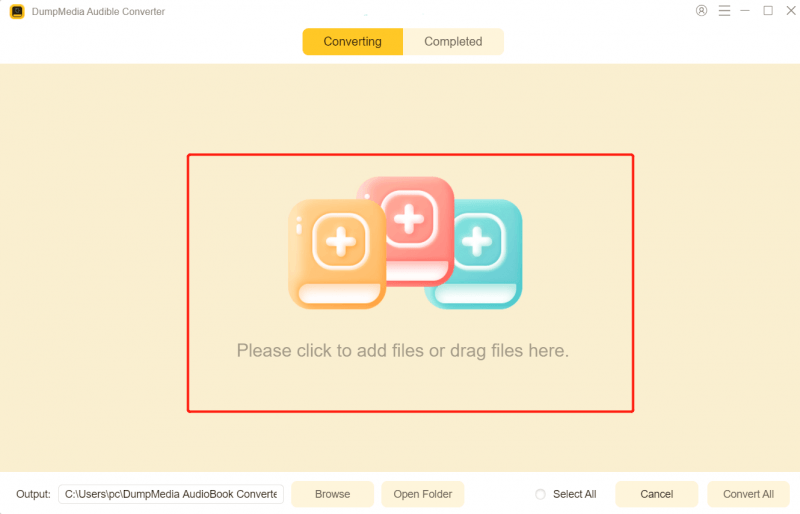
Passo 2. Abra o reprodutor web Audible integrado dentro do aplicativo. DumpMedia Faça login com sua conta Audible. Navegue pelo catálogo da Audible e arraste o livro que deseja baixar para o conversor.
Passo 3. No painel de configurações, selecione o formato que deseja baixar.

Passo 4. O último passo seria clicar no botão “Converter” para iniciar o processo de conversão.
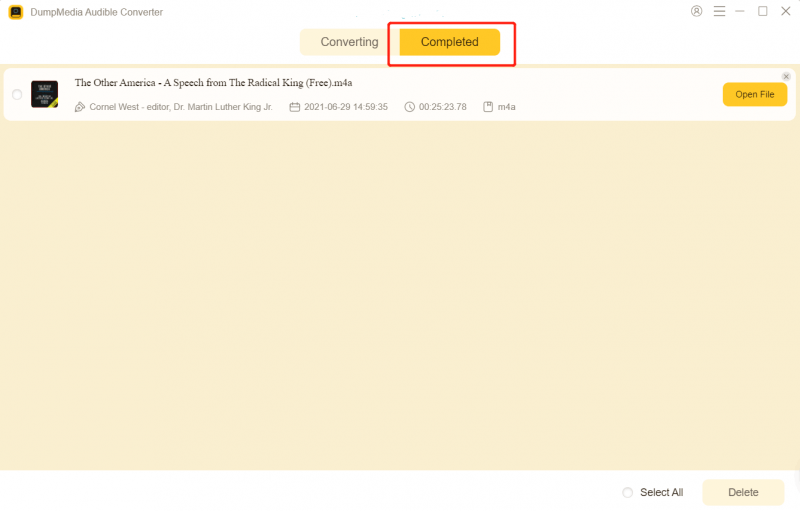
Passo 5. Adicione o arquivo à sua biblioteca de músicas.
- No Mac: Abra o aplicativo Música, vá em Arquivo > Importar e selecione o livro convertido.
- On Windows: Abra o iTunes ou o aplicativo Apple Music para WinBaixe e arraste o arquivo para sua biblioteca.
Passo 6. Conecte seu iPhone ao computador. Nas configurações de sincronização do dispositivo, certifique-se de que seu novo "Audiolivro" esteja selecionado para sincronizar. Execute a sincronização para que o livro apareça no seu iPhone dentro do aplicativo Livros (ou aplicativo Música, dependendo da sua configuração de Tipo de Mídia).
Passo 7. Como ouvir o Audible no Apple Watch? Abra o app Watch no seu iPhone. Vá para Meu Relógio > Audiolivros. Toque em Adicionar Audiolivro e selecione o título que você acabou de sincronizar do seu computador. Coloque o Apple Watch no carregador. A sincronização começará automaticamente via Wi-Fi/Bluetooth.
Agora você pode curtir audiolivros da Audible offline no seu relógio, a qualquer hora e em qualquer lugar.
Parte 4. Resumo
O Apple Watch é prático, mas o suporte oficial da Audible é limitado. Se você realmente quer aproveitar seus audiolivros offline e em qualquer lugar, use... DumpMedia O Audible Converter é a escolha mais inteligente. Não deixe que as restrições do Apple Watch atrapalhem sua experiência com audiolivros. Baixe agora. DumpMedia hoje e ouça em qualquer lugar, a qualquer hora.