


Hoe schakel ik de waarschuwing voor gevoelige inhoud op YouTube Music uit?
Veel gebruikers van YouTube Music krijgen vaak de waarschuwing 'kijkersdiscretie' te zien, waardoor ze bepaalde nummers of afspeellijsten niet direct kunnen afspelen. Als je je afvraagt hoe je deze waarschuwing op YouTube Music kunt uitschakelen , dan vind je in deze handleiding alle mogelijke oorzaken, oplossingen en zelfs alternatieven om ongestoord te kunnen luisteren. Of het nu gaat om leeftijdsbeperkingen, ouderlijk toezicht of app-instellingen, wij helpen je de volledige controle over je muziekervaring terug te krijgen. Bovendien bieden we een betrouwbare oplossing om onderbrekingen tijdens het offline luisteren te voorkomen.
Inhoudsopgave Deel 1. Wat betekent 'Kijkersdiscretie' op YouTube Music? Deel 2. Hoe schakel ik 'Kijkersdiscretie' uit op YouTube Music? Deel 3. Hoe luister ik offline naar YouTube Music zonder onderbrekingen? Deel 4. Veelgestelde vragen Deel 5. Samenvatting
Deel 1. Wat betekent 'kijkersdiscretie' op YouTube Music?
Kijkersdiscretie is een waarschuwing die op YouTube Music wordt weergegeven wanneer een nummer inhoud bevat die onder een leeftijdsbeperking valt of gevoelige inhoud. Dit kan bijvoorbeeld expliciete songteksten, controversiële onderwerpen of inhoud die door de rechthebbenden is gemeld, betreffen. Wanneer u deze waarschuwing ziet, kan het afspelen worden gepauzeerd of moet u mogelijk uw leeftijd verifiëren om verder te kunnen luisteren.
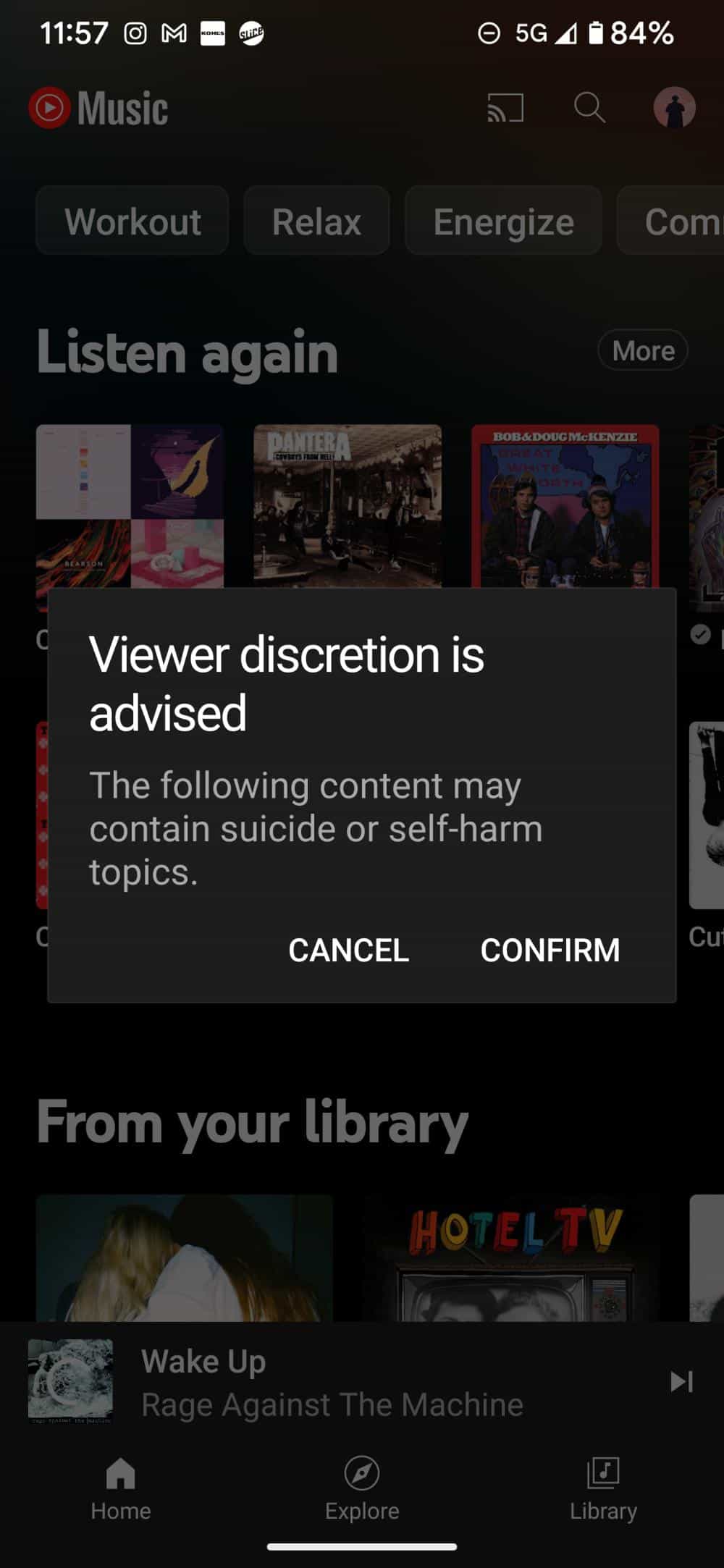
Begrijpen waarom YouTube Music waarschuwingen voor kijkersdiscretie weergeeft, is de eerste stap om te leren hoe je deze waarschuwingen op YouTube Music kunt uitschakelen.
Deel 2. Hoe schakel ik de waarschuwing voor mindervaliden op YouTube Music uit?
Hoe schakel je de waarschuwing voor kijkers op YouTube Music uit? Helaas is er momenteel geen officiële instelling in de YouTube Music-app of op de website om de pop-up 'Waarschuwing voor kijkers' uit te schakelen. Sommige gebruikers hebben echter oplossingen gevonden die door de community zijn bedacht. Hier zijn een paar methoden:
Schakel de beperkte modus uit
- Open de YouTube Music-app.
- Tik op je profielfoto in de rechterbovenhoek.
- Selecteer Instellingen.
- Tik op Algemeen.
- Zoek de optie 'Beperkte modus' en zet de schakelaar in de stand 'Uit'.
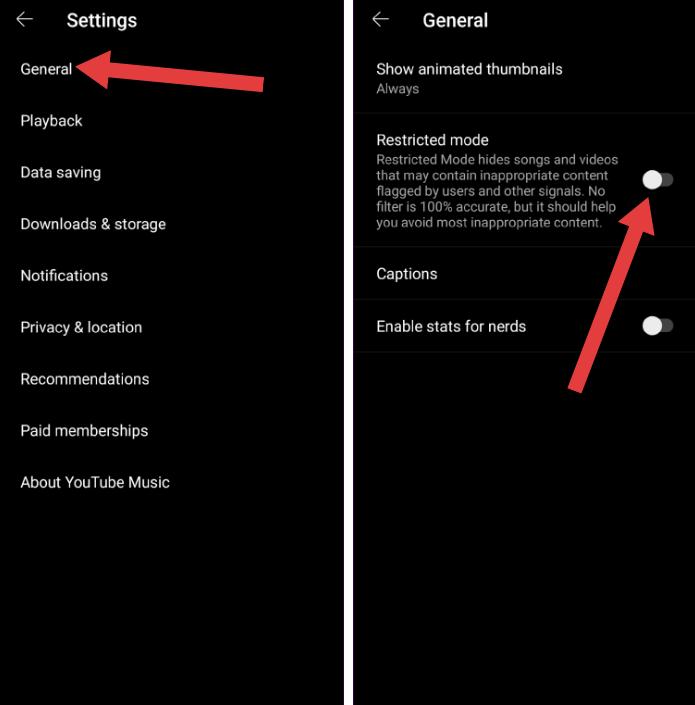
Hoewel het uitschakelen van de Beperkte modus (via Instellingen > Algemeen > Beperkte modus) ervoor zorgt dat er geen ongepaste inhoud meer in je aanbevelingen verschijnt, blijft de handmatige bevestiging voor specifieke nummers of video's met een waarschuwing 'Kijkersdiscretie' vereist.
Controleer uw leeftijd
Update je Google-account om je leeftijd te bevestigen. Geverifieerde accounts hebben doorgaans geen last van waarschuwingen voor kijkers.
Update YouTube Music
Een verouderde app geeft mogelijk uw accountwijzigingen niet weer. Zorg ervoor dat u de nieuwste versie van de YouTube Music-app gebruikt.
Google-accountinstellingen wijzigen
Controleer je instellingen voor ouderlijk toezicht. Vraag voor gezinsaccounts de beheerder om de beperkingen aan te passen.
Door deze methoden te volgen, kunnen de meeste gebruikers de kijkersprivileges op YouTube Music succesvol uitschakelen.
Deel 3. Hoe luister je offline naar YouTube-muziek zonder onderbrekingen?
Als YouTube Music steeds waarschuwingen voor kijkersdiscretie of andere onderbrekingen weergeeft, is het een handig alternatief om je favoriete nummers te downloaden om ze offline te beluisteren. DumpMedia YouTube-muziekconvertor kunt u Sla YouTube Music-nummers lokaal op in populaire formaten zoals MP3, WAV en FLAC.
Gratis downloaden Gratis downloaden
Het is een professionele tool, speciaal ontworpen voor YouTube Music-gebruikers, waarmee ze nummers kunnen downloaden en er altijd en overal van kunnen genieten, zonder zich zorgen te hoeven maken over beperkingen of waarschuwingen. Zelfs als de YouTube Music-app niet werkt op je apparaat, kun je YouTube Music-nummers direct offline afspelen op een andere muziekspeler.
🏆Belangrijkste mogelijkheden van DumpMedia YouTube-muziekconvertor
- 🎵Integratie met de YouTube Music-webspeler
- 🎵Behoud originele metadata (artiest, album, enz.)
- 🎵Snelle batchconversie
- 🎵Behoud de originele geluidskwaliteit
- 🎵Compatibel met beide Windows en Mac
Converteer YouTube-muziek naar MP3 Stap voor Stap
Stap 1. Download en installeer de software op uw computer. Het werkt met beide. WinWindows en Mac. De interface is gebruiksvriendelijk, waardoor het gemakkelijk is voor beginners.
Gratis downloaden Gratis downloaden
Stap 2. Open de ingebouwde YouTube Music-webspeler in DumpMedia Log in met je YouTube Music-account. Blader door YouTube Music en sleep de nummers, albums of afspeellijsten die je wilt downloaden naar de converter.
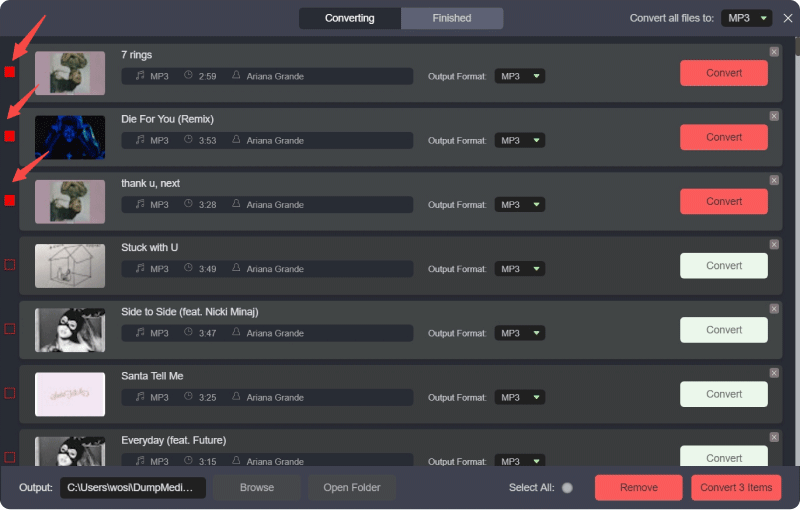
Stap 3. Selecteren MP3 (meest compatibel). Je kunt ook de bitrate of de samplefrequentie aanpassen. Kies voor de beste balans 320 kbps.
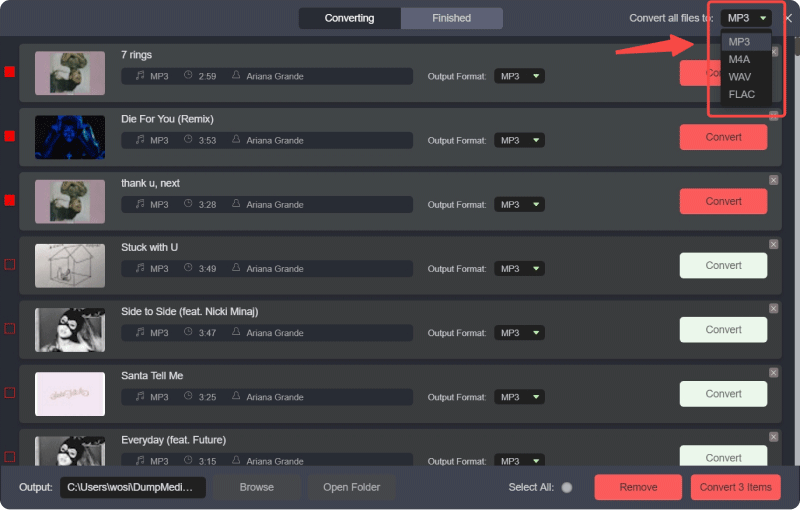
Stap 4. Zodra de instellingen zijn voltooid, kunnen gebruikers de conversie uitvoeren door op het pictogram 'Converteren' te klikken. DumpMedia zal YouTube Music-nummers downloaden naar MP3 Binnen enkele seconden dankzij de supersnelle snelheid.
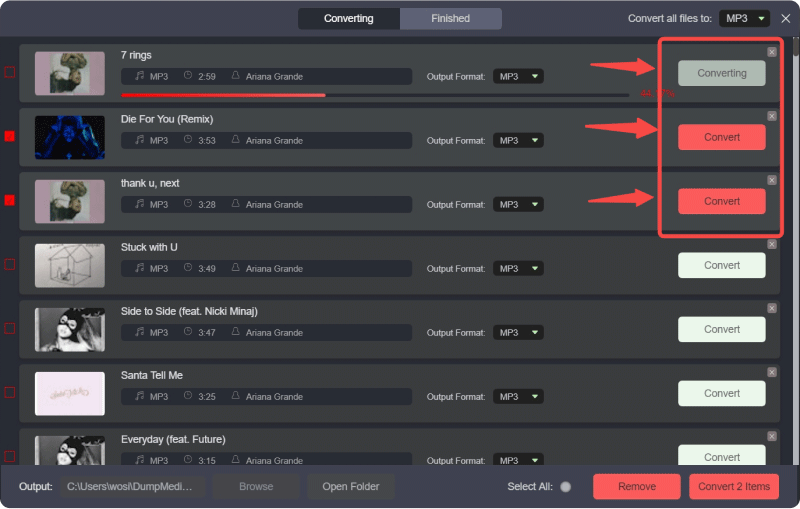
Met deze gedownloade nummers hoef je je geen zorgen meer te maken over waarschuwingen voor kijkers, beperkte weergave of leeftijdsverificatie. Geniet ongestoord van muziek wanneer je maar wilt.
Deel 4. Veelgestelde vragen
Vraag 1. Kan ik de kijkersdiscretie op YouTube Music volledig uitschakelen?
Ja, door de beperkte modus uit te schakelen, uw leeftijd te verifiëren en de accountinstellingen aan te passen, kunnen de meeste waarschuwingen worden verwijderd.
Vraag 2. Waarom is de beperkte modus vergrendeld op YouTube Music?
Familieaccounts, schoolaccounts of apparaatbeleid kunnen de beperkte modus vergrendelen, waardoor wijzigingen niet mogelijk zijn.
Vraag 3. Worden kijkerswaarschuwingen vanwege leeftijdsverificatie verwijderd?
Ja, door je leeftijd te verifiëren krijg je meestal toegang tot nummers waarvoor een leeftijdsbeperking geldt.
Vraag 4. Waarom blijven sommige nummers beperkingen vertonen nadat de Beperkte modus is uitgeschakeld?
Instellingen van de contenteigenaar of regionale beperkingen kunnen er nog steeds voor zorgen dat bepaalde nummers worden geblokkeerd.
Vraag 5. Is 'kijkerdiscretie' hetzelfde als 'beperkte modus'?
Vanwege inhoudsbeperkingen verschijnen waarschuwingen voor kijkers, terwijl de Beperkte modus een instelling is die gemarkeerde inhoud filtert.
Vraag 6. Kan ik gedownloade YouTube Music-nummers offline beluisteren?
Absoluut. Gebruik DumpMedia Met YouTube Music Converter kun je nummers downloaden en offline afspelen zonder waarschuwingen.
Deel 5. Overzicht
Door de bovenstaande stappen te volgen, kunt u eenvoudig leren hoe u de privacyinstellingen voor kijkers op YouTube Music uitschakelt en ongestoord van uw muziek kunt genieten. Voor een naadloze offline ervaring, DumpMedia YouTube Music Converter is dé tool om YouTube-muziek onbeperkt te downloaden en af te spelen.