


Hoe je Pandora-nummers kunt converteren naar MP3 in 2026: Stappenplan
Pandora is een van de populairste muziekstreamingplatforms, maar de nummers zijn vaak beschermd door abonnementsbeperkingen, waardoor offline toegang en flexibele weergave worden belemmerd. Veel gebruikers vragen zich af: hoe kan ik Pandora-nummers converteren naar een ander formaat? MP3 zodat ze overal kunnen luisteren zonder zich zorgen te hoeven maken over het verlopen van hun abonnement. In deze handleiding leggen we uit waarom je Pandora-muziek misschien wilt converteren naar een ander formaat. MP3De beste tools voor de klus, en een stapsgewijs proces om je muziek permanent offline te halen.
Inhoudsopgave Deel 1. Kun je Pandora-nummers direct downloaden naar MP3?Deel 2. Beste tool om Pandora-muziek te converteren naar MP3Deel 3. Pandora-muziek converteren naar MP3 Stap voor stap?Deel 4. FAQDeel 5. Conclusie
Deel 1. Kun je Pandora-nummers direct downloaden naar MP3?
Pandora biedt Premium-gebruikers de mogelijkheid om offline te luisteren, maar gedownloade nummers zijn gekoppeld aan je account en abonnement. Pandora (zoals Spotify en Apple Music) gebruikt DRM (beheer van digitale rechten) Om ervoor te zorgen dat je alleen luistert zolang je een actief abonnement hebt. Offline nummers kunnen niet naar andere apparaten worden overgezet of permanent worden opgeslagen. Om Pandora-nummers op een fysieke schijf te krijgen. MP3 Voor dit formaat moet je onofficiële methoden gebruiken.
Deel 2. Beste tool om Pandora-muziek te converteren naar MP3
Hoe converteer je Pandora-muziek naar MP3De meest betrouwbare oplossing is DumpMedia Pandora Muziek ConverterDeze tool helpt gebruikers Pandora-nummers om te zetten naar MP3, FLAC, M4A en WAV met één klik. Zo kun je afspeellijsten lokaal opslaan en je muziek behouden, ook na een abonnementswijziging. In plaats van volledig afhankelijk te zijn van streaming, kunnen gebruikers langdurige muziekcollecties opbouwen met hun Pandora-afspeellijsten. Zelfs als de Pandora-app niet werkt op je apparaat, kun je Speel Pandora-nummers offline af onmiddellijk op een andere muziekspeler.
🏅Waarom kiezen voor DumpMedia Pandora Muziek Converter:
- ⭐Integratie met Pandora webplayer
- ⭐Werkt voor zowel Pandora Premium- als gratis gebruikers
- ⭐Bied batchconversie met een snelheid tot 35x
- ⭐Behoud ID3-tags zoals artiest, cover, kunst, enz.
- ⭐Behoud de originele audiokwaliteit
- ⭐100% schoon. Geen risico bij gebruik
Gratis downloaden Gratis downloaden
Met deze tool kunt u Pandora-nummers eenvoudig converteren naar MP3 zonder ingewikkelde installaties of technische kennis.
Deel 3. Pandora-muziek converteren naar MP3 Stap voor stap?
Volg deze eenvoudige stappen om Pandora-nummers om te zetten naar MP3 with DumpMedia Pandora Muziek Converter:
Stap 1. Download en installeer DumpMedia Installeer Pandora Music Converter op je Mac/pc. Start het programma en je ziet de interface. Gebruik je Pandora Premium/Gratis account om in te loggen.
Gratis downloaden Gratis downloaden
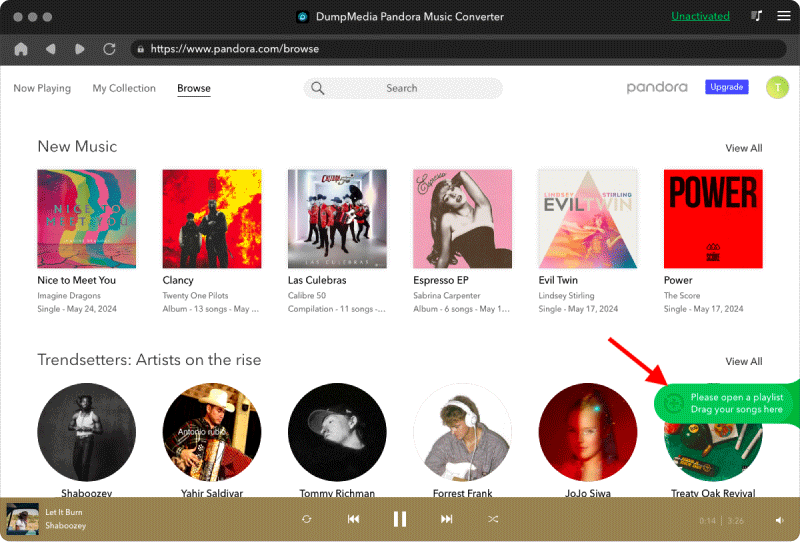
Stap 2. Sleep vervolgens de nummers of afspeellijsten rechtstreeks naar het zwevende "+" pictogram om ze toe te voegen aan de conversiewachtrij, zodat ze klaar zijn om gedownload te worden.
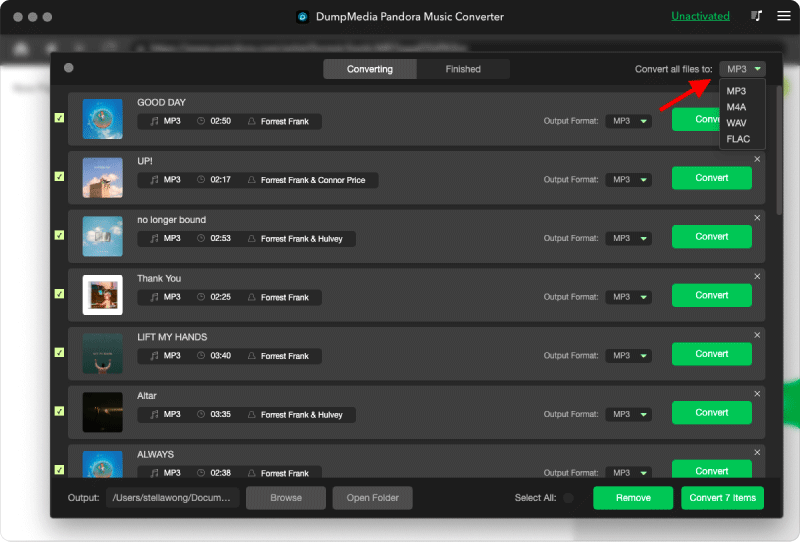
Stap 3. Zodra je tevreden bent met de nummers die je hebt geselecteerd, kun je het gewenste audiobestandsformaat kiezen.
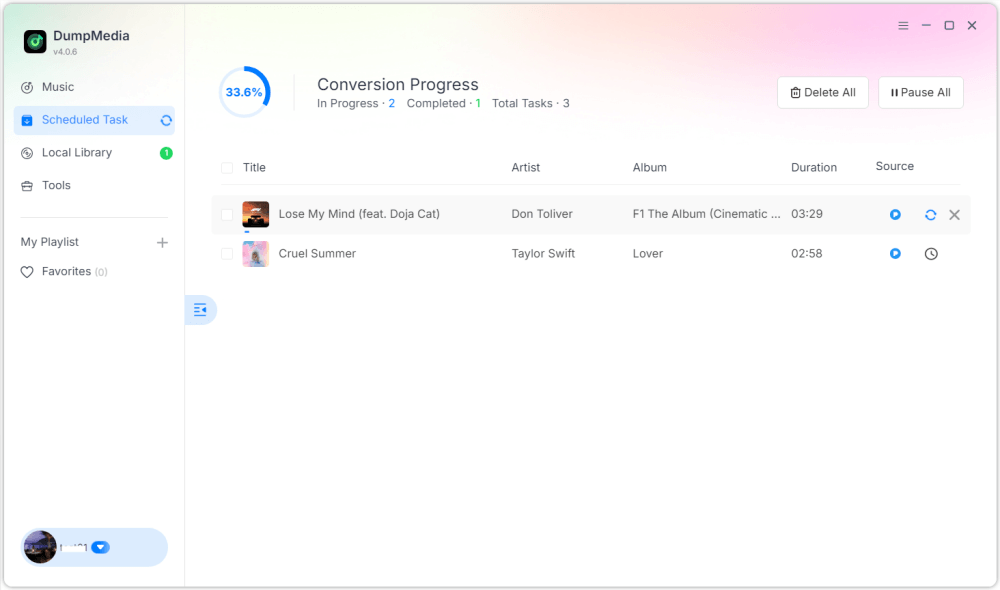
Stap 4. Zodra de instellingen zijn voltooid, kunnen gebruikers de conversie uitvoeren door op het pictogram 'Converteren' te klikken. DumpMedia zal Pandora-nummers converteren naar MP3 Binnen enkele seconden dankzij de supersnelle snelheid.
Deel 4. FAQ
Vraag 1: Kan ik Pandora-nummers converteren naar MP3 gratis?
Ja, sommige tools bieden gratis proefperiodes aan, maar betaalde converters zoals DumpMedia Biedt hogere snelheden en batchverwerking.
DumpMedia lanceert regelmatig promotiecampagnes; u kunt contact opnemen met DumpMedia Neem contact op met de klantenservice voor vragen over extra kortingen en aanbiedingen.
Vraag 2: Is het legaal om Pandora-nummers om te zetten naar...? MP3?
Het converteren voor persoonlijk offline gebruik wordt over het algemeen als acceptabel beschouwd, maar distributie of commercieel gebruik kan in strijd zijn met de auteursrechtwetgeving.
Vraag 3: Kan ik complete Pandora-afspeellijsten converteren naar MP3 onmiddelijk?
Ja. DumpMedia Pandora Music Converter ondersteunt batchconversie voor afspeellijsten en albums.
Vraag 4: Zal de MP3 Songinformatie behouden?
Ja, de converter behoudt metadata zoals titel, artiest, album en albumhoes.
Deel 5. Conclusie
Pandora-nummers converteren naar MP3 Dit is de beste manier om offline van je favoriete muziek te genieten, permanente back-ups te maken en de weergave op al je apparaten volledig te beheren. Zo converteer je Pandora-nummers naar... MP3? Gebruik makend van DumpMedia Pandora Music Converter stelt je in staat om snel en eenvoudig nummers, albums en afspeellijsten om te zetten naar verschillende bestandsformaten. MP3 Zonder kwaliteitsverlies of verlies van metadata. Begin vandaag nog met converteren om je Pandora-muziekcollectie voor altijd te bewaren.