


Deezer ARL: Hoe gebruik je het, en een veiliger alternatief?
Als je op zoek bent naar Deezer ARL, probeer je waarschijnlijk muziek te openen of te downloaden via tools van derden. Hoewel Deezer ARL in bepaalde situaties handig kan zijn, is het niet zo eenvoudig of veilig als veel gebruikers denken. In deze handleiding leggen we uit wat Deezer ARL is en hoe je Deezer ARL kunt verkrijgen. We delen ook een veiliger en betrouwbaarder alternatief. Laten we beginnen!
Inhoudsopgave Deel 1. Wat is Deezer ARL? Deel 2. Hoe krijg ik Deezer ARL?Deel 3. Is Deezer ARL veilig?Deel 4. Het beste alternatief voor Deezer ARL Deel 5. Deezer ARL vs. DumpMediaDeel 6. Veelgestelde vragen Deel 7. Conclusie
Deel 1. Wat is Deezer ARL?
In de wereld van digitale muziekdownloads en -streaming is ARL (Access Rights Language) in feite een authenticatietoken dat door de webversie van Deezer in de cookies van je browser wordt opgeslagen . Simpel gezegd fungeert het als de "digitale toegangspas" voor je account.
Waarom is Deezer ARL belangrijk?
Het Deezer ARL-token wordt vaak gebruikt in muziekprogramma's van derden, automatiseringsscripts en downloadprogramma's. Deze tools vertrouwen op ARL om toegang te krijgen tot je muziekbibliotheek, afspeellijsten op te halen en nummers te downloaden. Daarom wordt de term "Deezer ARL" vaak gebruikt door gebruikers die op zoek zijn naar geavanceerde toegang of downloads.
Deel 2. Hoe krijg je Deezer ARL??
De procedure voor het verkrijgen van een Deezer ARL blijft vooralsnog hetzelfde: het betreft een standaard authenticatietoken op basis van cookies. Dit moet via een webbrowser op een desktopcomputer (Chrome, Firefox of Edge) gebeuren, aangezien deze interne tokens niet toegankelijk zijn via de mobiele app.
Hoe u uw ARL kunt ophalen (stap voor stap)
Voor Chrome en Microsoft Edge
- Ga naar deezer.com en log in op je account.
- Druk op F12 (of Ctrl + Shift + I op Win(dows; Cmd + Option + I op Mac).
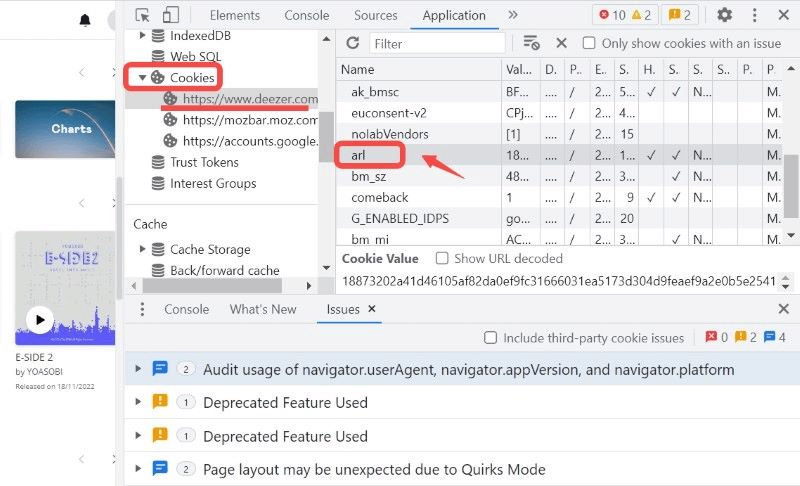
- Klik bovenaan op het tabblad 'Applicatie' (als u dit niet ziet, klik dan op de pijlen >>). Vouw in de linkerzijbalk het gedeelte 'Cookies' uit en selecteer https://www.deezer.com.
- Zoek naar 'arl' in de kolom 'Naam'. Dubbelklik op de lange reeks tekens in de kolom 'Waarde' en kopieer deze.
Voor Mozilla Firefox
- Log in op je account op deezer.com.
- Druk op F12 (of Ctrl + Shift + I op Win(dows; Cmd + Option + I op Mac).
- Klik bovenaan op het tabblad 'Opslag'. Vouw in de linkerzijbalk 'Cookies' uit en selecteer https://www.deezer.com.
- Zoek naar 'arl' in de lijst. Kopieer de alfanumerieke tekenreeks in de kolom 'Waarde'.
Met Deezer ARL kunnen gebruikers inloggen op tools van derden en bepaalde beperkingen omzeilen. De werkelijke bedoeling van Deezer ARL is dus niet alleen inloggen, maar vooral toegang tot muziek ontsluiten.
Belangrijke opmerking:
- Er is nu een extensie genaamd "Deezer ARL Retriever" beschikbaar in de Microsoft Edge-add-onswinkel waarmee u het token met één klik kunt extraheren, zodat u niet handmatig door de ontwikkelaarstools hoeft te navigeren.
- Houd er rekening mee dat uw ARL is gekoppeld aan uw huidige sessie. Als u uitlogt van de Deezer-website, wordt de ARL die u zojuist hebt gekopieerd onmiddellijk ongeldig.
- Je ARL is in feite je inlogcode zonder wachtwoord. Deel deze code nooit op openbare forums of Discord-kanalen, want hiermee krijg je volledige toegang tot je account en abonnement.
Deel 3. Is Deezer ARL veilig?
Dit is waar het kritiek wordt. Hoewel Deezer ARL werkt, brengt het verschillende risico's met zich mee die veel gebruikers negeren.
1. Beveiligingsrisico's van accounts
Je Deezer ARL-token fungeert in feite als een 'sleutel' tot je account, waarmee je standaardwachtwoorden kunt omzeilen en direct toegang krijgt. Omdat het een gevoelig authenticatietoken is, stelt het openbaar maken ervan anderen in staat om toegang te krijgen tot je account, je premium-abonnement zonder toestemming te gebruiken en mogelijk je persoonlijke gegevens in gevaar te brengen.
2. Problemen met het verlopen van tokens
Daarnaast kunnen Deezer ARL-tokens verlopen en plotseling stoppen met werken, wat kan leiden tot een instabiele gebruikerservaring. Deze sessiegebonden tokens worden vaak ongeldig wanneer u uitlogt van de officiële website of wanneer het platform zijn beveiligingsprotocollen vernieuwt. U moet dan handmatig een nieuwe code ophalen om toegang te blijven houden tot tools van derden.
3. Risico op accountbeperkingen
Bovendien brengt het gebruik van ARL-tokens met onofficiële tools het risico met zich mee van accountbeperkingen, aangezien deze acties vaak in strijd zijn met het platformbeleid en kunnen leiden tot geautomatiseerde beperkingen of permanente verbanningen.
4. Technische complexiteit
Laten we eerlijk zijn: de meeste gebruikers willen niet de moeite nemen om de ontwikkelaarstools van hun browser te openen, handmatig cookies te verwijderen of complexe configuraties door te voeren, alleen maar om naar hun muziek te luisteren. Dit handmatige proces is vaak te omslachtig en intimiderend voor de gemiddelde gebruiker die gewoon een naadloze, 'plug-and-play'-ervaring wil.
Deel 4. Het beste alternatief voor Deezer ARL
In plaats van de risico's van ARL te lopen, is er een veel eenvoudigere en veiligere oplossing: gebruik een professionele muziekconverter zoals DumpMedia Deezer Muziek ConverterDeze tool is speciaal ontworpen om muziek van Deezer te downloaden. nummers omzetten in MP3, WAV en FLAC.
Gratis downloaden Gratis downloaden
Meer functies
- Behoud verliesvrije audiokwaliteit
- Batchconversie voor afspeellijsten en albums
- Snelle conversiesnelheid
Stap voor stap: Deezer Music downloaden
Stap 1. Download en installeer de software op uw computer. Het werkt met beide. WinWindows en Mac. De interface is gebruiksvriendelijk, waardoor het gemakkelijk is voor beginners.
Gratis downloaden Gratis downloaden
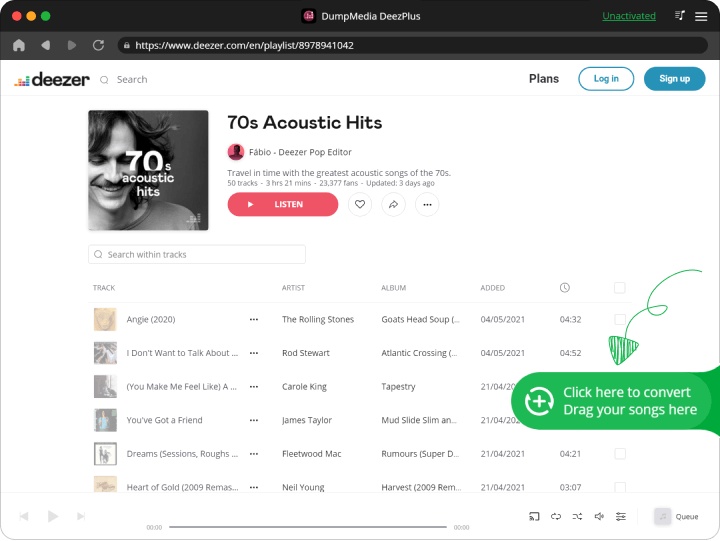
Stap 2. Open de ingebouwde Deezer-webspeler in DumpMedia Log in met je Deezer-account. Blader door Deezer en sleep de nummers, albums of afspeellijsten die je wilt downloaden naar de converter.
Stap 3. Selecteer in het instellingenpaneel MP3 als uitvoerformaat om een MP3 Download de door jou geselecteerde nummers.
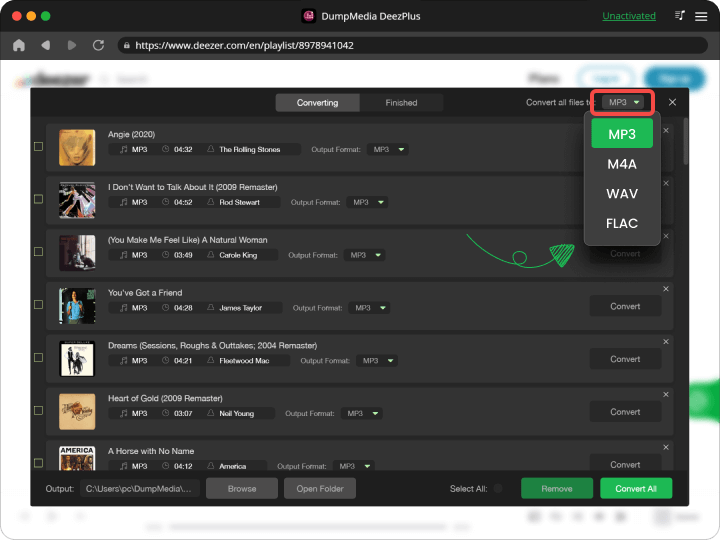
Stap 4. Druk op de knop "Alles converteren" en start de conversie. DumpMedia Deezer Music Converter ondersteunt 35x snellere downloadsnelheden; u hoeft alleen maar te wachten tot het conversieproces is voltooid.
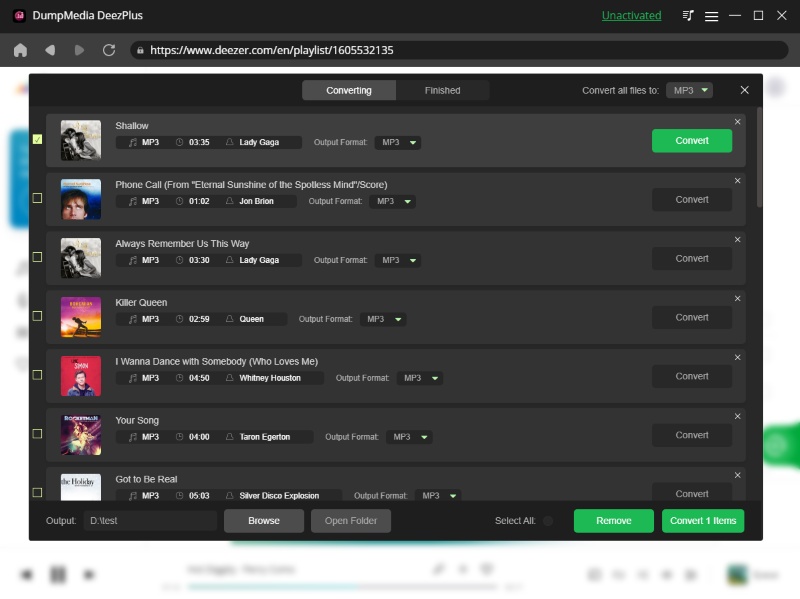
Een ander fantastisch kenmerk van deze converter is dat je verschillende parameters kunt aanpassen. Je kunt de bitrate en samplefrequentie wijzigen. Je kunt zelfs de ID3- tags van je nummers aanpassen.
Deel 5. Deezer ARL vs. DumpMedia
| Kenmerk | Deezer AR | DumpMedia |
| Makkelijk te gebruiken | ❌ Complex | ✅ Eenvoudig |
| Veiligheid | ❌ Riskant | ✅ Veilig |
| Stabiliteit | ❌ Onstabiel | ✅ Betrouwbaar |
| Downloadmogelijkheden | ✅ Ja | ✅ Ja |
| Permanente bestanden | ❌ Beperkt | ✅ Ja |
Het verschil is duidelijk: DumpMedia biedt een complete oplossing, terwijl Deezer ARL slechts een tijdelijke oplossing is.
Deel 6. Veelgestelde vragen
1. Is Deezer ARL veilig in gebruik?
Het kan riskant zijn als het gedeeld of misbruikt wordt, omdat het toegang geeft tot je account.
2. Kan ik muziek downloaden met Deezer ARL?
Ja, maar het is afhankelijk van tools van derden en kan instabiel zijn.
3. Wat is het beste alternatief voor Deezer ARL?
Een veiligere optie is het gebruik van een hulpmiddel zoals DumpMedia Deezer Muziek Converter.
4. Heb ik technische vaardigheden nodig om dit te gebruiken? DumpMedia?
Nee, het is ontworpen voor beginners en vereist geen technische installatie.
Deel 7. Conclusie
Moet je Deezer ARL gebruiken? Ja, als je technisch onderlegd bent en de risico's begrijpt. Maar voor de meeste gebruikers is het niet de beste keuze. Als je muziek wilt downloaden zonder risico's, kun je beter een speciaal programma zoals Deezer ARL gebruiken. DumpMedia DeezPlus is de slimmere keuze.