


Kun je audioboeken beluisteren op de Kindle Paperwhite? Complete handleiding (2026)
Veel gebruikers vragen: kun je naar audioboeken luisteren op Kindle Paperwhite Het korte antwoord is ja, maar met enkele belangrijke beperkingen. Als je audioboeken op je Kindle wilt beluisteren, is het belangrijk om te begrijpen hoe het werkt, welke formaten worden ondersteund en welke opties je hebt als je audioboeken niet compatibel zijn. In deze handleiding leggen we alles uit wat je moet weten over de mogelijkheid om audioboeken op je Kindle Paperwhite te beluisteren en hoe je dit probleemloos kunt laten werken.
Inhoudsopgave Deel 1. Kan ik audioboeken beluisteren op mijn Kindle Paperwhite?Deel 2. Hoe luister je naar Audible-audioboeken op je Kindle Paperwhite?Deel 3. De beste manier om gratis naar audioboeken te luisteren op je Kindle PaperwhiteDeel 4. Veelgestelde vragenDeel 5. Conclusie
Deel 1. Kan ik audioboeken beluisteren op mijn Kindle Paperwhite?
Kun je dus naar audioboeken luisteren op de Kindle Paperwhite? Ja, maar alleen onder specifieke voorwaarden. De Kindle Paperwhite ondersteunt audioboeken via... HoorbaarAmazon's officiële platform voor luisterboeken. Dit betekent dat je het volgende kunt doen:
- Koop audioboeken bij Audible.
- Download ze direct naar je Kindle.
- Luister via Bluetooth-hoofdtelefoons of -luidsprekers.
Er is echter één belangrijke beperking. De Kindle Paperwhite ondersteunt GEEN standaard audioformaten zoals MP3 of WAV. Dus hoewel je technisch gezien naar audioboeken kunt luisteren op de Kindle Paperwhite, ben je beperkt tot content van Audible.
Deel 2. Hoe luister je naar Audible-audioboeken op je Kindle Paperwhite?
Hoe kun je audioboeken beluisteren op een Kindle Paperwhite? Dat kan probleemloos, mits je een model van de 10e generatie (2018) of later hebt. Omdat Kindle Paperwhite-apparaten geen ingebouwde luidsprekers hebben, heb je hiervoor een Bluetooth-koptelefoon of een externe luidspreker nodig.
Hier is hoe het werkt:
Hier is de officiële methode om je audioboeken af te spelen:
Stap 1. Zorg ervoor dat uw Paperwhite een Kindle Paperwhite 10e generatie (2018) of een Kindle Paperwhite 11e generatie (2021/2024) is.
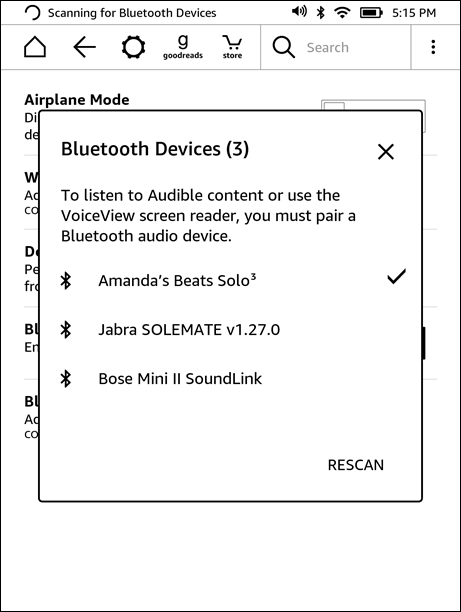
Stap 2. Veeg op het startscherm van je Kindle naar beneden om de snelle instellingen te openen. Tik op het Bluetooth-pictogram om Bluetooth in te schakelen. Zet je hoofdtelefoon of luidspreker in de koppelingsmodus. Tik op Bluetooth-apparaten op je Kindle en selecteer je apparaat uit de lijst.
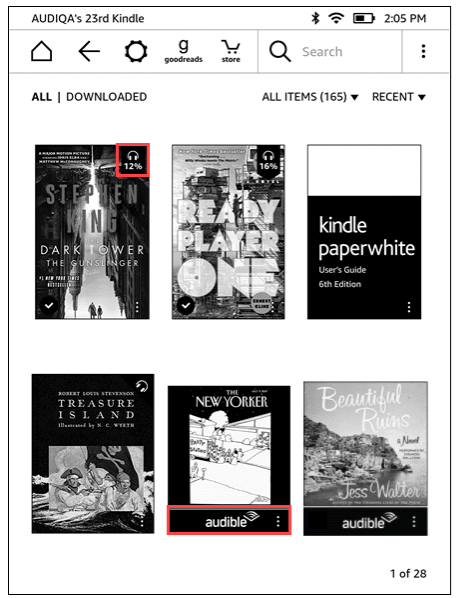
Stap 3. Ga naar je bibliotheek. Tik op het filterpictogram en selecteer Audible (of Audible/Audioboeken). Tik op de cover om de download te starten. (Zorg ervoor dat je verbonden bent met wifi, aangezien audioboeken veel groter zijn dan e-boeken).
Stap 4. Open het e-book. Tik in het midden van het scherm om het menu te openen. Tik op het koptelefoonpictogram rechtsonder. De Kindle synchroniseert je voortgang, zodat je kunt wisselen tussen lezen en luisteren zonder je leespositie te verliezen.
Dit is de officiële manier om audioboeken te beluisteren op je Kindle Paperwhite.
Beperkingen die u moet kennen
Hoewel het antwoord op de vraag "kun je audioboeken beluisteren op een Kindle Paperwhite?" ja is, is er wel een aantal beperkingen aan verbonden.
- Alleen Audible-ondersteuning: U kunt geen audioboeken van andere bronnen afspelen.
- DRM-beveiliging: Audible-bestanden zijn beveiligd en gekoppeld aan uw account.
- Nee MP3 Afspelen: Kindle Paperwhite ondersteunt geen gangbare formaten zoals MP3.
- Beperkte flexibiliteit: U kunt audioboekbestanden niet vrij overdragen of beheren.
Dit betekent dat als je audioboeken niet van Audible afkomstig zijn, je ze niet rechtstreeks op je Kindle Paperwhite kunt beluisteren.
Deel 3. De beste manier om gratis naar audioboeken te luisteren op je Kindle Paperwhite
Hoewel Kindles native ondersteuning bieden, zijn ze strikt gebonden aan het Audible-ecosysteem. Voor echte flexibiliteit op al je apparaten heb je een manier nodig om deze afspeelbeperkingen op te heffen. DumpMedia Hoorbare omzetter is de ideale oplossing, waarmee u DRM omzeilen en neem de volledige controle over je bibliotheek.
Gratis downloaden Gratis downloaden
Waarom zou je kiezen DumpMedia hoorbare converter?
Door gebruik te maken van een professionele converter krijgt u de vrijheid om:
- Universele formaatconversie: Direct Beveiligde Audible-audioboeken omzetten in MP3, M4A of FLAC.
- Volledige DRM-verwijdering*: Verwijder afspeelbeperkingen om ervoor te zorgen dat uw bibliotheek echt van u is.
- Compatibiliteit met meerdere apparaten: Luister op elk willekeurig apparaat MP3 Je kunt het geluid afspelen op je speler, autoradio of slimme luidspreker zonder de Audible-app te hoeven installeren.
- Permanent eigendom: Je kunt je gekochte audioboeken voor altijd bewaren, zelfs als je je abonnement opzegt.
*DumpMedia Het werkt door je audioboeken te decoderen en te downloaden naar DRM-vrije bestanden, zodat je een schone, onbeperkte kopie van je bibliotheek kunt verkrijgen voor elk apparaat.
Hoewel de Kindle Paperwhite zelf geen directe ondersteuning biedt voor directe downloads, ondersteunt deze Kindle Paperwhite zelf geen directe downloads. MP3 Door je audioboeken te converteren, krijg je volledige controle over hoe en waar je luistert. Voor gebruikers die verder willen kijken dan het gesloten ecosysteem van Audible, is dit de meest praktische en betrouwbare oplossing.
Audible-audioboeken converteren (stap voor stap)
Stap 1. Log in met je eigen Audible-account via de ingebouwde speler.
Stap 2. Blader of zoek naar het luisterboek dat u wilt converteren. U kunt het toevoegen door op de knop 'Toevoegen aan conversie' te klikken of door het naar het conversiepaneel te slepen.
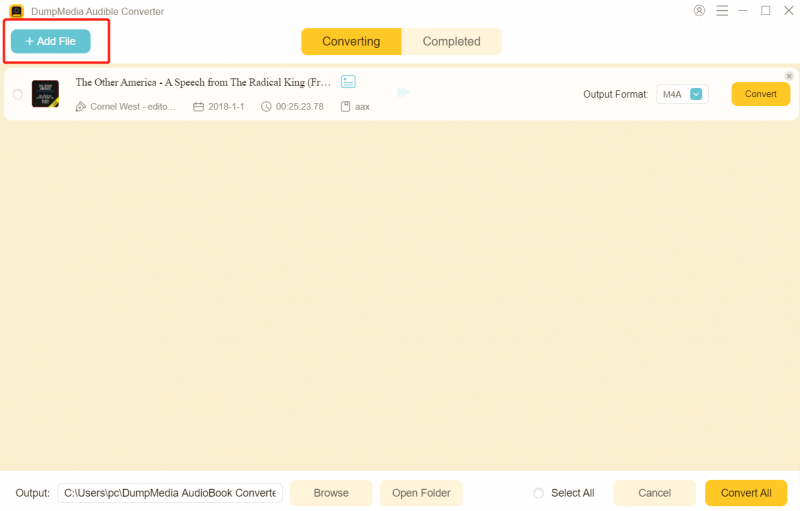
Stap 3. Kies het gewenste uitvoerformaat en de kwaliteitsinstellingen.

Stap 4. Klik op de knop 'Converteren' om het downloaden te starten. Wacht tot de conversie is voltooid.

Deel 4. Veelgestelde vragen
Kun je audioboeken beluisteren op de Kindle Paperwhite zonder Audible?
Nee, de Kindle Paperwhite ondersteunt officieel alleen Audible-audioboeken.
Waarom kan ik niet spelen? MP3 Luisterboeken op Kindle?
Omdat Kindle geen standaard audioformaten ondersteunt.
Heb ik Bluetooth nodig om naar audioboeken te luisteren?
Ja, de Kindle Paperwhite vereist Bluetooth-audioapparaten.
Kan ik audioboeken handmatig overzetten?
Niet tenzij ze in een ondersteund formaat zijn.
Deel 5. Conclusie
Kun je dus audioboeken beluisteren op een Kindle Paperwhite? Ja, maar alleen binnen een beperkt ecosysteem. Als je meer controle wilt over je audioboeken, bijvoorbeeld door ze op meerdere apparaten af te spelen of permanente kopieën te bewaren, heb je een andere oplossing nodig, zoals een ander apparaat. DumpMedia Audible Converter. Door deze beperkingen te begrijpen en de juiste tools te gebruiken, kunt u verder gaan dan de standaardinstellingen en een flexibelere luisterboekervaring creëren die aansluit bij uw behoeften.

30% korting >>>