


Spotify ¿No responde? Soluciónalo en 2026.
Muchos usuarios se encuentran con el frustrante problema donde Spotify no está respondiendo mientras intenta reproducir música, abrir listas de reproducción o usar el modo sin conexión. A veces el Spotify applicación Se congela por completo, falla inesperadamente o deja de funcionar durante la reproducción. Spotify Los problemas con las aplicaciones son extremadamente comunes. En esta guía, explicaremos por qué. Spotify deja de funcionar repentinamente, cómo solucionar problemas comunes Spotify Problemas con la aplicación y cómo disfrutar de una reproducción de música sin conexión más estable.
Guía de contenido Parte 1. Por qué es Spotify ¿La aplicación no responde?Parte 2. Como arreglar Spotify ¿La aplicación no responde?Parte 3. La mejor manera de evitar Spotify Problemas de reproducciónParte 4. Preguntas frecuentesParte 5. Conclusión
Parte 1. Por qué es Spotify ¿La aplicación no responde?
Hay muchas razones por las cuales Spotify No responde durante la reproducción de música ni durante el uso de la aplicación.
Mala conexión a internet
Spotify Depende en gran medida de un acceso a Internet estable para la transmisión y la verificación de la cuenta. Las conexiones de red débiles pueden causar Spotify congelarse o dejar de responder.
Corrompido Spotify Cache
Archivos temporales almacenados dentro Spotify Con el tiempo, pueden corromperse, provocando fallos en la aplicación y problemas de reproducción.
Anticuado Spotify Aplicaciones
Más antiguo Spotify Las versiones pueden contener errores que activan el "Spotify error "no responde".
Spotify Problemas del servidor
A veces Spotify Las interrupciones del servidor afectan la reproducción de los usuarios y el rendimiento de la aplicación a nivel mundial.
Conflictos de software en segundo plano
Los conflictos relacionados con el software antivirus, la configuración del firewall o la aceleración del hardware también pueden causar Spotify para dejar de responder.
Problemas de compatibilidad de dispositivos
Los sistemas operativos más antiguos o los dispositivos no compatibles pueden tener problemas para ejecutar la última versión. Spotify La aplicación funciona sin problemas.
Estas son algunas de las causas más comunes detrás de "Spotify "No responde" es un problema.
Parte 2. Como arreglar Spotify ¿La aplicación no responde?
If Spotify Si su dispositivo no responde, pruebe las siguientes soluciones.
Solución 1. Reiniciar Spotify
Completamente cerrado Spotify y vuelve a abrir la aplicación. Esta sencilla solución suele resolver problemas temporales de reproducción.
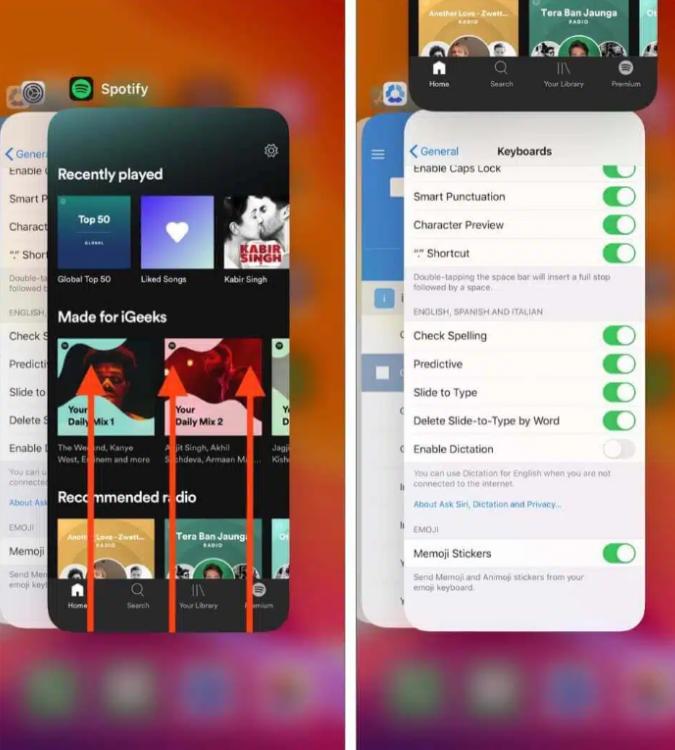
En iOS (iPhone/iPad): Desliza el dedo hacia arriba desde el borde inferior de la pantalla y detente en el medio (o haz doble clic en el botón Inicio en dispositivos más antiguos). Busca el Spotify Previsualiza la tarjeta y deslízala completamente hacia arriba, fuera de la pantalla.
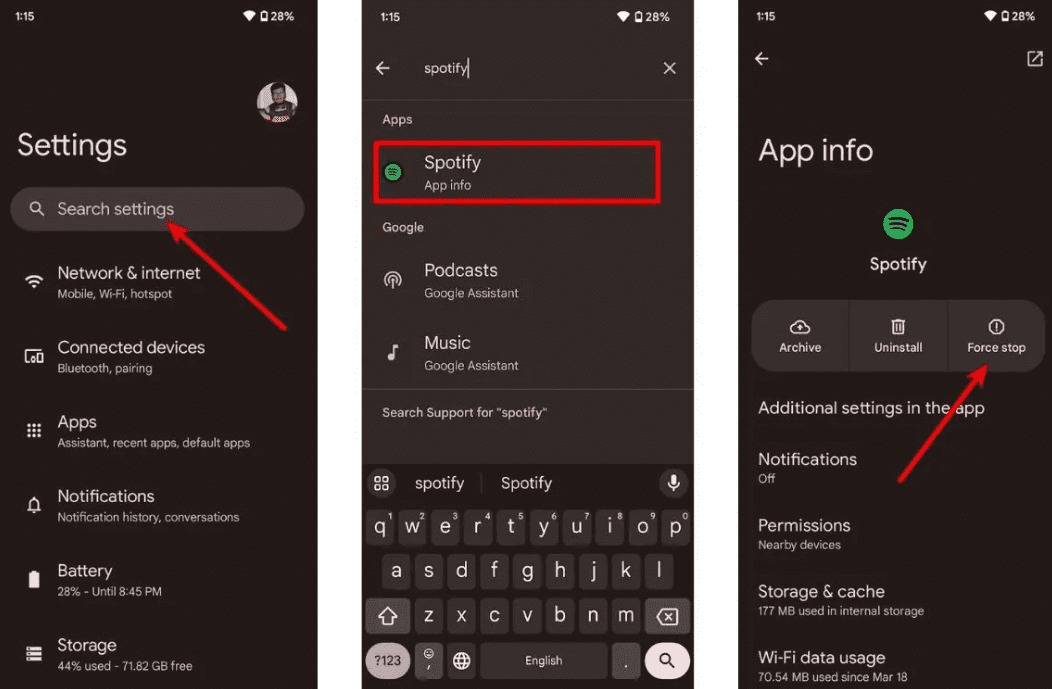
En Android: Ve a Ajustes > Aplicaciones > Spotify y pulsa Forzar detención. Esto finaliza todas las tareas en segundo plano que se quedan colgadas. Abrir Spotify desde el cajón de aplicaciones.
En macOS: Haga clic en Spotify en la barra de menú superior y seleccione Salir Spotifyo simplemente haga clic en la ventana y presione Comando (⌘) + Q.
On WinDow (10/11): Haga clic en Archivo en la esquina superior izquierda de la pantalla. Spotify Abra la ventana y seleccione Salir (al presionar la "X" en la esquina superior derecha, a menudo solo se minimiza a la bandeja del sistema en lugar de cerrarla).
Solución 2. Verifique su conexión a Internet
Cambia entre Wi-Fi y datos móviles para comprobar la estabilidad de la conexión.
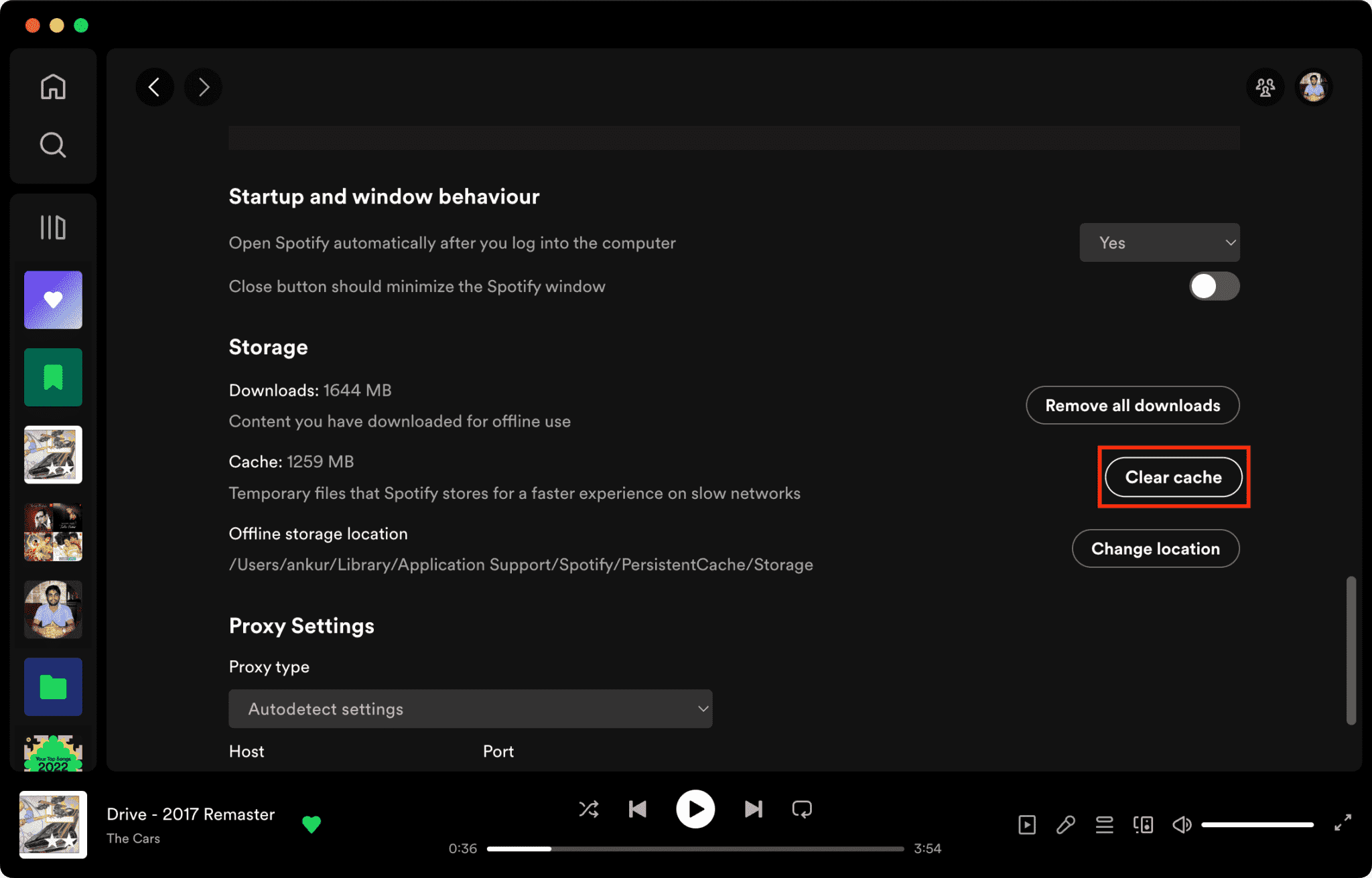
Solución 3. Borrar Spotify Cache
Los archivos de caché corruptos son una de las principales razones por las que Spotify no responde.
Cómo borrar Spotify Caché en Mac/WinWindows/iPhone/Android >>>>
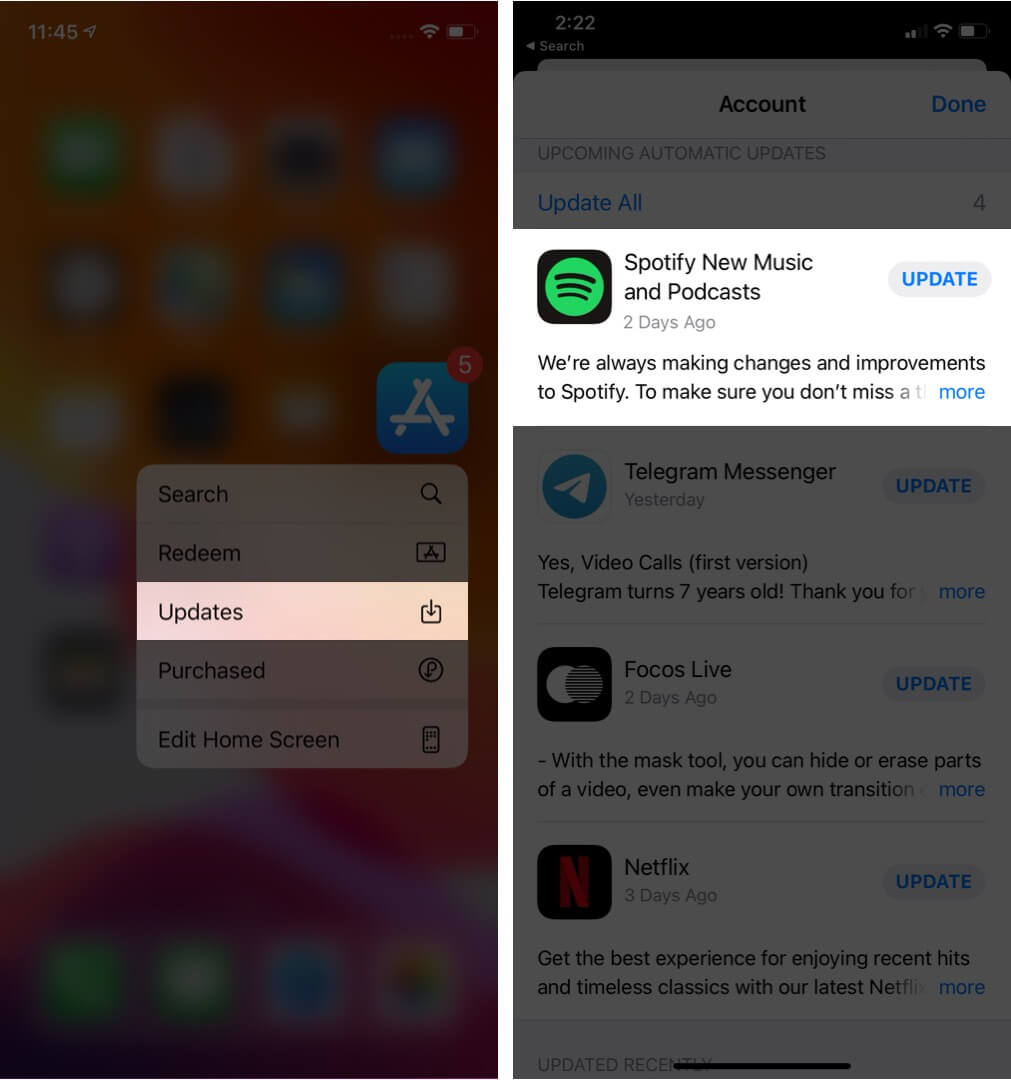
Solución 4. Actualización Spotify Aplicaciones
Instalando la última versión Spotify Esta versión podría corregir errores de software conocidos.
Solución 5. Reinicie su dispositivo
Reiniciar el ordenador o el teléfono puede actualizar los recursos del sistema.
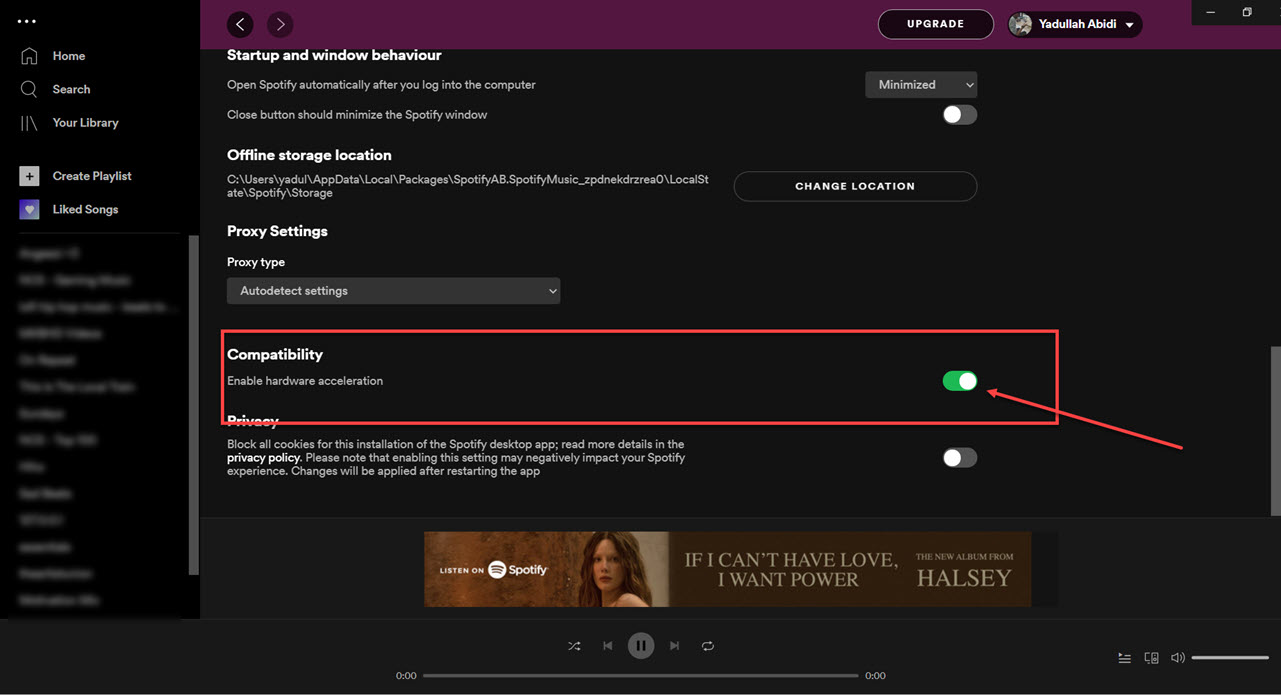
Solución 6. Deshabilite la aceleración de hardware
Puedes desactivar la aceleración de hardware. Esto a veces soluciona los problemas de bloqueo.
Solución 7. Verificar Spotify El estado del servidor
Global Spotify Las interrupciones del servicio afectan ocasionalmente a la reproducción de contenido y a los servicios de inicio de sesión.
Parte 3. La mejor manera de evitar Spotify Problemas de reproducción
Muchos usuarios asumen que se ha descargado Spotify Las canciones siempre funcionarán sin conexión, pero las canciones descargadas permanecen protegidas por DRM, lo que significa que la música solo funciona dentro de la aplicación de transmisión. Las descargas no se pueden transferir libremente. Si con frecuencia encuentra el "Spotify El problema de "no responde" es una herramienta popular. DumpMedia Spotify Music ConverterEste software permite a los usuarios convertir Spotify música en formatos de audio locales para una reproducción sin conexión más flexible. Incluso si la Spotify La aplicación no funciona en tu dispositivo, puedes PLAY Spotify canciones sin conexión en otro reproductor de música inmediatamente.
Descarga gratuita Descarga gratuita
🏆Características clave de DumpMedia Spotify Music Converter
- Descargar Spotify música para MP3WAV, FLAC y AAC
- Eliminar Spotify Protección DRM*
- Conserva la calidad de sonido original.
- Descarga por lotes listas de reproducción y álbumes
- Rápida velocidad de conversión
- Conservar los metadatos de la canción y las etiquetas ID3.
- Admite la reproducción sin conexión en cualquier dispositivo.
Para usuarios frustrados por Spotify A diferencia de la inestabilidad de la aplicación, la reproducción de música local suele ser mucho más fiable.
Convertir Spotify a MP3 Paso a Paso
Paso 1: Descarga e instala DumpMedia Spotify Music Converter en tu Mac/PC. Ejecútalo y verás la interfaz. Usa tu Spotify Cuenta Premium/Gratuita para iniciar sesión.
Descarga gratuita Descarga gratuita
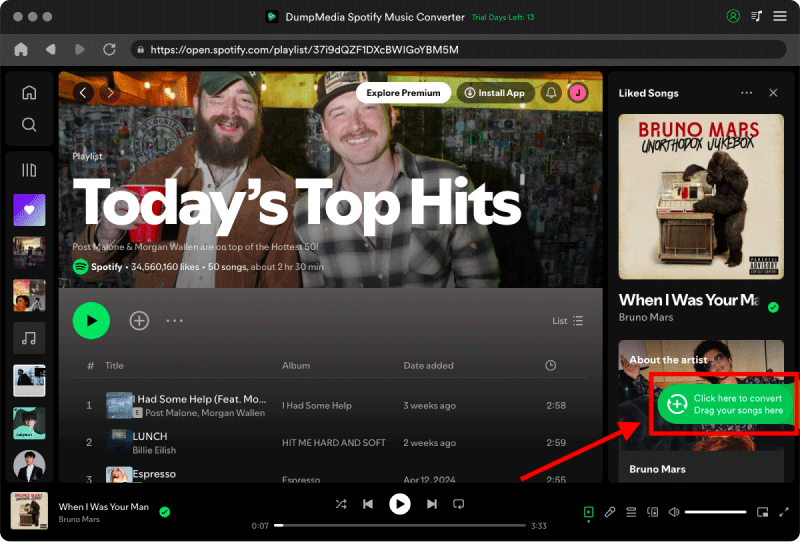
Paso 2. Busca la lista de reproducción, el álbum o la canción que deseas convertir. Puedes arrastrar una sola canción al icono "+" situado a la derecha de la pantalla. También puedes abrir una lista de reproducción o un álbum completo y hacer clic en el icono "Añadir para convertir" para cargarlo en el convertidor.
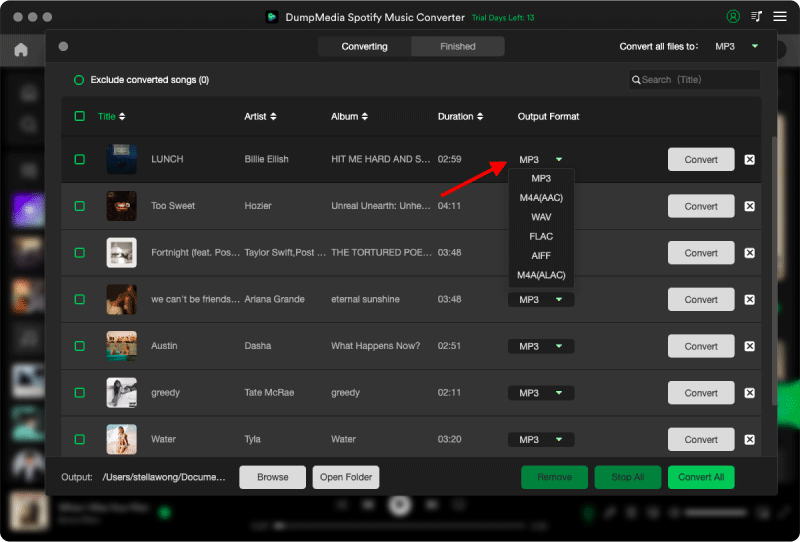
Paso 3: Seleccionar MP3 (la más compatible). También puedes cambiar la tasa de bits o la frecuencia de muestreo. Para obtener el mejor equilibrio, elige 320 kbps.
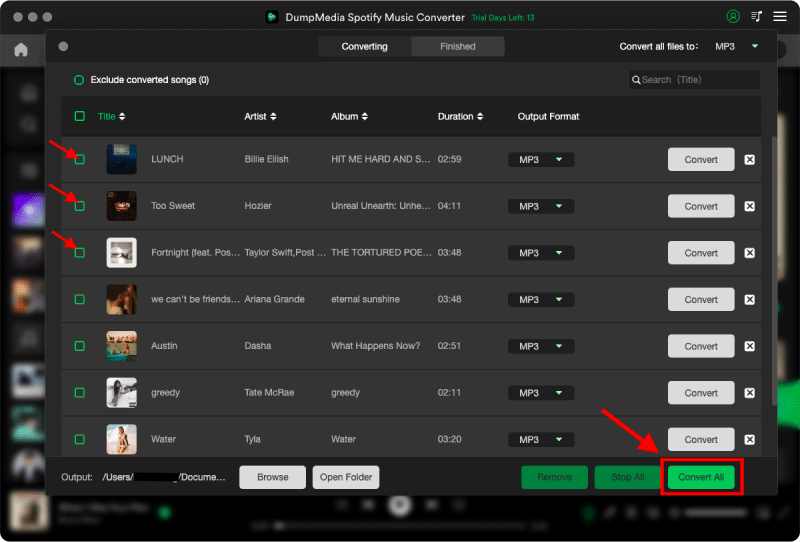
Paso 4: Una vez completada la configuración, los usuarios pueden procesar la conversión haciendo clic en el icono "Convertir". DumpMedia descargará Spotify canciones para MP3 En cuestión de segundos gracias a su velocidad ultrarrápida.
Parte 4. Preguntas frecuentes
¿Por qué es Spotify ¿No responde?
Spotify Puede que deje de responder debido a problemas de Internet, archivos de caché dañados, software obsoleto o problemas con el servidor.
¿Por que Spotify ¿Sigue congelándose?
Spotify Los problemas de congelación suelen estar relacionados con la corrupción de la caché o con conflictos de aceleración de hardware.
¿Por qué es Spotify ¿Se me bloquea el teléfono?
Móvil Spotify Los fallos pueden deberse a poco espacio de almacenamiento, versiones desactualizadas de las aplicaciones o conflictos de software.
¿Por qué es Spotify ¿El modo sin conexión no funciona?
La reproducción sin conexión todavía depende de Spotify Autorización y estabilidad de la aplicación.
Is DumpMedia Spotify Music Converter ¿seguro?
Sí. Está diseñado para Spotify Conversión de música y gestión de reproducción local.
Nota: Las plataformas de streaming tienen sus propias reglas y sistemas de monitoreo. Como herramienta de terceros, DumpMedia Spotify Music Converter También está sujeto a sus restricciones, que pueden afectar su uso en ciertos casos. Spotify puede tomar medidas si detecta actividad que viole sus Términos de Servicio; esto es enteramente responsabilidad de Spotifydiscreción.
Parte 5. Conclusión
La "Spotify El problema de "no responde" puede deberse a inestabilidad de Internet, archivos de caché dañados, software obsoleto o Spotify problemas de la aplicación. Aunque muchas soluciones temporales pueden ayudar a restaurar la reproducción, Spotify La transmisión en directo sigue dependiendo en gran medida de la estabilidad de la aplicación y la verificación en línea. Para los usuarios que desean una escucha sin conexión más estable, DumpMedia Spotify Music Converter proporciona una forma práctica de convertir Spotify canciones en local MP3 archivos para una reproducción flexible en diferentes dispositivos.
Descarga gratuita Descarga gratuita
*DumpMedia funciona descifrando y descargando Spotify Convierte tus canciones a archivos sin DRM, lo que te permite obtener una copia limpia y sin restricciones de tu biblioteca para cualquier dispositivo. Esta función no incluye la eliminación del DRM de archivos de audio locales.