


Spotify Modo DJ: Cómo usarlo (Guía completa 2026)
Si has oído hablar recientemente de Spotify Modo DJ: puede que te preguntes qué hace exactamente y cómo usarlo. Spotify El modo DJ con IA es uno de los SpotifyEntre sus características más emocionantes, ofrece una experiencia musical personalizada impulsada por inteligencia artificial. Pero si bien es potente, también tiene limitaciones que muchos usuarios desconocen. En esta guía, aprenderás qué Spotify AI DJ es y cómo habilitar AI DJ en Spotify.
Guía de contenido Parte 1. Que es Spotify ¿DJ con IA?Parte 2. Cómo habilitar Spotify ¿DJ con IA?Parte 3. Limitaciones de Spotify DJ con IAParte 4. Cómo ahorrar Spotify ¿Música de DJ para uso sin conexión?Parte 5. Preguntas frecuentesParte 6. Conclusión
Parte 1. Que es Spotify ¿DJ con IA?
Spotify El modo DJ es una guía musical personalizada que funciona como un locutor de radio virtual, combinando aprendizaje automático avanzado con una voz de IA sorprendentemente realista. Disponible para suscriptores Premium, no solo reproduce canciones aleatoriamente, sino que crea una selección musical continua basada en tu historial de escucha, las tendencias actuales e incluso éxitos nostálgicos que no has escuchado en años.
Características principales de Spotify DJ con IA
- Recomendaciones de canciones personalizadas
- Reproducción continua sin entrada manual
- Comentarios de voz generados por IA
- Transiciones inteligentes de ambiente y género
Esta es la razón Spotify El modo DJ se está volviendo cada vez más popular entre los usuarios que prefieren una experiencia auditiva sin esfuerzo.
Parte 2. Cómo habilitar Spotify ¿DJ con IA?
Cómo acceder Spotify ¿Modo DJ? Si te has suscrito a Spotify Premium, siga estos pasos:
Paso 1. Asegúrate de que tu aplicación esté actualizada a la última versión. Ve a la sección Inicio.
Paso 2. Busca la función de DJ en tu feed. Empieza a escuchar al instante.
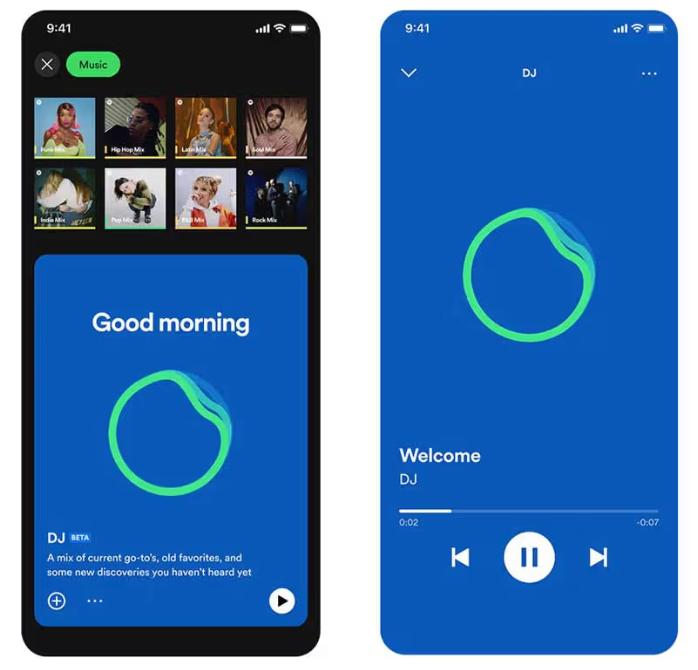
SpotifyLa aplicación AI DJ ahora admite la función "Peticiones". Al igual que hablarías con un DJ humano, puedes usar comandos de voz o mensajes de texto, diciendo cosas como "Cambia a un género más suave" o "Reproduce más canciones de Jay Justin Bieber", y la IA ajustará la lista de reproducción al instante.
Parte 3. Limitaciones de Spotify DJ con IA
Spotify El modo DJ destaca porque elimina la necesidad de buscar música manualmente. Es ideal para escuchar música de fondo, descubrir nuevas canciones y crear una experiencia similar a la de la radio. SpotifyEl DJ con IA de es impresionante, pero viene con varias limitaciones importantes.
1. No se permiten descargas permanentes.
Incluso con la versión Premium, las canciones no se pueden descargar realmente. Los archivos están bloqueados en la aplicación y no se pueden transferir.
2. Sin libertad fuera de línea
Puedes descargar la música para escucharla sin conexión, pero el acceso depende de una suscripción. Si la cancelas, la música desaparecerá.
3. Prohibida su exportación o distribución.
No se pueden exportar las listas de reproducción de DJ ni guardar las mezclas externamente.
4. Control limitado
Spotify La IA controla la selección y el orden de las canciones. No dispone de personalización completa.
Estas limitaciones cobran importancia si deseas tener más control sobre tu música.
Parte 4. Cómo ahorrar Spotify ¿Música de DJ para uso sin conexión?
Si te gusta Spotify Modo DJ pero quieres más flexibilidad, necesitas una forma de guardar canciones permanentemente. En lugar de depender de SpotifyLimitaciones integradas de , seleccionas canciones de las recomendaciones del DJ y las conviertes en archivos locales. Esto te da control total sobre tu música. La forma más fiable de hacerlo es utilizando una herramienta profesional como DumpMedia Spotify Music Converter.
Descarga gratuita Descarga gratuita
🏅¿Por qué elegir? DumpMedia Spotify Music Converter:
- ⭐Integración con Spotify reproductor web
- ⭐Trabaja para ambos Spotify Premium y Spotify Usuarios gratis
- ⭐Proporcione conversión por lotes a una velocidad de hasta 35x
- ⭐Convertir Spotify canciones para MP3WAV o FLAC
- ⭐Conserva etiquetas ID3 como artista, portada, arte, etc.
- ⭐Conserva la calidad del audio original
- ⭐100% Limpio. No hay riesgo en su uso.
Paso a paso: Convertir Spotify música de dj
Paso 1: Descarga e instala el software en tu ordenador. Funciona con ambos. WinWindows y Mac. La interfaz es fácil de usar, lo que la hace fácil para principiantes.
Descarga gratuita Descarga gratuita
Paso 2: Abra el incorporado Spotify reproductor web en el interior DumpMedia e inicie sesión con su Spotify cuenta. Explorar Spotify y arrastra las canciones, álbumes o listas de reproducción que quieras descargar al convertidor.

Paso 3: En el panel de configuración, seleccione MP3 como formato de salida para permitir una MP3 Descarga de tus pistas seleccionadas.

Paso 4: Pulse el botón "Convertir todo" e inicie la conversión. DumpMedia Spotify Music Converter Admite una velocidad de descarga 35 veces mayor, por lo que solo tienes que esperar a que finalice el proceso de conversión.

Parte 5. Preguntas frecuentes
1. Que es Spotify ¿Modo DJ?
Se trata de una función impulsada por inteligencia artificial que reproduce música personalizada según tus gustos.
2. Es Spotify¿Es gratis el DJ con IA?
No, normalmente requiere una suscripción Premium.
3. ¿Puedo descargar? Spotify ¿Canciones de DJ?
Solo dentro de la aplicación, no como archivos locales.
4. ¿Puedo crear mi propia lista de reproducción de DJ?
Sí, especialmente si tienes copias locales de tu música.
Parte 6. Conclusión
Spotify El modo DJ es una función potente que hace que descubrir música sea más fácil y agradable. Sin embargo, tiene limitaciones como la falta de descargas permanentes y el acceso sin conexión restringido. Si quieres disfrutar plenamente de los beneficios de SpotifyPara disfrutar de un DJ con IA sin estas restricciones, usar una herramienta confiable para guardar tu música es la mejor solución. Esto te permite conservar tus canciones favoritas, crear tus propias listas de reproducción y disfrutar de total libertad sobre tu experiencia auditiva.
Descarga gratuita Descarga gratuita
*DumpMedia funciona descifrando y descargando Spotify Convierte tus canciones a archivos sin DRM, lo que te permite obtener una copia limpia y sin restricciones de tu biblioteca para cualquier dispositivo. Su funcionalidad no incluye la conversión de archivos de audio locales.