


Cómo poner música MP3 jugador de Spotify en 2026
como poner musica MP3 jugador de Spotify Sigue siendo una de las preguntas más comunes entre Spotify usuarios, principalmente porque Spotify No permite descargas directas a ningún MP3 dispositivo debido a DRMSi intenta transferir archivos descargados Spotify pistas, la mayoría MP3 Los jugadores no podrán reconocerlos.
Para solucionar esta limitación, necesita una herramienta que pueda convertir Spotify música en un formato de audio estándar como MP3. DumpMedia Spotify Music Converter es una de las soluciones más fiables para esta tarea. Si su objetivo es mover su Spotify biblioteca a un dispositivo portátil para escuchar sin conexión, este convertidor proporciona el método más rápido y sencillo.
Guía de contenido Parte 1. Por qué no puedes poner Spotify Canciones en MP3 ¿Jugador?Parte 2. Cómo poner Spotify Música encendida MP3 ¿Jugador?Parte 3. Preguntas frecuentesParte 4. Para resumirlo todo
Parte 1. Por qué no puedes poner Spotify Canciones en MP3 ¿Jugador?
Spotify no permite a los usuarios transferir canciones directamente a un MP3 jugador porque todos Spotify Las pistas están protegidas por la Gestión de Derechos Digitales (DRM). Este cifrado DRM impide que los usuarios copien, exporten o conviertan SpotifyLos archivos de audio en formatos estándar como MP3. Incluso si descargas canciones usando un Spotify Premium cuenta, esos archivos permanecen en un formato OGG bloqueado que solo el Spotify La aplicación puede leer. Como resultado, los archivos tradicionales MP3 Los reproductores, especialmente los dispositivos no inteligentes, no pueden reconocer ni reproducir estos archivos cifrados.
En resumen, el sistema DRM garantiza que Spotify La música solo se puede reproducir dentro Spotifyecosistema autorizado. Por eso, simplemente arrastrando Spotify canciones para un MP3 El reproductor nunca funcionará.
como poner musica MP3 jugador de SpotifyPara evitar esta limitación, necesita una herramienta capaz de la eliminación de SpotifyProtección DRM de y convertir pistas a formatos universales. DumpMedia Spotify Music Converter Cumple exactamente este propósito. Convierte Spotify canciones, álbumes y listas de reproducción sin DRM MP3, archivos M4A, WAV o FLAC, lo que los hace compatibles con cualquier MP3 reproductor y permite la verdadera propiedad fuera de línea de su música.
Parte 2. Cómo poner Spotify Música encendida MP3 ¿Jugador?
como poner musica MP3 jugador de Spotify? Antes de poner Spotify música en tu MP3 Jugador, asegúrate de tener DumpMedia Spotify Music Converter instalado.
Descargar gratis Descargar gratis
DumpMedia Spotify Music Converter está ganando popularidad entre Spotify oyentes por su maravilloso servicio de descarga de música. No importa si eres usuario de Spotify Gratis o Spotify Premium, puedes descargar y convertir Spotify canciones, listas de reproducción y álbumes para MP3, AAC, ALAC, FLAC u otros formatos que utilicen DumpMediaMejor aún, las descargas siempre estarán disponibles incluso si tu suscripción expira.
Guía paso a paso: Cómo poner Spotify Música encendida MP3 jugador
Paso 1: Abra el software en su computadora. Funciona con ambos. WinWindows y Mac. La interfaz es fácil de usar, lo que la hace fácil para principiantes.
Paso 2: Vaya al Spotify y elige la canción, el álbum o la lista de reproducción que quieres convertir. El software detectará las pistas automáticamente.

Paso 3: Seleccione un formato compatible con su MP3 Jugador. Las opciones comunes son MP3, M4A, WAV o FLAC. También puedes configurar la calidad de salida y la velocidad de conversión.

Paso 4: Haga clic en el botón "Convertir" para comenzar el proceso de conversión. DumpMedia Spotify Music Converter Eliminará el DRM y convertirá todas las pistas seleccionadas al formato elegido. La conversión conserva la alta calidad de audio.

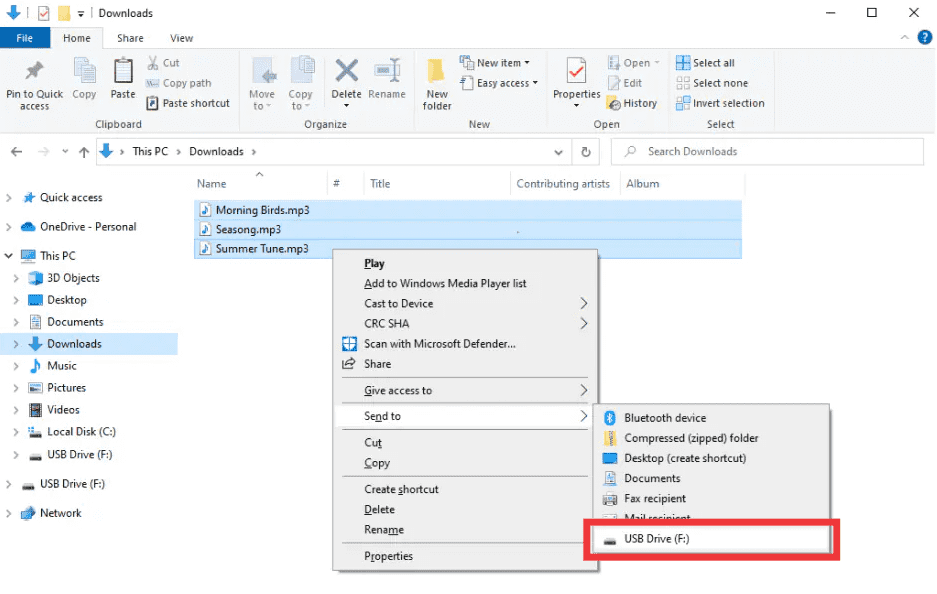
Paso 5: como poner musica MP3 jugador de SpotifyDespués de la conversión, localice la carpeta de salida. Conecte su MP3 reproductor a su computadora a través de USB y copie los archivos convertidos. Su Spotify La música ahora está lista para reproducirse sin conexión en cualquier dispositivo. MP3 .
Parte 3. Preguntas frecuentes
1. ¿Puedo poner? Spotify canciones directamente en MP3 jugadores?
No. SpotifyLas pistas están protegidas con DRM y no se pueden exportar directamente. Necesita un convertidor como DumpMedia Spotify Music Converter para hacerlos compatibles.
2. ¿Cómo convierto? Spotify listas de reproducción para MP3?
Usar DumpMedia Spotify Music Converter: copiar enlaces de listas de reproducción, seleccionar MP3 como salida y convertir. Luego, transferir archivos a su MP3 jugador.
3. ¿Es legal convertir? Spotify música?
Conversión Spotify Generalmente se permite el uso personal sin conexión de música. Evite distribuir archivos convertidos a terceros, ya que podría infringir las leyes de derechos de autor.
4. ¿Qué formatos puedo utilizar para? MP3 jugadores?
MP3 Es el más común. DumpMedia Spotify Music Converter También es compatible con M4A, WAV y FLAC, todos compatibles con la mayoría de los dispositivos.
5. ¿Puedo transferir? Spotify ¿Música a múltiples dispositivos?
Sí. Una vez convertido con DumpMedia, su Spotify Las canciones no tienen DRM y se pueden reproducir en cualquier dispositivo. MP3 reproductor, teléfono o tableta.
Parte 4. Para resumirlo todo
Si alguna vez te has preguntado cómo poner música en un MP3 jugador de SpotifyLa solución es clara: SpotifyEl DRM de 's impide transferencias directas, pero DumpMedia Spotify Music Converter Elimina estas restricciones. Convierte tus canciones, álbumes o listas de reproducción favoritas en MP3 u otros formatos universales, conservando una alta calidad y permitiendo la reproducción sin conexión en cualquier dispositivo.
Intente DumpMedia Spotify Music Converter hoy y disfruta Spotify Música en cualquier lugar, en cualquier momento, sin más límites, sin más problemas de DRM.

30% de descuento >>>