


¿Se pueden escuchar audiolibros en Kindle Paperwhite? Guía completa (2026)
Muchos usuarios preguntan: ¿se pueden escuchar audiolibros en Kindle Paperwhite ? La respuesta corta es sí, pero con algunas limitaciones importantes. Si quieres disfrutar de audiolibros en tu Kindle, es importante entender cómo funciona, qué formatos son compatibles y qué opciones tienes si tus audiolibros no lo son. En esta guía, te explicaremos todo lo que necesitas saber sobre si puedes escuchar audiolibros en Kindle Paperwhite y cómo hacerlo sin problemas.
Índice Parte 1. ¿Puedo escuchar audiolibros en Kindle Paperwhite? Parte 2. ¿Cómo escuchar audiolibros de Audible en Kindle Paperwhite? Parte 3. La mejor manera de escuchar audiolibros gratis en Kindle Paperwhite Parte 4. Preguntas frecuentes Parte 5. Conclusión
Parte 1. ¿Puedo escuchar audiolibros en mi Kindle Paperwhite?
Entonces, ¿se pueden escuchar audiolibros en Kindle Paperwhite? Sí, pero solo bajo ciertas condiciones. Kindle Paperwhite es compatible con audiolibros a través de Audible , la plataforma oficial de audiolibros de Amazon. Esto significa que puedes:
- Compra audiolibros en Audible.
- Descárgalos directamente a tu Kindle.
- Escucha usando auriculares o altavoces Bluetooth.
Sin embargo, existe una limitación importante. Kindle Paperwhite NO admite formatos de audio estándar como MP3 o WAV. Así que, aunque técnicamente puedes escuchar audiolibros en Kindle Paperwhite, estás limitado al contenido de Audible únicamente.
Parte 2. ¿Cómo escuchar audiolibros de Audible en Kindle Paperwhite?
¿Cómo escuchar audiolibros en Kindle Paperwhite? Es una experiencia sencilla, siempre que tengas un modelo de décima generación (2018) o posterior. Dado que los dispositivos Kindle Paperwhite no tienen altavoces integrados, necesitarás auriculares Bluetooth o un altavoz externo.
Así es como funciona:
Aquí tienes el método oficial para reproducir tus audiolibros:
Paso 1. Asegúrese de que su Paperwhite sea un Kindle Paperwhite de 10.ª generación (2018) o un Kindle Paperwhite de 11.ª generación (2021/2024).
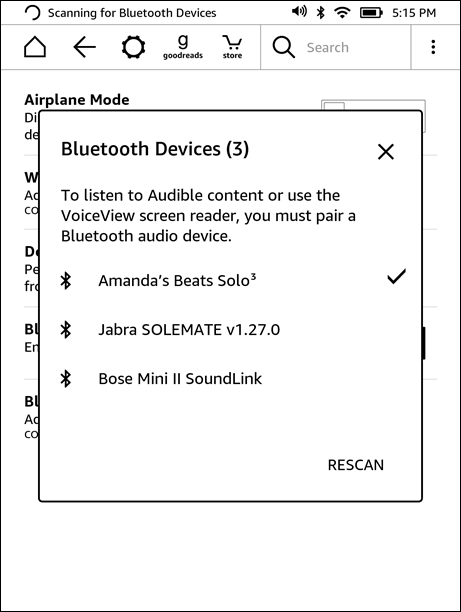
Paso 2. En la pantalla de inicio de tu Kindle, desliza hacia abajo para abrir Ajustes rápidos. Toca el icono de Bluetooth para activarlo. Pon tus auriculares o altavoz en modo de emparejamiento. Toca Dispositivos Bluetooth en tu Kindle y selecciona tu dispositivo de la lista.
Paso 3. Ve a tu biblioteca. Toca el icono de filtro y selecciona Audible (o Audible/Audiolibros). Toca la portada para iniciar la descarga. (Asegúrate de estar conectado a Wi-Fi, ya que los audiolibros ocupan mucho más espacio que los libros electrónicos).
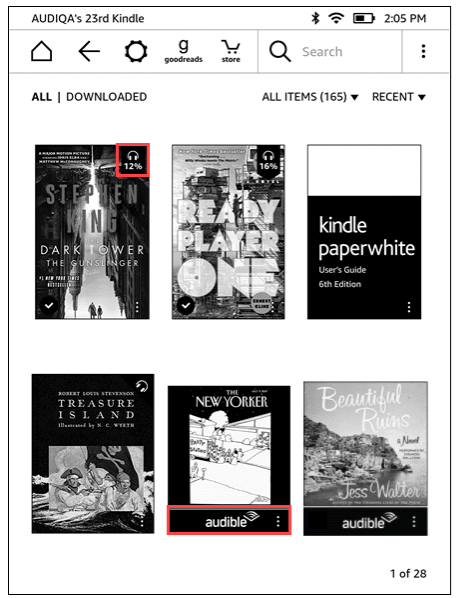
Paso 4. Abre el libro electrónico. Toca el centro de la pantalla para que aparezca el menú. Toca el icono de auriculares en la esquina inferior derecha. El Kindle sincronizará tu progreso para que puedas alternar entre leer y escuchar sin perder tu lugar.
Esta es la forma oficial de escuchar audiolibros en un Kindle Paperwhite.
Limitaciones que debes conocer
Si bien la respuesta a la pregunta "¿se pueden escuchar audiolibros en Kindle Paperwhite?" es sí, la experiencia conlleva varias restricciones.
- Compatibilidad exclusiva con Audible: No se pueden reproducir audiolibros de otras fuentes.
- Protección DRM: Los archivos de Audible están protegidos y vinculados a tu cuenta.
- No MP3 Reproducción: Kindle Paperwhite no admite formatos comunes como MP3.
- Flexibilidad limitada: No puede transferir ni gestionar libremente los archivos de audiolibros.
Esto significa que si tus audiolibros no son de Audible, no podrás escucharlos directamente en tu Kindle Paperwhite.
Parte 3. La mejor manera de escuchar audiolibros gratis en Kindle Paperwhite.
Si bien los Kindle ofrecen compatibilidad nativa, están estrictamente vinculados al ecosistema de Audible. Para lograr una verdadera flexibilidad en todos tus dispositivos, necesitas una forma de eliminar estas restricciones de reproducción. DumpMedia Audible Converter es la solución ideal, que le permite omitir DRM y toma el control total de tu biblioteca.
Descarga gratuita Descarga gratuita
¿Por qué elegir a DumpMedia Convertidor audible?
Al utilizar un convertidor profesional, usted obtiene la libertad de:
- Conversión de formato universal: Instantáneamente transformar audiolibros Audible protegidos en MP3, M4A o FLAC.
- Eliminación total de DRM*: Elimina las restricciones de reproducción para asegurarte de que tu biblioteca sea realmente tuya.
- Compatibilidad con múltiples dispositivos: Escucha en cualquier MP3 Reproductor, equipo de música para coche o altavoz inteligente sin necesidad de la aplicación Audible.
- Propiedad permanente: Conserva para siempre los audiolibros que hayas comprado, incluso si cancelas tu suscripción.
*DumpMedia Funciona descifrando y descargando tus audiolibros en archivos sin DRM, lo que te permite obtener una copia limpia y sin restricciones de tu biblioteca para cualquier dispositivo.
Si bien el Kindle Paperwhite en sí no admite la conexión directa MP3 La reproducción y conversión de audiolibros te brinda control total sobre cómo y dónde los escuchas. Para los usuarios que desean ir más allá de las restricciones de Audible, esta es la solución más práctica y confiable.
Convertir audiolibros de Audible (Paso a paso)
Paso 1. Inicie sesión con su cuenta de Audible a través del reproductor integrado.
Paso 2. Busca el audiolibro que deseas convertir. Puedes agregarlo haciendo clic en el botón "Agregar para convertir" o arrastrándolo al panel de conversión.
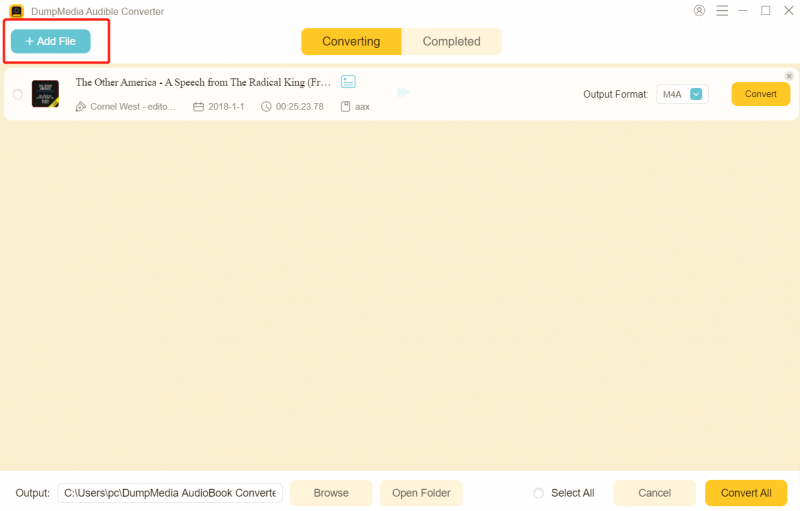
Paso 3. Elija el formato de salida y la configuración de calidad que desee.

Paso 4. Haga clic en el botón “Convertir” para iniciar la descarga. Espere a que finalice la conversión.

Parte 4. Preguntas frecuentes
¿Se pueden escuchar audiolibros en un Kindle Paperwhite sin Audible?
No, Kindle Paperwhite solo es compatible oficialmente con audiolibros de Audible.
¿Por qué no puedo jugar? MP3 ¿Audiolibros en Kindle?
Porque Kindle no admite formatos de audio estándar.
¿Necesito Bluetooth para escuchar audiolibros?
Sí, Kindle Paperwhite requiere dispositivos de audio Bluetooth.
¿Puedo transferir audiolibros manualmente?
Solo si están en un formato compatible.
Parte 5. Conclusión
Entonces, ¿se pueden escuchar audiolibros en Kindle Paperwhite? Sí, pero solo dentro de un ecosistema limitado. Si desea tener más control sobre sus audiolibros, como reproducirlos en varios dispositivos o guardar copias permanentes, necesitará un enfoque alternativo como DumpMedia Audible Converter. Al comprender estas limitaciones y utilizar las herramientas adecuadas, podrá superar las restricciones predeterminadas y crear una experiencia de audiolibro más flexible que se adapte a sus necesidades.