如何在 Apple Music 上下載所有歌曲:完整指南 (2026)

羅西(Rosie)撰寫

最後更新時間:2026年07月07日

2最小讀取

If you've built a large 蘋果音樂 library, you may be wondering how to download all songs on Apple Music so you can enjoy them offline without downloading each track individually. In this guide, you'll learn how to download all Apple Music songs on iPhone, Mac, and Windows, discover why downloads sometimes fail, and explore an easier way to keep your Apple Music collection for long-term offline playback.

內容指南 Part 1. Can You Download All Apple Music Songs at Once?Part 2. How to Download All Apple Music Songs?Part 3. Why Can't I Download All Apple Music Songs?Part 4. Best Way to Download and Keep Your Apple Music Library第 5 部分。 常見問題解答第6部分。 最後的想法

Part 1. Can You Download All Apple Music Songs at Once?

The short answer is not exactly. Apple Music doesn't provide a one-click option to download every song in your library simultaneously. Instead, you can download:

  • Entire playlists
  • 相冊
  • Artists' collections
  • Songs you've added to your library

If your music library contains hundreds or even thousands of tracks, downloading them all manually can take considerable time. That's why many users search for how to download all songs on Apple Music in hopes of finding a faster solution.

Part 2. How to Download All Apple Music Songs?

在iPhone上

If you're using an iPhone or iPad, follow these steps.

步驟 1 Go to Settings > Apps > Music > Sync Library. Turn it on. This ensures your Apple Music library is synchronized across all your devices.

步驟 2 Open the Apple Music app. Find the album, playlist, or song. Tap Add to Library. Repeat this for the music you want available offline.

步驟 3 Open Library in Apple Music. Select a playlist or album, then tap the Download icon. Repeat the process until your entire library has been downloaded.

Although this isn't a true "Download All" feature, it's Apple's official method for how to download all songs on Apple Music.

在Mac上

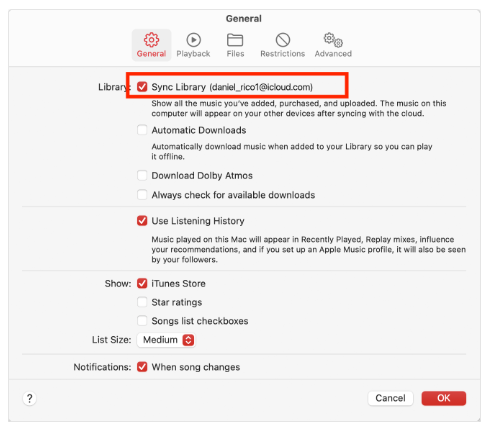
步驟 1 Open the Apple Music app. Sign in with your Apple ID. Enable Sync Library.

Enable Sync Library On Mac

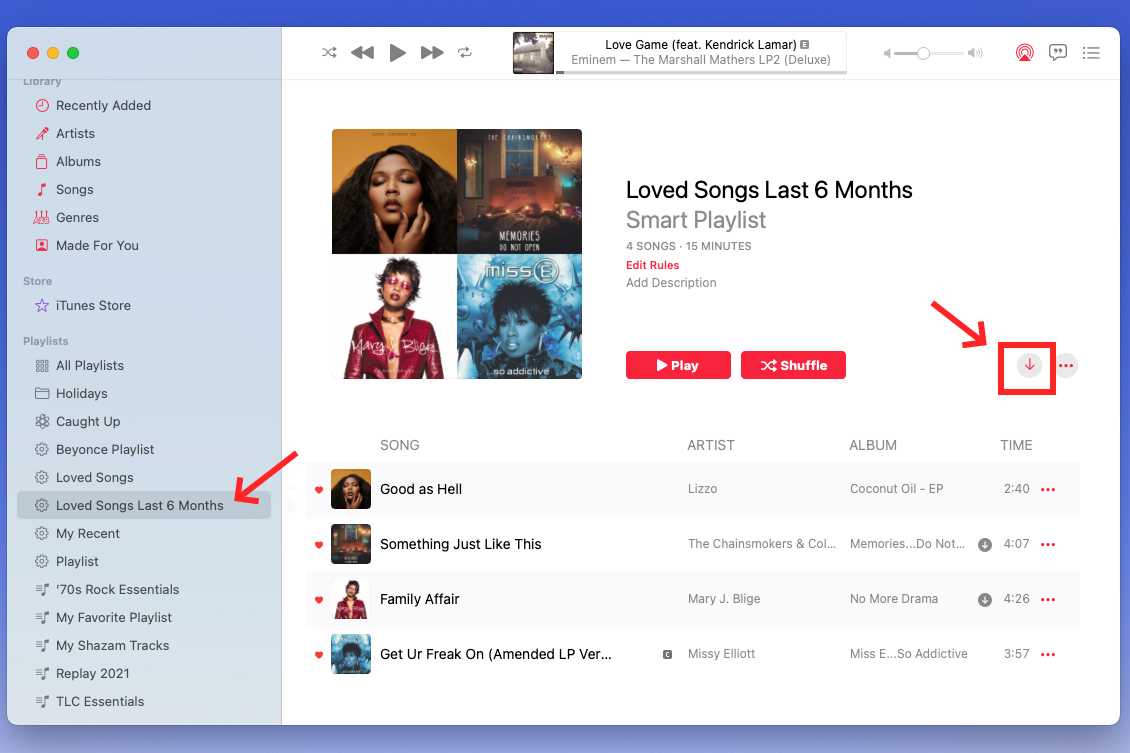
步驟 2 Open your Library. Click the Download button beside albums or playlists.

下載所有Apple音樂歌曲

On Win陶氏

步驟 1 Sign in with your Apple ID. Open your Library.

步驟 2 Locate your playlists or albums. Click Download.

Downloads will be stored locally for offline listening while your subscription remains active.

Part 3. Why Can't I Download All Apple Music Songs?

If you're trying how to download all songs on Apple Music but some tracks won't download, one of these issues may be responsible.

同步庫已停用

Without Sync Library enabled, downloaded music won't synchronize correctly across your devices.

存儲空間不足

To ensure you have enough space for your Apple Music downloads, be sure to check your available storage by going to Settings > General > iPhone Storage, and if you are running low, consider deleting any unused apps or files to make room for your music library.

Internet連接問題

Downloading hundreds of songs requires a stable Wi-Fi connection. Interrupted downloads often occur because of unstable networks.

訂閱問題

Offline downloads are only available with an active Apple Music subscription. If your subscription has expired, previously downloaded songs may become unavailable.

Apple 音樂服務器問題

Occasionally, Apple Music services may experience temporary outages that interrupt downloads. Waiting a few minutes and trying again often resolves the issue.

Part 4. Best Way to Download and Keep Your Apple Music Library

Although Apple Music supports offline listening, it comes with several restrictive conditions that users should be aware of: all downloaded songs are protected by Digital Rights Management (DRM), which restricts playback exclusively to authorized Apple Music apps and prevents the files from being copied to USB drives, MP3 players, or freely transferred to other devices. Additionally, these downloads become inaccessible if your subscription ends, which is a primary reason why many users explore alternative methods for managing their music libraries.

If you want more flexibility than Apple's built-in download feature offers, DumpMedia Apple Music 音樂轉檔器 is an excellent solution. Unlike standard Apple Music downloads, DumpMedia lets you convert your Apple Music songs into widely supported audio formats for personal offline use. With DumpMedia,你可以 將 Apple Music 歌曲轉換為 MP3,WAV、FLAC 或 AAC。之前 取消您的 Apple Music 訂閱你可以將歌曲備份到另一個音樂播放器。

免費下載 免費下載

For users searching how to download all songs on Apple Music, DumpMedia offers a faster and more flexible way to build a personal offline music collection.

🏆為什麼要使用 DumpMedia Apple Music 音樂轉檔器

  • 與 Apple Music 網路播放器集成
  • 移除 Apple Music DRM 保護*
  • 保持原音質
  • 批量下載播放清單和專輯
  • 轉換速度快
  • 保留歌曲元資料和 ID3 標籤
  • 支援在任何裝置上離線播放

Download Apple Music Library Using DumpMedia

步驟 1 下載並安裝 DumpMedia 在您的 Mac/PC 上安裝 Apple Music Converter。啟動它,您將看到介面。使用您的 Apple Music 帳戶登入。

免費下載 免費下載

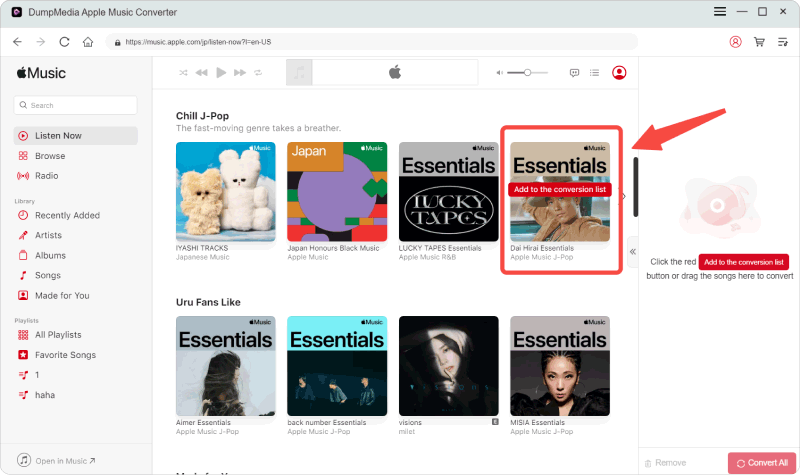
步驟 2 Find the playlist, album, or specific song you love. You can drag a single song onto the "+" icon on the right side of the screen. Alternatively, open an entire playlist/album and click the "Add to Convert" icon to load the entire list into the converter.

選擇您想要轉換的 Apple Music 文件

步驟 3 選擇 MP3 (相容性最強)。此外,您還可以變更位元率或取樣率。
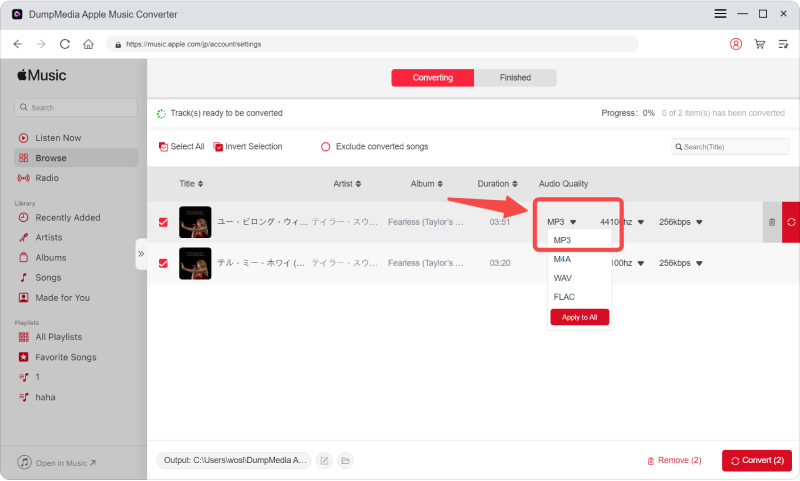
選擇您所需的輸出格式

步驟 4 設定完成後,使用者即可點選「轉換」圖示轉換。 DumpMedia 將 Apple Music 歌曲轉換為 MP3 憑藉其超快的速度,只需幾秒鐘即可完成。
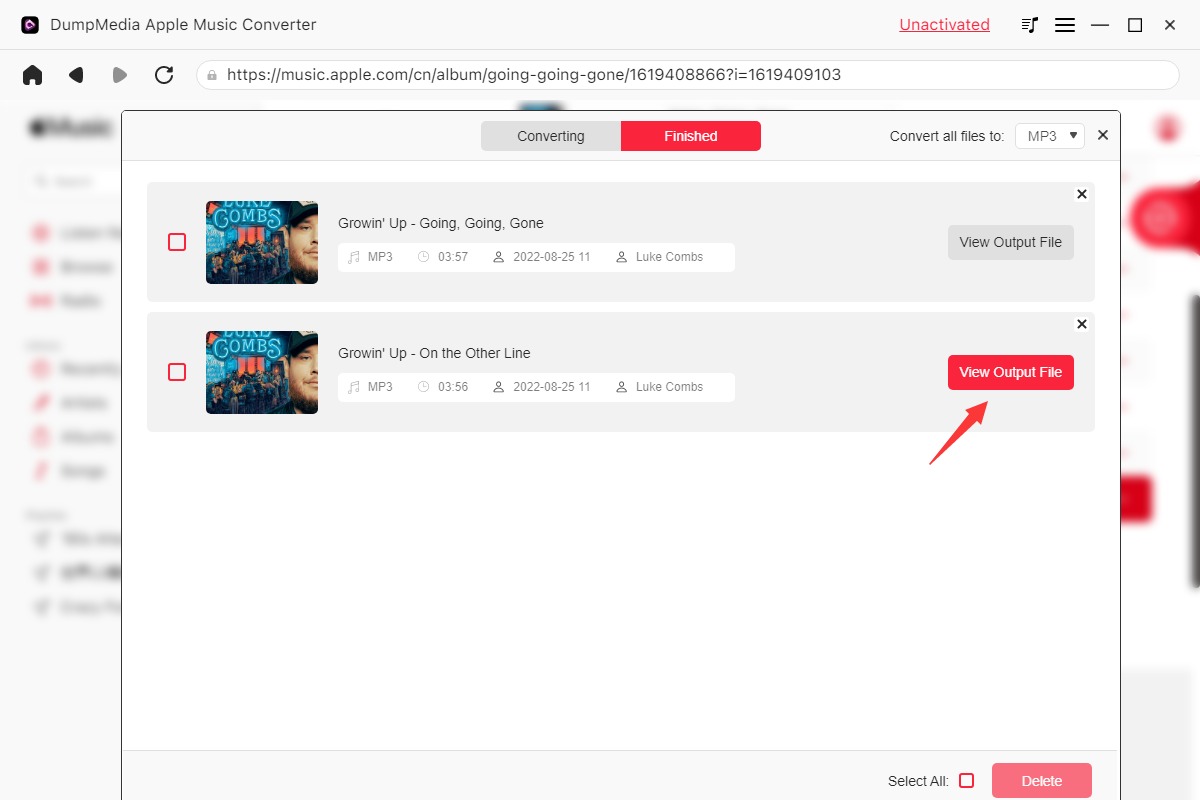
點擊轉換按鈕轉換歌曲


第 5 部分。 常見問題解答

Can I download my entire Apple Music library?

Apple Music doesn't provide a single "Download All" button. You can download albums, playlists, and songs you've added to your library individually.

Does Apple Music have a Download All feature?

No. Currently, Apple Music does not offer a one-click option to download every song in your library at once.

Why won't Apple Music download all songs?

Common reasons include disabled Sync Library, insufficient storage, network issues, expired subscriptions, or temporary Apple Music server problems.

Can I keep downloaded Apple Music forever?

No. Official Apple Music downloads remain tied to your subscription and are protected by DRM. If your subscription ends, downloaded songs can no longer be played.

第6部分。 最後的想法

Learning how to download all songs on Apple Music is useful if you frequently listen offline or want your favorite music available without relying on a constant internet connection. If you're looking for a more flexible way to organize, preserve, and enjoy your Apple Music collection across multiple compatible devices, DumpMedia Apple Music Converter provides an efficient solution with batch conversion, multiple output formats, and high-quality offline playback.

免費下載 免費下載

註冊即可享 30% 折扣 註冊獲取
30% 折扣 >>>