


Transfer nasıl Spotify YouTube Music'e Oynatma Listesi Ekleme (2 Kanıtlanmış Yöntem)
Eğer nasıl para aktaracağınızı arıyorsanız Spotify Çalma listenizi YouTube Music'e taşırken, büyük olasılıkla özenle oluşturduğunuz çalma listelerinizi şarkıları, yapıyı veya dinleme deneyimini kaybetmeden taşımaya çalışıyorsunuz. Ne yazık ki, Spotify YouTube Music, doğrudan yerleşik aktarım özelliği sunmadığı için kullanıcılar üçüncü taraf araçlara veya alternatif yöntemlere başvurmak zorundadır. Bu kılavuzda, iki güvenilir çözümü ele alacağız. Her iki yöntem de pratiktir, ancak hız, kontrol ve ses kalitesine bağlı olarak farklı kullanıcı ihtiyaçlarına hizmet ederler.
İçindekiler Kılavuzu Neden Doğrudan Transfer Yapamıyorsunuz? Spotify YouTube Music'e Yöntem 1: Dönüştürme Spotify Oynatma listesi MP3 (Çevrimdışı Kontrol İçin En İyisi)Yöntem 2: Aktarım Spotify Çalma listesini YouTube Music'e aktarma (Doğrudan Taşıma)SSSÖZET
Neden Doğrudan Transfer Yapamıyorsunuz? Spotify YouTube Music'e
Olası çözümleri incelemeden önce, söz konusu teknik sınırlamaları anlamak şarttır.
Çünkü Spotify YouTube Music ve diğer platformlar tamamen farklı lisanslama sistemleriyle çalıştığı için, çalma listeleri iki platform arasında doğrudan taşınamaz. Dahası, kütüphane yapıları ve meta veriler büyük ölçüde uyumsuzdur ve tek tek parçalar sıkı DRM kısıtlamalarıyla korunmaktadır. Bu nedenle, müzik listelerini nasıl aktaracağını araştıran herkes için bu durum geçerlidir. Spotify YouTube Music'e yüklenen çalma listeleri üçüncü taraf çözümlerine bağımlı olmalıdır.
Yöntem 1: Dönüştürme Spotify Oynatma listesi MP3 (Çevrimdışı Kontrol İçin En İyisi)
Nasıl transfer edilir Spotify Çalma listesini YouTube Music'e mi aktarmak istiyorsunuz? En güvenilir çözümlerden biri, profesyonel bir dönüştürücü kullanmaktır. DumpMedia Spotify Music ConverterBu yöntem, müzik dosyalarınız üzerinde tam kontrol sahibi olmak istiyorsanız veya şarkıları YouTube Music'e manuel olarak yüklemeyi tercih ediyorsanız idealdir.
🏅Neden Bunu Seçmelisiniz? DumpMedia Spotify Music Converter:
- ⭐Entegrasyon ile Spotify web oynatıcısı
- ⭐Her ikisi için de çalışın Spotify Premium ve Spotify Ücretsiz kullanıcılar
- ⭐35 kata kadar hızda toplu dönüştürme sağlayın
- ⭐dönüştürmek Spotify şarkılar MP3, WAV veya FLAC
- ⭐Sanatçı, kapak, sanat eseri vb. ID3 etiketlerini saklayın.
- ⭐Orijinal ses kalitesini koruyun
- ⭐100% temiz. Kullanırken risk yok
Adım adım rehber
1 Adım. Yazılımı bilgisayarınıza indirip kurun. Her ikisiyle de çalışır. WinWindows ve Mac işletim sistemleriyle uyumludur. Kullanıcı dostu arayüzü sayesinde yeni başlayanlar için kullanımı kolaydır.
2 Adım. Dahili menüyü açın. Spotify web oynatıcısı içinde DumpMedia ve ile oturum açın Spotify hesap. Gözat Spotify İndirmek istediğiniz şarkıları, albümleri veya çalma listelerini dönüştürücüye sürükleyin.

3 Adım. Ayarlar panelinde, şunu seçin: MP3 çıktı formatı olarak etkinleştirmek için MP3 Seçtiğiniz parçaların indirilmesi.

4 Adım. Dönüştür'e tıklayın ve şarkıları doğrudan indirin. MP3 dosyaları.
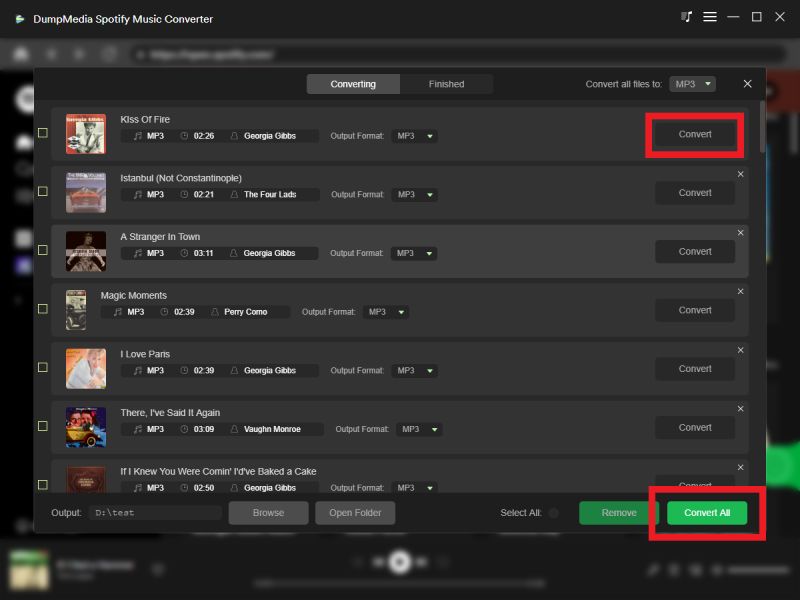
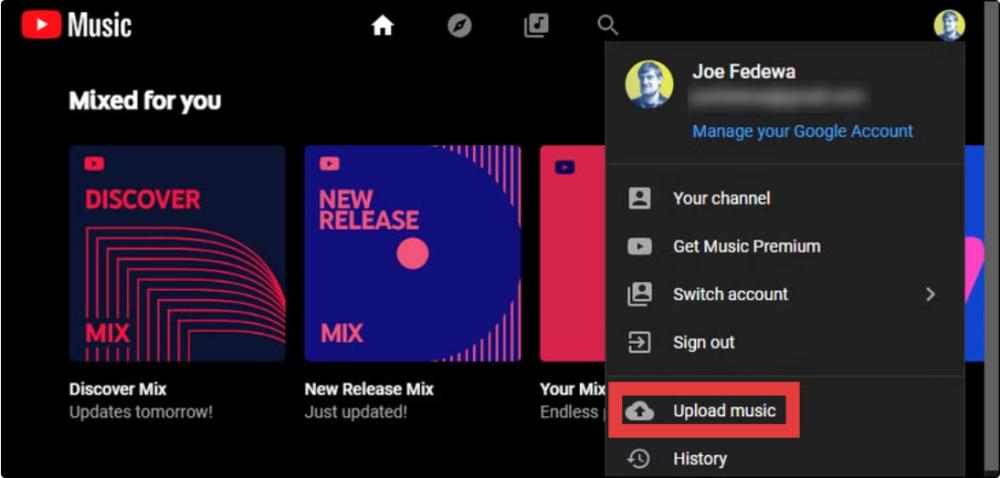
5 Adım. Nasıl transfer edilir Spotify Çalma listenizi YouTube Music'e nasıl yüklersiniz? Web tarayıcınızda music.youtube.com adresini açın. Sitenin sağ üst köşesindeki profil resminize tıklayın ve "Müzik Yükle"yi seçin.
Avantajlar
- Yüksek kaliteli ses dönüşümü
- Dosyalar üzerinde tam kontrol
- Platform API'lerine bağımlılık yok.
Dezavantajlar
- Manuel yükleme gerektirir
- Biraz daha uzun süreç
Yöntem 2: Aktarım Spotify Çalma listesini YouTube Music'e aktarma (Doğrudan Taşıma)
Nasıl transfer edilir Spotify Çalma listesini YouTube Music'e mi aktarmak istiyorsunuz? Eğer amacınız hız ve kolaylık ise, otomatik bir araç tam size göre olabilir. Herhangi Bir Müzik Dönüştürücüsünün Çalma Listesi Aktarımı Bu özellik daha iyi bir seçenektir. Bu yöntem doğrudan bağlantı kurar. Spotify YouTube Music hesaplarını ve çalma listelerini otomatik olarak aktarır.
Adım adım rehber
1 Adım. Açılış DumpMedia Bilgisayarınızdaki herhangi bir müzik dönüştürme programını kullanın. Yeni başlayanlar için bile dönüştürmeyi kolaylaştırmak üzere tasarlanmış, sade ve sezgisel bir arayüz göreceksiniz.
2 Adım. Araçlar > Çalma Listesi Aktarımı'nı seçin.
3 Adım. Klinik Spotify Kaynak olarak.

4 Adım. Çalma listenizi taşımak istediğiniz platform olarak YouTube Music'i seçin.
5 Adım. Aktarmak istediğiniz çalma listelerini bulun. Spotify YouTube Music'e gidin ve taşımak istediğiniz tüm çalma listelerini seçin.
6 Adım. Taşıma işlemine başlayın. Araç şarkıları otomatik olarak eşleştirir ve aktarır. "YouTube Music'e Git"e tıklayın. Çalma listeleriniz yeni bir hizmete taşındı ve yeni müzik yayın hizmetinizin keyfini çıkarmaya başlayabilirsiniz.
Avantajlar
- Tek tıklamayla aktarım
- Manuel indirme yok
- Hızlı ve yeni başlayanlar için uygun
Dezavantajlar
- Şarkı eşleştirmesi mümkün olmayabilir. 100% doğru
- Kararlı bir API bağlantısı gerektirir.
- Bazı parçalar eksik veya değiştirilmiş olabilir.
SSS
1. Doğrudan transfer yapabilir miyim? Spotify YouTube Music'te oynatma listeleri mi var?
Hayır. Aralarında resmi olarak yerleşik bir aktarım özelliği bulunmamaktadır. Spotify ve YouTube Müzik.
2. Para transfer etmenin en kolay yolu nedir? Spotify Çalma listesini YouTube Music'e mi ekleyelim?
En kolay yöntem, her iki hesabı da senkronize eden otomatik bir Çalma Listesi Aktarım aracı kullanmaktır.
Not: DumpMedia Any Music Converter aboneleri, çalma listesi aktarma özelliğini ücretsiz olarak kullanabilir. Henüz abone değil misiniz? Sorunsuz, yıldırım hızında ve tam kontrolle aktarımların keyfini çıkarmak için lütfen önce Any Music Converter'ı satın alın.
3. mı DumpMedia Spotify Music Converter kullanıma uygun?
Evet, kişisel müzik dönüştürme için tasarlanmıştır ve parçalarınızın çevrimdışı olarak saklanmasına olanak tanır.
4. Tüm şarkılar başarıyla aktarılacak mı?
Her zaman değil. Otomatik araçlar, lisans farklılıkları nedeniyle bazı şarkıları eşleştirmede başarısız olabilir.
5. Buna ihtiyacım var mı? Spotify Çalma listelerini aktarmak için premium hizmet mi?
Hayır. Üçüncü taraf araçların çoğu ücretsiz sürümlerle çalışır. Spotify hesaplar.
ÖZET
Eğer nasıl para transferi yapacağınızı anlamaya çalışıyorsanız Spotify YouTube Music'e çalma listesi eklemenin iki ana yolu vardır, Spotify Music Converter Ya da Any Music Converter'ın Çalma Listesi Aktarma özelliğini kullanabilirsiniz. Her iki çözüm de önceliklerinize bağlı olarak etkilidir.

%30 İndirim >>>