


Transfer nasıl Spotify Amazon Music'e çalma listesi?
Müzik yayın hizmetleri, insanların müzik dinleme biçimini tamamen değiştirdi. Ancak, özellikle zaman içinde özenle oluşturulmuş çalma listeleriniz varsa, platform değiştirmek bazen zahmetli olabilir. Daha önce müzik yayın hizmetlerine güvenen birçok kullanıcı, yeni platformlara geçiş yaparken bu sorunu yaşıyor. Spotify denemeye karar verebilir Amazon Müzik Amazon cihazlarıyla entegrasyonu, geniş müzik kütüphanesi ve Alexa özellikli akıllı hoparlörlerle uyumluluğu nedeniyle tercih edilmektedir.
Neyse ki, artık birçok araç çalma listelerini yayın hizmetleri arasında otomatik olarak taşımayı mümkün kılıyor. Bu kılavuzda, en etkili yöntemleri açıklayacağız. transfer Spotify çalma listesine Amazon Music'te Çevrimiçi araçlar, masaüstü yazılımlar ve mobil uygulamalar kullanarak. İster çevrimiçi araçlar, masaüstü yazılımlar ve mobil uygulamalar kullanıyor olun. WinWindows, Mac, iOS veya Android fark etmeksizin, çalma listelerinizi hızlı ve doğru bir şekilde taşımanıza yardımcı olacak bir çözüm bulacaksınız.
İçindekiler Kılavuzu Bölüm 1. Transfer Spotify Amazon Music Online için Çalma ListeleriBölüm 2. Transfer Spotify Çalma listelerini Amazon Music'e aktarın. WinDow/MacBölüm 3. Transfer Spotify iOS'ta Amazon Music'e Çalma ListeleriBölüm 4. Transfer Spotify Android'de Amazon Music'e ait çalma listeleriBölüm 5. SSSBölüm 6. Sonuç
Bölüm 1. Transfer Spotify Amazon Music Online için Çalma Listeleri
Yazılım yüklemeden hızlı ve basit bir yöntem isteyen kullanıcılar için çevrimiçi çalma listesi aktarma araçları uygun bir seçenektir. Bu hizmetler, web tarayıcısı aracılığıyla yayın hesaplarınızı bağlamanıza ve çalma listelerinizi platformlar arasında otomatik olarak taşımanıza olanak tanır.
Bu amaçla kullanılan en popüler çevrimiçi araçlardan biri TuneMyMusic'tir. TuneMyMusic, birçok yayın platformunu destekleyen web tabanlı bir çalma listesi taşıma aracıdır. Kullanıcıların çalma listelerini aktarmasına olanak tanır. Spotify Çalma listesini birkaç adımda Amazon Music'e ekleyin.
Ana Özellikler
- Doğrudan web tarayıcınızda çalışır.
- Birçok yayın platformunu destekler.
- Adım adım yönlendirme sağlayan basit arayüz.
- Hiçbir yazılım gerektirmez
Aktarma Adımları Spotify TuneMyMusic ile çalma listenizi Amazon Music'e ekleyin.
1 Adım. TuneMyMusic web sitesini ziyaret edin ve süreci başlatmak için "Başlayalım" düğmesine tıklayın.
2 Adım. Klinik Spotify Kaynak platform olarak hesabınıza giriş yapın. Araç, oynatma listelerinize erişim izni isteyecektir.
3 Adım. Bağlantı kurulduktan sonra, taşımak istediğiniz belirli çalma listesini seçebilir veya çalma listesi bağlantısını yapıştırabilirsiniz. Sistem, o çalma listesindeki tüm şarkıları yükleyecektir.
4 Adım. Ardından, hedef hizmet olarak Amazon Music'i seçin ve aktarımı onaylamak için Amazon hesabınıza giriş yapın.

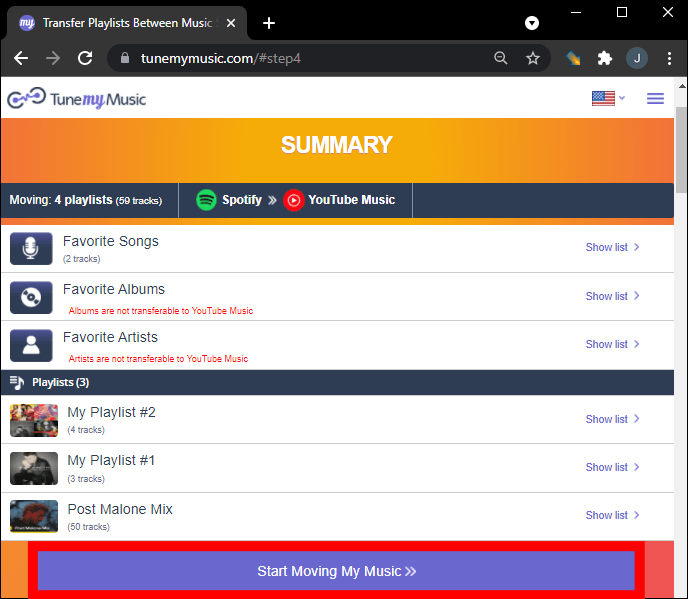
5 Adım. "Müziğimi Taşımaya Başla" seçeneğine tıklayın. Araç, şarkıları otomatik olarak eşleştirecektir. Spotify Amazon Music kataloğu ile.
6 Adım. İşlem tamamlandıktan sonra, çalma listesinin başarıyla oluşturulduğunu doğrulamak için Amazon Music kitaplığınızı açın.
TuneMyMusic gibi çevrimiçi bir araç kullanmak, müzik aktarımı için en hızlı yöntemlerden biridir. Spotify Küçük veya orta ölçekli çalma listeleri için Amazon Music'e aktarma seçeneği mevcuttur. Ancak, geniş müzik kütüphanelerine sahip kullanıcılar veya daha fazla istikrar isteyenler için masaüstü çözümü daha iyi bir tercih olabilir.
Bölüm 2. Transfer Spotify Çalma listelerini Amazon Music'e aktarın. WinDow/Mac
Daha güvenilir ve özellik bakımından zengin bir çözüm istiyorsanız, masaüstü yazılım kullanmak genellikle en iyi seçenektir. DumpMedia Herhangi bir Müzik Dönüştürücü Müzikleri yönetmek ve dönüştürmek için tasarlanmış güçlü bir program olup, aynı zamanda özel bir Çalma Listesi Aktarma özelliği de sunmaktadır. DumpMedia Kullanıcıların transfer yapmasına olanak tanır. Spotify Çalma listesi bilgilerini ve şarkı meta verilerini koruyarak çalma listesini Amazon Music'e verimli bir şekilde aktarın.
Ana Özellikler
- Destekler WinDows ve macOS
- Özel Çalma Listesi Aktarımı özelliği
- Toplu oynatma listesi taşıma
- Akıllı izleme eşleştirme
- Sanatçı, albüm ve parça başlıkları gibi meta verileri korur.
- Tarayıcı sınırlamaları olmaksızın istikrarlı yerel işlem
Bu özellikler onu en verimli para transferi yöntemlerinden biri haline getiriyor. Spotify Büyük çalma listelerine sahip kullanıcılar için çalma listesini Amazon Music'e aktarma özelliği.
Adım adım rehber
1 Adım. Indirin ve yükleyin DumpMedia Herhangi bir müzik dönüştürücü cihazınızda Windows veya Mac bilgisayar. Kurulumdan sonra programı başlatın.
2 Adım. Araçlar > Çalma Listesi Aktarımı'nı seçin. Spotify Kaynak olarak.

3 Adım. Hedef olarak Amazon Music'i seçin.
4 Adım. Aktarmak istediğiniz öğeleri seçin; favori şarkılarınızı, sanatçılarınızı, albümlerinizi ve oluşturduğunuz çalma listelerinizi destekliyoruz.

5 Adım. Aktarımı başlatmak için Dönüştür'e tıklayın.
6 Adım. Aktarım tamamlandı. "Amazon Music'e Git"e tıklayın. Çalma listeleriniz yeni bir hizmete taşındı ve Amazon Music'te yeni çalma listenizin keyfini çıkarmaya başlayabilirsiniz.
Çevrimiçi hizmetlerle karşılaştırıldığında, bu yöntem para transferi yaparken daha fazla istikrar ve daha iyi doğruluk sağlar. Spotify Çalma listesini Amazon Music'e ekleyin.
Bölüm 3. Transfer Spotify iOS'ta Amazon Music'e Çalma Listeleri
Mobil cihaz kullanmayı tercih ediyorsanız, çeşitli uygulamalar veri aktarımında size yardımcı olabilir. Spotify iPhone veya iPad'inizden doğrudan Amazon Music'e çalma listenizi aktarabilirsiniz. En popüler seçeneklerden biri SongShift'tir. SongShift, iOS kullanıcıları için tasarlanmış, iyi bilinen bir çalma listesi taşıma uygulamasıdır. Birçok müzik akış hizmetini destekler ve çalma listelerini aktarmak için sezgisel bir arayüz sunar.
Ana Özellikler
- Kullanımı kolay mobil arayüz
- Birden fazla yayın platformunu destekler
- Toplu oynatma listesi aktarımına olanak tanır.
- Özellikle iOS cihazlar için geliştirilmiştir.
Aktarma Adımları Spotify SongShift ile çalma listesini Amazon Music'e aktarın.
1 Adım. SongShift uygulamasını App Store'dan indirin ve açın. Yetkilendirin. Spotify Böylece uygulama çalma listelerinize erişebilir.
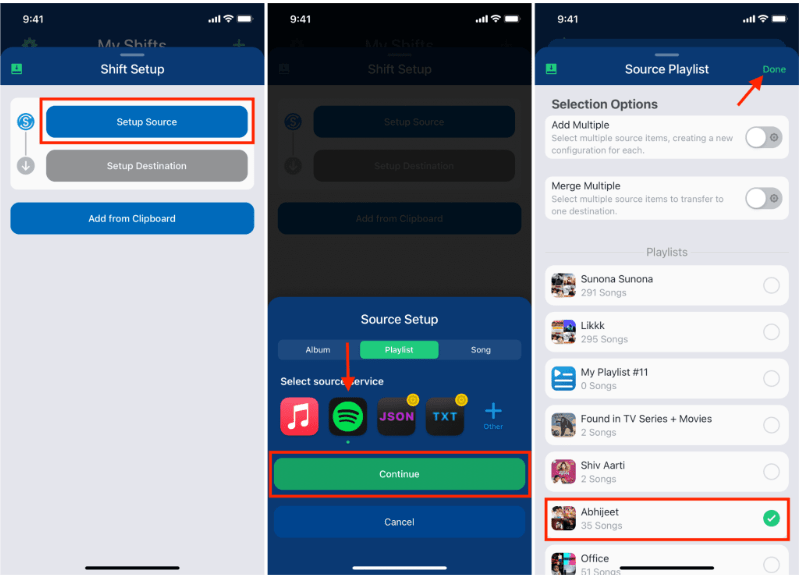
2 Adım. Amazon hesabınıza giriş yaparak Amazon Music'i hedef hizmetiniz olarak ekleyin.
3 Adım. Seçin Spotify Taşımak istediğiniz oynatma listesi.
4 Adım. Başlat'a dokunun ve uygulamanın platformlar arası şarkıları eşleştirmesine izin verin.
İşlem tamamlandıktan sonra, çalma listeniz Amazon Music'te görünmelidir. SongShift, müziklerini aktarmak isteyen kullanıcılar için kullanışlı bir seçenektir. Spotify Çalma listesini bilgisayar kullanmadan Amazon Music'e ekleme.
Bölüm 4. Transfer Spotify Android'de Amazon Music'e ait çalma listeleri
Android kullanıcıları, özel uygulamalar kullanarak da çalma listelerini yayın hizmetleri arasında aktarabilirler. Yaygın olarak kullanılan çözümlerden biri FreeYourMusic'tir. FreeYourMusic, Android, iOS ve diğer platformlarda çalışan, platformlar arası bir müzik aktarım aracıdır. WinWindows ve macOS işletim sistemlerinde çalışır. Kullanıcıların oynatma listelerini minimum çabayla farklı yayın hizmetleri arasında taşımasına olanak tanır.
Ana Özellikler
- Birçok yayın platformunu destekler.
- Basit transfer işlemi
- Birden fazla cihazda çalışır
- Toplu oynatma listesi aktarımına olanak tanır.
Aktarma Adımları Spotify FreeYourMusic ile çalma listenizi Amazon Music'e ekleyin.
1 Adım. Google Play Store'dan FreeYourMusic uygulamasını indirin ve açın. Seçin. Spotify Kaynak platform olarak hesabınıza giriş yapın.
2 Adım. Amazon Music'i seçin ve hesabınıza giriş yapın.
3 Adım. Seç Spotify Taşımak istediğiniz oynatma listesi.
4 Adım. Taşıma işlemini başlatmak için Aktar'a dokunun. Uygulama şarkıları eşleştirecek ve Amazon Music'te çalma listesini yeniden oluşturacaktır.
Bölüm 5. SSS
1. Transfer edebilir miyim? Spotify Çalma listesini Amazon Music'e ücretsiz olarak eklemek mi istiyorsunuz?
Bazı araçlar, aktarım başına maksimum şarkı sayısı gibi sınırlamalarla birlikte ücretsiz çalma listesi aktarımı sunar. Premium sürümler genellikle bu kısıtlamaları kaldırır.
2. Tüm şarkılar başarıyla aktarılacak mı?
Şarkıların çoğu başarıyla aktarılacaktır, ancak lisans farklılıkları nedeniyle bazı parçalar her iki platformda da mevcut olmayabilir.
3. Çalma listelerinin aktarılması ne kadar sürer?
Gerekli süre, çalma listenizin boyutuna bağlıdır. Daha küçük çalma listeleri birkaç dakika içinde aktarılabilirken, daha büyük olanlar daha uzun sürebilir.
4. Çalma listesi aktarma araçlarını kullanmak güvenli mi?
Güvenilir araçlar, hesaplarınıza erişmek için güvenli kimlik doğrulama yöntemleri kullanır. Para transferi yaparken her zaman güvenilir uygulamaları tercih edin. Spotify Çalma listesini Amazon Music'e ekleyin.
Bölüm 6. Sonuç
İster çevrimiçi bir hizmeti, ister masaüstü bir programı veya mobil uygulamayı tercih edin, dosya aktarmanın birçok yolu vardır. Spotify Çalma listelerinizi hızlı ve verimli bir şekilde Amazon Music'e aktarın. Özellikle büyük çalma listeleri için en istikrarlı ve doğru sonuçları isteyen kullanıcılar için. DumpMedia Herhangi bir müzik dönüştürücü, en iyi çözümlerden birini sunar.

%30 İndirim >>>