


Transfer nasıl Spotify YouTube'a Müzik Yükleme: Tüm Cihazlar İçin Tam Kılavuz
Çalma listelerinizi farklı yayın platformları arasında taşımak, özellikle uygulama değiştirirken veya müzik kütüphanenizi birleştirirken sık karşılaşılan bir ihtiyaçtır. Eğer bunu yapmak istiyorsanız... transfer Spotify YouTube'a müzikİyi haber şu ki, modern transfer araçları bu süreci web, masaüstü ve mobil cihazlar arasında sorunsuz hale getiriyor. Bu kılavuz, her yöntemi adım adım açıklayacaktır. Desteklenen özellikler arasında şunlar yer almaktadır: Spotify YouTube'u tüm önemli cihazlarda kullanarak, çalma listelerinizi zahmetsizce taşıyabilir ve müziğinize nerede dinlerseniz dinleyin erişebilirsiniz.
İçindekiler Kılavuzu Bölüm 1. Transfer Spotify YouTube'da Çevrimiçi Oynatma ListesiBölüm 2. Transfer Spotify Oynatma listesini YouTube'a yükle WinDow/MacBölüm 3. Transfer Spotify iOS'ta YouTube'a Oynatma ListesiBölüm 4. Transfer Spotify Android'de YouTube'a Oynatma Listesi EkleBölüm 5. SSSBölüm 6. Hepsini Özetlemek İçin
Bölüm 1. Transfer Spotify YouTube'da Çevrimiçi Oynatma Listesi
En hızlı transfer yöntemini istiyorsanız Spotify Yazılım yüklemeden müziklerinizi YouTube'a aktarmak için, çevrimiçi bir çalma listesi senkronizasyon aracı en uygun seçenektir. Yaygın olarak kullanılan çözümlerden biri, büyük yayın platformları arasında doğrudan çalma listesi geçişini destekleyen tarayıcı tabanlı bir hizmet olan TuneMyMusic'tir.
TuneMyMusic çevrimiçi olarak nasıl çalışır:
- Tarayıcınızda TuneMyMusic'i açın.
- Klinik Spotify Kaynak platform olarak giriş yapın.
- Taşımak istediğiniz oynatma listesini seçin.
- Klinik YouTube hedef olarak.
- Parça listesini onaylayın ve aktarımı başlatın.

Bu yöntem hızlı, platformlar arası uyumlu ve yerel kurulum gerektirmiyor. Spotify müziklerini YouTube'a mümkün olan en sorunsuz şekilde aktarmak isteyen kullanıcılar için idealdir.
Bölüm 2. Transfer Spotify Oynatma listesini YouTube'a yükle WinDow/Mac
Daha fazla kontrol, daha yüksek dönüştürme istikrarı ve otomatik oynatma listesi yönetimi arayan masaüstü kullanıcıları için, DumpMedia Herhangi bir Müzik Dönüştürücü Özel bir Çalma Listesi Aktarım modülü sunar. Özellikle düzenli olarak çalma listesi aktaran kullanıcılar için avantajlıdır. Spotify YouTube'a toplu olarak müzik yüklemek isteyenler veya öngörülebilir ve tekrarlanabilir çalma listesi eşleştirmesine ihtiyaç duyanlar için.
Çalma Listesi Aktarımı özelliğinin başlıca avantajları:
- Toplu oynatma listesi geçişini destekler.
- Meta verileri, albüm kapağını ve parça sıralamasını yönetir.
- Uyumsuz parçaları en aza indirmek için sağlam bir eşleştirme mantığı sunar.
- Her ikisinde de çalışır WinDows ve macOS
: Bu nasıl kullanılır
1 Adım. Any Music Converter uygulamasını açın. Araçlar > Çalma Listesi Aktarımı'nı seçin.
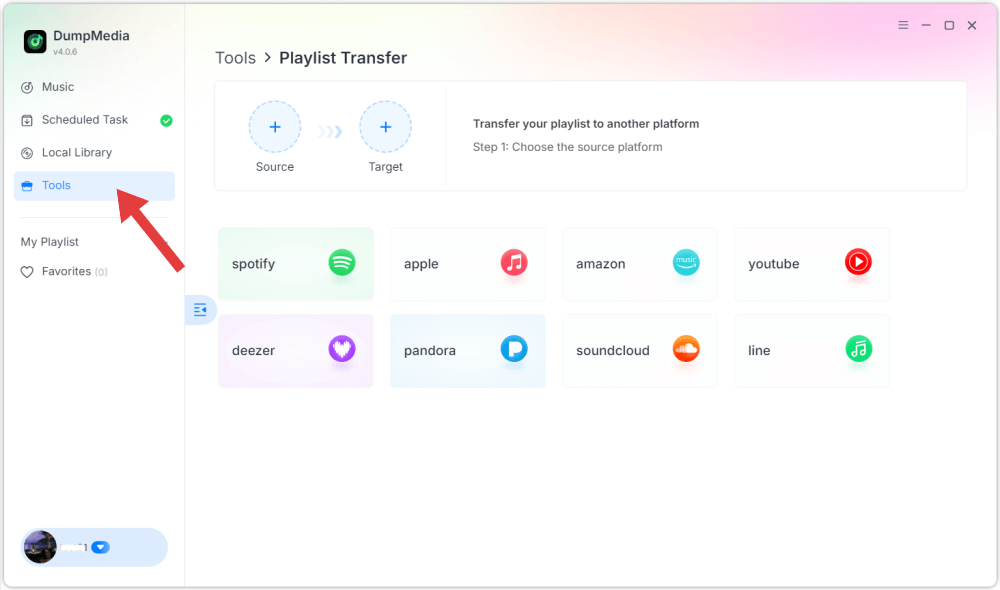
2 Adım. Seç Spotify Kaynak olarak.

3 Adım. Hedef olarak YouTube Music'i seçin.
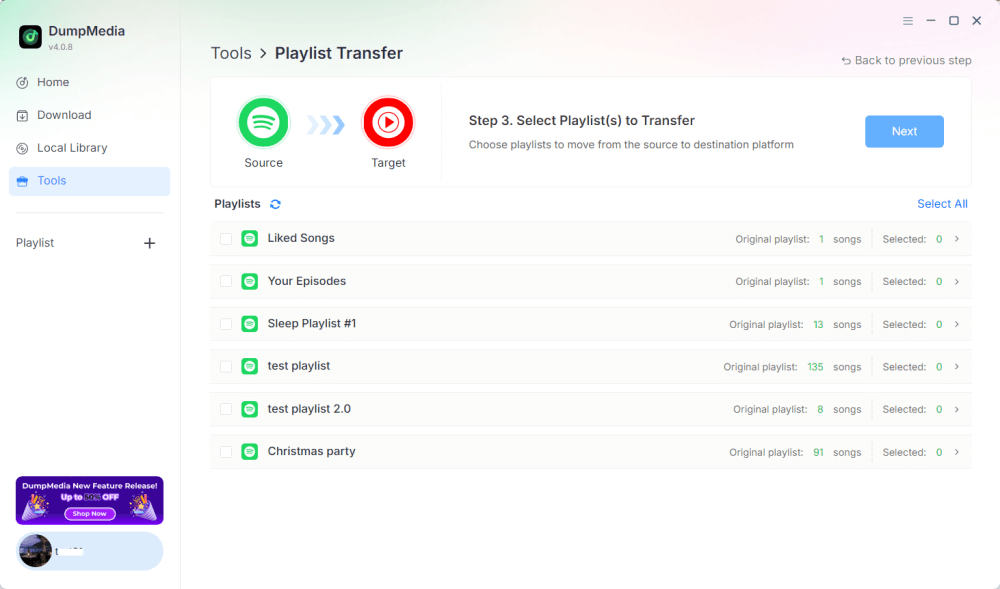
4 Adım. Aktarmak istediğiniz öğeleri seçin; favori şarkılarınızı, sanatçılarınızı, albümlerinizi ve oluşturduğunuz çalma listelerinizi destekliyoruz.
5 Adım. Aktarımı başlatmak için Dönüştür'e tıklayın.
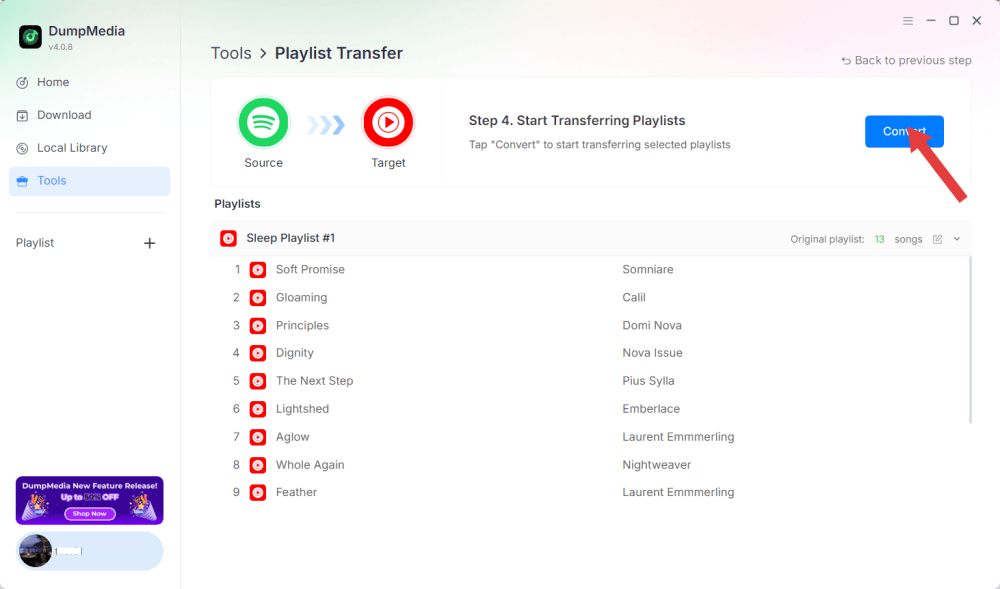
6 Adım. Aktarım tamamlandı. "YouTube Music'e Git"e tıklayın. Çalma listeleriniz yeni bir hizmete taşındı ve YouTube Music'te yeni çalma listenizin keyfini çıkarmaya başlayabilirsiniz.
Tüm işlemler yerel olarak çalıştığı için, bu çözüm tarayıcı tabanlı araçlardan daha kararlıdır ve Spotify müziklerini YouTube'a birden fazla çalma listesi veya büyük kütüphaneler için sık sık aktarması gereken kullanıcılar için mükemmeldir.
Bölüm 3. Transfer Spotify iOS'ta YouTube'a Oynatma Listesi
iPhone veya iPad kullanıyorsanız ve Spotify müziklerinizi YouTube'a aktarmak istiyorsanız, SongShift gibi mobil cihazlar için optimize edilmiş bir geçiş aracı denenmiş ve kanıtlanmış bir seçenektir. Özellikle Apple ekosistemleri için tasarlanmıştır ve sezgisel çalma listesi eşleme iş akışları sunar.
SongShift nasıl çalışır:
- SongShift uygulamasını App Store'dan indirin ve yükleyin.
- Connect Spotify hesap.
- YouTube hesabınızı bağlayın.
- Yeni bir Shift görevi oluşturun ve seçin. Spotify Kaynak olarak oynatma listesi.
- Hedef olarak YouTube'u ayarlayın ve parça eşleşmesini doğrulayın.
- Transfer işlemini gerçekleştirin.
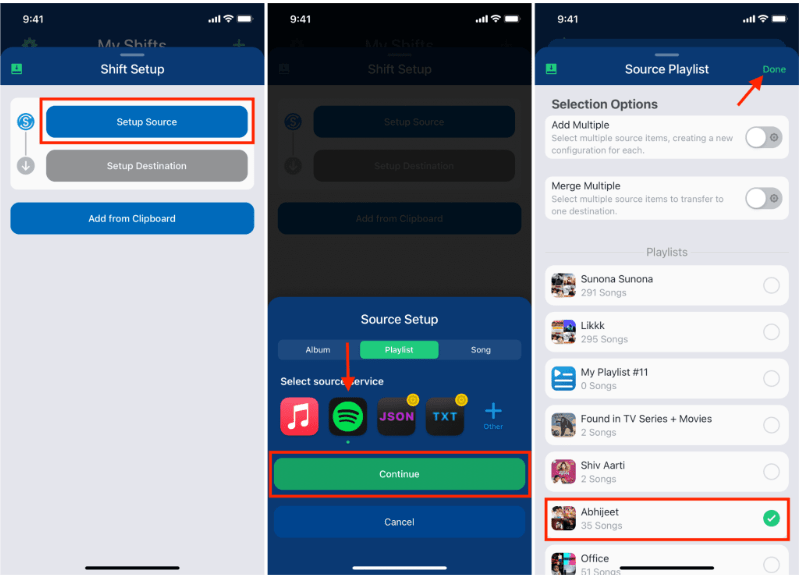
SongShift'in gücü, iOS'a özgü kullanıcı arayüzü etkileşimlerinde yatmaktadır; bu da aktarım işlemini kolaylaştırır. Spotify YouTube'a müzik yükleme, özellikle mobil cihazlarda çalışan kullanıcılar için sorunsuz bir deneyim sunar.
Bölüm 4. Transfer Spotify Android'de YouTube'a Oynatma Listesi Ekle
Android cihazlarda, aktarmanın en kolay yolu Spotify YouTube'a müzik yüklemek için Soundiiz Mobile Web kullanılabilir; bu uygulama mobil tarayıcılarda sorunsuz çalışır ve Android uyumlu arayüzleri destekler.
Soundiiz Mobil Web Sitesi için Adımlar:
- Android tarayıcınızda Soundiiz web sitesini açın.
- Lütfen giriş yapın Spotify hesap.
- Taşımak istediğiniz çalma listesini seçin.
- Hedef hizmet olarak YouTube'u seçin.
- Senkronizasyonu onaylayın ve başlatın.
Bu iş akışı, ek uygulama yüklemek istemeyen ancak yine de kolay bir aktarım yöntemine ihtiyaç duyan kullanıcılar için uygundur. Spotify Hareket halindeyken YouTube'dan müzik dinleyin.
Bölüm 5. SSS
1. Aktarım yaptığımda çalma listesi sırası aynı kalacak mı? Spotify YouTube'a müzik yüklemek mi?
Çoğu araç düzeni korumaya çalışır, ancak tam koruma, izlerin kullanılabilirliğine ve tanıma doğruluğuna bağlıdır.
2. Hepsi Spotify Şarkılar YouTube'da mevcut mu?
Her zaman değil. Telif hakkı farklılıkları, bölgesel kısıtlamalar ve mevcut olmayan şarkılar boşluklara neden olabilir.
3. Bu araçlar hesaplarıma erişim gerektiriyor mu?
Evet. Sizin bilgilerinizi okuyabilmeleri için yetkilendirmeye ihtiyaçları var. Spotify Oynatma listeleri oluşturun ve bunları YouTube kitaplığınıza ekleyin. Güvenilir araçlar güvenli OAuth kimlik doğrulamasını kullanır.
4. Transfer ne kadar sürer? Spotify Oynatma listelerini YouTube'a mı aktarıyorsunuz?
Bu, çalma listesinin boyutuna bağlıdır; küçük çalma listeleri saniyeler içinde tamamlanırken, büyük kütüphanelerin tamamlanması birkaç dakika sürebilir.
Bölüm 6. Hepsini Özetlemek İçin
En iyi transfer yöntemini bulmak Spotify YouTube'a müzik yüklemek, iş akışınıza ve cihazınıza bağlıdır. Doğru araçla, zahmetsizce aktarım yapabilirsiniz. Spotify Çalma listelerini YouTube'a yükleyin ve platformlar arasında müzikal sürekliliği sağlayın.

%30 İndirim >>>