


Apple Music'e Nasıl Aktarılır? Spotify: Tam Kılavuz
Dijital sadakat akışkandır. Müzik tutkunları daha iyi platformlar arası uyumluluk ve yeni keşif algoritmaları ararken, birçoğu bir platformdan diğerine geçiş yapıyor. elma Müzik için SpotifyAncak, geçişin önündeki en büyük engel abonelik ücreti değil, on yıllık müzik tarihini kaybetme korkusudur. Neyse ki, artık bunu mümkün kılan çeşitli araçlar mevcut. Apple Music'i aktar Spotify Otomatik olarak. Bu kılavuzda, Apple Music şarkılarını aktarmanın en etkili yöntemlerini inceleyeceğiz. Spotify farklı cihazlar arasında.
İçindekiler Kılavuzu Bölüm 1. Apple Music Çalma Listesini Aktarma Spotify on WinDow/MacBölüm 2. Apple Music Çalma Listesini Aktarma Spotify OnlineBölüm 3. Apple Music Çalma Listesini Aktarma Spotify iOS/Android'deBölüm 4. SSSBölüm 5. Hepsini Özetlemek İçin
Bölüm 1. Apple Music Çalma Listesini Aktarma Spotify on WinDow/Mac
Apple Music'i aktarmanın en güvenilir yollarından biri Spotify Gelişmiş çalma listesi taşıma özelliklerine sahip özel bir masaüstü aracı kullanmak mümkündür. Son derece önerilen bir seçenek şudur: DumpMedia Herhangi bir Müzik DönüştürücüBu özellik, güçlü bir Çalma Listesi Aktarma işlevini de içerir.
DumpMedia Any Music Converter, platformlar arası müzik yönetimi ve dönüştürme işlemlerini gerçekleştirmek için tasarlanmış profesyonel bir masaüstü uygulamasıdır. Hem iOS hem de Android cihazlarda çalışır. WinWindows ve macOS işletim sistemlerinde kullanılabilir. Dahili Çalma Listesi Aktarımı özelliği sayesinde kullanıcılar Apple Music müziklerini verimli bir şekilde aktarabilirler. Spotify Çalma listesi yapısını ve şarkı meta verilerini korurken.
Ana Özellikler
- Çalma Listesi Aktarma Fonksiyonu: DumpMedia Bu özellik, şarkıları tek tek aktarmak yerine tüm çalma listelerini taşımanıza olanak tanır. Bu da büyük müzik koleksiyonlarıyla uğraşırken önemli ölçüde zaman tasarrufu sağlar.
- Toplu Çalma Listesi Taşıma: Birden fazla çalma listesini seçip aynı anda taşıyabilirsiniz, bu da büyük kütüphaneleri yönetmeyi kolaylaştırır.
- İstikrarlı Masaüstü Performansı: O zamandan beri DumpMedia Bilgisayarınızda yerel olarak çalıştığı için, birçok tarayıcı tabanlı araca göre daha istikrarlı bir aktarım süreci sağlar.
- Akıllı Şarkı Eşleştirme: Yazılım, ilgili şarkıları otomatik olarak belirler. SpotifyKataloğu kontrol ederek, aktarılan çalma listesinin doğru parçaları içermesini sağlar.
- Meta Veri Koruma: Şarkı başlıkları, sanatçı adları, albümler ve çalma listesi sırası aktarım işlemi sırasında bozulmadan kalır.
Adım adım rehber
1 Adım. İlk önce, indir DumpMedia Resmi web sitesinden herhangi bir müzik dönüştürücü programı indirin. Programı bilgisayarınıza kurun. WinWindows veya Mac bilgisayarınızda uygulamayı başlatın. Uygulamayı açın ve Araçlar > Çalma Listesi Aktarımı'nı seçin.
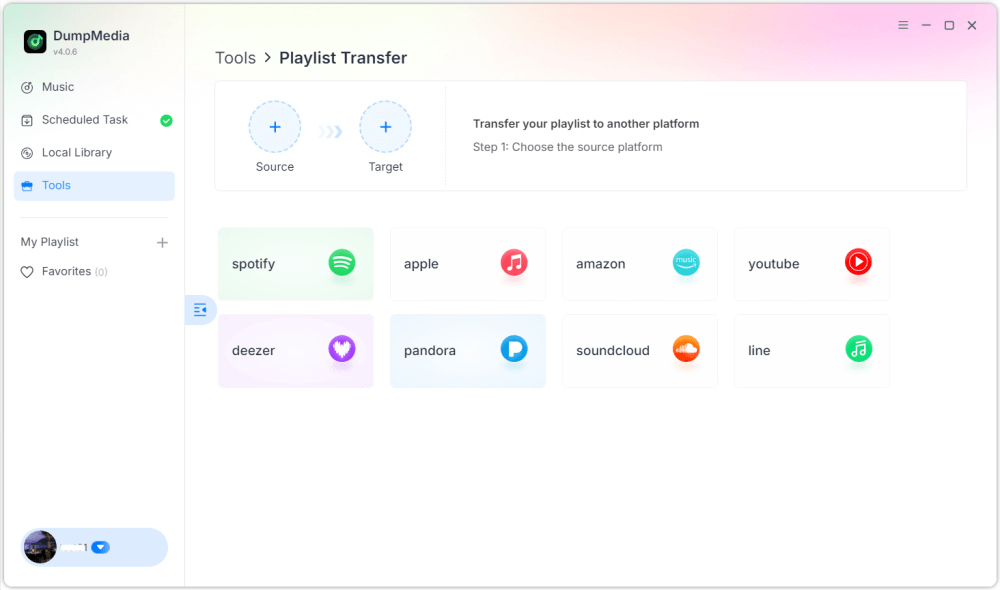
2 Adım. Kaynak olarak Apple Music'i seçin. Ardından seçin. Spotify hedef platform olarak
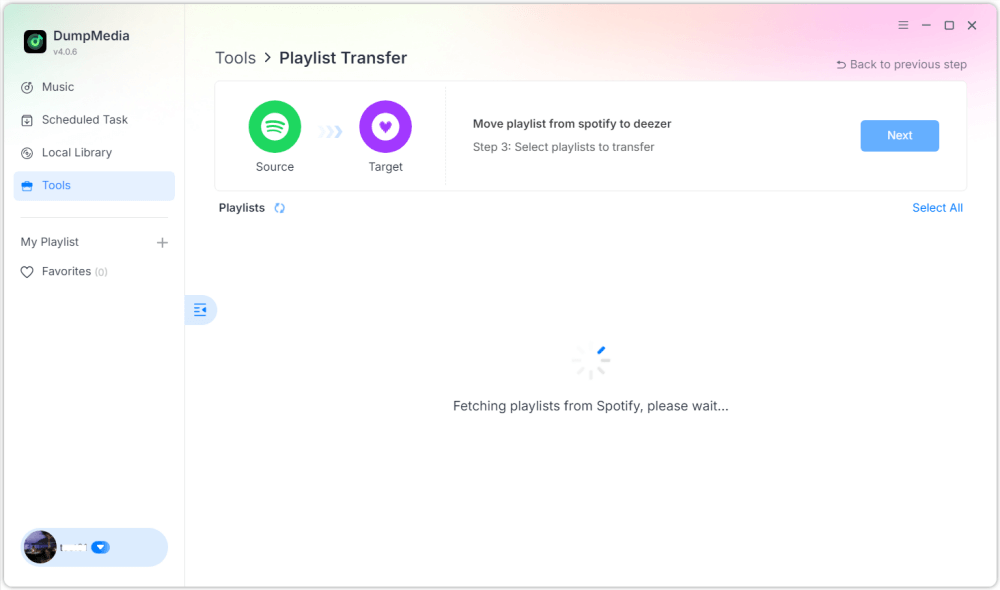
3 Adım. Apple Music'ten aktarmak istediğiniz çalma listelerini bulun. SpotifyArdından taşımak istediğiniz tüm oynatma listelerini seçin.

4 Adım. Çalma listesini taşımaya başlamak için Dönüştür düğmesine tıklayın. DumpMedia çalma listesini otomatik olarak yeniden oluşturacaktır. Spotify.
5 Adım. Transfer işlemi tamamlandı. "Git"e tıklayın. SpotifyÇalma listeleriniz yeni bir servise taşındı ve yeni müzik yayın hizmetinizin keyfini çıkarmaya başlayabilirsiniz.
Bu masaüstü yöntemi, Apple Music'i aktarmanın en verimli yollarından biridir. SpotifyÖzellikle birden fazla çalma listeniz veya geniş bir müzik arşiviniz varsa.
Bölüm 2. Apple Music Çalma Listesini Aktarma Spotify Online
Ek yazılım yüklemek istemiyorsanız, çevrimiçi bir çalma listesi aktarma aracı da Apple Music'i aktarmanıza yardımcı olabilir. Spotify Hızlı bir şekilde. Popüler seçeneklerden biri Soundiiz'dir. Soundiiz, kullanıcıların birçok müzik yayın hizmeti arasında çalma listelerini aktarmalarına olanak tanıyan bulut tabanlı bir çalma listesi yönetim platformudur. Tamamen tarayıcıda çalıştığı için neredeyse her cihazda kullanılabilir.
Ana Özellikler
- Kurulum gerektirmeyen web tabanlı arayüz.
- Birçok müzik yayın platformunu destekler.
- Çalma listesi dönüştürme araçları
- Toplu oynatma listesi yönetimi
Apple Music'i Aktarma Adımları Spotify Soundiiz ile
1. Adım. Soundiiz web sitesini ziyaret edin ve bir hesap oluşturun. Apple Music hesabınıza giriş yapın ve Soundiiz'e çalma listelerinize erişim izni verin.
2 Adım. Ardından, Spotify hesap.
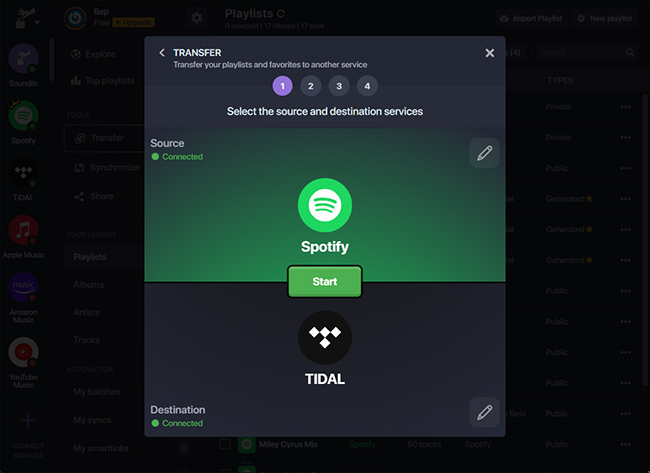
3 Adım. Apple Music çalma listelerinize göz atın ve aktarmak istediğiniz çalma listesini seçin. Dönüştür'e tıklayın ve seçin. Spotify hedef platform olarak.
4 Adım. Soundiiz, şarkıları eşleştirmeye ve çalma listesini yeniden oluşturmaya başlayacak. Spotify.
Soundiiz gibi çevrimiçi araçlar, Apple Music şarkılarını başka platformlara aktarmak isteyen kullanıcılar için kullanışlı bir seçenektir. Spotify Masaüstü yazılımı yüklemeye gerek kalmadan kullanılabilirler. Ancak, aktarım sınırları veya büyük çalma listeleri için daha yavaş işlem gibi sınırlamaları olabilir.
Bölüm 3. Apple Music Çalma Listesini Aktarma Spotify iOS/Android'de
Çalma listelerinizi doğrudan akıllı telefonunuzdan yönetmeyi tercih ediyorsanız, Apple Music'i aktarmanıza yardımcı olabilecek çeşitli mobil uygulamalar mevcuttur. Spotify Çok kolay. En yaygın kullanılan uygulamalardan ikisi FreeYourMusic ve SongShift'tir.
FreeYourMusic uygulamasını kullanarak (iOS ve Android)
FreeYourMusic, hem iOS hem de Android cihazlarda kullanılabilen, platformlar arası bir müzik aktarım aracıdır. Kullanıcıların çalma listelerini doğrudan telefonlarından farklı yayın hizmetleri arasında taşımalarına olanak tanır.
- FreeYourMusic uygulamasını App Store veya Google Play'den indirin.
- Uygulamayı açın ve kaynak platform olarak Apple Music'i seçin.
- Apple Music hesabınızda oturum açın.
- Klinik Spotify hedef platform olarak.
- Taşımak istediğiniz oynatma listesini seçin.
- Transfer işlemine başlamak için Transfer'e dokunun.
Çalma listeniz birkaç dakika içinde görünecektir. Spotify.
SongShift Kullanımı (Sadece iOS)
SongShift, özellikle iOS kullanıcıları için tasarlanmış bir diğer popüler mobil uygulamadır. Birden fazla müzik servisi arasında hızlı çalma listesi aktarımına olanak tanır.
- SongShift'i App Store'dan indirin.
- Apple Music'inizi bağlayın ve Spotify hesaplar.
- Vardiya Oluştur'a dokunun.
- Kaynak olarak Apple Music'i seçin ve Spotify hedef olarak.
- Aktarmak istediğiniz oynatma listesini seçin.
- Transfer işlemine başlayın.
Apple Music'i aktarmak istiyorsanız mobil uygulamaları kullanmak mükemmel bir seçenektir. Spotify Bilgisayar kullanmadan doğrudan telefonunuzdan.
Bölüm 4. SSS
1. Apple Music'i aktarabilir miyim? Spotify ücretsiz mi?
Bazı araçlar, şarkı sayısı gibi sınırlamalarla birlikte ücretsiz çalma listesi aktarımı sunar. Ücretli sürümler genellikle sınırsız aktarım ve daha hızlı işlem imkanı sağlar.
2. Tüm şarkılar başarıyla aktarılacak mı?
Şarkıların çoğu doğru şekilde aktarılacaktır, ancak bazen hedef platformda mevcut olmayan bazı parçalar görünmeyebilir.
3. Transfer ne kadar sürer?
Gerekli süre, çalma listesinin boyutuna bağlıdır. Daha küçük çalma listeleri birkaç dakika içinde aktarılabilirken, daha büyük olanlar daha uzun sürebilir.
4. Çalma listesi aktarma araçlarını kullanmak güvenli mi?
Güvenilir araçlar, müzik hesaplarınıza bağlanmak için güvenli kimlik doğrulama yöntemleri kullanır. Apple Music'i aktarırken her zaman güvenilir bir yazılım seçin. Spotify.
Bölüm 5. Hepsini Özetlemek İçin
Müzik yayın platformunu değiştirmek artık özenle oluşturduğunuz çalma listelerinizi kaybetmek anlamına gelmiyor. Modern çalma listesi taşıma araçlarıyla, Apple Music'i başka bir platforma aktarmak artık her zamankinden daha kolay. Spotify Müzik kitaplığınızı manuel olarak yeniden oluşturmanıza gerek kalmadan. Cihazınıza ve çalma listesi boyutunuza en uygun yöntemi seçerek, Apple Music şarkılarınızı başarıyla aktarabilirsiniz. Spotify Yeni yayın platformunuzda en sevdiğiniz şarkıların keyfini sorunsuz bir şekilde çıkarmaya devam edin.