


Amazon Music'i Nasıl Aktarırım? Spotify [3 Cevaplar]
Yayın platformları geniş müzik kütüphaneleri sunar, ancak kullanıcılar genellikle daha iyi özellikler aramak için hizmet değiştirirler. Eğer bir hizmetten diğerine geçiyorsanız... Amazon Müzik için SpotifyEn büyük engel, özenle oluşturduğunuz çalma listelerinizi manuel olarak yeniden oluşturmanın zahmetli işine gerek kalmadan aktarmaktır. Bu kılavuz, her iki platformu karşılaştırıyor ve size yardımcı olmak için en verimli yolları inceliyor. Amazon Music'i aktarın Spotify Çalma listelerini sıfırdan yeniden oluşturmadan.
İçindekiler Kılavuzu Bölüm 1. Genel Bakış: Amazon Music vs. SpotifyBölüm 2. Amazon Müzik Çalma Listesini Aktarma Spotify on WinDow/MacBölüm 3. Amazon Müzik Çalma Listesini Aktarma Spotify OnlineBölüm 4. Amazon Müzik Çalma Listesini Aktarma Spotify iOS / AndroidBölüm 5. SSSBölüm 6. Sonuç
Bölüm 1. Genel Bakış: Amazon Music vs. Spotify
Hem Amazon Müzik hem de Spotify Geniş müzik kütüphaneleri ve kullanışlı yayın deneyimleri sunuyorlar, ancak kullanıcı tercihlerini etkileyen birkaç önemli açıdan farklılık gösteriyorlar.
Fiyatlandırma ve Abonelik Planları
Amazon Music, ücretsiz sürüm, Amazon Prime üyeleri için Amazon Music Prime ve Amazon Music Unlimited dahil olmak üzere çeşitli abonelik seçenekleri sunmaktadır. Spotify Ayrıca hem ücretsiz hem de premium planlar sunmaktadır. SpotifyÜcretsiz sürümü reklamlar ve sınırlı oynatma özellikleri içerirken Spotify Premium, reklamsız dinleme, çevrimdışı indirme ve sınırsız atlama imkanı sunar.
- Aradaki farkı görmek için detaylı karşılaştırmamızı okuyun. Spotify Ücretsiz ve Premium.
Ses Kalitesi
Amazon Music, HD ve Ultra HD parçaları içeren Amazon Music Unlimited aracılığıyla yüksek çözünürlüklü ses seçenekleri sunmasıyla bilinir. Spotify Aynı zamanda yüksek kaliteli yayın akışı sunar ve cihazlar arasında tutarlı oynatma performansı ile geniş çapta tanınır. Birçok dinleyici için her iki platform da mükemmel ses kalitesi sunar, ancak Amazon Music yüksek çözünürlüklü ses seçeneklerine daha fazla odaklanır.
Özellikler ve Müzik Keşif Araçları
Spotify Gelişmiş öneri sistemi ve Discover Weekly ve Daily Mix gibi algoritma tabanlı çalma listeleriyle geniş çapta övgü topluyor. Bu kişiselleştirilmiş çalma listeleri, kullanıcıların dinleme alışkanlıklarına göre yeni müzikler keşfetmelerine yardımcı oluyor. Amazon Music, özenle hazırlanmış çalma listeleri ve Amazon Alexa ile ses entegrasyonu sağlayarak özellikle akıllı ev ortamları için oldukça kullanışlı hale geliyor.
Cihaz Uyumluluğu ve Ekosistem Entegrasyonu
Amazon Music, Echo hoparlörler gibi Amazon cihazlarıyla derinlemesine entegre olurken, Spotify Akıllı TV'ler, oyun konsolları ve otomobil sistemleri de dahil olmak üzere çok çeşitli üçüncü taraf cihazlarla sorunsuz bir şekilde çalışır. Bu farklılıklar nedeniyle birçok dinleyici Amazon Music'i başka bir cihaza aktarmaya karar verir. Spotify yararlanmak SpotifyKeşif özelliklerinin yanı sıra daha geniş cihaz uyumluluğu.
Bölüm 2. Amazon Müzik Çalma Listesini Aktarma Spotify on WinDow/Mac
Amazon Music'i aktarmanın en güvenilir yollarından biri Spotify Bu, oynatma listesi taşıma özelliklerini içeren masaüstü yazılımları kullanarak yapılabilir. Önerilen çözüm şudur: DumpMedia Herhangi bir Müzik Dönüştürücüher ikisinde de çalışan WinWindows ve macOS işletim sistemlerinde kullanılabilen bu yazılım, kullanıcıların oynatma listelerini yayın platformları arasında hızlı ve verimli bir şekilde taşımalarına yardımcı olmak için tasarlanmış bir Oynatma Listesi Aktarımı özelliği içerir.
DumpMedia Any Music Converter, kullanıcıların müzik hesaplarını bağlamalarına ve hedef platformda çalma listelerini otomatik olarak yeniden oluşturmalarına olanak tanır. Her parçayı manuel olarak aramak yerine, program çalma listenizi tarar, hizmetler arasında şarkıları eşleştirir ve çalma listesini yeniden oluşturur. SpotifyBu yaklaşım, özellikle büyük müzik kütüphanelerine sahip kullanıcılar için önemli miktarda zaman tasarrufu sağlar.
Adım adım rehber
1 Adım. Indirin ve yükleyin DumpMedia Herhangi bir müzik dönüştürücü cihazınızda Windows veya Mac bilgisayar. Kurulumdan sonra programı başlatın.
Adım 2. Kütüphaneniz yüklendikten sonra, programın Çalma Listesi Aktarımı bölümüne gidin.
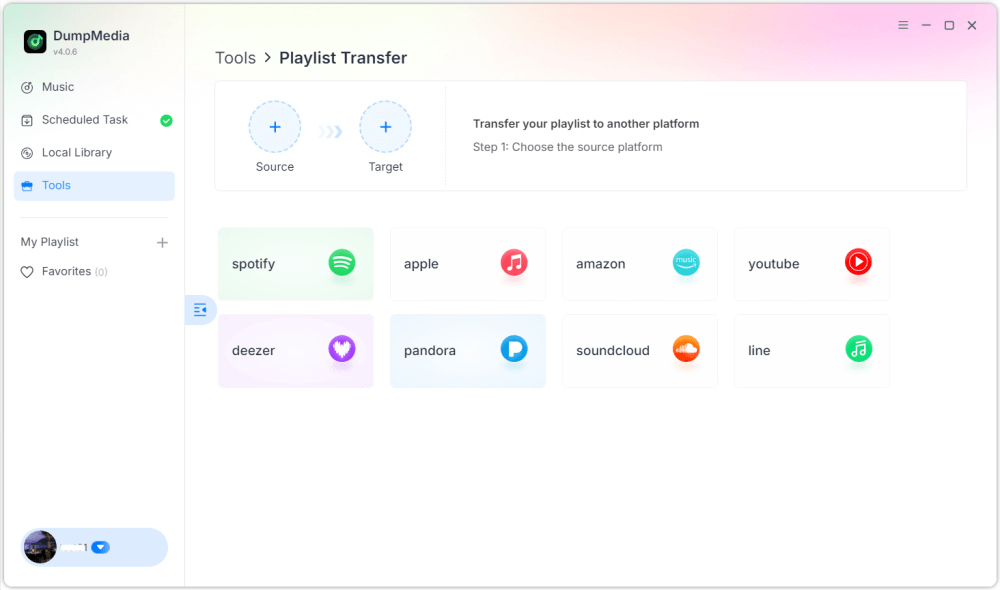
3. Adım. Kaynak olarak Amazon Music'i seçin.
4 Adım. Seç Spotify bir varış noktası olarak.
5. Adım. Aktarmak istediğiniz öğeleri seçin; favori şarkılarınızı, sanatçılarınızı, albümlerinizi ve oluşturduğunuz çalma listelerinizi destekliyoruz.
Adım 6. Aktarımı başlatmak için Dönüştür'e tıklayın.
7 Adım. Transfer işlemi tamamlandı. "Git"e tıklayın. Spotify". Çalma listeniz artık eşleşen şarkılarla birlikte görünmelidir."
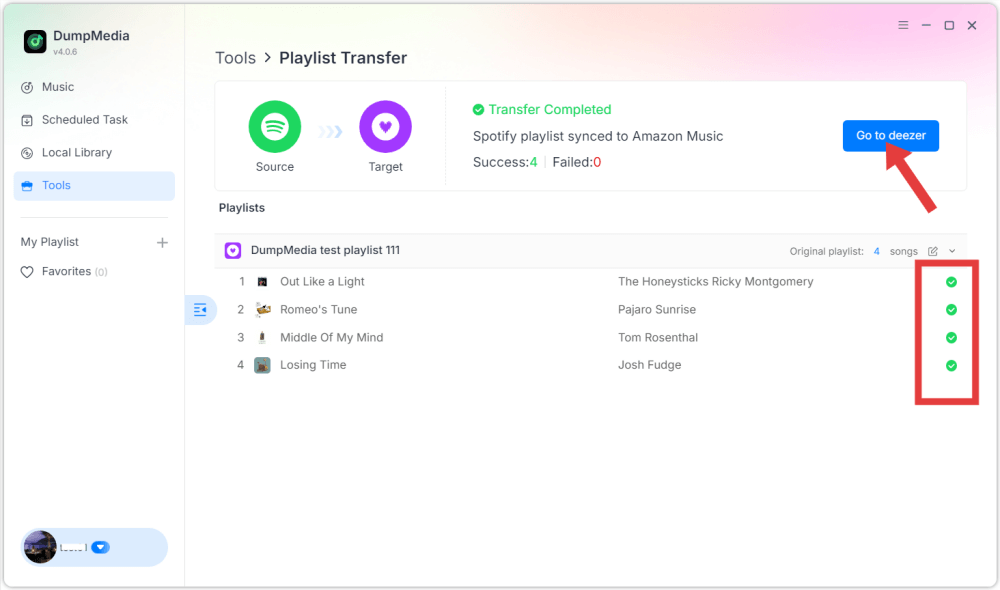
Bu yöntem sayesinde kullanıcılar Amazon Music'i verimli bir şekilde aktarabilirler. Spotify Çalma listesinin sırasını ve parça bilgilerini korurken.
Bölüm 3. Amazon Müzik Çalma Listesini Aktarma Spotify Online
Amazon Music'i aktarmanın bir başka kolay yolu da şudur: Spotify Bunun bir yolu da çevrimiçi bir çalma listesi taşıma hizmeti kullanmaktır. Yaygın olarak kullanılan araçlardan biri, doğrudan web tarayıcısında çalışan ve kurulum gerektirmeyen TuneMyMusic'tir. Çevrimiçi araçlar, özellikle ek yazılım yüklemeden hızlı bir çözüm isteyen kullanıcılar için kullanışlıdır.
Adım adım rehber
1. Adım. Başlamak için TuneMyMusic web sitesini ziyaret edin ve yeni bir aktarım işlemi başlatın. Kaynak platform olarak Amazon Music'i seçin ve çalma listelerinize erişebilmesi için hesabınıza giriş yapın.
2. Adım. Hesabınızı bağladıktan sonra, platform mevcut oynatma listelerinizi gösterecektir. Taşımak istediğiniz oynatma listesini seçin ve bir sonraki adıma geçin.
3 Adım. Sonra seç Spotify Hedef platform olarak belirleyin ve bağlantıyı yetkilendirmek için giriş yapın. Ardından TuneMyMusic, çalma listenizi analiz edecek ve her parçayı eşleştirmeye çalışacaktır. Spotify'nin kataloğu.
4 Adım. İşlem tamamlandığında, çalma listesi otomatik olarak yeniden oluşturulacaktır. Spotify Bu, Amazon Music'i kütüphaneye aktarmayı kolaylaştırır. Spotify Teknik becerilere ihtiyaç duymadan.
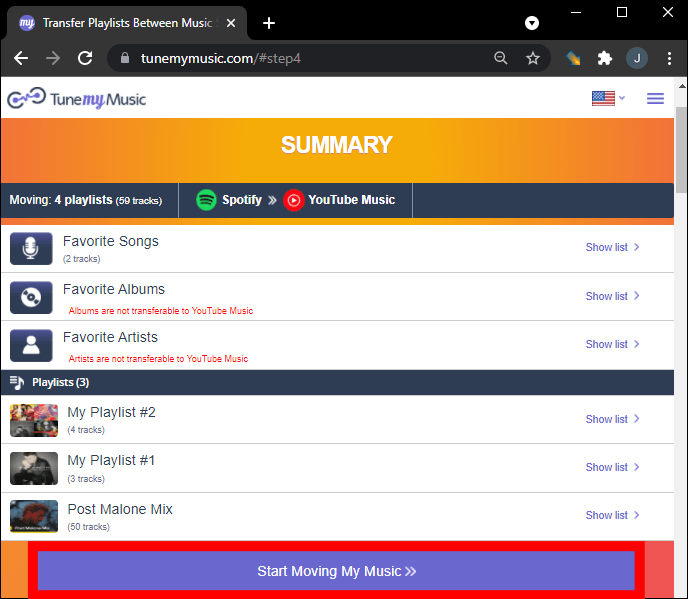
Çevrimiçi araçlar kullanışlı olsa da, bazen aktarım sınırları veya büyük çalma listeleri için daha yavaş performans gibi sınırlamalara sahip olabilirler. Geniş kütüphaneleri olan kullanıcılar için masaüstü araçlar daha istikrarlı bir çözüm sağlayabilir.
Bölüm 4. Amazon Müzik Çalma Listesini Aktarma Spotify iOS / Android
Müzik kütüphanelerinizi yönetmek için akıllı telefonunuzu kullanmayı tercih ediyorsanız, Amazon Music'i aktarmanıza yardımcı olabilecek çeşitli mobil uygulamalar da mevcuttur. SpotifyBu uygulamalar, kullanıcıların çalma listelerini doğrudan mobil cihazlarından aktarmalarına olanak tanır. Popüler mobil çözümlerden biri olan FreeYourMusic, hem iOS hem de Android cihazlarda çalışır. Uygulama, birden fazla yayın platformunu destekler ve çalma listelerini aktarmak için basit bir arayüz sunar.
Adım adım rehber
Adım 1. Uygulamayı yükledikten sonra açın ve kaynak platform olarak Amazon Music'i seçin. Uygulamanın çalma listelerinize erişebilmesi için hesabınıza giriş yapın.
2 Adım. Sonra seç Spotify Hedef platform olarak belirleyin ve bağlantıyı yetkilendirin.
3 Adım. Ardından, taşımak istediğiniz çalma listesini seçin ve aktarımı başlatın. Uygulama, eşleşen parçaları otomatik olarak arayacaktır. Spotify'ın kataloğunu kullanın ve çalma listesini yeniden oluşturun.
FreeYourMusic gibi mobil uygulamalar, Amazon Music'i aktarmanın kullanışlı bir yolunu sunuyor. Spotify Özellikle bilgisayar kullanmayı tercih etmeyen kullanıcılar için, doğrudan akıllı telefondan erişim imkanı.
Bölüm 5. SSS
Tüm şarkılar başarıyla aktarılacak mı?
Çoğu durumda, parçaların büyük çoğunluğu doğru şekilde aktarılacaktır. Ancak, hedef platformda mevcut olmayan bazı şarkılar görünmeyebilir.
Transfer süreci ne kadar sürüyor?
Gerekli süre, çalma listenizdeki şarkı sayısına ve kullanılan araca bağlıdır. Küçük çalma listeleri birkaç dakika içinde aktarılabilirken, daha büyük kütüphaneler daha uzun sürebilir.
Çalma listesi aktarma araçlarını kullanmak güvenli mi?
Güvenilir araçlar, kişisel bilgileri ifşa etmeden çalma listelerine erişim sağlayan güvenli kimlik doğrulama sistemleri kullanır. Amazon Music'i aktarmaya çalışırken güvenilir hizmetler kullanmak önemlidir. Spotify.
Bölüm 6. Sonuç
Müzik yayın platformunu değiştirmek, en sevdiğiniz çalma listelerini kaybetmek anlamına gelmez. Modern çalma listesi taşıma araçları sayesinde, Amazon Music şarkılarını başka platformlara aktarmak artık mümkün. Spotify Hızlı ve verimli bir şekilde. Doğru yöntemi seçerek Amazon Music'i başarıyla aktarabilirsiniz. Spotify Dünyanın en popüler yayın platformlarından birinde en sevdiğiniz müzik koleksiyonunuzun keyfini çıkarmaya devam edin ve çalma listelerinizi manuel olarak yeniden oluşturmanıza gerek kalmasın.