


Pandora Şarkılarını Nasıl Dönüştürürsünüz? MP3 2026'da: Adım Adım Kılavuz
Pandora, en popüler müzik yayın platformlarından biridir, ancak şarkıları genellikle abonelik kısıtlamalarıyla korunmaktadır; bu da çevrimdışı erişimi ve esnek oynatmayı engellemektedir. Birçok kullanıcı şu soruyu soruyor: Pandora şarkılarını nasıl dönüştürebilirim? MP3 Böylece aboneliklerinin sona ermesinden endişe etmeden her yerde müzik dinleyebilirler. Bu kılavuzda, Pandora müziklerini neden dönüştürmek isteyebileceğinizi açıklayacağız. MP3İş için en iyi araçlar ve müziğinizi kalıcı olarak çevrimdışı hale getirmek için adım adım bir süreç.
İçindekiler Kılavuzu Bölüm 1. Pandora Şarkılarını Doğrudan İndirebilir misiniz? MP3?Bölüm 2. Pandora Müziklerini Dönüştürmek İçin En İyi Araç MP3Bölüm 3. Pandora Müziklerini Nasıl Dönüştürebilirsiniz? MP3 Adım adım?Bölüm 4. SSSBölüm 5. Sonuç
Bölüm 1. Pandora Şarkılarını Doğrudan İndirebilir misiniz? MP3?
Pandora, Premium kullanıcılar için çevrimdışı dinleme olanağı sunuyor, ancak indirilen şarkılar hesabınıza ve aboneliğinize bağlı kalıyor. Pandora (örneğin) Spotify ve Apple Music) kullanıyor DRM (Dijital Haklar Yönetimi) Yalnızca aktif aboneliğiniz olduğu sürece dinlemenizi sağlamak için. Çevrimdışı parçalar diğer cihazlara aktarılamaz veya kalıcı olarak yedeklenemez. Pandora şarkılarını fiziksel bir cihaza aktarmak için MP3 Bu format için resmi olmayan yöntemler kullanmanız gerekiyor.
Bölüm 2. Pandora Müziklerini Dönüştürmek İçin En İyi Araç MP3
Pandora müziklerini nasıl dönüştürürüm? MP3En güvenilir çözüm nedir? DumpMedia Pandora Müzik DönüştürücüBu araç, kullanıcıların Pandora şarkılarını dönüştürmelerine yardımcı olur. MP3FLAC, M4A ve WAV formatlarını tek tıklamayla kaydedin. Böylece çalma listelerinizi yerel olarak kaydedebilir ve abonelik değişikliklerinden sonra da müziğinizi koruyabilirsiniz. Kullanıcılar, tamamen yayın akışına bağlı kalmak yerine, Pandora çalma listelerinden uzun vadeli müzik koleksiyonları oluşturabilirler. Pandora uygulaması cihazınızda çalışmıyor olsa bile, Pandora şarkılarını çevrimdışı oynatın Hemen başka bir müzik çalara geçin.
🏅Neden Bunu Seçmelisiniz? DumpMedia Pandora Müzik Dönüştürücü:
- ⭐Pandora web oynatıcısı ile entegrasyon
- ⭐Hem Pandora Premium hem de Ücretsiz kullanıcıları için geçerlidir.
- ⭐35 kata kadar hızda toplu dönüştürme sağlayın
- ⭐Sanatçı, kapak, sanat eseri vb. ID3 etiketlerini saklayın.
- ⭐Orijinal ses kalitesini koruyun
- ⭐100% temiz. Kullanırken risk yok
Bu araç, Pandora şarkılarını kolayca dönüştürmenizi sağlar. MP3 Karmaşık kurulumlar veya teknik bilgi gerektirmeden.
Bölüm 3. Pandora Müziklerini Nasıl Dönüştürebilirsiniz? MP3 Adım adım?
Pandora şarkılarını dönüştürmek için şu basit adımları izleyin. MP3 'da DumpMedia Pandora Müzik Dönüştürücü:
1 Adım. Indirin ve yükleyin DumpMedia Mac/PC'nizde Pandora Music Converter'ı çalıştırın. Başlattığınızda arayüzü göreceksiniz. Giriş yapmak için Pandora Premium/Ücretsiz hesabınızı kullanın.
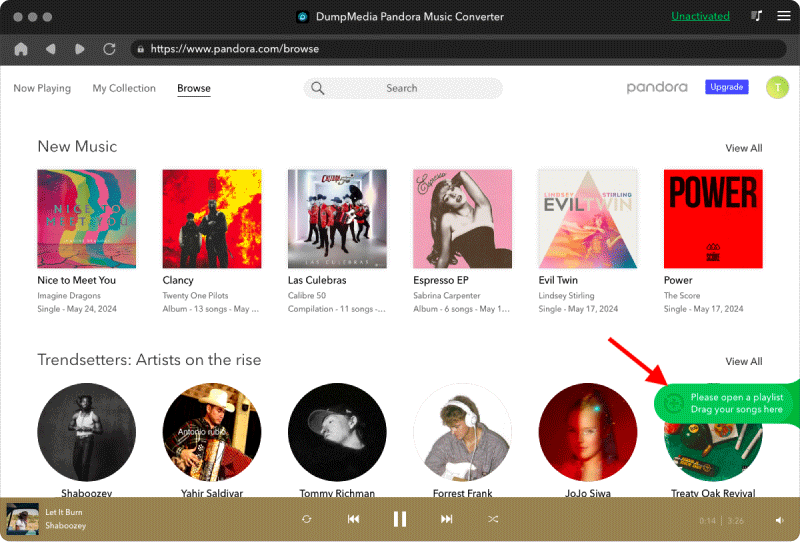
2 Adım. Daha sonra şarkıları veya çalma listelerini doğrudan yüzen "+" simgesine sürükleyerek dönüştürme kuyruğuna ekleyebilir ve indirmeye hazır hale getirebilirsiniz.
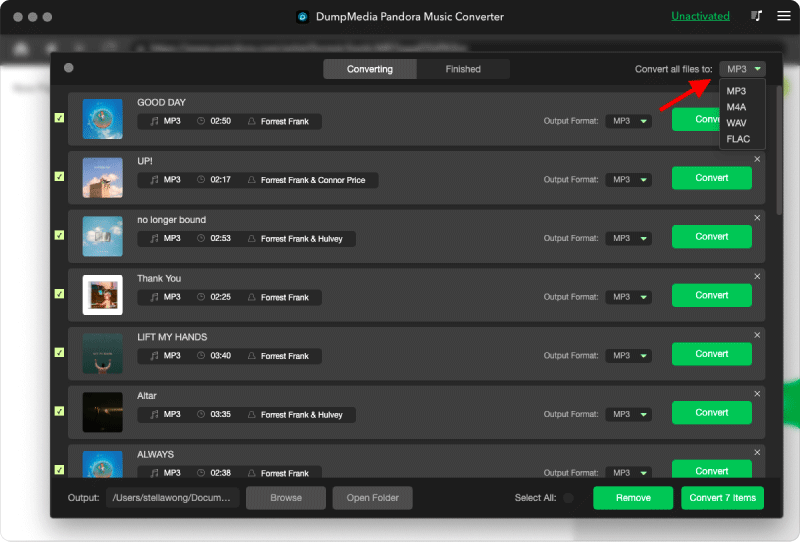
3 Adım. Seçtiğiniz şarkılardan memnun kaldığınızda, tercih ettiğiniz ses dosyası formatını seçebilirsiniz.
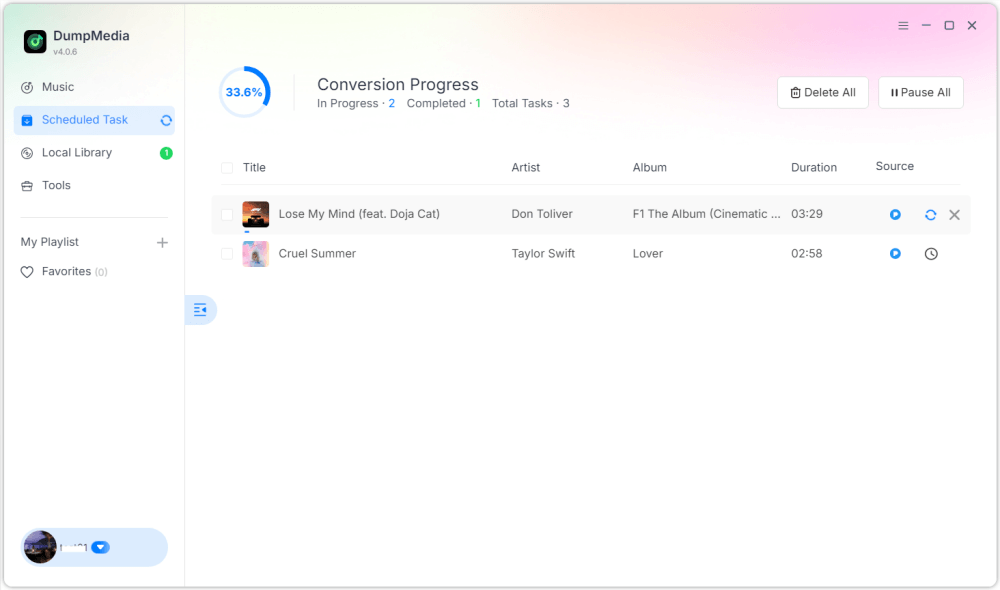
4 Adım. Ayarlar tamamlandıktan sonra, kullanıcılar "Dönüştür" simgesine tıklayarak dönüştürme işlemini gerçekleştirebilirler. Ardından DumpMedia Pandora şarkılarını dönüştürmek için performans sergileyecek MP3 Süper hızlı hızı sayesinde saniyeler içinde.
Bölüm 4. SSS
S1: Pandora şarkılarını dönüştürebilir miyim? MP3 ücretsiz mi?
Evet, bazı araçlar ücretsiz deneme sürümleri sunuyor, ancak premium dönüştürücüler gibi araçlar daha uygun fiyatlı. DumpMedia Daha yüksek hızlar ve toplu dönüştürme imkanı sağlar.
DumpMedia Sık sık promosyon kampanyaları başlatıyor; iletişime geçebilirsiniz. DumpMedia Ek indirimler ve teklifler hakkında bilgi almak için müşteri desteğiyle iletişime geçin.
S2: Pandora şarkılarını dönüştürmek yasal mı? MP3?
Kişisel çevrimdışı kullanım için dönüştürme genellikle kabul edilebilir olarak değerlendirilir, ancak dağıtım veya ticari kullanım telif hakkı yasalarını ihlal edebilir.
S3: Pandora çalma listelerinin tamamını dönüştürebilir miyim? MP3 bir kerede?
Evet. DumpMedia Pandora Music Converter, çalma listeleri ve albümler için toplu dönüştürmeyi destekler.
S4: Olacak mı? MP3 Şarkı bilgilerini saklamak mı?
Evet, dönüştürücü başlık, sanatçı, albüm ve kapak resmi dahil olmak üzere meta verileri korur.
Bölüm 5. Sonuç
Pandora şarkılarını dönüştürmek MP3 En sevdiğiniz müzikleri çevrimdışı dinlemenin, kalıcı yedeklemeler oluşturmanın ve cihazlar arasında oynatma üzerinde tam kontrol sahibi olmanın en iyi yolu budur. Pandora şarkılarını nasıl dönüştürebilirsiniz? MP3? kullanma DumpMedia Pandora Music Converter ile şarkıları, albümleri ve çalma listelerini hızlı ve kolay bir şekilde dönüştürebilirsiniz. MP3 Kalite veya meta veri kaybı olmadan. Pandora müzik koleksiyonunuzu sonsuza dek saklamak için bugün dönüştürmeye başlayın.

%30 İndirim >>>