


YouTube'dan Apple Music'e Dönüştürücü: Çalma Listelerini Kolayca Aktarma
Özellikle Apple'ın ekosisteminden, kayıpsız sesten, uzamsal sesten ve iPhone, iPad ve Mac ile kusursuz entegrasyondan yararlanmak isteyen kullanıcılar için YouTube Music'ten Apple Music'e geçiş giderek yaygınlaşıyor. Yüzlerce şarkıyı manuel olarak yeniden oluşturmadan YouTube Music çalma listelerini Apple Music'e nasıl aktarabilirsiniz? Bu kılavuzda, YouTube'dan Apple Music'e dönüştürücünün gerçekten ne işe yaradığını açıklayacak, en iyi çalma listesi aktarma araçlarını tanıtacak ve çalma listelerinizi verimli bir şekilde nasıl taşıyacağınızı göstereceğiz.
İçindekiler Kılavuzu Bölüm 1. YouTube Müzik Çalma Listelerini Apple Music'e Aktarabilir misiniz? Bölüm 2. En İyi YouTube Müzik - Apple Music Dönüştürme Araçları Bölüm 3. Başarılı Bir Çalma Listesi Aktarımı İçin İpuçları Bölüm 4. Sıkça Sorulan Sorular Bölüm 5. Özet
Bölüm 1. YouTube Müzik Çalma Listelerini Apple Music'e Aktarabilir misiniz?
Evet. YouTube Music ve Apple Music'te yerleşik bir taşıma özelliği bulunmasa da, üçüncü taraf çalma listesi aktarma araçları bu işlemi kolaylaştırır.
Çoğu YouTube'dan Apple Music'e dönüştürücü, Apple Music'te eşleşen parçaları bulmak için şarkı başlıkları, sanatçı adları ve albüm bilgileri gibi meta verilere güvenir. Eşleştirme algoritması ne kadar iyi olursa, aktarılan çalma listeleriniz o kadar doğru olur.
Bölüm 2. En İyi YouTube Music'ten Apple Music'e Dönüştürme Araçları
YouTube Music çalma listelerinizi Apple Music'e aktarmanıza yardımcı olabilecek çeşitli YouTube'dan Apple Music'e dönüştürücüler mevcuttur. Her birinin kendine özgü güçlü ve zayıf yönleri vardır.
1. MyMusic'i Ayarla
YouTube Music'teki çalma listelerinizi TuneMyMusic kullanarak Apple Music'e aktarmak oldukça kolay bir işlemdir. TuneMyMusic, büyük yayın hizmetlerinin resmi API'lerini kullandığı için, müzik kütüphanenizi taşımak için genellikle güvenilir ve güvenli bir yöntem olarak kabul edilir.
Nasıl çalışır:
- tunemymusic.com adresini ziyaret edin ve "Başlayalım" düğmesine tıklayın.
- Kaynak platform olarak YouTube Music'i seçin ve TuneMyMusic'e hesabınıza erişim izni vermek için talimatları izleyin.
- Aktarmak istediğiniz belirli çalma listelerini, albümleri veya parçaları seçin.
- Hedef servis sağlayıcı olarak Apple Music'i seçin ve yetkilendirin.
- Taşıma işlemine başlamak için "Aktarımı Başlat" düğmesine tıklayın. Tarayıcınızı kapatabilir veya sayfadan ayrılabilirsiniz; işlem arka planda çalışmaya devam eder.
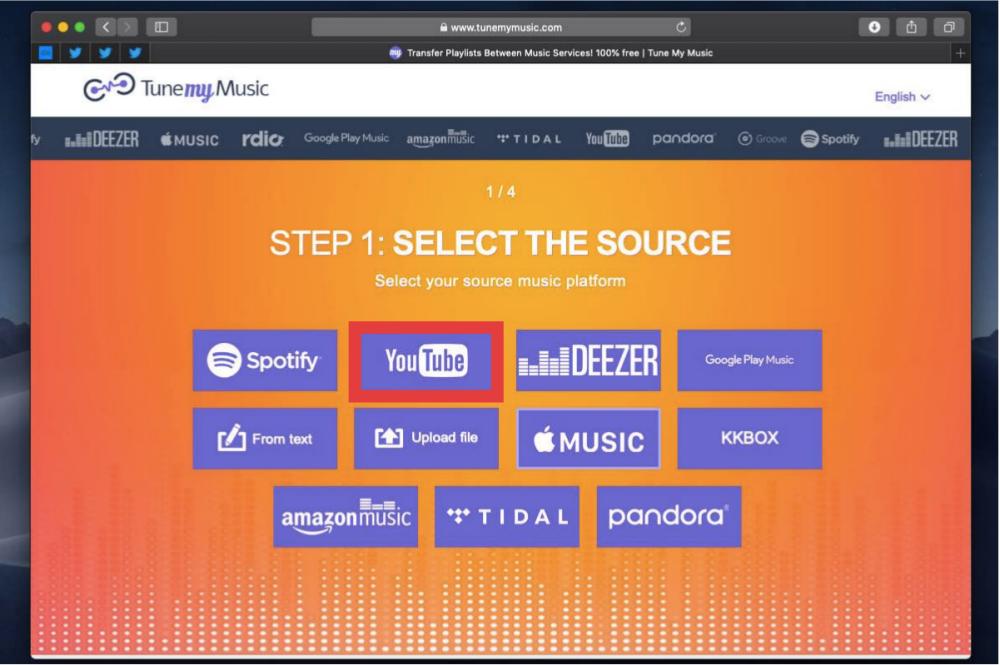
TuneMyMusic, şarkılarınızı bulmak için gelişmiş algoritmalar kullanırken, bazen bir parçayı farklı bir sürümle (örneğin, "Albüm" sürümü yerine "Tekli" sürümüyle) eşleştirebilir veya şarkı Apple Music'te mevcut değilse eşleşme bulamayabilir.
2.Şarkı Değiştirme
YouTube Music'ten Apple Music'e çalma listelerinizi aktarmak için SongShift kullanmak mükemmel bir seçimdir, çünkü bu amaç için en yüksek puan alan araçlardan biridir. İşte hizmeti nasıl kullanacağınız.
- SongShift uygulamasını indirin ve açın.
- "Bağlantılar" sekmesine gidin ve hem YouTube Music'i hem de Apple Music'i bağlayın.
- "+" simgesine dokunun ve "Kaynak Ayarla"yı seçerek YouTube Music'i belirleyin.
- Taşımak istediğiniz çalma listelerini seçin.
- İlk taramanın ardından SongShift, otomatik olarak eşleştirilemeyen şarkıları size gösterecektir. Bu eşleşmeme durumlarını manuel olarak arayabilir ve "düzeltebilirsiniz".
- Onaylandıktan sonra, uygulama Apple Music kitaplığınıza aktarımı tamamlayacaktır.
Apple, SongShift'in teknolojisini doğrudan Apple Music uygulamasına entegre ettiği için, bu işlemi gerçekleştirmek için ayrı bir uygulama indirmenize bile gerek kalmayabilir. İşte nasıl yapılacağı:
- iPhone veya iPad'inizde Ayarlar uygulamasını açın. Menüyü aşağı kaydırın ve Uygulamalar bölümünü bulun.
- İndirdiğiniz tüm uygulamaların listesinden Müzik'i seçin.
- Diğer Müzik Servislerinden Müzik Aktar seçeneğini seçin.
- Burada, şarkıları aktarabileceğiniz diğer müzik yayın hizmetlerinin bir listesini bulacaksınız. YouTube Music'i seçin.
- İstenildiğinde YouTube Music giriş bilgilerinizi girin.
- Taşımak istediğiniz çalma listelerini seçin ve Kitaplığa Ekle'ye dokunun.
- Uygulama, parçalarınızı Apple Music kataloğuyla eşleştirmek için arka planda çalışacaktır. İşlem tamamlandığında bir bildirim alacaksınız.
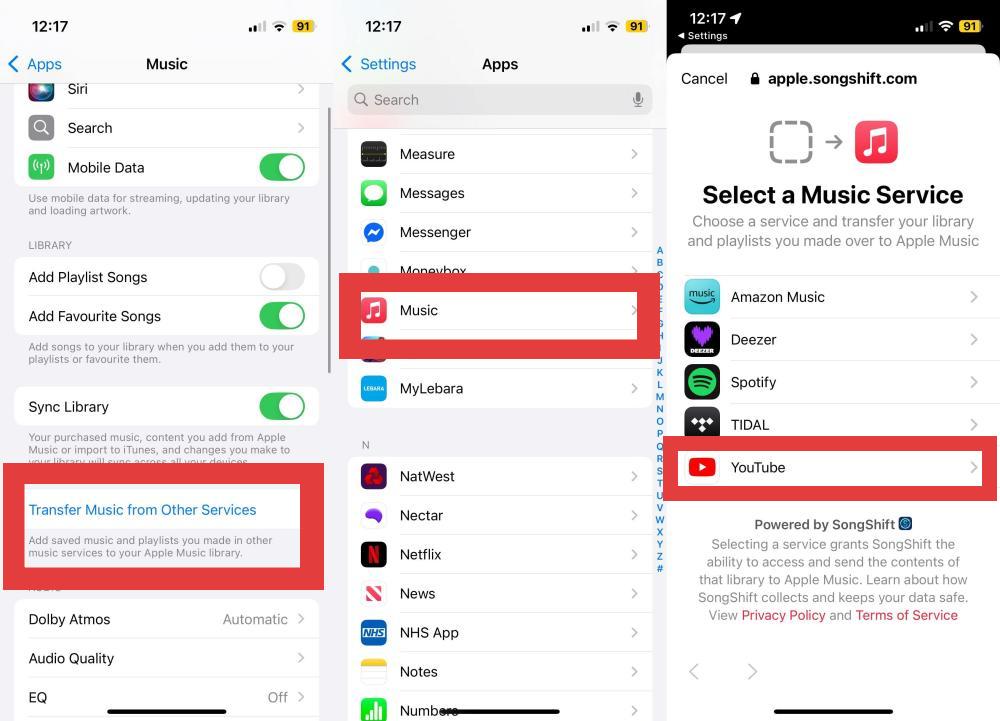
SongShift eşleştirme konusunda oldukça etkilidir, ancak meta verilere (başlıklar, sanatçılar) dayandığı için, resmi olmayan yüklemelerin (kullanıcı tarafından yüklenen canlı kayıtlar gibi) Apple Music'teki resmi stüdyo parçalarıyla başarılı bir şekilde eşleşmeyebileceğini unutmayın.
Bu bir paragraf
3. Seslendirme
Soundiiz, birden fazla yayın platformunu yöneten kullanıcılar için tasarlanmıştır. Sadece mobil cihazlarda kullanılabilen uygulamaların aksine, doğrudan web tarayıcınızda çalışır; bu da kütüphanenizi masaüstünden yönetmeyi tercih edenler için oldukça kullanışlıdır.
Ancak, ücretsiz sürümün tek seferde yalnızca bir çalma listesini (en fazla 200 parça) aktarmanıza izin vermesi dezavantajıdır. Eğer bu boyutta tek bir çalma listeniz veya sadece birkaç küçük çalma listeniz varsa, Soundiiz mükemmel çalışır; aşağıdaki adımları izlemeniz yeterlidir.
- soundiiz.com adresine gidin ve bir hesap oluşturun.
- "Platformlar" sekmesine gidin ve her ikisi için de giriş yönergelerini izleyerek hem YouTube Music hem de Apple Music hesaplarınızı bağlayın.
- Soldaki menüde bulunan "Aktarım" düğmesine tıklayın.
- "Çalma Listeleri"ni seçin (albüm, sanatçı veya parça da seçebilirsiniz).
- Kaynak olarak YouTube Music'i seçin.
- Taşımak istediğiniz oynatma listelerini seçin.
- Seçiminizi onaylamak için son adımları izleyin, hedef olarak Apple Music'i seçin ve Soundiiz eşleştirme işlemine başlayacaktır.
Soundiiz, 2013'ten beri faaliyet gösteren ve sektördeki en olgun eşleştirme motorlarından birine sahip olarak kabul ediliyor. Ancak, tüm transfer hizmetlerinde olduğu gibi, meta verilere dayanıyor; belirli bir YouTube videosu Apple Music'te resmi bir parça olarak mevcut değilse, sistem onu atlayacaktır.
4. DumpMedia Herhangi bir Müzik Dönüştürücü
Güvenilir bir YouTube'dan Apple Music'e dönüştürücü arıyorsanız, DumpMedia Herhangi bir Müzik Dönüştürücü Müzik geçişini kolaylaştırmak için tasarlanmış kullanışlı bir Çalma Listesi Aktarımı özelliği sunar.
DumpMedia'ın Çalma Listesi Aktarımı özelliği, ihtiyaçlarınıza göre tüm çalma listelerini, albümleri veya yalnızca seçili parçaları aktarır. Çalma listesi sırasını ve meta verilerini koruyarak, müzik deneyiminizin yeni platformda tutarlı kalmasını sağlar. Çalma listelerinizi manuel olarak yeniden oluşturmak yerine, DumpMedia Bu, tüm geçiş sürecini otomatikleştirmeye yardımcı olarak önemli ölçüde zaman ve emek tasarrufu sağlar.
Daha Özellikleri DumpMedia Herhangi bir Müzik Dönüştürücü
- Müzik indir SpotifyApple Music, YouTube Music ve daha fazlası.
- Audible sesli kitaplarını yaygın ses formatlarına indirin.
- DRM koruması olmayan müzikleri indirin MP3M4A, AAC ve FLAC formatlarını destekler.
- Müziği orijinal ses kalitesi ve ID3 etiketleriyle birlikte çıktı olarak verin.
- Müzik indirmelerini 35 kat daha hızlı bir şekilde toplu olarak işleyin.
- Dahili web müzik oynatıcılarıyla zahmetsiz kullanım sunar.
- Müzik çalar, format dönüştürücü ve ID3 düzenleyici gibi ek araçlar.
YouTube Müzik Çalma Listelerini Apple Music'e Aktarma Yöntemi DumpMedia
1 Adım. Indirin ve yükleyin DumpMedia Mac/PC'nizdeki herhangi bir müzik dönüştürücü programı.
Adım 2. Araçlar > Çalma Listesi Aktarımı'nı seçin.
3. Adım. Kaynak olarak YouTube Music'i seçin.
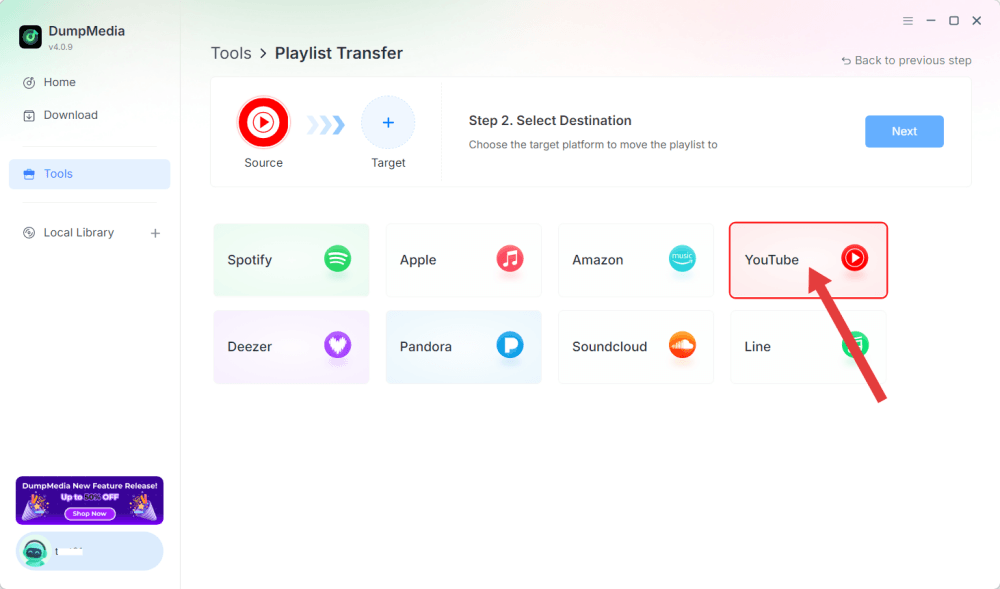
4. Adım. Hedef olarak Apple Music'i ayarlayın.
Adım 5. Aktarmak istediğiniz çalma listelerini bulun ve taşımak istediğiniz tüm çalma listelerini seçin.
Adım 6. Aktarımı başlatmak için Dönüştür'e tıklayın.
7. Adım. Aktarım tamamlandı. "Apple Music'e Git"e tıklayın. Çalma listeleriniz yeni bir hizmete taşındı.
Bölüm 3. Başarılı Bir Çalma Listesi Aktarımı İçin İpuçları
YouTube'dan Apple Music'e dönüştürücü kullanırken en iyi sonuçları elde etmek için şu ipuçlarını aklınızda bulundurun.
Şarkının kullanılabilirliğini kontrol edin
Her şarkı her ülkede lisanslı değildir. Eğer bir şarkı bölgenizde Apple Music'te mevcut değilse, aktarılamayabilir.
Oynatma Listesi Eşleşmelerini İncele
Çoğu çalma listesi aktarma aracı, hangi şarkıların başarıyla eşleştirildiğini ve hangilerinin manuel müdahale gerektirdiğini gösteren bir rapor sunar.
Cihazlar Arasında Senkronizasyon
Çalma listeleriniz Apple Music'te kullanılabilir hale geldikten sonra, tüm Apple cihazlarınızdan bunlara erişmek için iCloud Müzik Kütüphanesini etkinleştirin.
Bölüm 4. Sıkça Sorulan Sorular
YouTube Music çalma listelerimi Apple Music'e aktarabilir miyim?
Evet. Birçok çalma listesi taşıma aracı, YouTube Music çalma listelerinizi Apple Music'te otomatik olarak yeniden oluşturabilir.
Tüm şarkılar başarıyla aktarılacak mı?
Her zaman değil. Başarı, şarkının Apple Music kataloğunda olup olmamasına ve bölgesel lisanslama imkanlarına bağlıdır.
Çalma listesi aktarımı ücretsiz mi?
Birçok araç sınırlamalarla birlikte ücretsiz transfer imkanı sunarken, gelişmiş özellikler için ücretli bir plan gerekebilir.
YouTube'dan Apple Music'e en iyi dönüştürücü hangisi?
Eğer asıl amacınız çalma listesi geçişi ise, yüksek şarkı eşleştirme doğruluğuna, hızlı aktarım hızına ve birden fazla yayın platformunu desteklemeye sahip bir araç seçin, örneğin... DumpMedia Herhangi bir müzik dönüştürücü.
Albümleri ve sanatçıları taşıyabilir miyim?
Evet. Birçok hizmet, albümlerin, takip edilen sanatçıların ve kaydedilmiş koleksiyonların aktarılmasını desteklemektedir.
Çalma listemin isimleri aynı kalacak mı?
Çoğu durumda evet. Çalma listesi adları genellikle aktarım işlemi sırasında korunur.
Bölüm 5. Son Düşünceler
Her şarkıyı tekrar manuel olarak aramak yerine, bir YouTube - Apple Music dönüştürücü, çalma listelerinizi, beğendiğiniz şarkıları, albümlerinizi ve müzik kütüphanenizi minimum çabayla otomatik olarak taşıyabilir. Mevcut çözümler arasında, DumpMedia Any Music Converter, özellikle çalma listesi aktarımı özelliğiyle öne çıkıyor ve YouTube Music'ten Apple Music'e geçişi, dinleme deneyiminizi koruyarak kolaylaştırıyor. Apple'ın müzik ekosistemine geçmeyi planlıyorsanız, güvenilir bir YouTube'dan Apple Music'e dönüştürücü kullanmak, çalma listelerinizi yanınızda getirmenin en hızlı ve en verimli yoludur.