


Deezer ARL: Nasıl Kullanılır ve Daha Güvenli Bir Alternatif
Deezer ARL arıyorsanız, büyük olasılıkla üçüncü taraf araçlar kullanarak müziklere erişmeye veya indirmeye çalışıyorsunuz demektir. Deezer ARL belirli senaryolarda faydalı olsa da, birçok kullanıcının düşündüğü kadar basit veya güvenli değildir. Bu kılavuzda, Deezer ARL'nin ne olduğunu ve nasıl edinileceğini ayrıntılı olarak ele alacağız. Ayrıca daha güvenli ve güvenilir bir alternatif de paylaşacağız. Hadi başlayalım!
İçindekiler Kılavuzu Bölüm 1. Deezer ARL Nedir? Bölüm 2. Deezer ARL Nasıl Alınır?Bölüm 3. Deezer ARL Güvenli mi?Bölüm 4. Deezer ARL'ye En İyi Alternatif Bölüm 5. Deezer ARL vs DumpMediaBölüm 6. SSS Bölüm 7. Sonuç
Bölüm 1. Deezer ARL Nedir?
Dijital müzik indirme ve yayınlama alanında, ARL (Erişim Hakları Dili), özünde, Deezer'ın web sürümü tarafından tarayıcınızın çerezlerinde saklanan bir kimlik doğrulama belirteci görevi görür . Basitçe söylemek gerekirse, hesabınız için "dijital geçiş kartı" görevi görür.
Deezer ARL neden önemli?
Deezer ARL tokenı genellikle üçüncü taraf müzik araçlarında, otomasyon komut dosyalarında ve indirme yardımcı programlarında kullanılır. Bu araçlar, müzik kitaplığınıza erişmek, çalma listelerini almak ve şarkıları indirmek için ARL'ye güvenir. Bu nedenle, gelişmiş erişim veya indirmeler arayan kullanıcılar tarafından "Deezer ARL" terimi sıklıkla aranır.
Bölüm 2. Deezer ARL Nasıl Alınır??
Şu an itibariyle, Deezer ARL'yi alma süreci aynı kalmıştır, çünkü bu standart çerez tabanlı bir kimlik doğrulama belirtecidir. Bu işlemi masaüstü web tarayıcısı (Chrome, Firefox veya Edge) üzerinden yapmalısınız, çünkü bu dahili belirteçlere mobil uygulama üzerinden erişemezsiniz.
ARL'nizi Nasıl Geri Alabilirsiniz (Adım Adım)
Chrome ve Microsoft Edge için
- Deezer.com adresine gidin ve hesabınıza giriş yapın.
- F12 tuşuna (veya Ctrl + Shift + I tuşuna) basın. Windows; (Mac'te Cmd + Option + I).
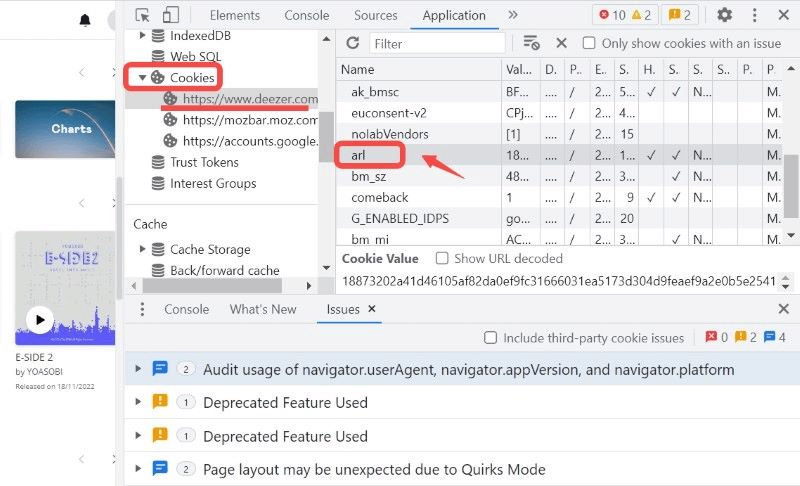
- En üstte bulunan Uygulama sekmesine tıklayın (eğer görmüyorsanız, >> oklarına tıklayın). Sol kenar çubuğunda, Çerezler bölümünü genişletin ve https://www.deezer.com adresini seçin.
- "Ad" sütununda "arl" kelimesini arayın. Değer sütunundaki uzun karakter dizisine çift tıklayın ve kopyalayın.
Mozilla Firefox için
- Deezer.com adresinden hesabınıza giriş yapın.
- F12 tuşuna (veya Ctrl + Shift + I tuşuna) basın. Windows; (Mac'te Cmd + Option + I).
- En üstteki Depolama sekmesine tıklayın. Sol kenar çubuğunda Çerezler'i genişletin ve https://www.deezer.com adresini seçin.
- Listede "arl" kelimesini bulun. Değer sütunundaki alfanümerik dizeyi kopyalayın.
Deezer ARL ile kullanıcılar üçüncü taraf araçlara giriş yapabilir ve belirli kısıtlamaları aşabilirler. Dolayısıyla Deezer ARL'nin asıl amacı sadece giriş yapmak değil, müzik erişiminin kilidini açmaktır.
Önemli Not:
- Microsoft Edge Eklentiler mağazasında artık tek bir tıklamayla token'ı çıkarabilen ve Geliştirici Araçları'nda manuel olarak gezinme zahmetinden kurtaran "Deezer ARL Retriever" adlı bir uzantı mevcut.
- ARL'nizin mevcut oturumunuzla bağlantılı olduğunu unutmayın. Deezer web sitesinden çıkış yaparsanız, az önce kopyaladığınız ARL anında geçersiz hale gelir.
- ARL kodunuz esasen "şifresiz" giriş bilgilerinizdir. Hesabınıza ve aboneliğinize tam erişim sağladığı için bu kodu asla herkese açık forumlarda veya Discord kanallarında paylaşmayın.
Bölüm 3. Deezer ARL Güvenli mi?
İşte işler burada kritik bir hal alıyor. Deezer ARL çalışıyor olsa da, birçok kullanıcının göz ardı ettiği çeşitli riskleri de beraberinde getiriyor.
1. Hesap Güvenliği Riskleri
Deezer ARL token'ınız esasen hesabınıza "anahtar" görevi görerek standart şifreleri atlayıp doğrudan erişim sağlar. Hassas bir kimlik doğrulama token'ı olduğu için, ifşa edilmesi başkalarının hesabınıza girmesine, premium aboneliğinizi izinsiz kullanmasına ve potansiyel olarak kişisel verilerinizi tehlikeye atmasına olanak tanır.
2. Jeton Süresi Dolması Sorunları
Ayrıca, Deezer ARL token'ları süresi dolmaya yatkındır ve aniden çalışmayı durdurabilir, bu da istikrarsız bir kullanıcı deneyimine yol açar. Bu oturum tabanlı token'lar genellikle resmi web sitesinden çıkış yaptığınızda veya platform güvenlik protokollerini yenilediğinde geçersiz hale gelir ve üçüncü taraf araçlara erişimi sürdürmek için manuel olarak yeni bir kod almanız gerekir.
3. Hesap Kısıtlamaları Riski
Ayrıca, ARL token'larını resmi olmayan araçlarla kullanmak, hesap kısıtlamaları riskini de beraberinde getirir; zira bu eylemler genellikle platform politikalarını ihlal eder ve otomatik sınırlamalara veya kalıcı yasaklamalara yol açabilir.
4. Teknik Karmaşıklık
Dürüst olalım: çoğu kullanıcı, müzik dinlemek için tarayıcı geliştirici araçlarını açmak, manuel çerez ayıklama işlemleri yapmak veya karmaşık yapılandırmalarla uğraşmak istemez. Bu manuel süreç, sorunsuz ve "tak ve çalıştır" bir deneyim isteyen ortalama bir kişi için genellikle çok sıkıcı ve göz korkutucudur.
Bölüm 4. Deezer ARL'ye En İyi Alternatif
ARL riskleriyle uğraşmak yerine, çok daha basit ve güvenli bir çözüm var: profesyonel bir müzik dönüştürücü kullanın, örneğin... DumpMedia Deezer Müzik DönüştürücüBu araç, özellikle Deezer müziklerini indirmek için tasarlanmıştır. şarkıları dönüştür MP3, WAV ve FLAC.
Diğer Özellikler
- Kayıpsız ses kalitesini koruyun.
- Çalma listeleri ve albümler için toplu dönüştürme
- Hızlı dönüşüm hızı
Adım Adım: Deezer Müzik İndirme
1 Adım. Yazılımı bilgisayarınıza indirip kurun. Her ikisiyle de çalışır. WinWindows ve Mac işletim sistemleriyle uyumludur. Kullanıcı dostu arayüzü sayesinde yeni başlayanlar için kullanımı kolaydır.
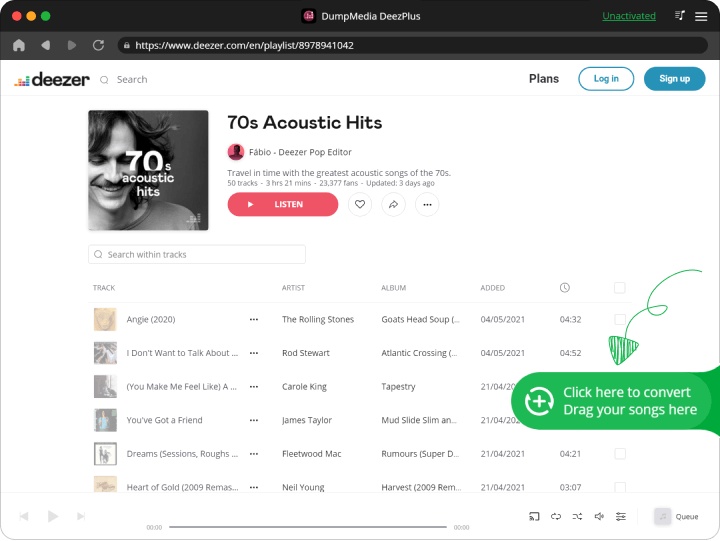
2 Adım. Dahili Deezer web oynatıcısını açın. DumpMedia Deezer hesabınızla giriş yapın. Deezer'da gezinin ve indirmek istediğiniz şarkıları, albümleri veya çalma listelerini dönüştürücüye sürükleyin.
3 Adım. Ayarlar panelinde, şunu seçin: MP3 çıktı formatı olarak etkinleştirmek için MP3 Seçtiğiniz parçaların indirilmesi.
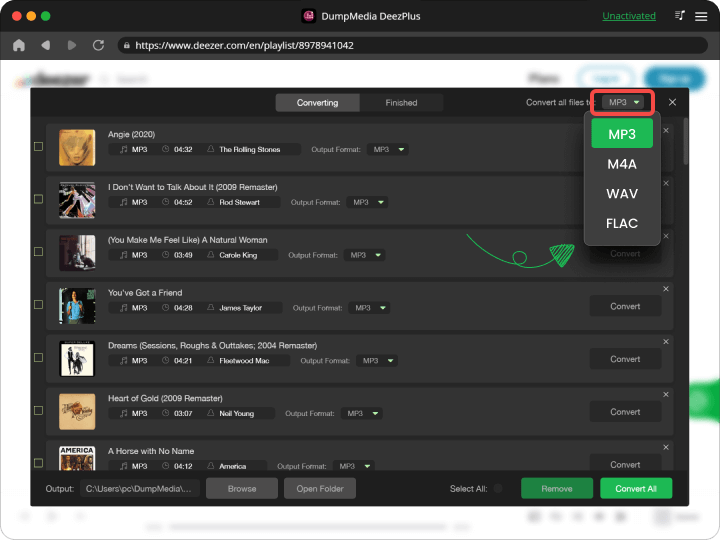
4 Adım. "Tümünü Dönüştür" düğmesine basın ve dönüştürme işlemini başlatın. DumpMedia Deezer Music Converter, 35 kat daha hızlı indirme hızı sunar; dönüştürme işleminin tamamlanmasını beklemeniz yeterlidir.
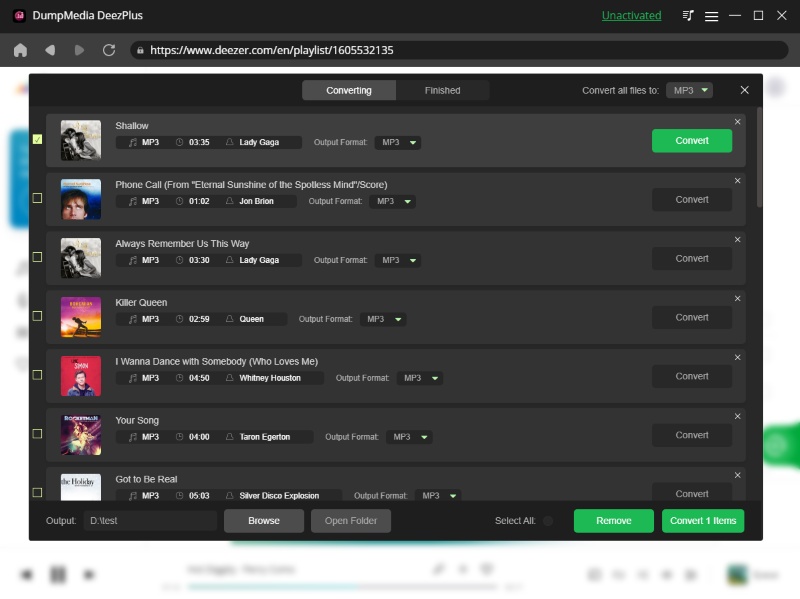
Bu dönüştürücünün bir diğer harika özelliği de birçok parametreyi ayarlayabilmenizdir. Bit hızlarını ve örnekleme hızlarını değiştirebilirsiniz. Hatta şarkılarınızdaki ID3 etiketlerini bile değiştirebilirsiniz.
Bölüm 5. Deezer ARL vs DumpMedia
| Özellik | Deezer ARL'si | DumpMedia |
| Kullanım kolaylığı | ❌ Karmaşık | ✅ Basit |
| Güvenlik | ❌ Riskli | ✅ Güvenli |
| istikrar | ❌ Kararsız | ✅ Güvenilir |
| İndirme Yeteneği | ✅ Evet | ✅ Evet |
| Kalıcı Dosyalar | ❌ Sınırlı | ✅ Evet |
Aradaki fark ortada: DumpMedia Bu, eksiksiz bir çözüm sunarken, Deezer ARL yalnızca geçici bir çözümdür.
Bölüm 6. SSS
1. Deezer ARL kullanımı güvenli mi?
Paylaşılması veya kötüye kullanılması riskli olabilir, çünkü hesabınıza erişim sağlar.
2. Deezer ARL ile müzik indirebilir miyim?
Evet, ancak bu üçüncü taraf araçlara bağlıdır ve kararsız olabilir.
3. Deezer ARL'ye en iyi alternatif nedir?
Daha güvenli bir seçenek ise şöyle bir araç kullanmaktır: DumpMedia Deezer Müzik Dönüştürücü.
4. Kullanmak için teknik becerilere ihtiyacım var mı? DumpMedia?
Hayır, yeni başlayanlar için tasarlanmıştır ve herhangi bir teknik kurulum gerektirmez.
Bölüm 7. Sonuç
Peki, Deezer ARL'yi kullanmalı mısınız? Evet, eğer teknik olarak deneyimliyseniz ve riskleri anlıyorsanız. Ancak çoğu kullanıcı için en iyi seçenek değil. Amacınız risksiz müzik indirmekse, bunun yerine Deezer ARL gibi özel bir araç kullanmak daha iyi olur. DumpMedia DeezPlus daha akıllıca bir seçenektir.