


Sesli Kitap CD'si Nasıl Kopyalanır MP3 (Ücretsiz Yöntemler ve Daha İyi Alternatifler)
Sesli kitap CD'sini kopyalamak MP3 Hala mümkün, ancak sesli kitapların keyfini çıkarmanın en uygun yolu artık değil. Günümüzde birçok kullanıcı, sesli kitap koleksiyonlarını dönüştürmek için birden fazla disk, eksik meta veriler ve eski donanımlarla uğraşmak zorunda kalıyor. Bu kılavuzda, sesli kitap CD'lerini nasıl kopyalayacağınızı öğreneceksiniz. MP3 Karşılaşabileceğiniz yaygın sorunlarla birlikte, adım adım ilerleyeceğiz. Daha da önemlisi, CD'lere hiç ihtiyaç duymadan sesli kitapların keyfini çıkarmanızı sağlayan daha iyi ve modern bir alternatifi size göstereceğiz.
İçindekiler Kılavuzu Bölüm 1. Bir Sesli Kitap CD'sini Kopyalayabilir misiniz? MP3?Bölüm 2. Sesli Kitap CD'sini Kopyalama MP3 iTunes/Apple Music KullanımıBölüm 3. Sesli Kitap CD'sini Kopyalama MP3 kullanma WinDows Medya OynatıcısıBölüm 4. Sesli Kitap CD'lerini Kopyalarken Karşılaşılan Sık Karşılaşılan SorunlarBölüm 5. Audible Kitaplarını Nasıl İndirebilirsiniz? MP3 (En İyi Çözüm)Bölüm 6. Sonuç
Bölüm 1. Bir Sesli Kitap CD'sini Kopyalayabilir misiniz? MP3?
Evet, sesli kitap CD'lerini hala kopyalayabilirsiniz. MP3 Standart medya yazılımlarını kullanarak dosyaları dönüştürebilirsiniz. Ancak, CD/DVD sürücüsüne sahip bir bilgisayara, CD dönüştürme yazılımına ve birden fazla diski işlemek için yeterli zamana ihtiyacınız olacak.
İşlem sürecinin kendisi fazla değişmemiş olsa da, etrafındaki teknoloji eskimiştir. Birçok modern dizüstü bilgisayarda artık disk sürücüsü bulunmamaktadır, bu da CD tabanlı iş akışlarını eskisi kadar pratik olmaktan çıkarmaktadır.
Bölüm 2. Sesli Kitap CD'sini Kopyalama MP3 iTunes/Apple Music Kullanımı
Sesli kitap CD'sini nasıl kopyalayabilirim? MP3İşte bunu yapmanın en iyi yolları. WinDow ve Mac.
1 Adım. Açılış iTunes/Müzik > Ayarlar (veya Tercihler) > Genel > İçe Aktarma Ayarları. İçe Aktarma Yöntemini şu şekilde ayarlayın: MP3 Kodlayıcı. Kontrol edin: "Ses CD'lerini okurken hata düzeltmeyi kullanın" (çizik kütüphane CD'lerinde yardımcı olur).
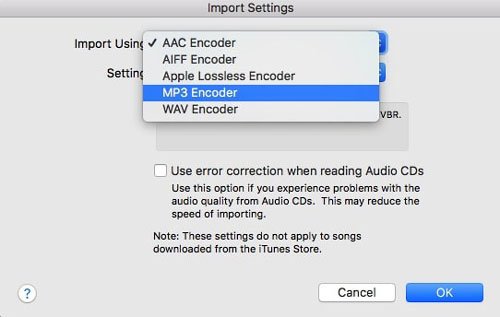
Adım 2. CD'yi takın. Parça listesi göründüğünde, tüm parçaları seçin (Ctrl+A veya Cmd+A).
3. Adım. Seçenekler (üç nokta) veya dişli çark simgesine tıklayın ve CD Parçalarını Birleştir'i seçin.
4 Adım. "CD İçe Aktar" seçeneğine tıklayın. Her disk için tekrarlayın. Yazılım her parçayı dönüştürecektir. MP3 biçimi.
Sesli kitap CD'sini kopyalamak MP3 iTunes kullanımı kolaydır, ancak özellikle sesli kitaplar için, tek bir kitap için 100 küçük dosya oluşturmamak adına bölüm düzenine ve dosya birleştirmeye dikkat etmeniz gerekir.
Bölüm 3. Sesli Kitap CD'sini Kopyalama MP3 kullanma WinDows Medya Oynatıcısı
Eğer varsa WinDows 10 veya 11'i kullanabilirsiniz. WinWindows Media Player Legacy'den sesli kitap CD'lerini kopyalamaya MP3.
1 Adım. Açılış WinWindows Media Player'da, Rip ayarları > Biçim bölümüne gidin ve seçin. MP3.
Adım 2. Rip ayarları > Ses Kalitesi bölümüne gidin ve 192 Kbps'yi seçin.
3. Adım. CD'nizi takın ve "CD'yi Kopyala" seçeneğine tıklayın.
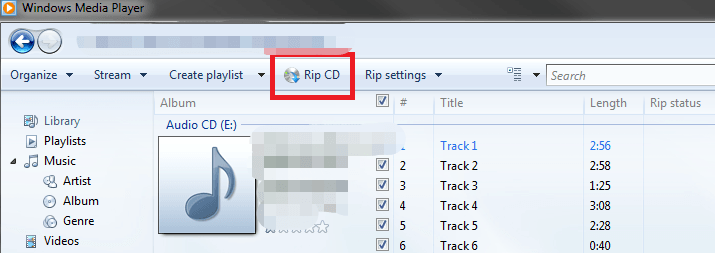
Bu, mevcut en basit ücretsiz yöntemlerden biridir. Ancak, WinWindows Media Player'da "Parçaları Birleştir" özelliği bulunmadığından, her CD'de birden fazla dosya elde edersiniz. Dosya yönetimi manuel olarak yapılmalıdır.
Bölüm 4. Sesli Kitap CD'lerini Kopyalarken Karşılaşılan Sık Karşılaşılan Sorunlar
CD'lerden müzik arşivinizi dijital ortama aktarmak güvenilir bir yöntem olsa da, bu süreç genellikle can sıkıcı birkaç engelle karşılaşmanıza neden olur:
- Yüksek Zaman Gereksinimi: Sesli kitaplar genellikle 10 veya daha fazla diskten oluşur ve basit bir görevi yavaş, tekrarlayan bir angarya haline getirir.
- Parçalı Çıktı: Birçok ses dosyası düzenleme aracı, her parçayı ayrı bir dosya olarak dışa aktarır ve bu da size kusursuz bir kitap yerine yüzlerce küçük klip bırakır.
- Meta Veri Eksiklikleri: Otomatik veritabanları genellikle eski veya niş sesli kitapları tanımakta başarısız olur ve bu da başlıkları, yazarları ve bölüm işaretlerini manuel olarak girmenizi gerektirir.
- Donanım Kıtlığı: Çoğu modern dizüstü ve masaüstü bilgisayar artık dahili optik sürücü içermiyor; bu da harici bir CD sürücüsünün ek masrafını ve karmaşasını gerektiriyor.
Bölüm 5. Audible Kitaplarını Nasıl İndirebilirsiniz? MP3 (En İyi Çözüm)
Oynatma sınırlamaları nedeniyle birçok kullanıcı CD'lerden uzaklaşıp dijital sesli kitap platformlarını tercih ediyor. Dijital sesli kitaplar anında erişim (fiziksel disk yok) ve birden fazla cihazla uyumluluk sunuyor. Ancak bir zorluk var: çoğu platform (Audible gibi) DRM koruması kullanıyor, bu da sesli kitaplarınızı nasıl ve nerede oynatabileceğinizi sınırlıyor.
Eğer esnekliği istiyorsanız MP3 CD'lerle uğraşmadan en verimli yaklaşım şudur: dijital sesli kitapları dönüştürün MP3 biçim. Burası DumpMedia Sesli Dönüştürücü yararlı olur.
Neden seçtin DumpMedia Ses Dönüştürücü?
- ✅ DRM korumasını kaldır* Bu araç, DRM'yi kaldırarak dosyalarınız üzerinde tam kontrol sahibi olmanızı sağlar.
- ✅ Audible'ı şuna dönüştür: MP3 Kolayca: Audible kitaplarını hızlıca indirebilirsiniz. MP3 ve M4A veya FLAC gibi diğer formatlar.
- ✅ Yüksek Hızlı Dönüşüm: Sesli kitapların tamamını dakikalar içinde dijital ortama aktarın.
- ✅ Kayıpsız Kalite: Dönüştürme sırasında kalite kaybı yaşanmaz.
- ✅ Birden fazla cihazda çalışır: Sesli kitaplarınızı çevrimdışı dinleyin. Dönüştürme işleminden sonra herhangi bir yerde.
CD'leri kopyalamak yerine, herhangi bir cihazda çalışan tamamen dijital bir sesli kitap kütüphanesi oluşturabilirsiniz.
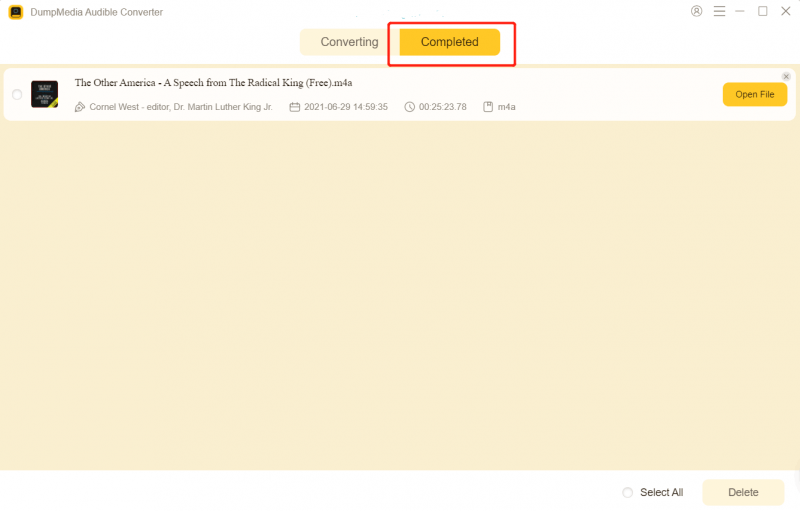
Nasıl Kullanılır? DumpMedia Audible Dönüştürücü (Kapsamlı Kılavuz) >>>
Bölüm 6. Sonuç
Sesli kitap CD'lerini kopyalama MP3 2026'da hala mümkün olsa da, giderek eskimekte ve verimsiz hale gelmektedir. iTunes gibi araçlar ve WinWindows Media Player işinizi görebilir, ancak zaman, çaba ve birçok kullanıcının artık sahip olmadığı donanım gerektirir.
Daha hızlı ve esnek bir çözüm arıyorsanız, dijital sesli kitaplara geçmek ve bunları kullanmak sizin için faydalı olabilir. DumpMedia Audible Converter daha akıllıca bir seçim. CD sürücüsüne gerek yok, daha hızlı işlem (disk değiştirme yok) ve gerçek çevrimdışı dinleme. Bunlar, deneyiminizi daha keyifli hale getiriyor. DumpMedia Geleneksel CD iş akışlarının modern bir alternatifi.
*DumpMedia Bu hizmet, sesli kitaplarınızı şifresini çözerek ve DRM korumasız dosyalara indirerek çalışır; böylece kütüphanenizin temiz ve kısıtlamasız bir kopyasını herhangi bir cihazda elde edebilirsiniz.