


Audible uygulamasından kitap nasıl indirilir?
Merak ediyorsan Audible uygulamasından kitap nasıl indirilir?Doğru yerdesiniz. Audible, satın aldığınız sesli kitapları çevrimdışı dinlemek için indirmenize olanak tanır, ancak çoğu kullanıcının gözden kaçırdığı bazı sınırlamalar vardır. Bu kılavuzda, Audible'da sesli kitaplarınızı nasıl indireceğinizi ve cihazlar arasında bile bunlara kalıcı erişimi nasıl sağlayacağınızı adım adım göstereceğiz.
İçindekiler Kılavuzu Bölüm 1. Audible Uygulamasından Sesli Kitaplar Nasıl İndirilir?Bölüm 2. Audible Kitaplarını Kalıcı Olarak Saklama ve Her Yerde Dinleme YöntemiBölüm 3. Audible Kitaplarını İndirme Hakkında Sıkça Sorulan SorularBölüm 4. Özet
Bölüm 1. Audible Uygulamasından Sesli Kitaplar Nasıl İndirilir?
Audible uygulamasından kitapları nasıl indirebilirsiniz? Basit bir işlemdir, ancak adımlar iPhone veya Android cihaz kullanmanıza bağlı olarak biraz farklılık gösterir. İşte sesli kitaplarınızı çevrimdışı dinlemeye hazır hale getirmenin en doğrudan yolu.
1 Adım. Hesabınızda oturum açtığınızdan emin olun Amazon/Audible hesabı.
2 Adım. Ekranın alt kısmında bulunan Kütüphane simgesine dokunun. Ardından indirmek istediğiniz başlığı bulun.
3 Adım. Kitabın kapak resminin sağ alt köşesinde bulunan aşağı ok simgesine dokunun. İlerleme çemberi tamamlandığında, aşağı ok kaybolacak ve kitap çevrimdışı oynatılmaya hazır olacaktır.
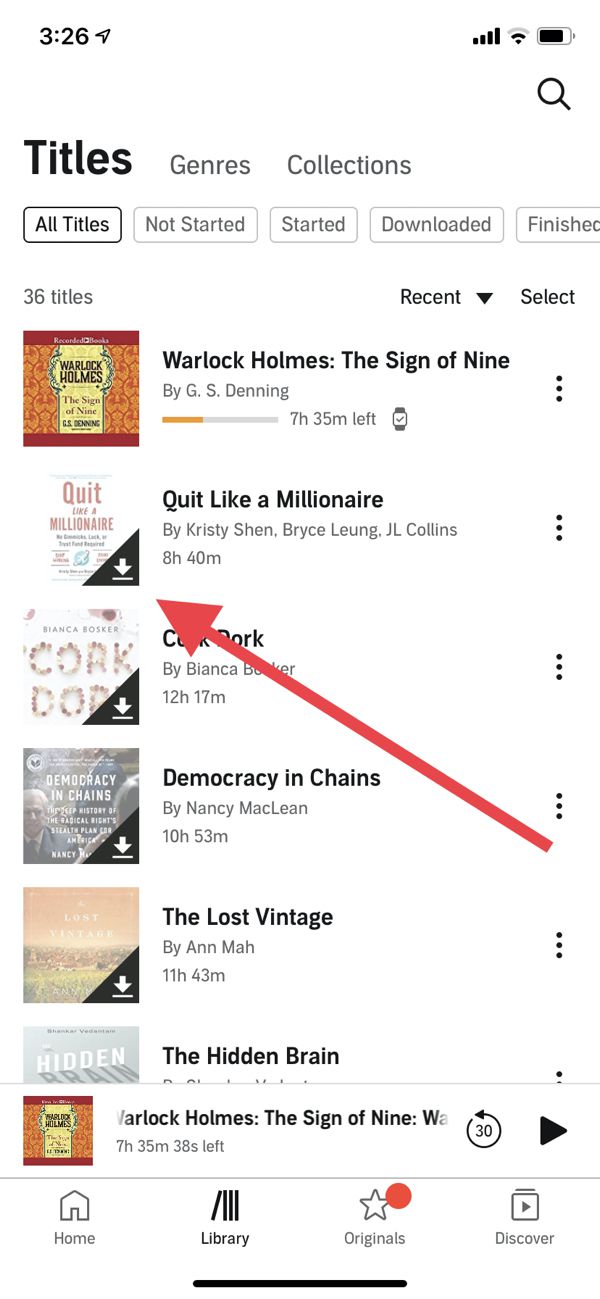
Bu, Audible uygulamasında kitap indirmenin nasıl yapılacağına dair bir cevap olsa da, indirilen dosyaların hala DRM korumalı olduğunu unutmayın. Bu, onları yalnızca Audible uygulaması içinde veya yetkilendirilmiş cihazlarda dinleyebileceğiniz anlamına gelir.
Bölüm 2. Audible Kitaplarını Kalıcı Olarak Saklama ve Her Yerde Dinleme Yöntemi
Şöyle soruyor olabilirsiniz: Audible kitaplarını her yerde dinleyebilir miyim? Sorun DRM'de yatıyor. Audible uygulamasından kitap indirmek yalnızca uygulama içinde çevrimdışı erişime izin verir, dosyaları serbestçe başka yerlere aktarmanıza izin vermez. MP3 oynatıcılar, araç ses sistemleri veya diğer cihazlar. İşte burası DumpMedia Sesli Dönüştürücü devreye girer
Neden seçtin DumpMedia Ses Dönüştürücü?
- ✅ DRM korumasını kaldır* Bu araç, DRM'yi kaldırarak dosyalarınız üzerinde tam kontrol sahibi olmanızı sağlar.
- ✅ Audible'ı şuna dönüştür: MP3 Kolayca: Çabuk yapabilirsiniz Sesli kitapları şuraya indir: MP3 ve M4A veya FLAC gibi diğer formatlar.
- ✅ Yüksek Hızlı Dönüşüm: Sesli kitapların tamamını dakikalar içinde dijital ortama aktarın.
- ✅ Kayıpsız Kalite: Dönüştürme sırasında kalite kaybı yaşanmaz.
- ✅ Birden fazla cihazda çalışır: Dönüştürme işleminden sonra sesli kitaplarınızı dilediğiniz yerde dinleyebilirsiniz.
Audible Kitaplarını Kalıcı Olarak Saklayın
Kullanarak DumpMediaBu sayede sesli kitaplarınızın kontrolünü tamamen elinize alabilir ve Audible uygulamasının sınırlamalarını aşabilirsiniz. Bu, içeriğine gerçekten sahip olmak isteyen herkes için en güvenilir çözümdür. Aboneliğinizi iptal ettikten veya cihaz değiştirdikten sonra erişiminizi kaybetmekten endişe ediyorsanız, Audible uygulamasından kitapları indirmek yeterli değildir. Audible sesli kitaplarını nasıl indireceğinize dair rehbere göz atalım. DumpMedia.
1 Adım. Indirin ve yükleyin DumpMedia Audible Converter. PC ve Mac sürümleri mevcuttur. Açın DumpMediaArdından Audible sekmesine gidin.
2 Adım. Audible kütüphanenizden dönüştürmek istediğiniz kitapları seçin.
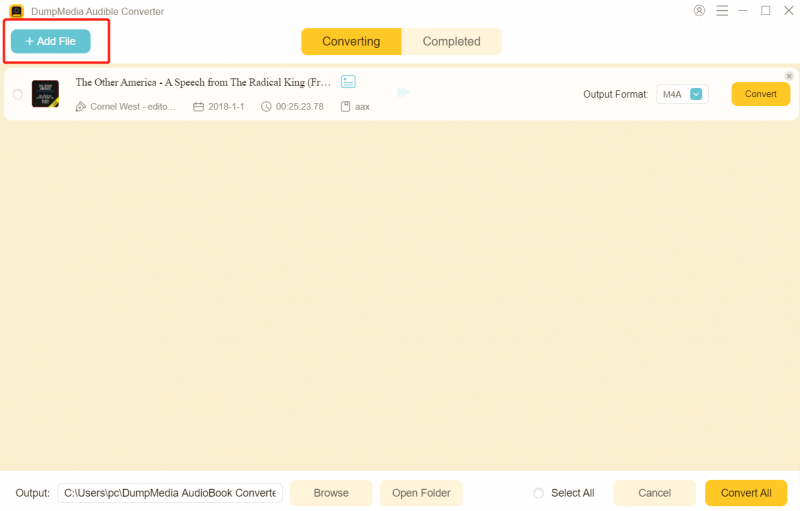
3 Adım. Çıktı ayarlarını seçin ve dönüştürmeye başlayın.

4 Adım. Dönüştürme işlemini tamamlayın ve çıktı dosyalarını görüntüleyin.

Dönüştürme işlemi tamamlandıktan sonra, kitaplarınızı istediğiniz zaman, istediğiniz yerde, hiçbir kısıtlama olmadan dinleyebilirsiniz. Bu yöntem, Audible uygulamasında kitapları kalıcı erişim sağlayacak şekilde indirmenin kesin çözümüdür.
Bölüm 3. Audible Kitaplarını İndirme Hakkında Sıkça Sorulan Sorular
Audible kitaplarını indirebilir miyim? MP3?
Evet. kullanma DumpMedia Audible Converter ile indirdiğiniz Audible kitaplarını dönüştürebilirsiniz. MP3.
Dönüştürme işlemi sırasında kalite kaybı yaşar mıyım?
Hayır. DumpMedia Dönüştürme sırasında kalite kaybı olmamasını sağlar.
Dönüştürülmüş dosyaları tüm cihazlarda oynatabilir miyim?
Evet. MP3 Dosyalar telefonlarda, tabletlerde çalışır. MP3 oyuncular, bilgisayarlar ve otomobil sistemleri.
Audible aboneliğimi iptal edersem ne olur?
Satın aldığınız kitaplar kütüphanenizde kalır, ancak dönüştürme işlemi yapılmadığı takdirde erişim yalnızca Audible uygulamasıyla sınırlıdır. DumpMedia Kitaplarınızı kalıcı olarak saklamanızı sağlar.
Bölüm 4. Özet
Eğer amacınız Audible uygulamasından kitap indirmek ve gerçekten onlara sahip olmaksa, sadece uygulamayı kullanmak yeterli değildir. DRM kısıtlamaları tam kontrolü engeller ve oynatmayı yalnızca yet授权li cihazlarla sınırlandırır. Kalıcı erişim, her yerde çevrimdışı dinleme ve esneklik için, DumpMedia Audible Converter en iyi çözümdür. DRM'nin sesli kitaplarınızı sınırlamasına izin vermeyin. Bugün tam kontrolü elinize alın ve satın aldığınız kitaplara erişiminizi asla kaybetmeyin.
*DumpMedia Bu hizmet, sesli kitaplarınızı şifresini çözerek ve DRM korumasız dosyalara indirerek çalışır; böylece kütüphanenizin temiz ve kısıtlamasız bir kopyasını herhangi bir cihazda elde edebilirsiniz.

%30 İndirim >>>