


AAX'e Nasıl Dönüştürülür MP3 (Audible veya DRM korumasız dosyalar için en uygunudur)
AAX'i dönüştürmeye çalışıyorsanız MP3Yalnız değilsiniz. AAX, Audible tarafından kullanılan varsayılan formattır, ancak birçok cihazda kolay oynatımı engelleyen kısıtlamaları vardır. İyi haber? AAX sesli kitaplarını dönüştürebilirsiniz. MP3Ancak yöntem, AAX dosyanızın DRM ile korunup korunmadığına bağlıdır. Bu kılavuzda, doğru yöntemi nasıl seçeceğinizi ve dosyalarınızı başarıyla nasıl dönüştüreceğinizi adım adım göstereceğiz.
İçindekiler Kılavuzu Bölüm 1. AAX Sesli Kitaplarını Başka Bir Formata Dönüştürebilir misiniz? MP3?Bölüm 2. Audible AAX'i Dönüştürmenin En İyi Yolu MP3 (DRM Korumalı Dosyalar)Bölüm 3. AAX Sesli Kitaplarını Dönüştürmenin Diğer Yolları MP3 (DRM'siz Dosyalar)Bölüm 4. SSSBölüm 5. Nihai Karar
Bölüm 1. AAX Sesli Kitaplarını Başka Bir Formata Dönüştürebilir misiniz? MP3?
Evet, AAX'i dönüştürebilirsiniz. MP3Ancak tüm yöntemler her dosya için işe yaramaz. Çoğu AAX dosyası, özellikle Audible'dan indirilenler, DRM ile korunmaktadır (Dijital Haklar YönetimiDRM ile kitapları indirebilirsiniz. MP3 ve yetkisiz cihazlarda oynatılmasını engelliyor. Bu nedenle AAX kitaplarını dönüştürmeye çalışmadan önce... MP3Öncelikle hangi dosya türüyle uğraştığınızı belirlemeniz gerekiyor.
AAX dosyanız DRM korumalı mı?
- Audible'dan AAX Dosyaları (DRM Korumalı): Dosyanız Audible'dan geliyorsa, büyük olasılıkla DRM ile korunmaktadır. Bu durumda, dönüştürmeden önce DRM'yi kaldırabilecek bir araca ihtiyacınız vardır.
- DRM'siz AAX Dosyaları (Yerel Dosyalar): Eğer AAX dosyanız zaten kilitsiz ise veya başka bir kaynaktan edinilmişse, DRM kaldırma işlemine ihtiyacınız yok. Sadece bir format dönüştürücüye ihtiyacınız var.
Bölüm 2. Audible AAX'i Dönüştürmenin En İyi Yolu MP3 (DRM Korumalı Dosyalar)
Dosya türünüzü belirledikten sonra, AAX'i dönüştürmek çok daha kolay hale gelir. MP3 Başarılı bir şekilde. Audible kullanıcıları için, Audible'dan AAX'i dönüştürmenin en güvenilir yolu budur. MP3 kullanarak DumpMedia Sesli Dönüştürücü.
Neden seçtin DumpMedia Ses Dönüştürücü?
- ✅ DRM korumasını kaldır* Bu araç, DRM'yi kaldırarak dosyalarınız üzerinde tam kontrol sahibi olmanızı sağlar.
- ✅ Audible'ı şuna dönüştür: MP3 Kolayca: Audible kitaplarını hızlıca indirebilirsiniz. MP3 ve M4A veya FLAC gibi diğer formatlar.
- ✅ Yüksek Hızlı Dönüşüm: Sesli kitapların tamamını dakikalar içinde dijital ortama aktarın.
- ✅ Kayıpsız Kalite: Dönüştürme sırasında kalite kaybı yaşanmaz.
- ✅ Birden fazla cihazda çalışır: Sesli kitaplarınızı çevrimdışı dinleyin. Dönüştürme işleminden sonra herhangi bir yerde.
Kullanarak DumpMediaBu sayede sesli kitaplarınızın kontrolünü tamamen elinize alabilir ve Audible uygulamasının sınırlamalarını aşabilirsiniz. Bu, içeriğine gerçekten sahip olmak isteyen herkes için en güvenilir çözümdür. AAX'i dönüştürme kılavuzuna göz atalım. MP3 'da DumpMedia.
Audible AAX'ı şuna dönüştürün: MP3 'da DumpMedia
1 Adım. Indirin ve yükleyin DumpMedia Audible Converter. PC ve Mac sürümleri mevcuttur. Açın DumpMediaArdından Audible sekmesine gidin.
2 Adım. Audible kütüphanenizden dönüştürmek istediğiniz kitapları seçin.
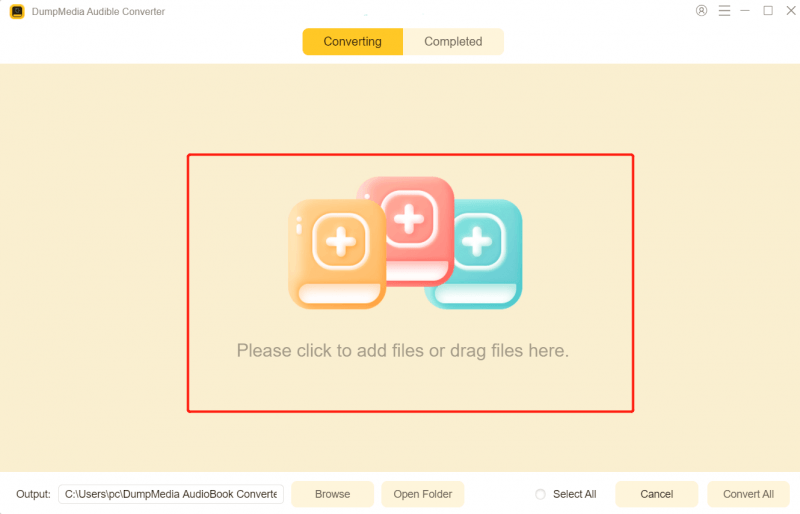
3 Adım. AAX'i dönüştürmek için MP3seçin MP3 çıktı formatı olarak etkinleştirmek için MP3 Seçtiğiniz sesli kitapların indirilmesi.

4 Adım. Ayarları yaptıktan sonra, dönüştürme işlemini başlatmak için Dönüştür düğmesine basın. Birkaç saniye bekleyin ve dönüştürme sonuçlarını görmek için Tamamlanan sekmesine gidebilirsiniz. Dönüştürülen kitap dosyalarını hızlıca bulmak için Dosya Aç'ı tıklayın.

Bölüm 3. AAX Sesli Kitaplarını Dönüştürmenin Diğer Yolları MP3 (DRM'siz Dosyalar)
AAX dosyalarınız korunmamışsa, aşağıdaki araçları deneyebilirsiniz.
1. DumpMedia Herhangi bir Müzik Dönüştürücü
2025 olarak, DumpMedia Any Music Converter, özellikle Audible kullanıcıları için tasarlanmış, temel bir katma değer modülü olan AA/AAX dönüştürme özelliğini tanıttı. Basit bir format dönüştürme aracından çok daha fazlası olan bu özellik, verimli bir "sesli kitap yöneticisi" görevi görüyor. Any Music Converter, yerel, DRM'siz sesli kitap dosyalarını aşağıdaki gibi evrensel formatlara dönüştürebiliyor: MP3, M4A, WAV veya FLAC. DumpMedia "Kayıpsız" dönüştürme modunu destekleyerek, dönüştürülen dosyaların ses kalitesinin orijinal sesli kitaplarınkiyle tamamen aynı kalmasını sağlar.
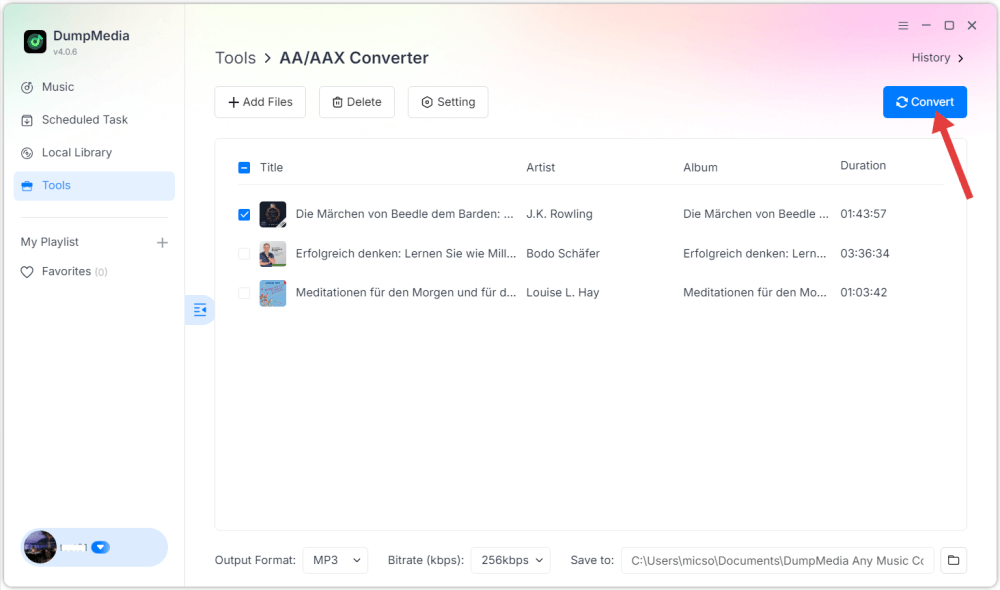
Bu, AAX'i dönüştürmenin hızlı ve verimli bir yoludur. MP3 DRM kullanılmadığı durumlarda.
2. SürükleBırakDo
DragDropDo, AAX dosyalarını dönüştürmek için özel bir modül de dahil olmak üzere, hızlı medya dönüştürme için tasarlanmış, sadeleştirilmiş, web tabanlı bir yardımcı programdır. MP3Geleneksel bulut dönüştürücülerin aksine, verilerinizi uzak bir sunucuya yüklemek yerine, DragDropDo öncelikle istemci tarafında çalışan bir araçtır. Şifre çözme işlemini gerçekleştirmek için kullanıcının tarayıcı kaynaklarını kullanır ve bu da onu popüler bir "kurulum gerektirmeyen" alternatif haline getirir.
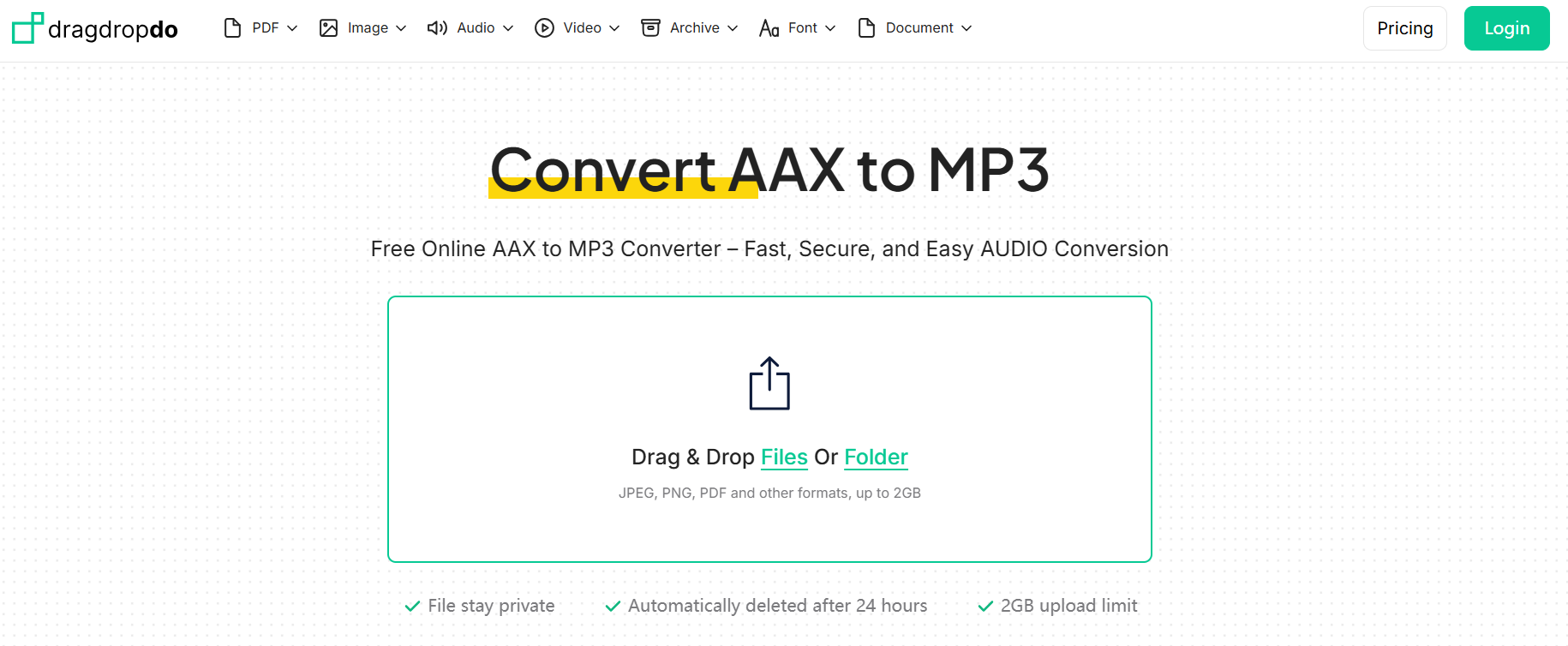
Tarayıcı belleğine bağlı olduğu için, büyük dosyaları (örneğin, 20 saatten uzun sesli kitaplar) işlerken zorlanabilir veya çökebilir. Performansı tarayıcılar arasında önemli ölçüde değişir; genellikle sorunsuz çalışması için Chrome veya Edge'in modern sürümlerini gerektirir. Ayrıca, özel yazılımların sunduğu gelişmiş bölüm bölme özelliğini de bulamazsınız. DumpMedia Sesli Dönüştürücü.
Bölüm 4. SSS
AAX dosyasını dönüştürebilir miyim? MP3 ücretsiz mi?
Tam olarak değil. Ücretsiz yöntemler sınırlıdır. Deneme sürümü olan bir dönüştürücü kullanmak en pratik çözümdür.
AAX her zaman DRM korumalı mıdır?
Audible'dan indirilen AAX dosyalarının çoğu DRM korumalıdır, ancak bazı yerel dosyalar korumalı olmayabilir.
Ses kalitesinde bir kayıp yaşar mıyım?
Hayır. Her iki araç da AAX'i dönüştürürken yüksek kaliteli çıktı sağlar. MP3.
Bölüm 5. Nihai Karar
AAX'i dönüştürmek istiyorsanız MP3Burada önemli olan, dosya türünüze göre doğru yöntemi seçmektir. Audible AAX dosyaları için, DumpMedia Audible Converter en iyi seçimdir. DRM korumasız AAX dosyaları için ise şunları deneyebilirsiniz: DumpMedia Herhangi bir müzik dönüştürücü veya DragDropDo.
*DumpMedia Bu hizmet, sesli kitaplarınızı şifresini çözerek ve DRM korumasız dosyalara indirerek çalışır; böylece kütüphanenizin temiz ve kısıtlamasız bir kopyasını herhangi bir cihazda elde edebilirsiniz.

%30 İndirim >>>