


En İyi AAX Oynatıcısı (Ücretsiz Seçenekler ve Her Yerde Nasıl Oynanır)
Audible dosyalarınızı açmak için bir AAX oynatıcısı mı arıyorsunuz? Yalnız değilsiniz. Birçok kullanıcı AAX sesli kitaplarını indiriyor ancak çoğu medya oynatıcısının bunları desteklemediğini fark ediyor. Sorun oynatıcıda değil, formatın kendisinde. AAX dosyaları şu şekilde korunmaktadır: DRM (Dijital Haklar Yönetimi)Bu durum, dosyaların nasıl ve nerede oynatılabileceğini kısıtlar. Bu kılavuzda, piyasadaki en iyi AAX sesli kitap oynatıcılarını, neden genellikle yetersiz kaldıklarını ve AAX dosyalarını herhangi bir cihazda sınırlama olmaksızın oynatmanın en etkili yolunu göstereceğiz.
İçindekiler Kılavuzu Bölüm 1. AAX Dosyası Nedir?Bölüm 2. En İyi AAX Sesli Kitap Oynatıcıları (Resmi Seçenekler)Bölüm 3. Herhangi Bir Cihazda Audible AAX Dosyalarını Oynatmanın En İyi YoluBölüm 4. Özet
Bölüm 1. AAX Dosyası Nedir?
AAX, Audible tarafından geliştirilen tescilli bir sesli kitap formatıdır. Genellikle indirilen sesli kitaplar için kullanılır ve yerleşik DRM koruması içerir. Bu, dosyaların yalnızca yetkilendirilmiş uygulamalar veya cihazlarda oynatılabileceği anlamına gelir. Erişmek için bir Audible hesabına ihtiyacınız vardır.
AAX telif hakkı korumasını sağlarken, kullanıcılar için uyumluluk sorunları da yaratıyor. İşte nedeni:
- DRM koruması yetkisiz oynatmayı engeller.
- VLC gibi standart oynatıcılar veya WinWindows Media Player, AAX dosyalarını çözemez.
- Dosya yetkilendirmesi Audible hesabınızla ilişkilidir.
Sonuç olarak, dosyaya sahip olsanız bile, onu özgürce oynatamazsınız. MP3.
Bölüm 2. En İyi AAX Sesli Kitap Oynatıcıları (Resmi Seçenekler)
İşte en iyi AAX oyuncularının kesin listesi.
1. Audible Uygulaması
Audible uygulaması, Audible ekosistemini tam olarak destekleyerek .aax ve .aaxc dosyalarını yerel olarak açabilen tek oynatıcı olmaya devam ediyor. Hem Kindle e-kitabına hem de sesli kitaba sahipseniz, senkronize metin vurgulama (Karaoke tarzı) özelliğinden yararlanabilirsiniz. Ayrıca, olay örgüsü veya karakterler hakkında sorular sormanıza olanak tanıyan yerleşik bir yapay zeka asistanı da bulunmaktadır (örneğin, "2. Bölümde bahsedilen karakter kimdi?"). Whispersync özelliği, konumunuzun iPhone, Android, Alexa ve Apple Watch cihazlarınızda kaydedilmesini sağlar.
En: En basit deneyimi ve Plus Kataloğuna erişimi isteyen kullanıcılar.
2. Apple Kitapları
Mac kullanıcıları için, AAX dosyalarınızı çevrimdışı dinlemek için üçüncü taraf bir uygulamaya ihtiyacınız yok. macOS'taki Apple Books, Audible kullanıcıları için en sağlam "masaüstü iş atı" olmaya devam ediyor. Çoğu medya oynatıcısının aksine, Apple Books'un Audible'ın DRM'siyle yerleşik bir "bağlantısı" vardır. Satın aldığınız kitapları orijinal yüksek kaliteli formatlarında oynatabilirsiniz. Bir kitabı Mac'inize aktarırsanız, okuma ilerlemeniz, yer işaretleriniz ve notlarınız iPhone, iPad ve Apple Watch'unuz arasında otomatik olarak senkronize edilir.
En: Yüksek kaliteli ve hafif bir masaüstü oynatıcı isteyen Mac kullanıcıları.
AAX Oynatıcılarının Sınırlamaları:
AAX oynatıcılar Audible ekosisteminde sorunsuz bir deneyim sunarken, önemli doğal sınırlamalara da sahiptirler. Kullanıcılar genellikle katı cihaz kısıtlamalarına ve sürekli hesap bağımlılığına bağlıdırlar; içeriğe erişmek için aktif yetkilendirme gereklidir. Dahası, DRM'nin varlığı, gerçek dosya sahipliğinin olmadığı anlamına gelir; kullanıcılar esasen veriye sahip olmak yerine içeriği lisanslamaktadırlar. Bu esneklik eksikliği, dosyaların genel cihazlar gibi yetkisiz cihazlara serbestçe aktarılmasını engeller. MP3 oynatıcılar veya özel yüksek kaliteli ses sistemleri.
Bölüm 3. Herhangi Bir Cihazda Audible AAX Dosyalarını Oynatmanın En İyi Yolu
Uyumlu bir AAX oynatıcısı aramak yerine, daha iyi bir yaklaşım, sınırlamanın kendisini ortadan kaldırmaktır. Sorun DRM korumasından kaynaklandığı için, en etkili çözüm AAX dosyalarını standart bir formata dönüştürmektir. MP3Bu size sesli kitaplarınız üzerinde tam kontrol sağlar. AAX dosyalarınızın kilidini açmak için şunu kullanabilirsiniz: DumpMedia Sesli Dönüştürücü.
Neden seçtin DumpMedia Ses Dönüştürücü?
- ✅ DRM korumasını kaldır* Bu araç, DRM'yi kaldırarak dosyalarınız üzerinde tam kontrol sahibi olmanızı sağlar.
- ✅ Audible'ı şuna dönüştür: MP3 Kolayca: Audible kitaplarını hızlıca indirebilirsiniz. MP3 ve M4A veya FLAC gibi diğer formatlar.
- ✅ Yüksek Hızlı Dönüşüm: Sesli kitapların tamamını dakikalar içinde dijital ortama aktarın.
- ✅ Kayıpsız Kalite: Dönüştürme sırasında kalite kaybı yaşanmaz.
- ✅ Birden fazla cihazda çalışır: Sesli kitaplarınızı çevrimdışı dinleyin. Dönüştürme işleminden sonra herhangi bir yerde.
AAX'e Nasıl Dönüştürülür MP3
1 Adım. Yazılımı bilgisayarınızda açın. Her ikisiyle de çalışır. WinWindows ve Mac işletim sistemleriyle uyumludur. Kullanıcı dostu arayüzü sayesinde yeni başlayanlar için kullanımı kolaydır.
2 Adım. Dahili Audible web oynatıcısını açın. DumpMedia Audible hesabınızla giriş yapın. Audible'da gezinin ve indirmek istediğiniz kitabı dönüştürücüye sürükleyin.
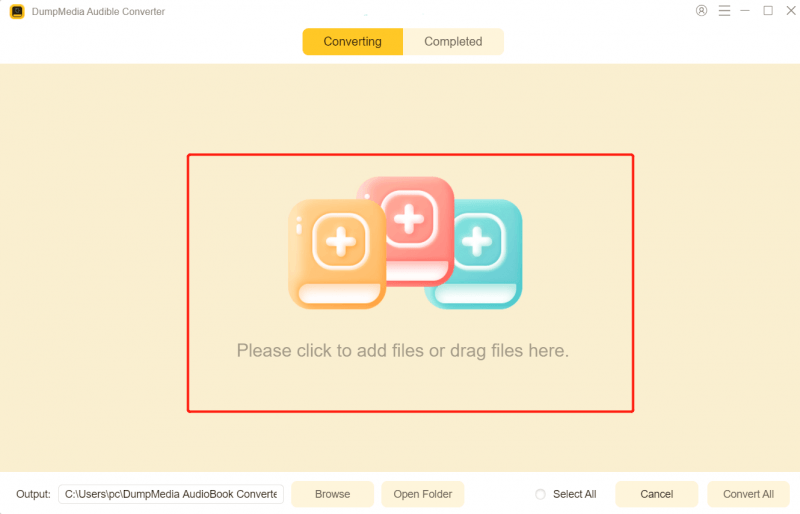
3 Adım. Ayarlar panelinden indirmek istediğiniz formatı seçin.

4 Adım. Son adım, dönüştürme işlemini başlatmak için "Dönüştür" düğmesine basmak olacaktır.
Dönüştürme işleminden sonra sesli kitaplarınız tamamen erişilebilir ve taşınabilir hale gelir.
Bölüm 4. Özet
Piyasada birkaç resmi AAX oynatıcısı bulunsa da, DRM koruması nedeniyle önemli sınırlamalara sahiptirler. Gerçek esneklik istiyorsanız, yalnızca bir oynatıcıya güvenmek yeterli değildir. En iyi çözüm, AAX dosyalarını dönüştürmektir. MP3 Bu format sayesinde sesli kitaplarınızı istediğiniz zaman, istediğiniz yerde, istediğiniz cihazda dinleyebilirsiniz. Kısıtlamaları aşın ve sesli kitaplarınızın tam kontrolünü elinize alın. DumpMedia Sesli Dönüştürücü.
*DumpMedia Bu hizmet, sesli kitaplarınızı şifresini çözerek ve DRM korumasız dosyalara indirerek çalışır; böylece kütüphanenizin temiz ve kısıtlamasız bir kopyasını herhangi bir cihazda elde edebilirsiniz.

%30 İndirim >>>