


Apple Music'e Kendi Müziğinizi Nasıl Ekleyebilirsiniz (2026 Kılavuzu)
Birçok kullanıcı kişisel müzik koleksiyonlarını içe aktarmak istiyor, örneğin... MP3 Dosyaları, indirilen parçaları veya eski CD'leri içine elma Müzik Cihazlar arasında daha kolay erişim için. Apple Music yerel dosyaları eklemenize izin verse de, işlem her zaman kolay değildir. Senkronizasyon sorunları, desteklenmeyen formatlar veya daha sonra müziğinizi yönetmeye çalışırken sınırlamalarla karşılaşabilirsiniz. Bu kılavuzda, kendi müziğinizi Apple Music'e adım adım nasıl ekleyeceğinizi ve müzik kitaplığınız üzerinde tam kontrolü nasıl sağlayacağınızı öğreneceksiniz.
İçindekiler Kılavuzu Bölüm 1: Apple Music'e Her Zaman Müzik Ekleyememenizin NedenleriBölüm 2: Apple Music'e Kendi Müziğinizi Ekleyin Windows (iTunes)Bölüm 3: Mac'inizde Apple Music'e Kendi Müziğinizi EkleyinBölüm 4: Apple Music'e Müzik Ekledikten Sonra Ne Olur?Bölüm 5: Müziğinizi Özgürce Yönetmenin En İyi ÇözümüBölüm 6: SSS7. Bölüm: Sonuç
Bölüm 1: Apple Music'e Her Zaman Müzik Ekleyememenizin Nedenleri
Apple Music'e kendi müziğinizi nasıl ekleyeceğinize geçmeden önce, işlemin neden bazen başarısız olduğunu anlamak önemlidir.
Yaygın sorunlar şunları içerir:
- Desteklenmeyen dosya formatları (Apple Music şunları tercih eder: MP3(AAC, ALAC)
- iCloud Müzik Kütüphanesi senkronizasyon hataları
- Senkronizasyon sonrasında yinelenen veya eksik parçalar
- Dosya boyutu veya meta veri sorunları
Kendi müziklerinizi Apple Music'e başarıyla ekleseniz bile, bu dosyaları daha sonra yönetmek yine de kısıtlayıcı olabilir.
Bölüm 2: Apple Music'e Kendi Müziğinizi Ekleyin Windows (iTunes)
Apple Music'e kendi müziğinizi nasıl ekleyebilirsiniz? Eğer bir WinWindows PC kullanıyorsanız, müziğinizi eklemek için iTunes'a ihtiyacınız olacak.
Adımları takip et:
- iTunes'u açın ve şuraya gidin: Dosya > Dosyayı Kitaplığa Ekle
- İçe aktarmak istediğiniz müzik dosyalarını seçin.
- Tıkla Açılış onları kütüphanenize eklemek için
- etkinleştirme Senkronizasyon Kütüphanesi ayarlarda
- Müziğinizin iCloud'a yüklenmesini bekleyin.
İşlem tamamlandığında, şarkılarınız aynı Apple ID'yi kullanan tüm cihazlarda görünecektir.
Bölüm 3: Mac'inizde Apple Music'e Kendi Müziğinizi Ekleyin
macOS'ta (Catalina veya sonrası), iTunes'un yerini Apple Music uygulaması almıştır. İşte Mac'inizde Apple Music'e kendi müziğinizi nasıl ekleyeceğiniz.
- Apple Music uygulamasını açın
- Müzik dosyalarınızı kütüphaneye sürükleyip bırakın.
- MyCAD'de yazılım Güncelleme ye git Müzik > Ayarlar > Genel
- etkinleştirme Senkronizasyon Kütüphanesi
- Senkronizasyonun tamamlanmasını bekleyin.
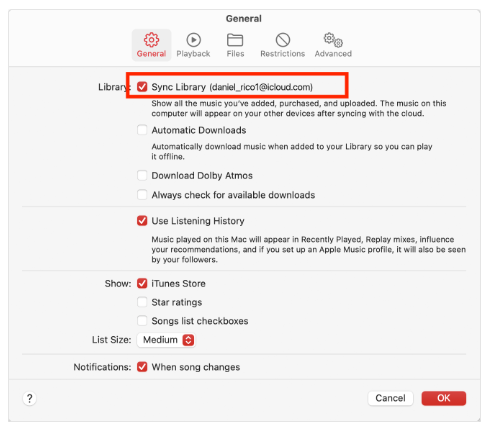
Bu, Mac'inizdeki Apple Music'e kendi müziğinizi eklemenin en kolay yoludur.
Bölüm 4: Apple Music'e Müzik Ekledikten Sonra Ne Olur?
Apple Music'e kendi müziğinizi eklemeyi başarıyla öğrendikten sonra, dosyalarınız iCloud Müzik Kitaplığınızda saklanır ve Apple cihazlarınız üzerinden erişilebilir hale gelir.
Ancak yine de sınırlamalar mevcut. Kendi müziğinizi Apple Music'e ekledikten sonra bile şunları fark edebilirsiniz:
- ❌ Şarkıları kolayca dışa aktaramazsınız.
- ❌ Dosyalar Apple'ın ekosistemine bağlıdır.
- ❌ Meta veriler otomatik olarak değiştirilebilir.
- ❌ Bazı parçalar kullanılamaz hale gelebilir.
Müzik eklemek kolay, ancak kontrol etmek zor. İşte birçok kullanıcının karşılaştığı ikinci sorun da burada ortaya çıkıyor.
Bölüm 5: Müziğinizi Özgürce Yönetmenin En İyi Çözümü
Amacınız sadece müzik eklemek değil, aynı zamanda onu kısıtlamalar olmadan yönetmek ve saklamak ise, farklı bir yaklaşıma ihtiyacınız olacak. Bunun için şu gibi araçlar kullanabilirsiniz: DumpMedia Apple Müzik Dönüştürücü izin ver Apple Music şarkılarını dönüştürün MP3WAV veya FLAC formatlarından birini seçebilirsiniz. Ardından, müziğinizi kalıcı olarak saklayabilir ve dosyaları herhangi bir cihaza aktarabilirsiniz. Bu, Apple Music'e kendi müziğinizi nasıl ekleyeceğiniz konusunda öğrendiklerinizi tamamlayarak, kütüphaneniz üzerinde tam esneklik sağlar.
Nasıl Kullanılır? DumpMedia Apple Music Converter (Kapsamlı Kılavuz) >>>

Bölüm 6: SSS
1. Apple Music'e neden kendi müziklerimi ekleyemiyorum?
Bu durum genellikle desteklenmeyen formatlar, senkronizasyon sorunları veya iCloud Müzik Kütüphanesi sorunları nedeniyle oluşur. Dosyalarınızın doğru formatta olduğundan emin olun. MP3AAC veya ALAC formatında olması ve Senkronizasyon Kütüphanesinin etkinleştirilmiş olması gerekir.
2. Apple Music destekliyor mu? MP3 dosyalar?
Evet, Apple Music destekliyor. MP3 Dosyaları kolayca içe aktarabilirsiniz. Apple Music'e kendi müziğinizi nasıl ekleyeceğinizi öğrenirken bu dosyaları da kolayca içe aktarabilirsiniz.
3. Apple Music'ten şarkıları dışa aktarabilir miyim?
Hayır, Apple Music korumalı şarkıların dışa aktarılmasına izin vermiyor. Bu, kullanıcıların karşılaştığı başlıca sınırlamalardan biridir.
4. Apple Music dosyalarını yönetmenin en iyi yolu nedir?
Daha fazla esneklik istiyorsanız, müziği yerel dosyalar olarak dönüştüren ve depolayan araçları kullanmak en iyi çözümdür.
7. Bölüm: Sonuç
Apple Music'e kendi müziğinizi eklemeyi öğrenmek, kişisel müzik kütüphanenizi düzenlemenin ve cihazlar arasında erişmenin harika bir yoludur. Ancak müzik eklemek sürecin sadece bir parçasıdır. Dönüştürme, dışa aktarma veya müziğinizi kalıcı olarak saklama gibi tam kontrol istiyorsanız, Apple Music'in ötesinde ek araçlara ve stratejilere ihtiyacınız olacaktır. Apple Music'i doğru araçlarla birleştirmek size hem kolaylık hem de özgürlük sağlar.