


M4P'den MP3 Ücretsiz Dönüştürücü Yazılımı: 100% Çalışma Araçları (2026)
En iyisini arıyorsanız M4P'den MP3 dönüştürücü ücretsiz yazılımBüyük ihtimalle eski bir kilidi açmaya çalışıyorsunuz. elma Müzik M4P dosyalarını herhangi bir cihazda oynatabilirsiniz. M4P dosyaları geçmişte Apple Music tarafından yaygın olarak kullanılıyordu, ancak DRM koruması içerdiği için çoğu oynatıcıyla uyumsuzdu. Bu kılavuzda, en iyi M4P-to-Steam dosyalarını inceleyeceğiz.MP3 Bu çalışmada, dönüştürücünün sınırlamaları tartışılacak ve modern müzik kullanıcıları için daha verimli bir alternatif sunulacaktır.
İçindekiler Kılavuzu Bölüm 1. M4P Dosyası Nedir ve Neden Dönüştürülmelidir? MP3?Bölüm 2. En İyi Ücretsiz M4P MP3 Dönüştürücü (En İyi Seçenekler)Bölüm 3. En İyi Alternatif: İndir MP3 M4P'yi dönüştürmek yerine doğrudanBölüm 4. SSSBölüm 5. Son Düşünceler
Bölüm 1. M4P Dosyası Nedir ve Neden Dönüştürülmelidir? MP3?
M4P'yi seçmeden önce MP3 Ücretsiz dönüştürme yazılımı kullanıyorsanız, M4P dosyalarının ne olduğunu anlamak önemlidir.
M4P, Apple Music tarafından (özellikle eski satın alımlar ve indirmeler) kullanılan korumalı bir ses formatıdır. DRM kısıtlamaları nedeniyle, M4P dosyaları çoğu oynatıcıda oynatılamaz. MP3 Oynatıcılar. Bunları serbestçe aktaramaz veya düzenleyemezsiniz ve oynatma yalnızca yet授权li Apple cihazlarıyla sınırlıdır.
Bu nedenle birçok kullanıcı M4P arıyor. MP3 Dosyaları kısıtlamalardan arındırıp evrensel bir formata dönüştüren ücretsiz dönüştürücü yazılımı. MP3.
Bölüm 2. En İyi Ücretsiz M4P MP3 Dönüştürücü (En İyi Seçenekler)
İşte M4P için yaygın olarak kullanılan bazı örnekler. MP3 Ücretsiz dönüştürme araçları:
1. Ücretsiz Ses Kaydedici
Açık kaynak topluluğunda bir ölçüt olarak Audacity, sistem sesini kaydetmek için en iyi ücretsiz seçenek olarak öne çıkıyor. Bilgisayarınızın ses kartından çıkan ses sinyallerini yakalayarak, çalınan M4P parçalarını doğrudan dalga formu dosyaları olarak kaydediyor. Başlıca avantajları arasında tamamen ücretsiz olması, reklamsız olması ve yüksek bit hızında dışa aktarmayı desteklemesi yer alıyor. MP3s.
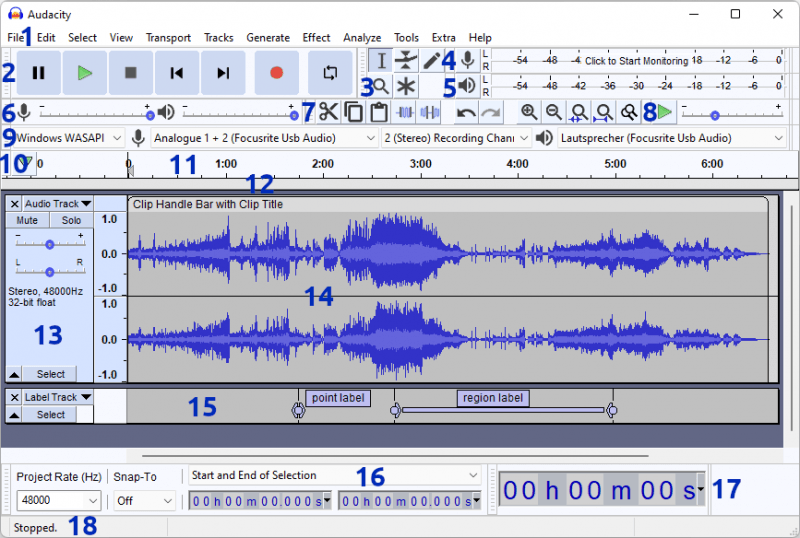
M4P formatında şarkı kaydederken, bilgisayarınızda "Rahatsız Etmeyin" modunu etkinleştirdiğinizden emin olun; aksi takdirde, sosyal medya uygulamalarından veya sistemin kendisinden gelen bildirim sesleri ortaya çıkan kayda dahil edilecektir. MP3 Ayrıca, ses kayıt cihazlarının kullanımı biraz karmaşık olma eğilimindedir ve genellikle ses sürücülerinin yapılandırılmasını gerektirir; bu işlem, yeni başlayanlar için pek kullanıcı dostu olmayabilir.
2. Çevrimiçi Ses Dönüştürücüler
Bazı çevrimiçi araçlar M4P gibi çalıştığını iddia ediyor. MP3 Ücretsiz dosya dönüştürme yazılımı. Convertio, ses, video, belge ve resim dahil olmak üzere 300'den fazla formatta 25,000'den fazla kombinasyonu destekleyen çok yönlü, bulut tabanlı bir dosya dönüştürücüdür. Başlıca avantajı, yazılım kurulumuna gerek kalmadan tarayıcı tabanlı arayüzünde yatmaktadır. Kullanıcılar, yerel depolama, Google Drive veya Dropbox aracılığıyla 100 MB'a kadar dosyaları ücretsiz olarak yükleyebilirler.
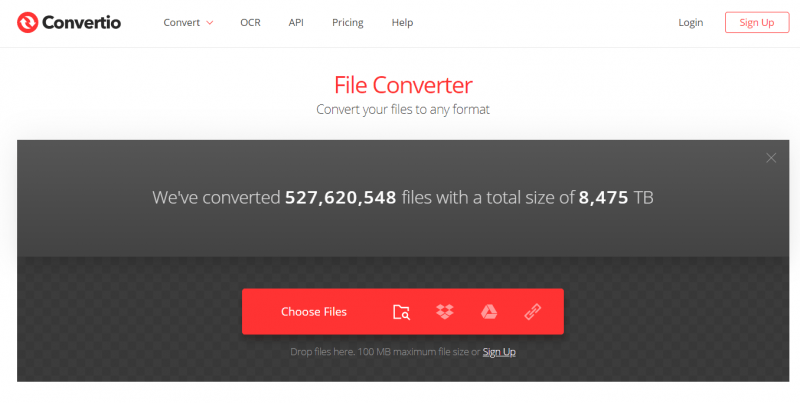
Convertio'da M4P'den dönüştürme için özel bir sayfa bulunmasına rağmen,MP3 Dönüştürme işlemi sırasında, DRM (Dijital Hak Yönetimi) ile korunan dosyaları işleyememektedir. M4P dosyalarının büyük çoğunluğu, 2009 öncesinde Apple Music veya iTunes Store'dan satın alınan şifrelenmiş ses parçaları olduğundan, Convertio genellikle bunları işlemeye çalışırken bir hata döndürür.
Bölüm 3. En İyi Alternatif: İndir MP3 M4P'yi dönüştürmek yerine doğrudan
Birçok araç kendisini M4P olarak tanıtsa da... MP3 Ücretsiz ses dönüştürme yazılımları, gerçek dünya kullanımında genellikle başarısız olur. Bu ücretsiz araçlar, genellikle DRM telif hakkı korumasını gerçekten kaldıramazlar. Dönüştürme hızları yavaş olmakla kalmaz, aynı zamanda ses kalitesinde de önemli kayıplara neden olarak, büyük ölçekli toplu işleme görevleri için tamamen yetersiz kalırlar. Kısacası, yüksek kaliteli sese öncelik veren veya geniş müzik kütüphanelerine sahip kullanıcılar için geleneksel ücretsiz araçlar kesinlikle güvenilir bir seçim değildir.
Verimsiz M4P dönüştürücülerle zaman kaybetmek yerine, daha verimli bir çözüm tercih edin: şifrelenmiş formatları tamamen atlayın ve DRM'siz indirin. MP3 Dosyaları doğrudan buraya. İşte tam olarak burası. DumpMedia Apple Müzik Dönüştürücü öne çıkmaktadır.
Sadece bir format dönüştürücüden çok daha fazlası olan bu araç, buluttan yüksek kaliteli ses dosyalarını doğrudan şifresini çözüp indirebilen güçlü bir verimlilik aracıdır. Bu sayede tüm erişim kısıtlamalarını aşabilir ve tek bir tıklamayla müziğinizin kalıcı, kayıpsız kopyalarını herhangi bir cihazda oynatılabilir şekilde elde edebilirsiniz.
Temel Avantajlar
- Apple Music'i şuna dönüştür: MP3WAV, FLAC, AAC
- Müziği kalıcı olarak saklayın.
- Tüm oynatma listelerini toplu olarak indirin
- ID3 etiketlerini (sanatçı, albüm, başlık) koruyun.
- Yüksek kaliteli ses çıkışının keyfini çıkarın.
Bu da onu yalnızca M4P'ye güvenmeye kıyasla daha pratik bir çözüm haline getiriyor. MP3 Ücretsiz dönüştürücü araçları.
Nasıl Alınır MP3 Apple Music'i Kolayca (Adım Adım)
1 Adım. Yazılımı bilgisayarınıza indirip kurun. Her ikisiyle de çalışır. WinWindows ve Mac işletim sistemleriyle uyumludur. Kullanıcı dostu arayüzü sayesinde yeni başlayanlar için kullanımı kolaydır.
2 Adım. Uygulama içindeki yerleşik Apple Music web oynatıcısını açın. DumpMedia Apple Music hesabınızla giriş yapın. Apple Music'te gezinin ve indirmek istediğiniz şarkıları, albümleri veya çalma listelerini dönüştürücüye sürükleyin.

3 Adım. Ayarlar panelinde, şunu seçin: MP3 çıktı formatı olarak etkinleştirmek için MP3 Seçtiğiniz parçaların indirilmesi.

4 Adım. Dönüştür'e tıklayın ve şarkıları doğrudan indirin. MP3 dosyaları.

Artık DRM'siz bir sürümünüz var. MP3 M4P'ye ihtiyaç duymadan herhangi bir cihazda kullanıma hazır dosyalar. MP3 Ücretsiz dönüştürücü yazılımı.
Bölüm 4. SSS
M4P'lerin çoğu neden böyle yapıyor? MP3 Ücretsiz çeviri araçları başarısız mı oluyor?
Çoğu M4P MP3 Dönüştürme araçları, M4P dosyalarının DRM (Dijital Hak Yönetimi) ile korunması nedeniyle başarısız olur. Bu koruma, Apple ekosistemi dışında yetkisiz dönüştürme veya oynatmayı engeller. Ücretsiz araçlar genellikle DRM'yi atlama özelliğine sahip değildir, bu nedenle genellikle beklendiği gibi çalışmazlar.
M4P kullanmak yasal mı? MP3 dönüştürücü?
M4P kullanarak MP3 Kişisel kullanım (yedekleme veya çevrimdışı dinleme gibi) için dönüştürücü kullanımı birçok bölgede genellikle kabul edilebilir. Ancak, dönüştürülmüş dosyaların dağıtılması veya paylaşılması telif hakkı yasalarını ihlal edebilir. Müzik dosyalarını dönüştürürken her zaman yerel düzenlemelere uymanız önemlidir.
M4P dosyasını dönüştürebilir miyim? MP3 kaliteden ödün vermeden?
Çoğu M4P MP3 Dönüştürücüler, özellikle kayda dayalı olanlar, kayıpsız kaliteyi garanti edemez. Bu durum genellikle sıkıştırma bozulmalarına veya bit hızının azalmasına yol açar. Yüksek kaliteli çıktı için, daha gelişmiş araçlar gereklidir. DumpMedia Apple Music Converter gereklidir.
Hâlâ M4P'ye ihtiyacım var mı? MP3 Bugün dönüştürücü mü?
Çoğu durumda hayır. M4P eski bir Apple Music formatı olduğundan, birçok kullanıcı artık modern çözümleri tercih ediyor. M4P kullanmak yerine... MP3 dönüştürücü ücretsiz yazılım, indirme MP3 Dosyaları doğrudan aktarmak daha hızlı, daha güvenli ve daha verimlidir.
Bölüm 5. Son Düşünceler
Birçok M4P seçeneği mevcut olsa da MP3 Piyasada M4P için ücretsiz dönüştürme araçları mevcut olsa da, bunlar genellikle hız, kalite ve işlevsellik açısından sınırlamalara sahiptir. Daha sorunsuz bir deneyim istiyorsanız, daha akıllıca yaklaşım M4P'den tamamen kaçınmak ve bunun yerine şu gibi araçları kullanmaktır. DumpMedia Amazon Music Converter'ı edinin MP3 Dosyaları doğrudan. Deneyin. DumpMedia Amazon Music Converter'ı bugün edinin ve M4P dönüştürme zahmetinden kurtulun!

%30 İndirim >>>