


M4P DRM Kaldırma: Korumalı iTunes Şarkılarını Dönüştürme MP3 Kolayca
M4P, DRM korumalı bir ses formatıdır ve çeşitli kuruluşlar tarafından kullanılır. iTunesBu, kullanıcıların yetkisiz cihazlar dışında müzik kopyalamasını, dönüştürmesini veya oynatmasını engeller. Bu kısıtlama nedeniyle birçok kullanıcı M4P DRM kaldırma yöntemleri arıyor. Ancak zamanla işler değişti. Geleneksel DRM kaldırma yöntemleri artık güvenilir değil ve modern çözümler farklı bir yaklaşım benimsiyor. Bu kılavuzda, günümüzde M4P DRM'yi nasıl kaldıracağınızı ve en iyi pratik çözümün ne olduğunu açıklayacağız.
İçindekiler Kılavuzu Bölüm 1: M4P Nedir ve Neden DRM İçerir? Bölüm 2: M4P Dosyalarından DRM'yi Gerçekten Kaldırabilir misiniz?Bölüm 3: M4P Dosyalarından DRM'yi Kaldırmanın Ücretsiz YöntemleriBölüm 4: M4P ve Apple Music KarşılaştırmasıBölüm 5: M4P Dosyalarından DRM'yi Kaldırmanın En İyi Alternatif YöntemiBölüm 6: SSSBölüm 7. Sonuç
Bölüm 1: M4P Nedir ve Neden DRM İçerir?
M4P, Apple Inc. tarafından iTunes Store'un ilk dönemlerinde satın alınan müzikler için sunulan, korumalı bir ses formatıdır.
Temel özellikler:
- DRM korumalı (Dijital Hak Yönetimi)
- Yetkili cihazlarda sınırlı oynatma
- Doğrudan dönüştürülemez MP3
Bu kısıtlamalar nedeniyle, kullanıcılar müzik dosyalarının kilidini açmak için sıklıkla M4P DRM kaldırma araçları ararlar.
Bölüm 2: M4P Dosyalarından DRM'yi Gerçekten Kaldırabilir misiniz?
M4P DRM kaldırma arayan birçok kullanıcı basit bir çözüm bekliyor: M4P dosyasını yükleyin ve DRM'si anında kaldırılsın. Ancak gerçek daha karmaşık. M4P dosyaları, Apple Inc. tarafından geliştirilen ve ses dosyalarının nasıl oynatılabileceğini, kopyalanabileceğini veya dönüştürülebileceğini kısıtlayan DRM teknolojisiyle korunmaktadır. Bu koruma, iTunes'tan satın alınan müziğin yetkisiz dağıtımını önlemek için tasarlanmıştır. Teoride, M4P DRM kaldırma mümkündür. Pratikte ise genellikle başarısız olur.
Bölüm 3: M4P Dosyalarından DRM'yi Kaldırmanın Ücretsiz Yöntemleri
Ücretsiz bir M4P DRM kaldırma çözümü arıyorsanız, birkaç yöntem mevcut ancak her birinin önemli sınırlamaları var.
Yöntem 1: Eski DRM Kaldırma Araçları
Requiem veya iTunes tabanlı komut dosyaları gibi ilk araçlar, özellikle M4P dosyalarından DRM korumasını kaldırmak için tasarlanmış olsalar da, uzun zamandır bakımları durdurulmuştur. Sonuç olarak, modern işletim sistemlerinde büyük ölçüde çalışmaz durumdadırlar; son derece düşük uyumluluk ve çok düşük başarı oranlarından muzdariptirler; bu noktada tamamen eskimişlerdir.
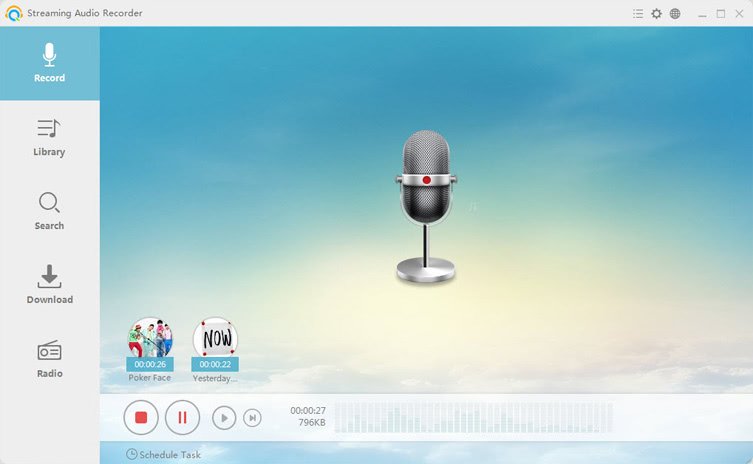
Yöntem 2: Ses Kaydı Yöntemi
M4P DRM korumasının kaldırılması için yaygın olarak kullanılan bir diğer yöntem ise, sesin sisteminizde çalarken gerçek zamanlı olarak kaydedilmesidir. Bu yöntem, ses çıkışını yakalayarak ve bir dosya olarak kaydederek şifrelemeyi etkili bir şekilde atlatır. MP3Bu, zahmetli ve manuel bir işlemdir ve ses kalitesinde gözle görülür bir kayba yol açar. Dahası, parçanın baştan sona çalınmasını gerektirdiği için, modern dönüştürme yazılımlarına kıyasla inanılmaz derecede yavaştır.
Yöntem 3: CD Yakma (Eski Yöntem)
Bazı kullanıcılar, şarkılarını fiziksel veya sanal bir CD'ye yazdırıp daha sonra kütüphanelerine yeniden içe aktararak M4P DRM korumasını atlatmaya çalışırlar. Bu "açık" kopyalama işlemi sırasında şifrelemeyi başarıyla kaldırsa da, inanılmaz derecede zaman alan, özel CD yazma araçları gerektiren ve büyük bir müzik koleksiyonunu yöneten herkes için pratik olmayan bir yöntemdir.
Bölüm 4: M4P ve Apple Music Karşılaştırması
M4P DRM kaldırma işlemini tam olarak anlamak için, M4P'nin modern Apple Music'ten nasıl farklı olduğunu bilmeniz gerekir.
Apple Müzik Nedir?
- Abonelik tabanlı bir yayın hizmeti
- Kalıcı olarak indirilebilir dosyalar sağlamaz.
- Dosya sahipliği yerine DRM korumalı akış kullanır.
Birçok kullanıcı M4P DRM kaldırma ve Apple Music'e dönüştürme işlemlerinin aynı olduğunu varsayar, ancak durum böyle değildir. Bununla birlikte, önemli bir bağlantı vardır: Müziğiniz Apple Music'te mevcutsa, ona tekrar erişebilir ve DRM'siz bir formata dönüştürebilirsiniz. Bu, geleneksel M4P DRM kaldırma yönteminden daha etkili bir çözüm sunar.
Bölüm 5: M4P Dosyalarından DRM'yi Kaldırmanın En İyi Alternatif Yöntemi
Geleneksel M4P DRM kaldırma yöntemleri güvenilir olmadığından, en iyi modern yaklaşım, DRM'yi doğrudan kaldırmak yerine DRM'siz bir sürüm kullanmaktır. DumpMedia Apple Müzik Dönüştürücü Bu uygulama, özellikle Apple Music kullanıcılarının kütüphaneleri üzerinde tam kontrol sahibi olmak isteyenler için tasarlanmıştır. Kullanıcılara şunları sağlar: Apple Music kütüphanelerini çeşitli ses formatlarına dönüştürmek, örneğin: MP3Çevrimdışı oynatma için AAC, WAV ve FLAC formatlarını destekler. Apple Music uygulaması cihazınızda çalışmasa bile, dosyalarınızı başka bir müzik çalar üzerinden hemen oynatabilirsiniz.
Ana Özellikler
- Apple Music'i şuna dönüştür: MP3WAV, AAC ve daha fazlası
- Kayıpsız ses kalitesini koruyun.
- Çalma listeleri ve albümler için toplu dönüştürme
- Hızlı dönüşüm hızı
Adım Adım: Apple Music'i şu formata dönüştürün: MP3
1 Adım. Yazılımı bilgisayarınıza indirip kurun. Her ikisiyle de çalışır. WinWindows ve Mac işletim sistemleriyle uyumludur. Kullanıcı dostu arayüzü sayesinde yeni başlayanlar için kullanımı kolaydır.
2 Adım. Uygulama içindeki yerleşik Apple Music web oynatıcısını açın. DumpMedia Apple Music hesabınızla giriş yapın. Apple Music'te gezinin ve indirmek istediğiniz şarkıları, albümleri veya çalma listelerini dönüştürücüye sürükleyin.

3 Adım. Ayarlar panelinde, şunu seçin: MP3 çıktı formatı olarak etkinleştirmek için MP3 Seçtiğiniz parçaların indirilmesi.

4 Adım. Dönüştür'e tıklayın ve şarkıları doğrudan indirin. MP3 dosyaları.

M4P DRM kaldırma işleminin amacı sadece DRM'yi kaldırmak değil, müziğiniz üzerinde tam kontrol sahibi olmaktır. Modern bir çözümle bunu başarabilirsiniz. DumpMedia Apple Music Converter ile bu amaca, eski DRM kaldırma araçlarını kullanmaktan çok daha verimli bir şekilde ulaşabilirsiniz.
Bölüm 6: SSS
M4P DRM'sini kaldırmak hala mümkün mü?
Teknik olarak evet, ancak çoğu araç eski ve güvenilmez.
M4P DRM kaldırma işlemine en iyi alternatif nedir?
Bir dönüştürücü kullanarak, örneğin DumpMedia DRM korumasız müzik elde etmek için Apple Music Converter en pratik çözümdür.
M4P dosyasını dönüştürebilir miyim? MP3 direkt olarak?
DRM kısıtlamaları nedeniyle bu kolay değil. Bu yüzden birçok kullanıcı M4P DRM kaldırma yöntemleri arıyor.
Bu yöntem güvenli midir?
Evet, güvenilir bir dönüştürücü kullanmak, eski DRM kaldırma araçlarını kullanmaktan daha güvenlidir.
Bölüm 7. Sonuç
Birçok kullanıcı M4P DRM kaldırma yöntemlerini ararken, gerçek şu ki geleneksel DRM kaldırma yöntemleri artık etkili değil. Doğrudan DRM kaldırmaya çalışmak yerine, daha akıllıca bir yaklaşım, modern araçlar kullanarak müziğinizin DRM'siz sürümlerini elde etmektir. DumpMedia Apple Music Converter ile şarkıları dönüştürebilirsiniz. MP3 Hızlı, güvenli ve eski çözümlerin sınırlamaları olmadan.

%30 İndirim >>>