


Apple Music'e Nasıl Aktarılır? Spotify (3 Çalışma Yöntemi)
Apple Music'i nasıl aktaracağınızı arıyorsanız... SpotifyBüyük olasılıkla çalma listelerinizi, şarkılarınızı veya tüm müzik kütüphanenizi koleksiyonunuzu kaybetmeden taşımaya çalışıyorsunuz. Ancak birçok kullanıcı kısa sürede can sıkıcı bir gerçeği fark ediyor: Apple Music şarkıları doğrudan yeni cihazınıza aktarılmıyor. SpotifyBu kılavuz size bunun nedenini ve daha da önemlisi, 3 etkili yöntem kullanarak nasıl çözeceğinizi gösterecektir.
İçindekiler Kılavuzu Apple Music'i başka bir yere aktarabilir misiniz? Spotify Direkt olarak?Yöntem 1: Apple Music'i dönüştürün ve yükleyin. Spotify (En İyi Yöntem)Yöntem 2: Apple Music'i aktarın Spotify on WinDow ve MacYöntem 3: Apple Music'i aktarın Spotify MobildeSSSSonuç
Apple Music'i başka bir yere aktarabilir misiniz? Spotify Direkt olarak?
Kısa cevap hayır, Apple Music'i doğrudan aktaramazsınız. SpotifyApple Music'ten şarkı indirmiş olsanız bile, bunlar standart ses dosyaları değildir. Spotify tanıyabilir.
Apple Music'in Neden Aktarılamadığı Spotify
Ana sebep DRM (Dijital Haklar Yönetimi) Koruma. Apple Music parçaları şifrelenir ve Apple ekosistemine kilitlenir. Bu nedenle indirilen dosyalara normal şekilde erişilemez. MP3 dosyaları. SpotifyÖte yandan, yalnızca yerel ses dosyalarını destekler (MP3(WAV, AAC). Bu, Apple Music şarkılarını doğrudan dışa aktarıp başka bir uygulamaya içe aktaramayacağınız anlamına gelir. SpotifyApple Music'i başka bir cihaza aktarmayı öğrenirken karşılaşılan en büyük engel budur. Spotify.
Yöntem 1: Apple Music'i dönüştürün ve yükleyin. Spotify (En İyi Yöntem)
Apple Music'i nasıl aktarırım? SpotifyEğer bir şey istiyorsanız... 100% Çalışan ve istikrarlı bir çözüm için, Apple Music şarkılarını standart formatlara dönüştürmeli ve ardından yüklemelisiniz. Spotify.Böyle bir araç kullanarak DumpMedia Apple Müzik DönüştürücüDRM kısıtlamalarını* tamamen atlayabilirsiniz Apple Music çalma listelerini yüksek kaliteli hale dönüştürmek MP3WAV veya AAC dosyaları. Bu yaklaşım, parçaları yerel olarak saklamanıza ve doğrudan içe aktarmanıza olanak tanır. Spotify Yerel dosyalar olarak kaydedilmeleri, kütüphanenizin platformlar arasında bozulmadan ve işlevsel kalmasını sağlarken orijinal ses kalitesini de korur.
Diğer Özellikler
- Müziği kalıcı olarak saklayın.
- Tüm oynatma listelerini toplu olarak indirin
- ID3 etiketlerini (sanatçı, albüm, başlık) koruyun.
- Yüksek kaliteli ses çıkışının keyfini çıkarın.
Adım adım rehber
Apple Music'i nasıl aktarırım? Spotifyİşte bunu kullanmak için basit kılavuzlar. DumpMedia Apple Müzik Dönüştürücü.
1 Adım: Yazılımı bilgisayarınıza indirip kurun. Her ikisiyle de çalışır. WinWindows ve Mac işletim sistemleriyle uyumludur. Kullanıcı dostu arayüzü sayesinde yeni başlayanlar için kullanımı kolaydır.
2 Adım: Uygulama içindeki yerleşik Apple Music web oynatıcısını açın. DumpMedia Apple Music hesabınızla giriş yapın. Apple Music'te gezinin ve indirmek istediğiniz şarkıları, albümleri veya çalma listelerini dönüştürücüye sürükleyin.

3 Adım: Ayarlar panelinde, şunu seçin: MP3 çıktı formatı olarak etkinleştirmek için MP3 Seçtiğiniz parçaların indirilmesi.

4. Adım: "Dönüştür"e tıklayın ve işlemin tamamlanmasını bekleyin.

5 Adım: Açılış SpotifyAyarlar → Yerel Dosyalar bölümüne gidin. "Yerel Dosyaları Göster" seçeneğini etkinleştirin. Dönüştürdüğünüz müzik klasörünü ekleyin.
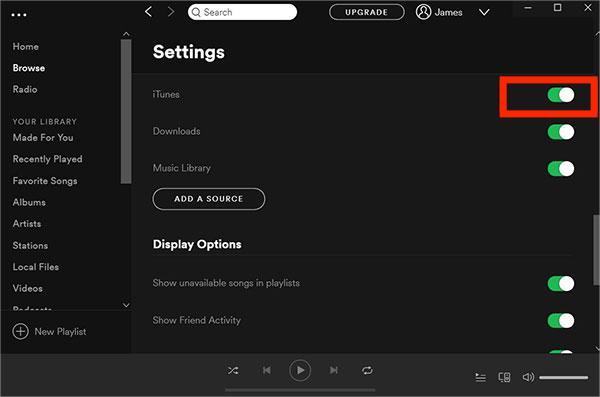
Apple Music'i nasıl aktaracağınız konusunda ciddiyseniz SpotifyBu, en güvenilir çözümdür.
Yöntem 2: Apple Music'i aktarın Spotify on WinDow ve Mac
Apple Music'i aktarma sorununu çözmenin başka bir yolu Spotify Çalma listesi aktarma araçları kullanılıyor. Herhangi bir Müzik Dönüştürücü şunları içerir: Çalma Listesi Aktarımı Platformlar arasında şarkı eşleştirmeyi sağlayan özellik. Bu yöntem, Apple Music ve diğer platformlar arasında doğrudan bağlantı kurar. Spotify Hesapları ve transferleri otomatik olarak gerçekleştirir ve çalma listelerini aktarır.
Adım adım rehber
1 Adım: Açılış DumpMedia Bilgisayarınızdaki herhangi bir müzik dönüştürme programını kullanın. Yeni başlayanlar için bile dönüştürmeyi kolaylaştırmak üzere tasarlanmış, sade ve sezgisel bir arayüz göreceksiniz.
Adım 2: Araçlar > Çalma Listesi Aktarımı'nı seçin.
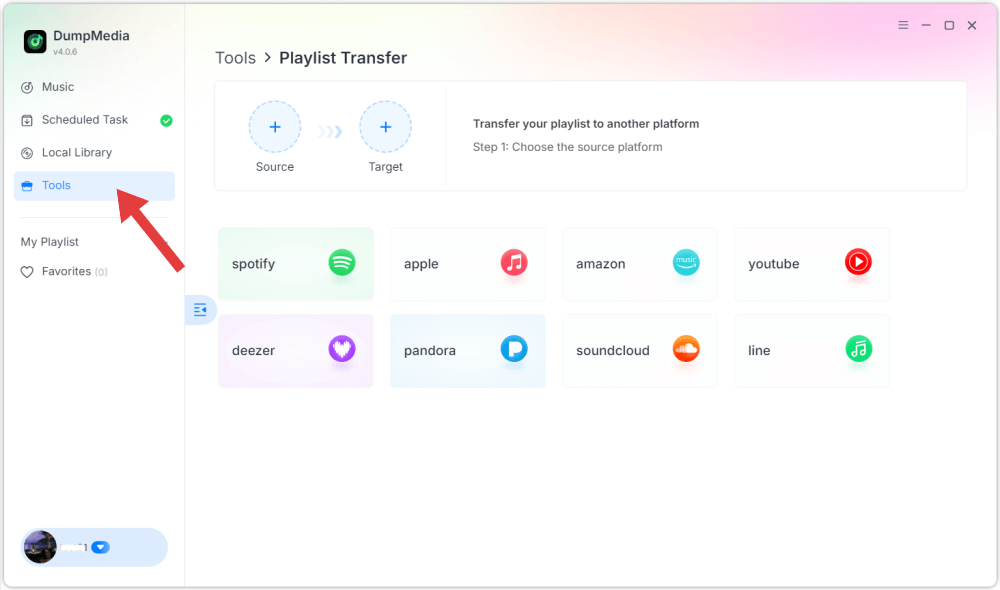
3. Adım: Kaynak olarak Apple Music'i seçin.
4 Adım: Seç Spotify Çalma listenizi taşımak istediğiniz platform olarak.
5 Adım: Apple Music'ten aktarmak istediğiniz çalma listelerini bulun. Spotify ve taşımak istediğiniz tüm oynatma listelerini seçin.
6 Adım: Taşıma işlemine başlayın. Araç, şarkıları otomatik olarak eşleştirir ve aktarır. "Git"e tıklayın. SpotifyÇalma listeleriniz yeni bir servise taşındı ve yeni müzik yayın hizmetinizin keyfini çıkarmaya başlayabilirsiniz.
Avantajlar
- Hızlı ve otomatik
- Dosya dönüştürme işlemine gerek yok.
- Yeni başlayanlar için kolay
Dezavantajlar
- Eşleştirme her zaman doğru sonuç vermez.
- Bazı şarkılar eksik olabilir.
- Bağlıdır Spotify kullanılabilirliği
Yöntem 3: Apple Music'i aktarın Spotify Mobilde
Apple Music'i nasıl aktarırım? Spotify Mobil cihaz mı kullanıyorsunuz? Mobil öncelikli bir yaklaşımı tercih edenler için, özel uygulamalar çalma listelerini doğrudan akıllı telefonunuzdan aktarmanın uygun bir yoludur. SongShift, FreeYourMusic ve Soundiiz gibi popüler araçlar, her iki müzik servisinize de aynı anda bağlanarak süreci basitleştirir. Bağlandıktan sonra, bu uygulamalar platformlar arasında şarkıları tarar ve eşleştirir, tüm kütüphanenizi otomatik olarak yeniden oluşturur. Spotify Bilgisayara ihtiyaç duymadan.
Adım adım rehber
Adım 1: iOS App Store'dan SongShift uygulamasını indirin. iPhone'unuzda Ayarlar > Müzik bölümüne gidin ve Kütüphaneyi Senkronize Et seçeneğinin açık olduğundan emin olun.
Adım 2: SongShift uygulamasını açın ve "Müzik Servislerini Bağla" düğmesine (veya ayarlar simgesine) dokunun. Listedeki Apple Music uygulamasını bulun, Bağlan'a dokunun ve uygulamanın kitaplığınıza erişmesine izin verin.
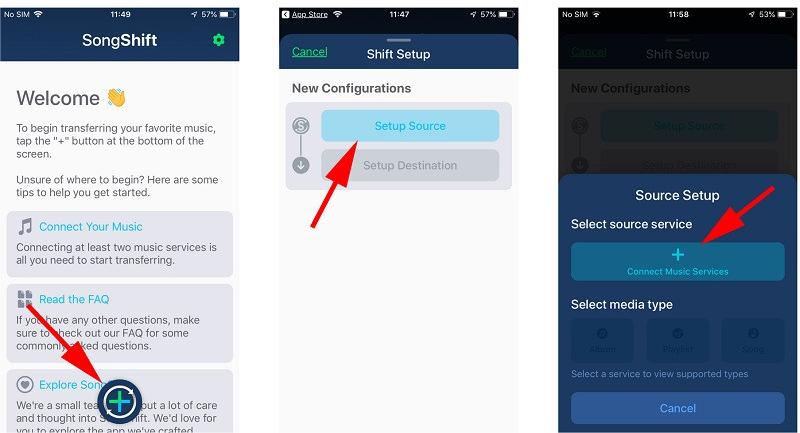
3 Adım: Bunu şu şekilde tekrarlayın: SpotifyGiriş yapıp izinleri kabul etmeniz gerekiyor.
Adım 4: Yeni bir "Vardiya" başlatmak için ana ekranın üst kısmındaki "+" (Artı) simgesine dokunun.
Adım 5: Kaynak Kurulumu'na dokunun ve Apple Music'i seçin. Medya türünü (genellikle Çalma Listesi) seçin ve taşımak istediğiniz belirli çalma listelerini seçin.
6 Adım: Kurulum Hedefi'ne dokunun ve seçin. Spotify.
Adım 7: Uygulamanın işlemeye başlaması için "İşlem Tamamlandı" seçeneğine tıklayın.
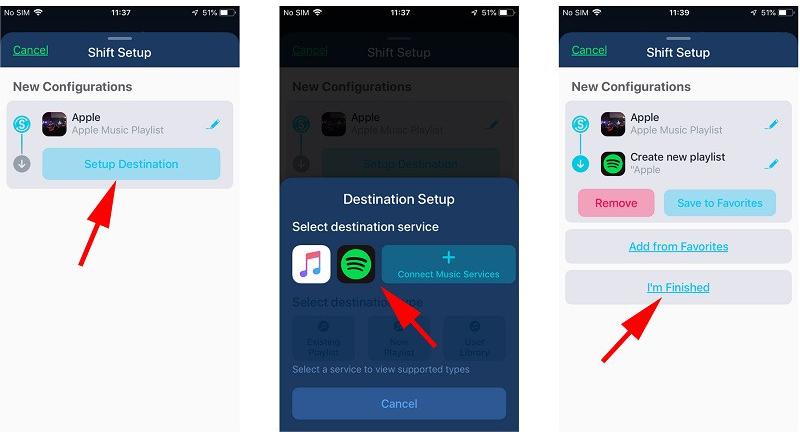
8 Adım: Memnun kaldığınızda, Eşleşmeleri Onayla'ya dokunun. Şarkılar artık listenizde görünecektir. Spotify kütüphane.
Avantajlar
- Bilgisayara ihtiyaç duymadan müzik dosyalarını eksiksiz aktarın.
- Basit, adım adım bir arayüz
- Aktarımı tamamlamadan önce uyumsuzlukları manuel olarak düzeltmenizi sağlar.
Dezavantajlar
- DRM korumalı ses dosyaları aktarılamıyor.
- Eşleştirme doğruluğu değişkenlik gösterir.
- Bazı özellikler ödeme gerektirir
SSS
1. Apple Music'i aktarabilir miyim? Spotify ücretsiz mi?
Evet, ancak ücretsiz araçların genellikle sınırlamaları vardır ve tüm şarkıları aktaramayabilirler.
2. Şarkılar neden aktarılamıyor?
Apple Music'teki parçalar DRM korumalıdır ve doğrudan erişilemez.
3. Kutu Spotify Yerel dosyaları içe aktarayım mı?
Evet, Spotify Yerel dosyaları içe aktarmanıza ve oynatmanıza olanak tanır. MP3 dosyaları.
Sonuç
Özetle, Apple Music'i nasıl aktaracağınızı arıyorsanız... SpotifyDRM kısıtlamaları nedeniyle doğrudan bir yolun olmadığını anlamak önemlidir. Çalma listesi aktarma araçları ve mobil uygulamalar hızlı çözümler sunsa da, genellikle eksik parçalar veya yanlış eşleştirme gibi sınırlamalarla birlikte gelirler. En güvenilir ve eksiksiz yöntem, Apple Music'i standart formatlara dönüştürmek ve bunları yüklemektir. SpotifyBu sayede tam kontrol sağlanır ve veri kaybı yaşanmaz. Doğru yaklaşımı seçerek müzik kütüphanenizi başarıyla taşıyabilir ve sorunsuz bir dinleme deneyiminin tadını çıkarabilirsiniz. Spotify Kısıtlamalar olmaksızın.
*DumpMedia Bu özellik, Apple Music şarkılarını şifresini çözerek ve DRM korumasız dosyalara indirerek çalışır; böylece kütüphanenizin temiz ve kısıtlamasız bir kopyasını herhangi bir cihazda elde edebilirsiniz. Yerel ses dosyalarının dönüştürülmesini içermez.