


Ücretsiz AAX MP3 Converter: 3 Working Methods (Audible Files Included)
AAX is a proprietary audio format developed by Duyulabilir, and it comes with built-in DRM protection. This means you cannot simply play or convert AAX files without using the right tools. While there are some ways to use a free AAX to MP3 converter, most free tools come with limitations such as low success rates, slow speed, or poor audio quality. In this guide, we’ll show you working methods and the best solution to convert AAX files efficiently.
İçindekiler Kılavuzu Part 1: What Is AAX and Why You Need a ConverterPart 2: Free AAX Files to MP3 Converter (Online & Free Tools)Part 3: Best Way to Convert AAX to MP3 (Önerilen)Part 4: Free AAX Converter vs DumpMediaBölüm 5: SSSBölüm 6: Hepsini Sarmak
Part 1: What Is AAX and Why You Need a Converter
AAX is an audiobook format used by Audible to protect copyrighted content. Because of DRM restrictions:
- You cannot directly convert AAX to MP3
- Many media players do not support AAX files
- Standard converters will fail to process AAX files
This is why users search for a free AAX to MP3 converter to remove these limitations and make their audiobooks playable on any device.
Part 2: Free AAX Files to MP3 Converter (Online & Free Tools)
If you want a free AAX to MP3 converter, here are two commonly used options.
Method 1: AAX Audio Converter (Open-source Tool)
AAX Audio Converter is a desktop tool that can convert Audible files into non-protected formats like MP3, M4A, or M4B. It is highly regarded in the audiobook community for its ability to bypass DRM using the user's individual activation bytes.
Adımlar:
- First, ensure you have Audible Manager or the Audible App installed and authorized on your PC. The converter needs your "activation bytes" (the digital key) from your system to legally decrypt the files you own.
- Launch the program and click the Add... button (or simply drag and drop your .aax files into the main window).
- In the Format dropdown menu, choose your preferred type.
- Then choose Single File or Split by Chapter.
- Choose where you want the converted files to be saved in the Output Directory field.
- Click the Convert button at the bottom. A console window will pop up showing the progress.
Method 2: Online Audio Converters
Some websites claim to be a free AAX to MP3 converter online, such as WaveSpeed Online, AhaConvert, CloudConvert, and more.
However, you must upload the original and download the result; slow internet makes this tedious for high-res WAV/FLAC files. Also, converting an entire music library (e.g., 500 songs) is much slower online than using a desktop tool.
Part 3: Best Way to Convert AAX to MP3 (Önerilen)
If you want a stable and efficient solution beyond a basic free AAX to MP3 converter, the best option is DumpMedia Sesli Dönüştürücü.
Neden seçtin DumpMedia Ses Dönüştürücü?
- ✅ Full DRM removal* from AAX files
- ✅ Yüksek kalite MP3 çıktı
- ✅ Batch conversion for audiobooks
- ✅ Fast conversion speed
- ✅ Preserves chapters and metadata
AAX'e Nasıl Dönüştürülür MP3?
1 Adım. Indirin ve yükleyin DumpMedia Audible Converter. PC ve Mac sürümleri mevcuttur. Açın DumpMediaArdından Audible sekmesine gidin.
2 Adım. Audible kütüphanenizden dönüştürmek istediğiniz kitapları seçin.
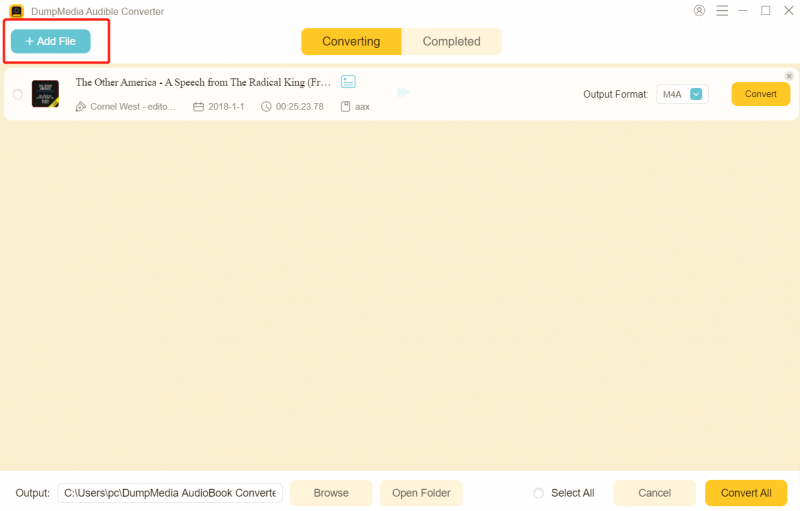
3 Adım. Çıktı ayarlarını seçin ve dönüştürmeye başlayın.

4 Adım. Dönüştürme işlemini tamamlayın ve çıktı dosyalarını görüntüleyin.

Instead of relying on a limited free AAX to MP3 converter, this method ensures reliable results every time.
Part 4: Free AAX Converter vs DumpMedia
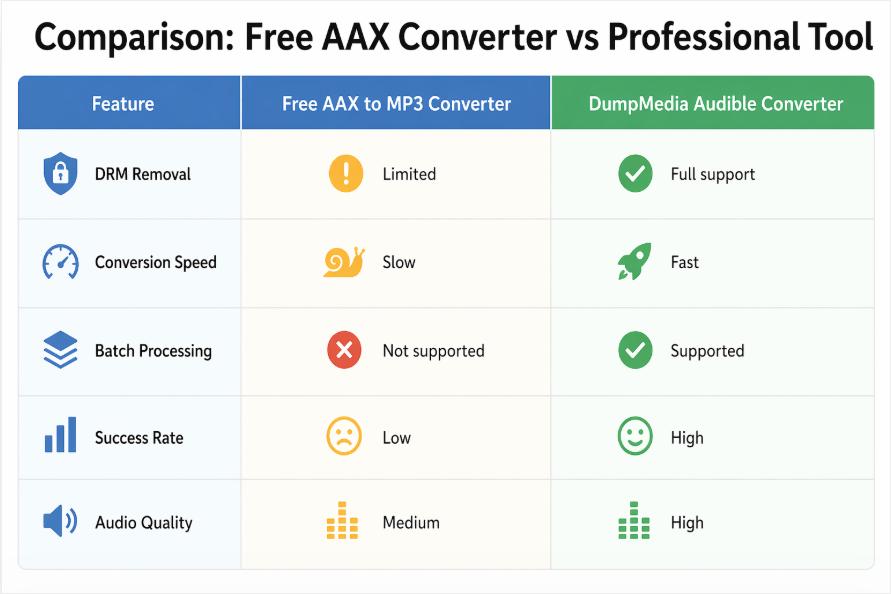
While a free AAX to MP3 converter may work for basic needs, professional tools deliver far better performance.
Bölüm 5: SSS
Is there a completely free AAX to MP3 dönüştürücü?
Yes, some tools claim to be a free AAX to MP3 converter, but most have limitations in functionality and success rate.
Can I convert Audible AAX files to MP3 Yasal olarak?
Converting for personal use is generally acceptable, but redistribution is not allowed.
Why do online AAX converters fail?
Most online tools cannot handle DRM, making them ineffective as a free AAX to MP3 dönüştürücü.
What is the best alternative to a free AAX to MP3 dönüştürücü?
A dedicated solution like DumpMedia Audible Converter provides the most reliable results.
Bölüm 6: Hepsini Sarmak
Using a free AAX to MP3 converter can work in limited cases, but most free tools struggle with DRM protection, speed, and reliability. If you want a smooth and high-quality experience, switching to a professional solution like DumpMedia Audible Converter is the best choice. Instead of wasting time on unstable tools, you can convert Audible files quickly and efficiently with a dedicated converter.
*DumpMedia Bu hizmet, sesli kitaplarınızı şifresini çözerek ve DRM korumasız dosyalara indirerek çalışır; böylece kütüphanenizin temiz ve kısıtlamasız bir kopyasını herhangi bir cihazda elde edebilirsiniz.

%30 İndirim >>>