


Nasıl Dönüştürülür MP3 Sesli Kitap Rehberi (2026'nın En İyi Rehberi)
Süre MP3 Dosyalar yaygın olarak destekleniyor olsa da, yer imi ekleme, bölüm navigasyonu ve yapılandırılmış meta veriler gibi temel sesli kitap özelliklerinden yoksunlar. Bu nedenle daha fazla kullanıcı, bu eksiklikleri gidermenin yollarını arıyor. dönüştürmek MP3 sesli kitaba M4B veya AAX gibi formatlar. Bu kılavuzda, başarılı bir şekilde dönüştürmek için bilmeniz gereken her şeyi, en iyi formatları, yöntemleri ve araçları adım adım ele alacağız. MP3 gerçek bir sesli kitaba dönüştürün.
İçindekiler Kılavuzu Bölüm 1: "Dönüştürmek" Ne Anlama Geliyor? MP3 "Dosyaları Sesli Kitaba Dönüştürmek" Gerçekten Ne Anlama Geliyor?Bölüm 2: Dönüştürülecek En İyi Formatlar MP3 Dosyaları Sesli Kitaba DönüştürmeBölüm 3: Nasıl Dönüştürülür MP3 Dosyaları Sesli Kitaba Dönüştürme (Temel Yöntemler)Bölüm 4: Gelişmiş Dönüştürme Yöntemi MP3 Dosyaları Sesli Kitaba Dönüştürme (En İyi Yöntem)Bölüm 5: Dönüştürme Sırasında Sık Karşılaşılan Sorunlar MP3 Sesli Kitaba6. Bölüm: Sonuç
Bölüm 1: "Dönüştürmek" Ne Anlama Geliyor? MP3 "Dosyaları Sesli Kitaba Dönüştürmek" Gerçekten Ne Anlama Geliyor?
Araçlara geçmeden önce, dönüştürmenin gerçekte ne anlama geldiğini anlamak önemlidir. MP3 Sesli kitaba dönüştürme. Birçok kullanıcı bunun sadece bir format dönüştürme olduğunu varsayıyor, ancak bu doğru değil.
| Özellik | MP3 | Sesli Kitap (M4B / AAX) |
| Çalmaya devam et | ❌ | ✅ |
| Bölümler | ❌ | ✅ |
| Meta veriler (yazar, başlık) | Sınırlı | Tam destek |
| Uygulama uyumluluğu | Temel | Optimize Edilmiş |
Dönüştürdüğünüzde MP3 Sesli kitap dinlemek için esasen şunları yapıyorsunuz:
- Bölümler ekleme
- Meta verilerin yerleştirilmesi
- Dosyayı sesli kitap uygulamalarıyla uyumlu hale getirmek
Bu nedenle basit dönüştürücüler genellikle başarısız olur; çünkü yalnızca dosya türünü değiştirirler, yapısını değil.
Bölüm 2: Dönüştürülecek En İyi Formatlar MP3 Dosyaları Sesli Kitaba Dönüştürme
Dönüştürme işlemi sırasında doğru formatı seçmek çok önemlidir. MP3 sesli kitaba.
1. M4B (Apple Cihazlar İçin En İyisi)
En üst düzey dinleme deneyimini arayan Apple tutkunları için, dönüştürmek MP3 M4B formatı, iPhone ve iPad kullanıcıları için en iyi seçenektir. En popüler sesli kitap formatı olan M4B, Apple Books ile sorunsuz bir entegrasyon sunarak yüksek kaliteli ses ve yer işaretleme özelliği gibi önemli avantajlar sağlar; böylece okuduğunuz yeri mükemmel bir şekilde koruyabilirsiniz.
2. AAX (Audible uyumluluğu için en iyisi)
Gerçekten profesyonel bir sesli kitap deneyimi için, dönüştürme işlemi MP3 Dosyaları AAX formatına dönüştürmek güçlü bir seçenektir, çünkü bu format Audible ekosistemi için özel olarak optimize edilmiştir. AAX kullanarak, yüksek sıkıştırma verimliliğinin yanı sıra eksiksiz bir sesli kitap yapısının avantajlarından yararlanırsınız; bu da kütüphanenizin Audible'ın yüksek performanslı ortamında yerel ve mükemmel bir şekilde entegre olmasını sağlar.
Bölüm 3: Nasıl Dönüştürülür MP3 Dosyaları Sesli Kitaba Dönüştürme (Temel Yöntemler)
Nasıl dönüştürülür? MP3 Sesli kitap (M4B/AAX) formatına dönüştürme? Gelişmiş araçları kullanmadan önce, insanların denediği bazı yaygın yöntemlere bakalım.
Yöntem 1: iTunes / Apple Books Kullanımı
Standartları dönüştürmenin en kolay yollarından biri MP3 Dosyaları işlevsel bir sesli kitaba dönüştürmenin yolu, iTunes tarafından sağlanan yerleşik ekosistemi kullanmaktır (üzerinde). Win(Windows) veya (macOS'ta) Apple Books/Music uygulamalarını kullanabilirsiniz. Bu yöntem özellikle kullanışlıdır çünkü üçüncü taraf yazılım kurulumu gerektirmez ve ses dosyalarınızı yeniden sınıflandırmak için Apple'ın yerel kütüphane yönetiminden yararlanır.
Adımlar:
- ithalat MP3 Dosyaları iTunes'a aktarın.
- Medya türünü "Sesli Kitap" olarak değiştirin.
- Apple Books ile senkronize edin.
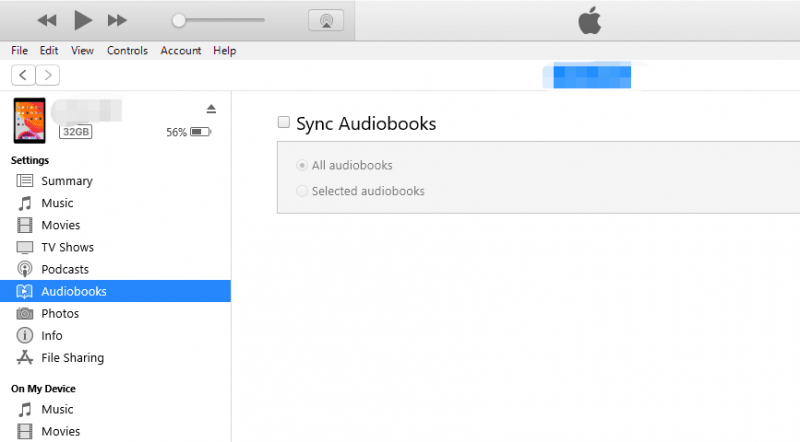
Erişilebilirliğine rağmen, iTunes veya Apple Books'un standart kütüphane yönetim özelliklerini kullanmak, "gerçek" bir dönüştürme işlemi olmasını engelleyen önemli sınırlamalar getiriyor. En büyük dezavantaj, gerçek bölüm oluşturma özelliğinin olmamasıdır; sistem dosyaları sesli kitap olarak tanısa da, birden fazla dosyayı birleştiremiyor. MP3Bunları dahili bir gezinme menüsüne sahip tek bir dosyaya dönüştürmek yerine, kitabınız ayrı ayrı parçalardan oluşan, yönetimi zor olabilen bir koleksiyon olarak kalır.
Dahası, bu oldukça manuel bir süreçtir ve her yeni ekleme için meta verileri ve "Medya Türü" etiketlerini tek tek düzenlemenizi gerektirir; bu da büyük kütüphaneler için verimsiz hale getirir.
Yöntem 2: Çevrimiçi Dönüştürücüleri Kullanma
Dönüştürmenin bir diğer yaygın yolu MP3 Sesli kitap oluşturmanın bir yolu da çevrimiçi dönüştürücüler kullanmaktır. Bu araçlar kullanışlıdır çünkü kurulum gerektirmezler ve doğrudan tarayıcınızda kullanılabilirler. Bir örnek, özellikle sesli kitap oluşturmak için tasarlanmış tarayıcı tabanlı bir araç olan Audiobook Converter'dır.
Adımlar:
- Bir veya birden fazla dosya yükleyin MP3 dosyaları.
- Dosyaları sırayla düzenleyin (bölümler için önemlidir).
- Bunları tek bir M4B sesli kitap haline dönüştürün.
- Son dosyayı indirin.
Çevrimiçi dönüştürücüler, hızlı işlemler için kullanışlı ve kurulum gerektirmeyen bir çözüm sunarken, profesyonel bir sesli kitap kütüphanesinin kalitesini tehlikeye atabilecek önemli dezavantajlar da taşırlar. Birçok kullanıcı için, özellikle yüksek kaliteli kayıtlar veya genellikle birkaç yüz megabaytı aşan uzun romanlarla uğraşırken, yavaş yükleme hızları ve katı dosya boyutu sınırlamaları anında engel teşkil eder.
Bölüm 4: Gelişmiş Dönüştürme Yöntemi MP3 Dosyaları Sesli Kitaba Dönüştürme (En İyi Yöntem)
Eğer eksiksiz bir çözüm istiyorsanız, sadece format dönüştürme değil, sesli kitap yapısını da destekleyen bir araca ihtiyacınız var. İşte bu noktada gelişmiş dönüştürücüler devreye giriyor. DumpMedia Herhangi bir Müzik Dönüştürücü etkili bir dönüşüm yöntemi sağlar MP3 Tam yapı desteğiyle sesli kitaba dönüştürme.
Neden Herhangi Bir Müzik Dönüştürücüyü (AA/AAX Özelliği) Seçmelisiniz?
- dönüştürmek MP3 AAX ve diğer sesli kitap uyumlu formatlara
- Yüksek kaliteli ses çıkışı
- Hızlı toplu dönüştürme
- Başlıca sesli kitap platformlarıyla uyumludur.
Not: AA/AAX dönüştürücüsünün kilidini açmak için Any Music Converter'ı satın almanız gerekmektedir.
Adım adım rehber
1 Adım. İndir DumpMedia Bilgisayarınızdaki herhangi bir müzik dönüştürücü programı. Her ikisiyle de çalışır. WinWindows ve Mac işletim sistemleriyle uyumludur. Kullanıcı dostu arayüzü sayesinde yeni başlayanlar için kullanımı kolaydır.
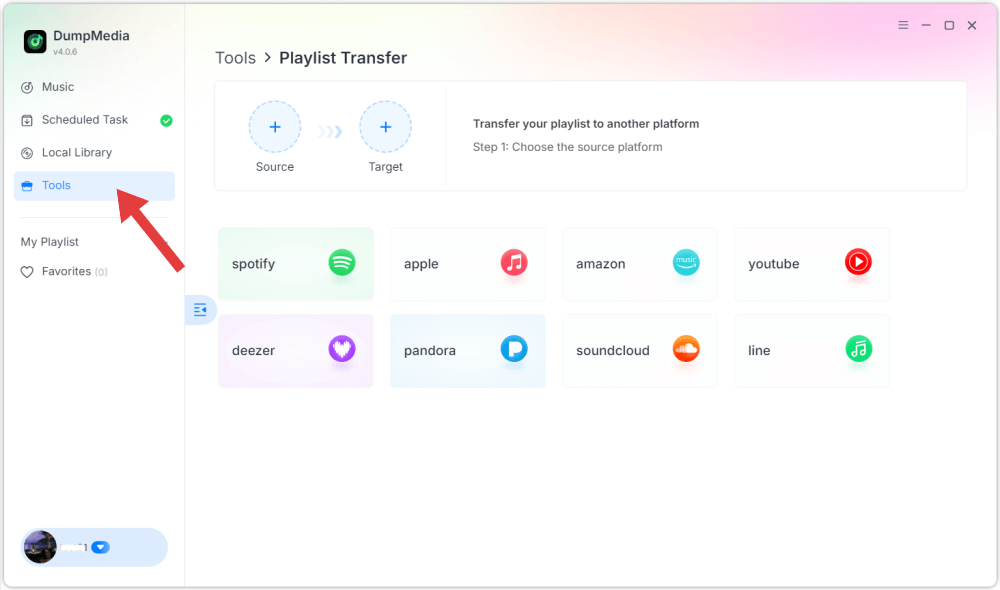
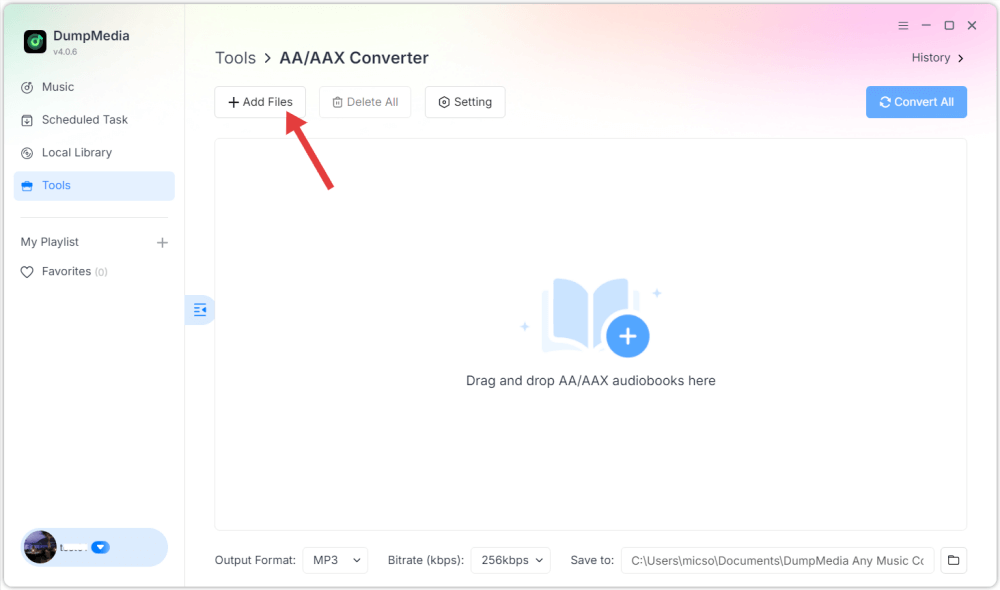
2 Adım. Soldaki "Araç"a tıklayın, ardından "AA/AAX Dönüştürücü"yü seçin. Dosyanızı içe aktarın. MP3 dosyaları.
3 Adım. Çıkış formatını seçin (varsa AAX veya M4B). Gerekirse meta verileri ayarlayın. Dönüştürmeyi başlatın.
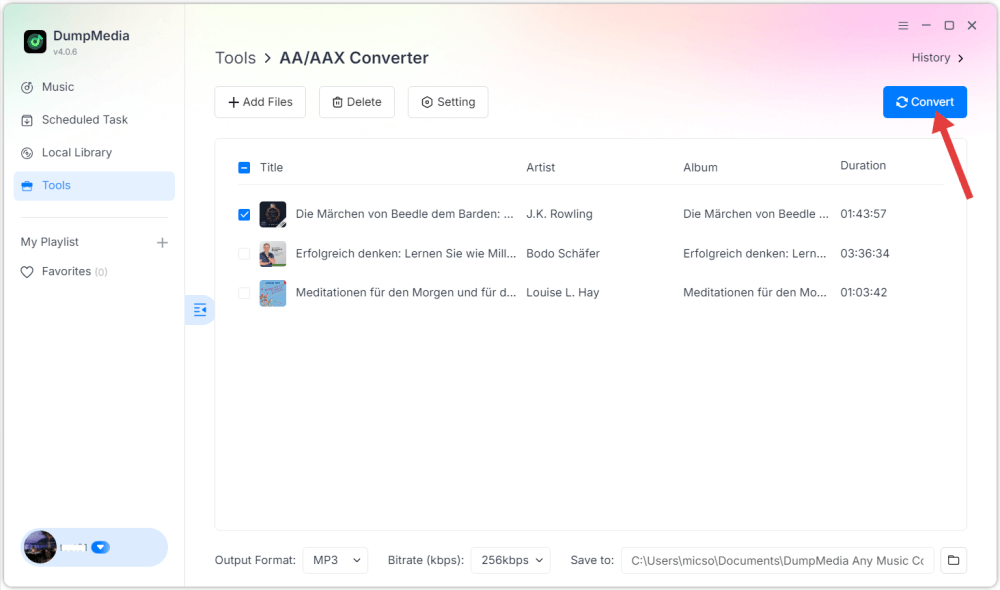
Dönüştürme işleminden sonra dosyalarınız gerçek sesli kitaplar gibi çalışacaktır.
Bölüm 5: Dönüştürme Sırasında Sık Karşılaşılan Sorunlar MP3 Sesli Kitaba
Sesli kitabım neden kaldığım yeri hatırlamıyor?
Çünkü o hala bir MP3 Sesli kitap yapısı içermeyen dosya.
Neden bölümler yok?
Dönüştürme işlemi sırasında bölümler eklenmelidir. MP3 sesli kitaba.
Apple Books'a neden dosya aktaramıyorum?
Bu format sesli kitap olarak tanınmıyor (M4B kullanın).
Dönüştürme neden başarısız oluyor?
Bazı araçlar uzun ses dosyalarını veya sesli kitap formatlarını desteklemiyor.
6. Bölüm: Sonuç
Dönüştürmek MP3 Sesli kitap formatına dönüştürmek için temel bir dönüştürücüden fazlasına ihtiyacınız var; yapılandırılmış bir dinleme deneyimi oluşturmanız gerekiyor. Gerçekten dönüştürmek istiyorsanız... MP3 AAX veya M4B sesli kitap formatına dönüştürmek için, yalnızca formatı değil, yapıyı da destekleyen bir araç seçin. Doğru yöntemle, herhangi bir dosyayı dönüştürebilirsiniz. MP3 Dosyayı, bölümler, yer imleri ve cihazlar arasında sorunsuz oynatma özelliğiyle tam işlevli bir sesli kitaba dönüştürün.

%30 İndirim >>>