


Apple Music'te Şarkı Bulunduğunuz Bölgede Mevcut Değil mi? 5 Kolay Yöntemle Sorunu Çözün
Özellikle en sevdiğiniz parçayı çalmaya çalışırken "Apple Music şarkısı bölgenizde mevcut değil" hatasını görmek sinir bozucu olabilir. Bu sorun genellikle lisans kısıtlamaları, hesap ayarları veya bölgesel sınırlamalar nedeniyle ortaya çıkar. İyi haber şu ki, Apple Music şarkısının bölgenizde mevcut olmaması sorununu çözmenin birkaç yolu var. Bu kılavuzda, bu hatanın neden oluştuğunu açıklayacak ve gerçekten işe yarayan pratik çözümler göstereceğiz.
İçindekiler Kılavuzu Bölüm 1: Apple Music Neden "Bölgenizde Kullanılamıyor" Diyor?Bölüm 2: "Apple Music'te Şarkı Bölgenizde Kullanılamıyor" Sorununu Nasıl Çözersiniz?Bölüm 3: Şarkı Hala Mevcut Değilse Ne Olacak?Bölüm 4: Bölge Kısıtlaması Olmadan Apple Music Şarkılarına Erişmenin En İyi YoluBölüm 5: SSSBölüm 6. Özet
Bölüm 1: Apple Music Neden "Bölgenizde Kullanılamıyor" Diyor?
Apple Music'te şarkının bölgenizde mevcut olmadığına dair bir hata mesajıyla karşılaşırsanız, bunun genellikle aşağıdaki nedenlerden birinden kaynaklanması olasıdır:
1. Lisanslama Kısıtlamaları
Müziklerin erişilebilirliği, telif hakkı anlaşmaları nedeniyle ülkeden ülkeye değişmektedir. Bir bölgede mevcut olan bir şarkı, başka bir bölgede engellenmiş olabilir.
2. Apple Kimliği Bölge Ayarları
Apple Kimliğiniz, hangi içeriğe erişebileceğinizi belirler. Hesabınızın bölgesi gerçek konumunuzla eşleşmiyorsa, "Apple Music şarkısı bu bölgede kullanılamıyor" mesajını görebilirsiniz.
3. Abonelik veya Senkronizasyon Sorunları
Süresi dolmuş abonelikler veya senkronizasyon sorunları da bu hataya neden olabilir.
4. Sanatçılar veya Plak Şirketleri Tarafından Kaldırılan İçerik
Bazen şarkılar kaldırılır veya değiştirilir; bu da Apple Music'te şarkının bulunduğunuz bölgede kullanılamaması sorununa yol açabilir.
Bölüm 2: "Apple Music'te Şarkı Bölgenizde Kullanılamıyor" Sorununu Nasıl Çözersiniz?
İşte Apple Music'te şarkının bulunduğunuz bölgede kullanılamaması sorununu çözmenin kanıtlanmış yolları:
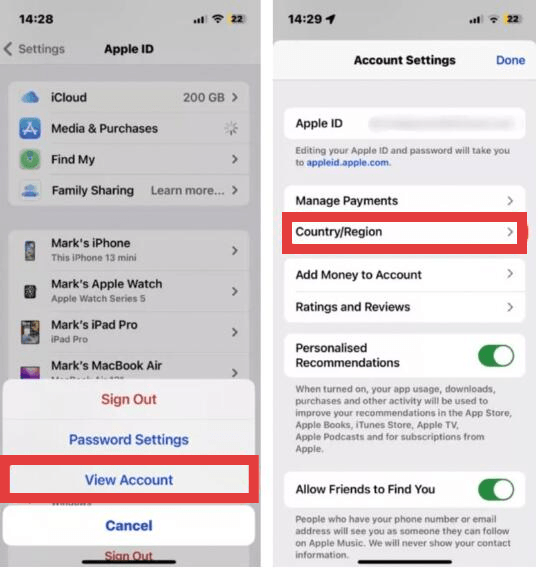
Çözüm 1: Apple Kimliği Bölgesini Değiştirin
Apple ID bölgenizi güncellemek, bu coğrafi kısıtlamaları sıklıkla çözebilir.
- iPhone/iPad'de: Ayarlar uygulamasını açın, en üstte bulunan Adınıza dokunun ve Medya ve Satın Alımlar'ı seçin. Hesabı Görüntüle'ye dokunun (kimlik doğrulaması yapmanız gerekebilir). Face ID veya şifreniz). Mac'te: Apple Music uygulamasını açın, menü çubuğundan Hesap'ı seçin ve Hesap Ayarları'nı seçin.
- Ülke/Bölge seçin ve ardından Ülke veya Bölge Değiştir'e dokunun.
- Listeden yeni konumunuzu seçin. Şartlar ve Koşulları inceleyin, Kabul Et'e dokunun ve o bölgeye ait geçerli bir ödeme yöntemi ve fatura adresi girin.
Düzeltme 2: Bir VPN Kullanın
Apple Music'te şarkının belirli bir bölgede kullanılamaması sorununu nasıl çözebilirim? Bölgesel lisanslama belirli parçaları dinlemenizi engellediğinde, Sanal Özel Ağ (VPN) bu coğrafi engelleri aşmak için güçlü bir araç olabilir. İnternet bağlantınızı farklı bir ülkede bulunan bir sunucu üzerinden yönlendirerek, VPN gerçek IP adresinizi gizler ve Apple Music'e içeriğin yasal olarak mevcut olduğu bir bölgeden erişiyormuşsunuz gibi görünmesini sağlar.
Etkili olsa da, bu yöntem mükemmel bir çözüm değildir. Daha yavaş yayın hızları, daha yüksek gecikme süreleri veya oynatma sırasında sık sık "arabelleğe alma" sorunları yaşayabilirsiniz; bu da dinleme deneyimini olumsuz etkileyebilir. Ayrıca, Apple Music, yalnızca IP adresinize değil, Apple ID'nizin bölgesine de büyük ölçüde bağlıdır. Bu, hesap ayarlarınız sahte konumla da uyumlu olmadığı sürece, VPN'in tek başına her zaman işe yaramayabileceği anlamına gelir.
3. Çözüm: Alternatif Sürümleri Arayın
Bazen aynı şarkı başka bir versiyonda veya albümde yer alabilir.
Çözüm 4: Kütüphanenizi Yeniden Senkronize Edin
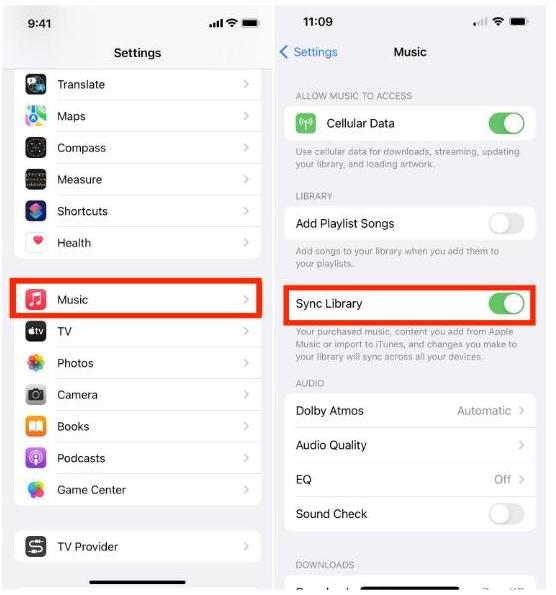
Apple Music kütüphanenizde şarkılar eksikse veya parçalar gri renkte görünüyorsa, hesabınızı yeniden senkronize etmek Apple sunucularıyla bağlantıyı yenileyebilir ve kütüphane tutarsızlıklarını çözebilir. Bu işlem, uygulamayı dizinini yeniden oluşturmaya ve abonelik durumunuzu yeniden doğrulamaya zorlar.
- Mobil Cihazda: MyCAD'de yazılım Güncelleme ye git Ayarlar > Music ve sağlamak Senkronizasyon Kütüphanesi değiştirildi ON. Eğer zaten açıksa, kapatıp birkaç saniye bekledikten sonra tekrar açarak yeni bir tarama başlatmayı deneyin..
- Masaüstünde: Müzik uygulamasını açın, şuraya gidin: Ayarlar (veya Tercihler) > Genelve emin olun Senkronizasyon Kütüphanesi kontrol edildi. Ayrıca, aşağıdaki adımları izleyerek manuel olarak da güncellemeyi tetikleyebilirsiniz. fileto > Kütüphane > Bulut Kütüphanesini Güncelle.
Düzeltme 5: Abonelik Durumunu Kontrol Edin
Bir diğer çözüm ise Apple Music aboneliğinizin hala aktif olup olmadığını doğrulamaktır. Ödeme başarısız olursa veya abonelik sona ererse, Apple Music yayın kataloğuna ve çevrimdışı kullanım için indirilen tüm parçalara erişimi anında kısıtlar.
Bu yöntemler, Apple Music'te şarkının bulunduğunuz bölgede mevcut olmaması durumunun birçok örneğini çözebilir, ancak tümünü değil.
Bölüm 3: Şarkı Hala Mevcut Değilse Ne Olacak?
Tüm çözüm yollarını denedikten sonra bile, Apple Music'te şarkının belirli bölgelerde kullanılamadığı hatasını görmeye devam edebilirsiniz. Bunun nedeni, bazı şarkıların belirli bölgelerde kalıcı olarak kısıtlanmış olması ve lisanslama sınırlamalarının kolayca aşılamamasıdır. Bu noktada birçok kullanıcı şu soruyu soruyor: "Bu sorunu tamamen ortadan kaldırmanın bir yolu var mı?"
Bölüm 4: Bölge Kısıtlaması Olmadan Apple Music Şarkılarına Erişmenin En İyi Yolu
Apple Music'te şarkının bölgenizde mevcut olmaması sorunuyla tekrar tekrar uğraşmak yerine, daha iyi bir uzun vadeli çözüm müziklerinizi DRM'siz olarak kaydetmektir. MP3 Dosyalar. Hesabınızın konumuna bağlı dijital kısıtlamaları kaldırarak, bölgesel lisans değişikliklerinden veya seyahatlerden bağımsız olarak müzik kitaplığınızın erişilebilir kalmasını sağlayabilirsiniz.
Bu amaç için, DumpMedia Apple Müzik Dönüştürücü Bu, şiddetle tavsiye edilen bir çözümdür. Özellikle Apple'ın FairPlay DRM* teknik sınırlamalarını aşmak ve müziğinizin kalıcı bir yerel koleksiyonunu korumanıza olanak sağlamak için tasarlanmıştır.
Temel Özellikler ve Avantajlar
- Sürekli Çevrimdışı Erişim: bir Zamanlar şarkılar dönüştürülür MP3Artık aktif bir Apple Music aboneliğine veya bölgesel sunucu kullanılabilirliğine bağlı değiller. Onları kişisel donanımınızda sonsuza kadar saklayabilirsiniz.
- Kayıpsız Kalite Dönüşümü: Bu araç, orijinal ses kalitesini koruyacak şekilde tasarlanmıştır ve sesinizin en iyi şekilde kaydedilmesini sağlar. MP3M4A veya FLAC formatındaki dışa aktarımlar, orijinal akış kadar net ses kalitesi sunar.
- Yüksek Hızlı Toplu İşleme: Tüm çalma listelerini veya albümleri standart kayıt yöntemlerine göre 10 kata kadar daha hızlı bir şekilde dönüştürebilir ve önemli ölçüde zaman tasarrufu sağlayabilirsiniz.
- Meta Verilerin Korunması: Şarkı başlığı, sanatçı adı, albüm kapağı ve tür dahil olmak üzere temel ID3 etiketlerini otomatik olarak saklayarak yerel kütüphanenizi mükemmel bir şekilde düzenli tutar.
- Evrensel Uyumluluk: Çıktı standart olduğundan MP3Müziğinizi aşağıdakiler de dahil olmak üzere herhangi bir cihaza aktarabilirsiniz. MP3 Apple Music uygulamasına ihtiyaç duymadan, müzik çalarlar, araç müzik sistemleri ve Apple olmayan akıllı hoparlörlerde kullanılabilir.
Nasıl Kullanılır? DumpMedia Apple Müzik Dönüştürücü
1 Adım. Yazılımı bilgisayarınıza indirip kurun. Her ikisiyle de çalışır. WinWindows ve Mac işletim sistemleriyle uyumludur. Kullanıcı dostu arayüzü sayesinde yeni başlayanlar için kullanımı kolaydır.
2 Adım. Uygulama içindeki yerleşik Apple Music web oynatıcısını açın. DumpMedia Apple Music hesabınızla giriş yapın. Apple Music'te gezinin ve indirmek istediğiniz şarkıları, albümleri veya çalma listelerini dönüştürücüye sürükleyin.

3 Adım. Ayarlar panelinde, şunu seçin: MP3 çıktı formatı olarak etkinleştirmek için MP3 Seçtiğiniz parçaların indirilmesi.

4 Adım. Dönüştür'e tıklayın ve şarkıları doğrudan indirin. MP3 dosyaları.

Bölüm 5: SSS
Apple Music neden şarkının bölgede kullanılamadığını söylüyor?
Bu durum genellikle lisans kısıtlamaları veya hesap ayarlarından kaynaklanır.
Apple Music'te "Bölgede şarkı kullanılamıyor" sorununu kalıcı olarak çözebilir miyim?
Bazı durumları düzeltebilirsiniz, ancak hepsini değil. Bazı şarkılar bölgesel kısıtlamaya tabidir.
Bu sorunun gelecekte tekrar yaşanmasını önlemenin bir yolu var mı?
Evet. Şarkıları dönüştürmek MP3 Bu sayede bir daha bölgesel kısıtlamalarla karşılaşmazsınız.
En iyi çözüm nedir?
kullanma DumpMedia Apple Music Converter, müziğinize her zaman erişebilmenin en güvenilir yoludur.
Bölüm 6. Özet
Apple Music'te şarkının bölgenizde mevcut olmaması hatası can sıkıcı olabilir, ancak çoğu durumda basit ayarlamalarla düzeltilebilir. Bununla birlikte, uzun vadeli kolaylık için yalnızca yayın platformlarına güvenmek yeterli olmayabilir. Müziğiniz üzerinde tam kontrol sahibi olmak ve bölge kısıtlamalarından tamamen kaçınmak istiyorsanız, şarkılarınızı dönüştürmek daha iyi olabilir. MP3 En iyi çözüm bu. Deneyin. DumpMedia Apple Music Converter'ı bugün kullanın ve müziğinizin keyfini sınırlama olmadan çıkarın.
*DumpMedia Bu özellik, Apple Music şarkılarını şifresini çözerek ve DRM korumasız dosyalara indirerek çalışır; böylece kütüphanenizin temiz ve kısıtlamasız bir kopyasını herhangi bir cihazda elde edebilirsiniz. Yerel ses dosyalarının dönüştürülmesini içermez.

%30 İndirim >>>