


Bölgenizde Apple Music kullanılamıyor mu? 2026'da düzeltilecek.
Birçok Apple Music kullanıcısı şu can sıkıcı mesajla karşılaşıyor: “ Apple Music bölgenizde kullanılamıyor .” Bölgesel kısıtlamalar, lisans anlaşmaları, DRM koruması ve hesap doğrulama sorunları genellikle Apple Music şarkılarının normal şekilde çalınmasını engelliyor. Bu kılavuzda, Apple Music'in neden “ülkenizde kullanılamıyor” dediğini, iPhone, Mac ve PC'de sorunu nasıl çözeceğinizi ve Apple Music şarkılarını bölgesel sınırlamalar olmadan çevrimdışı olarak oynatmanın en iyi yolunu açıklayacağız.
İçindekiler Kılavuzu Bölüm 1. Apple Music Neden “Bölgenizde Kullanılamıyor” Diyor? Bölüm 2. Apple Music'in Ülkenizde Kullanılamaması Sorununu Nasıl Çözersiniz? Bölüm 3. Apple Music'i Her Yerde Oynatmanın En İyi Yolu Bölüm 4. Sıkça Sorulan Sorular Bölüm 5. Özet
Bölüm 1. Apple Music Neden "Bölgenizde Kullanılamıyor" Diyor?
Kullanıcılar genellikle aşağıdaki durumlarda "Apple Music bölgenizde kullanılamıyor" şeklinde arama yaparlar.
- Apple Music Şarkıları Gri Renkte Gösteriliyor
- Şarkılar çalma listelerinde görünüyor ancak oynatılamıyor.
- İndirilen şarkılar aniden kullanılamaz hale geldi.
- Çevrimdışı izleme özelliği, abonelik veya bölge doğrulamasından sonra çalışmayı durdurur.
- Seyahat Sırasında Apple Music'te Yaşanan Sorunlar
- Apple Kimliği Ülke Değiştirme Sorunları
- Apple Music iPhone veya Mac'te Çalışmıyor
Kullanıcıların "Apple Music bölgenizde kullanılamıyor" hatasını görmesinin birkaç nedeni vardır.
Lisanslama Kısıtlamaları
Apple Music, şarkılar için ülkelere ve bölgelere göre farklı lisanslama yöntemleri kullanmaktadır. Bazı parçalar bir ülkede kullanılabilirken, telif hakkı anlaşmaları nedeniyle başka bir ülkede kısıtlanmış olabilir. Bu, "Apple Music ülkenizde kullanılamıyor" sorununun en yaygın nedenlerinden biridir.
Apple Kimliği Bölge Ayarları
Apple ID bölgeniz değişirse, bazı şarkılar kaybolabilir. Birçok kullanıcı, yurt dışına taşındıktan veya ödeme ayarlarını değiştirdikten sonra "Apple Music ülkenizde kullanılamıyor" hatasıyla karşılaşır.
DRM Koruması
Apple Music şarkıları, hesap doğrulaması ve bölgesel yetkilendirme gerektiren DRM (Dijital Hak Yönetimi) ile korunmaktadır . DRM kısıtlamaları nedeniyle, çevrimdışı oynatma başarısız olabilir.
Abonelik Doğrulama Sorunları
Apple Music, abonelik durumunu periyodik olarak çevrimiçi olarak kontrol eder. Doğrulama başarısız olursa, kullanıcılar indirdikleri şarkılara erişimlerini aniden kaybedebilirler.
Yerel Katalogdan Kaldırılan Şarkılar
Bazen müzik şirketleri şarkıları belirli bölgesel kataloglardan kaldırarak, daha önce çalınabilir olsalar bile parçaların erişilemez hale gelmesine neden olurlar.
Bölüm 2. Apple Music'in Ülkenizde Kullanılamaması Sorununu Nasıl Çözersiniz?
Sürekli olarak "Apple Music bölgenizde kullanılamıyor" mesajını görüyorsanız, aşağıdaki yöntemler sorunu çözmenize yardımcı olabilir.
Apple ID bölgenizi kontrol edin.
Yanlış bölge ayarları, Apple Music'in bölgenizde kullanılamamasının başlıca nedenlerinden biridir. Apple Kimliği ayarlarını açın ve ülkenizin veya bölgenizin mevcut konumunuz ve ödeme yönteminizle eşleştiğinden emin olun.
Ödeme Bilgilerini Güncelle
Süresi dolmuş veya desteklenmeyen ödeme yöntemleri, hesap doğrulamasını ve bölgesel erişimi etkileyebilir.
Apple Müzik Kütüphanesini Yeniden Senkronize Et
Şarkı kullanılabilirlik bilgilerini yenilemek için Senkronizasyon Kütüphanesini devre dışı bırakın ve yeniden etkinleştirin.
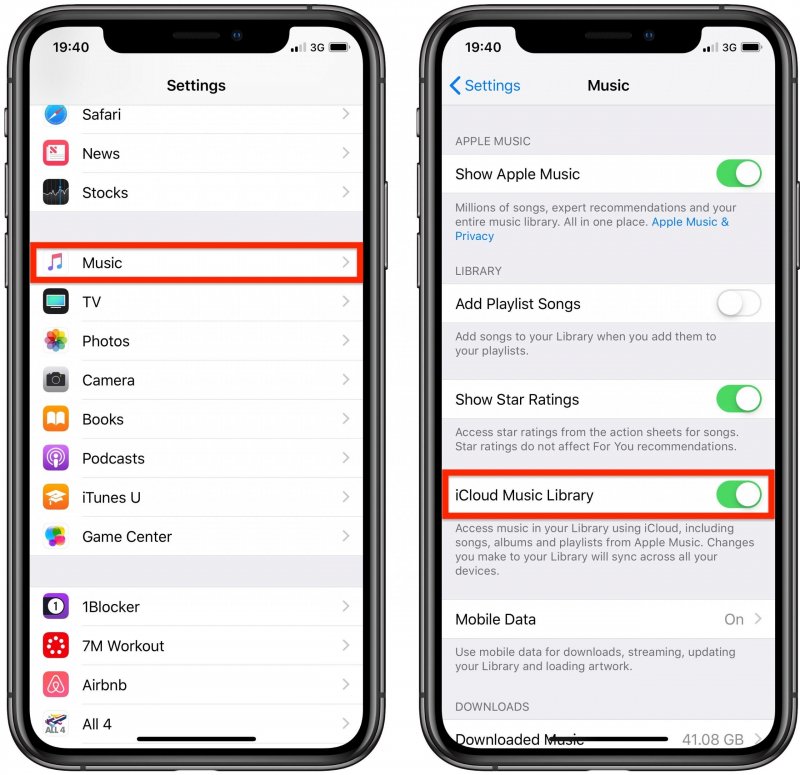
iOS (iPhone) için: Ayarlar > Uygulamalar > Müzik'i açın. Kütüphane Senkronizasyonu seçeneğini KAPALI konuma getirin. 30 saniye bekleyin, ardından Kütüphane Senkronizasyonu seçeneğini tekrar AÇIK konuma getirin. Müzik uygulamasını açın; üstte "Müzik Kütüphanesi Yükleniyor" yazan bir ilerleme çubuğu görmelisiniz.
Android için: Apple Music uygulamasını açın. Sağ üst köşedeki üç nokta menüsüne (⋮) dokunun ve Ayarlar'ı seçin. Kütüphaneyi Senkronize Et seçeneğini bulun ve KAPALI konuma getirin, ardından tekrar AÇIN.
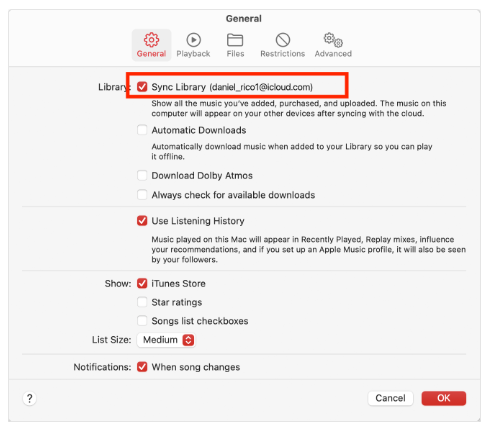
macOS (Tahoe / 2026) için: Müzik > Ayarlar > Genel bölümüne gidin ve Kitaplığı Senkronize Et seçeneğinin işaretini kaldırın, Tamam'a tıklayın, ardından geri dönüp tekrar işaretleyin.
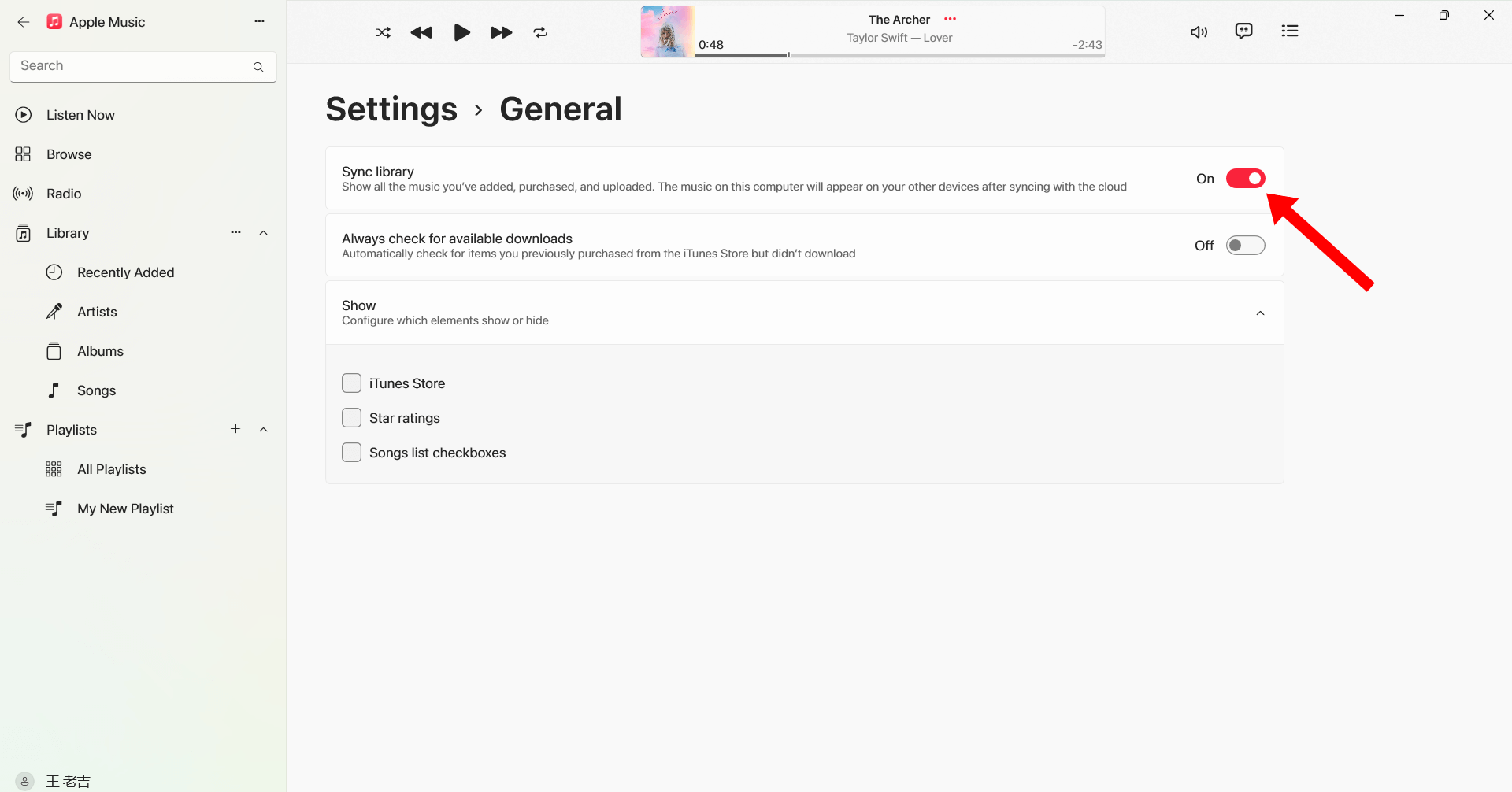
Her Ticaretçi İçin Mükemmellik WinDows (10/11): Apple Music uygulamasını açın. Kenar çubuğunun altındaki Profil Adınıza/Simgenize tıklayın. Ayarlar > Genel bölümüne gidin. Kütüphaneyi Senkronize Et seçeneğini kapatıp tekrar açın.
Çıkış Yap ve Tekrar Giriş Yap
Apple Kimliğinize yeniden giriş yapmak, Apple Music yetkilendirmesini yenileyebilir ve bölgeyle ilgili oynatma sorunlarını düzeltebilir.
Şarkıları Yeniden İndir
İndirilen bazı parçalar bozulabilir veya yetkilendirmeyi kaybedebilir. Şarkıları yeniden indirmek, oynatmayı geri yükleyebilir.
iOS veya macOS'u güncelleyin
Eski sistem sürümleri Apple Music uyumluluk sorunlarına neden olabilir.

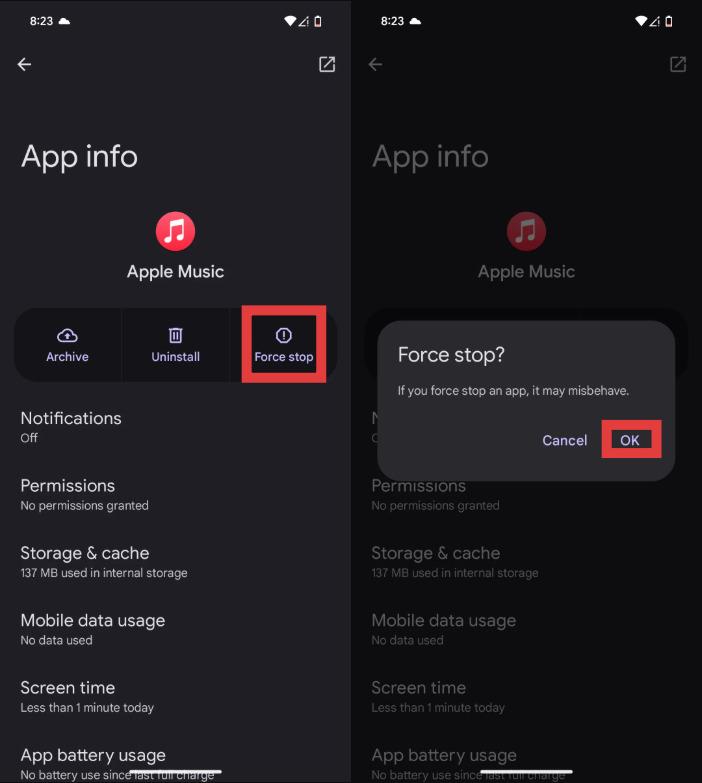
Apple Music Uygulamasını Yeniden Başlatın
Geçici hatalar da "Apple Music bölgenizde kullanılamıyor" mesajını tetikleyebilir.
Bu çözümler işe yaramazsa, sorun sizin kontrolünüz dışında olan DRM kısıtlamaları ve bölgesel lisans sınırlamalarıyla ilgili olabilir.
Bölüm 3. Apple Music'i Her Yerde Oynatmanın En İyi Yolu
Birçok kullanıcı, "Apple Music bölgenizde kullanılamıyor" sorunlarının tekrar etmesini önlemek için Apple Music şarkılarını yerel şarkılara dönüştürün MP3 DosyalarıBunun için en iyi araçlardan biri şudur: DumpMedia Apple Müzik DönüştürücüBu profesyonel Apple Music dönüştürücü, kullanıcıların bölgesel yetkilendirmeye bağlı kalmadan istikrarlı çevrimdışı oynatma için şarkıları yerel olarak kaydetmelerine yardımcı olur.
🏆Neden Bunu Seçmelisiniz? DumpMedia Apple Müzik Dönüştürücü
- Apple Music DRM korumasını kaldırın*
- Orijinal ses kalitesini koruyun
- Çalma listelerini ve albümleri toplu olarak indirin
- Hızlı dönüşüm hızı
- Şarkı meta verilerini ve ID3 etiketlerini koruyun.
- Herhangi bir cihazda çevrimdışı oynatmayı destekler.
"Apple Music bölgenizde kullanılamıyor" hatasıyla tekrar tekrar karşılaşan kullanıcılar için, yerel çözümler mevcuttur. MP3 Oynatma özelliği daha güvenilir bir uzun vadeli çözüm sunar.
Apple Music'i Apple Music'e Dönüştürme MP3 Çevrimdışı Oynatma için
1 Adım. Indirin ve yükleyin DumpMedia Mac/PC'nizde Apple Music Converter'ı açın. Başlattığınızda arayüzü göreceksiniz. Apple Music hesabınızla giriş yapın.
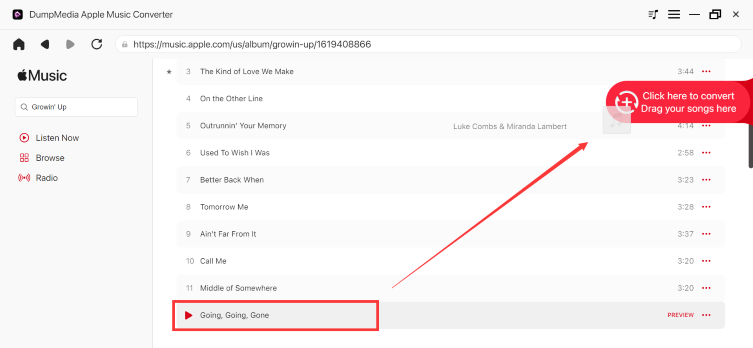
2. Adım. Dönüştürmek istediğiniz çalma listesini, albümü veya belirli şarkıyı bulun. Tek bir şarkıyı ekranın sağ tarafındaki "+" simgesinin üzerine sürükleyebilirsiniz. Alternatif olarak, tüm çalma listesini/albümü açın ve tüm listeyi dönüştürücüye yüklemek için "Dönüştürmeye Ekle" simgesine tıklayın.
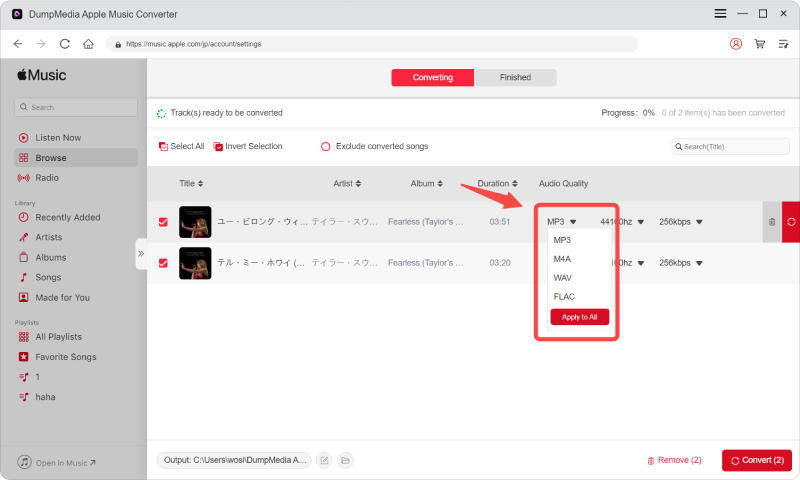
3 Adım. Seç MP3 (en uyumlu olanı). Ayrıca, bit hızını veya örnekleme hızını değiştirebilirsiniz. En iyi denge için 320 kbps'yi seçin.
4 Adım. Ayarlar tamamlandıktan sonra, kullanıcılar "Dönüştür" simgesine tıklayarak dönüştürme işlemini gerçekleştirebilirler. Ardından DumpMedia Apple Music şarkılarını dönüştürecek MP3 Süper hızlı hızı sayesinde saniyeler içinde.

Dönüştürme işleminden sonra, şarkılarınız Apple Music bölge doğrulaması olmadan çevrimdışı olarak oynatılabilir.
Bölüm 4. SSS
Apple Music neden bölgenizde kullanılamıyor diyor?
Bu durum genellikle lisans kısıtlamaları, Apple ID bölge ayarları veya DRM yetkilendirme sorunları nedeniyle meydana gelir.
Bölgenizde Apple Music'in kullanılamaması sorununu nasıl çözebilirim?
Apple ID bölge ayarlarını güncellemeyi, kitaplığınızı yeniden senkronize etmeyi, şarkıları yeniden indirmeyi veya uygulamayı yeniden başlatmayı deneyebilirsiniz.
Apple Music'teki şarkılarım neden gri renkte görünüyor?
Soluk renkte gösterilen şarkılar genellikle bölgesel lisanslama veya senkronizasyon sorunlarını gösterir.
Yurt dışındayken Apple Music kullanabilir miyim?
Evet, ancak bazı şarkılar bölgesel telif hakkı kısıtlamaları nedeniyle erişilemez hale gelebilir.
Apple Music'teki şarkıları kalıcı olarak nasıl saklayabilirim?
Birçok kullanıcı kullanıyor DumpMedia Apple Music Converter, şarkıları yerel formata dönüştürmek için kullanılır. MP3 Kalıcı çevrimdışı oynatma için dosyalar.
Is DumpMedia Apple Music Converter güvenli mi?
Evet. Apple Music'e dönüştürme ve çevrimdışı oynatma yönetimi için tasarlanmıştır.
Bölüm 5. Özet
"Apple Music bölgenizde kullanılamıyor" hatası genellikle lisans kısıtlamaları, DRM koruması, Apple ID bölge ayarları veya abonelik doğrulama sorunlarından kaynaklanır. Bölgesel kısıtlamalar olmadan istikrarlı çevrimdışı dinleme isteyen kullanıcılar için, DumpMedia Apple Music Converter, Apple Music'i kalıcı yerel formatlara dönüştürmenin pratik bir yolunu sunar. MP3 Dosyalar. Uygulama bağımlılığını ve yayın kısıtlamalarını ortadan kaldırarak, kullanıcılar Apple Music'in keyfini farklı cihazlarda ve konumlarda daha özgürce çıkarabilirler.
*DumpMedia Bu özellik, Apple Music şarkılarını şifresini çözerek ve DRM'siz dosyalara indirerek çalışır; böylece herhangi bir cihaz için kütüphanenizin temiz ve kısıtlamasız bir kopyasını elde edebilirsiniz. İşlevselliği, yerel ses dosyalarının DRM'sinin kaldırılmasını içermez.