


Amazon'dan Müzik Nasıl İndirilir MP3 Oyuncu (Hızlı, Kayıpsız Yöntem)
Merak ediyorsan Amazon'dan müzik nasıl indirilir? MP3 oyuncuYalnız değilsiniz. Birçok kullanıcı en sevdiklerinin tadını çıkarmak istiyor. Amazon Müzik Taşınabilir cihazlarda Amazon şarkılarını indirmek mümkün, ancak DRM koruması nedeniyle bazı sınırlamalar olduğunu kısa sürede fark ediyorsunuz. Bu kılavuzda, Amazon şarkılarını cihazınıza nasıl indireceğinizi adım adım göstereceğiz. MP3 Oyuncu, günümüzde mevcut olan en verimli ve güvenilir yöntemi kullanıyor.
İçindekiler Kılavuzu Bölüm 1: Amazon Music'i Doğrudan İndirememenizin Nedenleri MP3 OyuncuBölüm 2: Amazon'dan Müzik İndirmenin En İyi Yolu MP3 OyuncuBölüm 3: SSSBölüm 4: Özet
Bölüm 1: Amazon Music'i Doğrudan İndirememenizin Nedenleri MP3 Oyuncu
Amazon'dan müzik indirmeyi öğrenmeden önce... MP3 Oynatıcı, sınırlamayı anlamak önemlidir. Amazon Music parçaları (özellikle Prime ve Unlimited'dan olanlar) DRM (Dijital Hak Yönetimi) ile korunmaktadır. Bu şu anlama gelir:
- Şarkılar doğrudan aktarılamaz. MP3 oyuncular
- Dosyalar standart formatta değil. MP3 biçim
- Oynatma özelliği yalnızca Amazon Music uygulamasında mevcuttur.
Yani eğer hareket etmeye çalışırsanız indirilen şarkılar sizin için MP3 Eğer oynatıcıda çalışıyorsa, bu dosyalar çalışmayacaktır. Bu sorunu çözmek için, DRM'yi kaldırabilen ve dosyaları dönüştürebilen profesyonel bir araca ihtiyacınız var. MP3 biçimi.
Bölüm 2: Amazon'dan Müzik İndirmenin En İyi Yolu MP3 Oyuncu
Amazon'dan müzik indirmek için en etkili çözüm MP3 oyuncu kullanıyor DumpMedia Amazon Müzik DönüştürücüBu araç, kullanıcıların Amazon Music'i dönüştürmelerine yardımcı olmak için özel olarak tasarlanmıştır. MP3 ve diğer yaygın formatlar sayesinde herhangi bir cihazda kolayca aktarılıp oynatılabiliyor. MP3 oyuncu.
Anahtar Yararları:
- Amazon Music'i şuraya dönüştür: MP3 kolayca
- DRM korumasını* otomatik olarak kaldır
- Orijinal ses kalitesini koruyun (320 kbps'ye kadar)
- Çalma listelerini ve albümleri toplu olarak indirin
- Her ikisinde de çalışır WinDow ve Mac
*DumpMedia Bu hizmet, sesli kitaplarınızı şifresini çözerek ve DRM korumasız dosyalara indirerek çalışır; böylece kütüphanenizin temiz ve kısıtlamasız bir kopyasını herhangi bir cihazda elde edebilirsiniz.
Amazon Music'i indirin MP3
Amazon'dan müzik nasıl indirilir? MP3 Amazon parçalarınızı oynatıcıya eklemek için şu adımları izleyin. MP3 ilk:
1 Adım: Yazılımı bilgisayarınızda açın. Her ikisiyle de çalışır. WinWindows ve Mac işletim sistemleriyle uyumludur. Kullanıcı dostu arayüzü sayesinde yeni başlayanlar için kullanımı kolaydır.
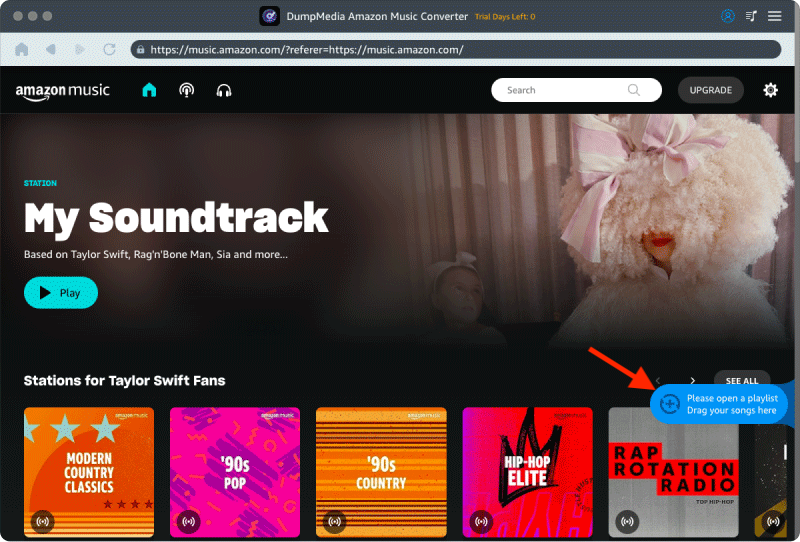
2 Adım: Dahili Amazon Music web oynatıcısını açın. DumpMedia Amazon Music hesabınızla giriş yapın. Amazon Music'te gezinin ve indirmek istediğiniz şarkıları, albümleri veya çalma listelerini dönüştürücüye sürükleyin.
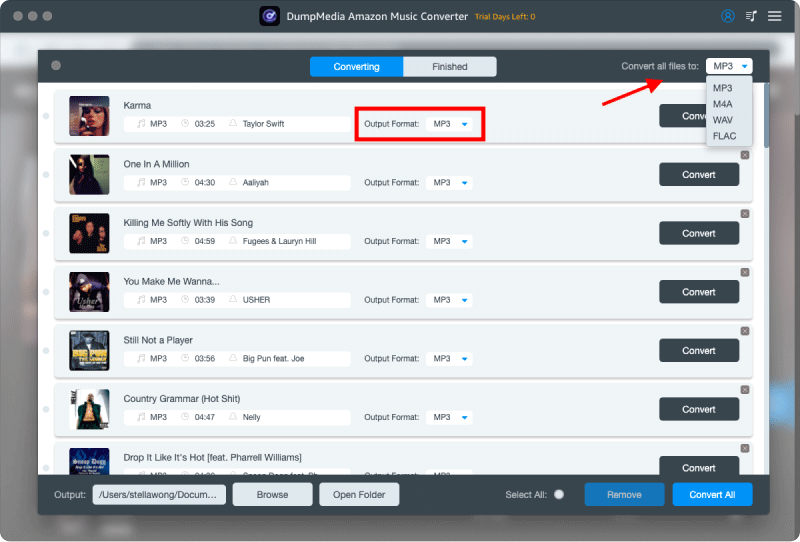
3 Adım: Ayarlar panelinde, şunu seçin: MP3 çıktı formatı olarak etkinleştirmek için MP3 Seçtiğiniz parçaların indirilmesi.
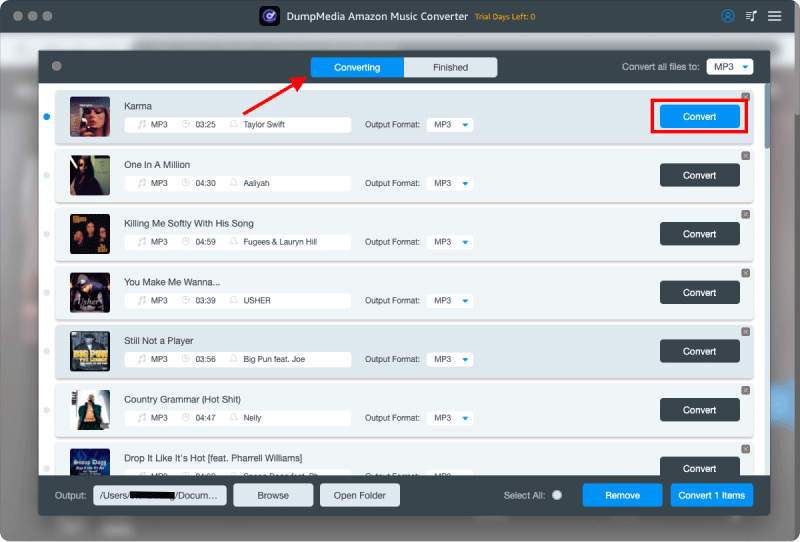
4 Adım: Son adım, dönüştürme işlemini başlatmak için "Dönüştür" düğmesine basmak olacaktır.
Amazon Music'i aktarın MP3 Oyuncu
Amazon'dan müzik nasıl indirilir? MP3 Oyuncu musunuz? Şu adımları izleyin:
Apple dışındaki çoğu cihaz için (örneğin Sony Walkman, Shanling, FiiO veya standart cihazlar) MP3 oyuncular)
- Connect MP3 Oynatıcıyı veri kablosu kullanarak bilgisayarınıza bağlayın.
- Bilgisayarınız bunu "Çıkarılabilir Disk" olarak tanıyacaktır (bu, "Bu Bilgisayar" altında görünür). Win(Windows'ta veya Mac'te Finder kenar çubuğunda).
- Bilgisayarınızda, indirdiğiniz Amazon Music dosyalarının bulunduğu klasörü açın.
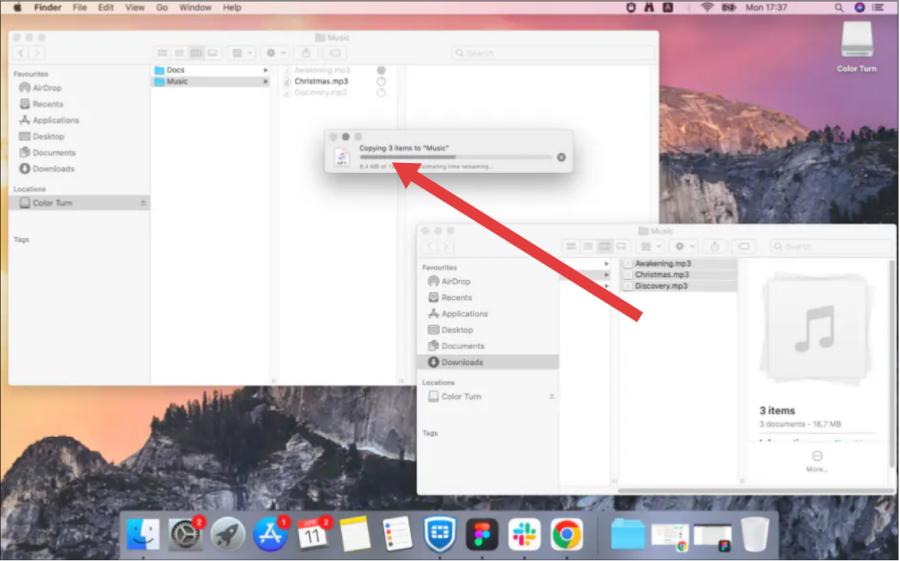
- Seçtiğiniz müzik dosyalarını doğrudan bilgisayarınızdaki "Müzik" klasörüne sürükleyin. MP3 oyuncu.
- Dosya bozulmasını önlemek için veri kablosunu çıkarmadan önce sürücüye sağ tıklayın ve "Çıkar" seçeneğini seçin.
Apple cihazları için (iPod veya iOS uyumlu oynatıcı)
- Cihazınızı bilgisayaranıza bağlayın.
- Apple Music'i (Mac) veya iTunes'u açın (Win(Duvarlar).
- Yerel Amazon Music uygulamanızı içe aktarın. MP3 Dosyaları kütüphanenize aktarın (Dosya > İçe Aktar).
- Cihaz simgesine tıklayın, "Müzik Senkronizasyonu"nu seçin ve ardından "Uygula"ya tıklayın.
Bölüm 3: SSS
Amazon Music'i doğrudan bir cihaza indirebilir miyim? MP3 Oyuncunun?
Hayır. DRM koruması nedeniyle doğrudan aktarım desteklenmiyor. Dosyaları önce dönüştürmeniz gerekiyor.
Kullanmak için güvenli mi DumpMedia Amazon Müzik Dönüştürücüsü?
Evet, güvenlidir ve Amazon Music hesabınızı veya orijinal dosyalarınızı etkilemez.
Dönüştürme işleminden sonra ses kalitesinde kayıp yaşar mıyım?
Hayır. DumpMedia Yüksek kaliteli çıktı sağlayarak orijinal dinleme deneyiminizi korumanıza olanak tanır.
Bölüm 4: Özet
Artık Amazon'dan müzik indirmenin tam olarak nasıl yapılacağını biliyorsunuz. MP3 DRM kısıtlamalarıyla uğraşmak yerine, en kolay ve etkili şekilde oyuncuyu kullanın. DumpMedia Amazon Music Converter, müziğiniz üzerinde tam özgürlük sunar. İndirin. DumpMedia Amazon Music Converter'ı hemen kullanın ve en sevdiğiniz şarkıları dönüştürmeye başlayın. MP3 bugün bulun!

%30 İndirim >>>