


Amazon Music'i çevrimdışı dinlemek için nasıl indirebilirim?
Birçok kullanıcı, internet bağlantısına ihtiyaç duymadan en sevdikleri parçaların keyfini çıkarmak için Amazon Music'i çevrimdışı dinlemek üzere indirmek istiyor . Amazon Music resmi çevrimdışı indirmelere izin verse de, dosyalar şifrelenir, diğer cihazlara aktarılamaz ve aboneliğiniz sona erdiğinde kaybolur. Kalıcı çevrimdışı erişim ve daha fazla esneklik istiyorsanız, bu kılavuz size hem resmi yöntemleri hem de profesyonel bir çözümü kullanarak Amazon Music'i çevrimdışı nasıl oynatabileceğinizi gösterecektir.
İçindekiler Kılavuzu Bölüm 1: Amazon Music'i Çevrimdışı Oynatmak İçin İndirebilir misiniz? Bölüm 2: Amazon Music'i Resmi Olarak Çevrimdışı Nasıl İndirebilirsiniz? Bölüm 3: Amazon Music'i Kalıcı Olarak İndirmenin En İyi Yolu Bölüm 4: Sıkça Sorulan Sorular Bölüm 5: Özet
Bölüm 1: Amazon Music'i Çevrimdışı Oynatmak İçin İndirebilir Misiniz?
Evet, Amazon Music aboneleri için çevrimdışı dinlemeyi resmi olarak destekliyor, ancak bazı sınırlamalar mevcut:
- Sadece Amazon Music Prime veya Unlimited kullanıcıları için geçerlidir.
- Şarkılar DRM korumalı ve serbestçe kopyalanamaz
- İndirilen müzikler yalnızca Amazon Music uygulaması içinde oynatılabilir.
- Aboneliğinizi iptal etmeniz, indirdiğiniz parçalara erişiminizi de ortadan kaldıracaktır.
Özetle, resmi indirmeler geçici çevrimdışı oynatmaya izin verir ancak kalıcı sahiplik sağlamaz. Amazon Music'i çevrimdışı dinlemek için indirme yolları arayan kullanıcılar genellikle müziklerini sonsuza dek saklayacak bir çözüme ihtiyaç duyarlar.
Bölüm 2: Amazon Music'i Resmi Olarak Çevrimdışı Nasıl İndirebilirsiniz?
Amazon Music'i çevrimdışı dinlemek için nasıl indirebilirsiniz? Bu oldukça basit bir işlem. Prime Music ve Unlimited hesabınızla adım adım nasıl yapacağınızı aşağıda bulabilirsiniz.
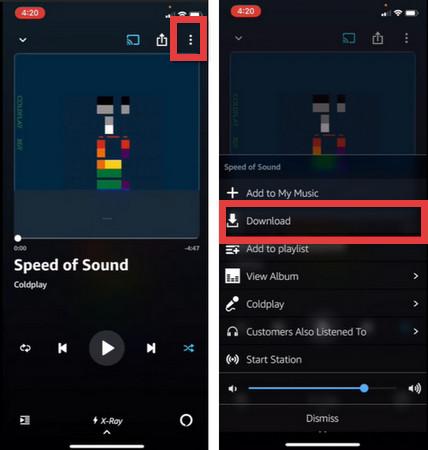
Mobil Cihazlarda (iOS / Android)
- Amazon Music uygulamasını başlatın ve oturum açmış olduğunuzdan emin olun.
- İndirmek istediğiniz şarkıya, albüme veya çalma listesine gidin.
- Parçanın yanındaki veya albümün/çalma listesinin üst kısmındaki üç nokta simgesine (⋮) dokunun.
- Listeden İndir'i seçin.
- İndirme işlemi tamamlandığında, müziğin yanında mavi bir "indirildi" simgesi (genellikle bir onay işareti veya aşağı ok) görünecektir.
- Cihazınızda depolanan müzikleri görmek için Kütüphane > İndirilenler bölümüne gidin.
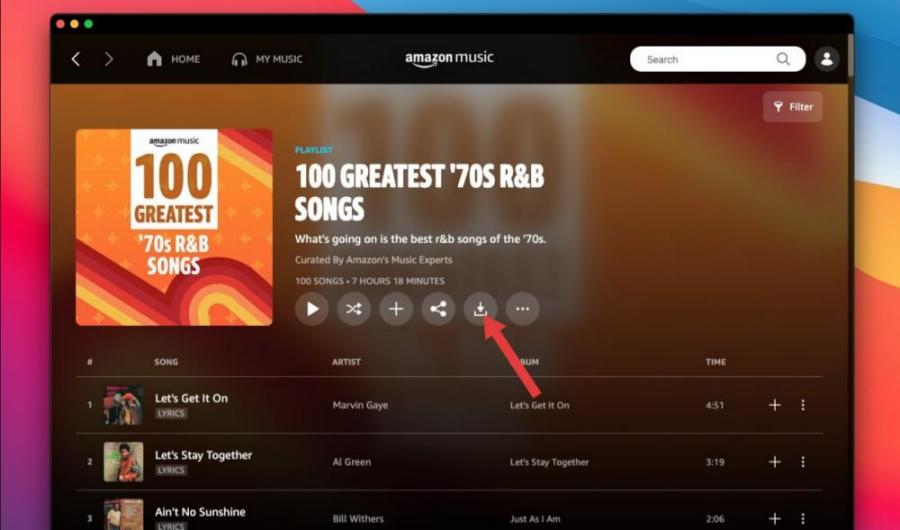
Masaüstünde (Windows / Mac)
- Amazon Music uygulamasını Amazon web sitesinden veya uygulama mağazanızdan indirip yükleyin.
- Müziklerinizi bulmak için Kütüphaneye gidin veya arama çubuğunu kullanın.
- Şarkı veya albüm başlığının yanındaki aşağı ok simgesine tıklayın.
- Yan taraftaki menüde bulunan "İndirmeler" sekmesinden aktif indirmelerinizi görebilirsiniz.
Amazon Music Çevrimdışı İndirmelerinin Sınırlamaları
Amazon Music'i çevrimdışı dinlemek için indirebilseniz de, önemli kısıtlamalar mevcuttur. İndirilen dosyaların DRM koruması, müziğin kopyalanmasını veya aktarılmasını engeller. Çevrimdışı oynatma yalnızca Amazon Music uygulamasıyla sınırlıdır. Ayrıca, abonelikler sona erdiğinde şarkılar kaybolur. Bu sınırlamalar, müziğinize çevrimdışı olarak gerçekten sahip olmanızı imkansız hale getirir. Kalıcı çevrimdışı erişim isteyen kullanıcılar için, profesyonel bir Amazon Music indirme programı en iyi çözümdür.
Bölüm 3: Amazon Music'i Kalıcı Olarak İndirmenin En İyi Yolu
Bu sınırlamaların üstesinden gelmek için şunları öneriyoruz: DumpMedia Amazon Müzik DönüştürücüAmazon Music'i çevrimdışı dinlemek için kalıcı olarak indirmenizi sağlayan profesyonel bir araç.
DumpMedia Amazon Music Converter, kullanıcıların Amazon Music'i indirmelerine yardımcı olur. MP3WAV, FLAC ve AAC formatlarını destekler. Bu sayede şarkıları kalıcı olarak kaydedebilir, çalma listelerinizi çevrimdışı olarak sonsuza dek saklayabilir ve müziği herhangi bir cihaza aktarabilirsiniz. Amazon Music uygulaması çalışmıyor. Cihazınızda Amazon Music şarkılarını başka bir müzik çalarda anında çevrimdışı olarak oynatabilirsiniz.
🏆Temel Özellikleri DumpMedia Amazon Müzik Dönüştürücü
- 🎵Amazon Music DRM korumasını kaldırın*
- 🎵Orijinal ses kalitesini koruyun
- 🎵Çalma listelerini ve albümleri toplu olarak indirin
- 🎵Hızlı dönüşüm hızı
- 🎵Şarkı meta verilerini ve ID3 etiketlerini koruyun
- 🎵Herhangi bir cihazda çevrimdışı oynatmayı destekler.
Amazon Music'i indirin MP3 Adım Adım
Amazon Music'i çevrimdışı dinlemek için indirmek için şu basit adımları izleyin. DumpMedia Amazon Müzik Dönüştürücü:
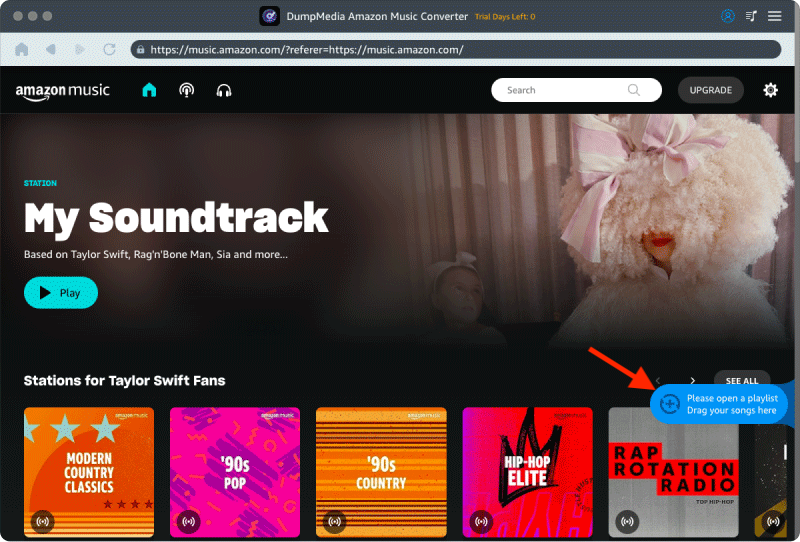
1 Adım. Indirin ve yükleyin DumpMedia Mac/PC'nizde Amazon Music Converter. DumpMedia Dahili Amazon Music web oynatıcısını kullanır. Giriş yapmak için Amazon Music Premium/Ücretsiz hesabınızı kullanın.
2. Adım. Dönüştürmek istediğiniz çalma listesini, albümü veya belirli şarkıyı bulun. Tek bir şarkıyı ekranın sağ tarafındaki "+" simgesinin üzerine sürükleyebilirsiniz. Alternatif olarak, tüm çalma listesini/albümü açın ve tüm listeyi dönüştürücüye yüklemek için "Dönüştürmeye Ekle" simgesine tıklayın.
3 Adım. Seç MP3 (en uyumlu olanı). Ayrıca, bit hızını veya örnekleme hızını değiştirebilirsiniz. En iyi denge için 320 kbps'yi seçin.
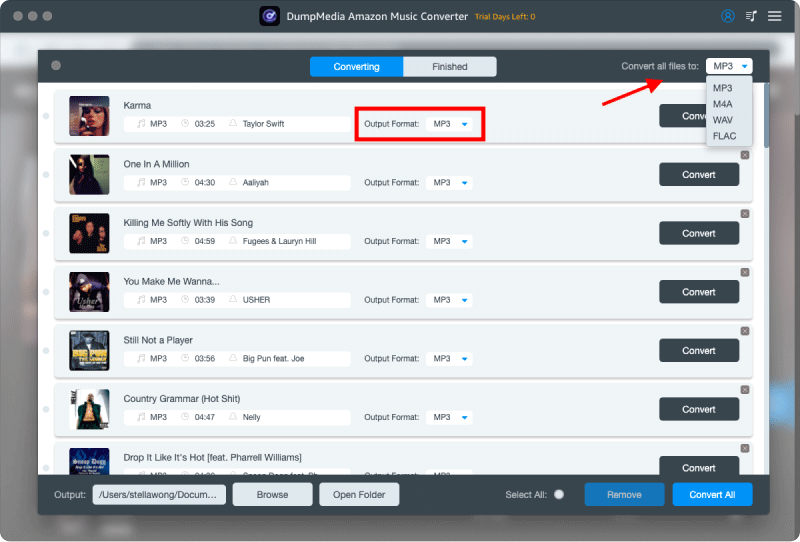
4 Adım. Ayarlar tamamlandıktan sonra, kullanıcılar "Dönüştür" simgesine tıklayarak dönüştürme işlemini gerçekleştirebilirler. Ardından DumpMedia Amazon Music'i dönüştürecek MP3 Süper hızlı hızı sayesinde saniyeler içinde.
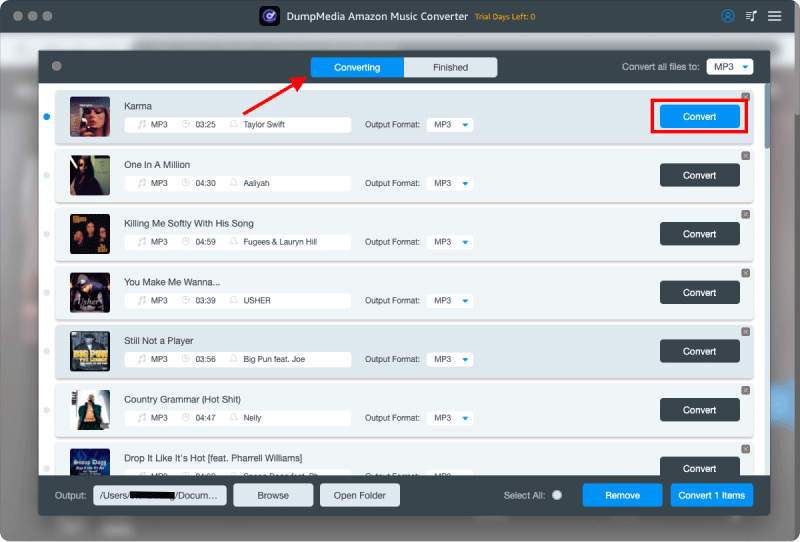
Dönüştürme işleminden sonra, herhangi bir kısıtlama olmaksızın herhangi bir cihazda çevrimdışı oynatmanın keyfini çıkarabilirsiniz. Bu, Amazon Music'i kalıcı olarak çevrimdışı dinlemek için indirmek isteyen kullanıcılar için ideal çözümdür.
Bölüm 4: SSS
S1. Amazon Music'i çevrimdışı dinlemek için indirebilir miyim?
Evet, ancak resmi indirmeler yalnızca Amazon Music uygulamasıyla sınırlıdır ve abonelik sona erdikten sonra kaybolur. DumpMedia kalıcı olmasına olanak tanır MP3 İndirilenler.
S2. Amazon Music'te çevrimdışı oynatma süresi sona eriyor mu?
Evet, aboneliğinizi iptal ederseniz resmi çevrimdışı indirmeler de geçerliliğini yitirir.
S3. Amazon Music'i nasıl dönüştürürüm? MP3?
Kullanım DumpMedia Şarkıları, çalma listelerini ve albümleri dönüştürmek için Amazon Music Converter. MP3.
S4. Amazon Music'i USB'ye aktarabilir miyim?
Resmi indirmeler mümkün değil, ancak dönüştürüldü. MP3 Dosyalar serbestçe aktarılabilir.
S5. Dır-dir DumpMedia Amazon Music Converter güvenli mi?
Evet, binlerce kullanıcı tarafından güvenilen güvenilir bir yazılımdır.
Bölüm 5: Özet
Amazon Music çevrimdışı oynatmaya izin verse de, resmi indirmeler DRM, abonelik ve cihaz kısıtlamalarıyla sınırlıdır. Amazon Music'i kalıcı olarak çevrimdışı dinlemek için indirmenin en etkili yolu, bir uygulama kullanmaktır. DumpMedia Amazon Müzik Dönüştürücü ile. DumpMediaAmazon Music parçalarını dönüştürebilirsiniz. MP3Onları sonsuza dek saklayın ve müziğinizin keyfini herhangi bir cihazda çevrimdışı olarak çıkarın. En sevdiğiniz Amazon Music şarkılarını bugün indirmeye başlayın ve bir daha asla erişiminizi kaybetme konusunda endişelenmeyin.
*DumpMedia Bu özellik, Amazon Music şarkılarını şifresini çözerek ve DRM'siz dosyalara indirerek çalışır; böylece herhangi bir cihaz için kütüphanenizin temiz ve kısıtlamasız bir kopyasını elde edebilirsiniz. İşlevselliği, yerel ses dosyalarının DRM'sinin kaldırılmasını içermez.